

9to5Mac is brought to you by iMazing: iMazing lets you back up, transfer, and manage your iPhone and iPad data like never before — including messages, photos, music, WhatsApp, voicemails, battery health, and more. No cloud required. Use code 9to5mac-20off to get 20% off, exclusively for 9to5Mac listeners. Visit iMazing.com/9to5mac.
Launchpad is blasting off into the sun with macOS Tahoe 26. While there’s no exact replacement, there are some alternatives that may help Launchpad users like me to adapt.
Launchpad has existed as an app launcher on the Mac since OS X Lion in 2011. I started using the Mac in 2009 shortly before Snow Leopard was released, so Launchpad has existed for nearly all of my time with the Mac.
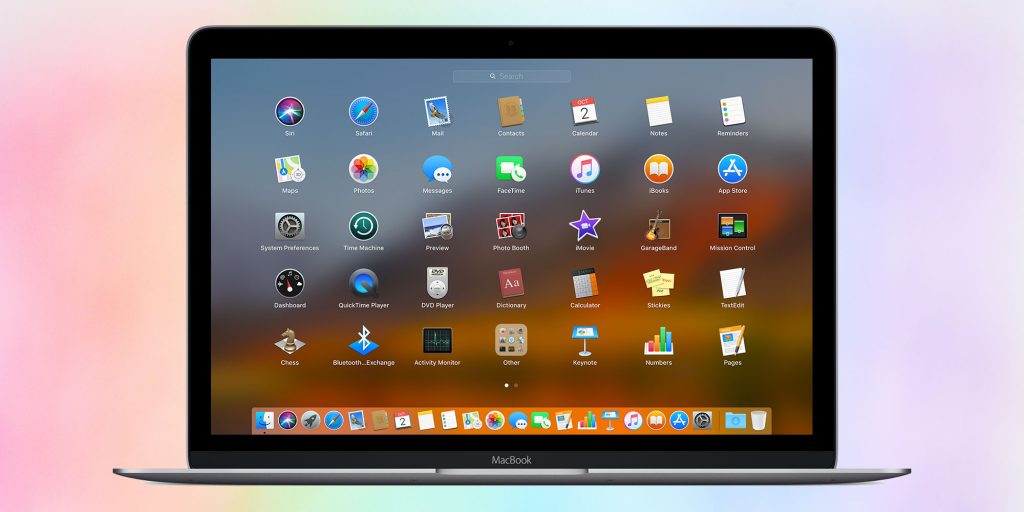
For others, Launchpad was just this weird iPad-inspired app grid that made no sense compared to Finder or Spotlight. As of macOS 26, that crowd has won with Launchpad being replaced with Apps.
Apps is a new app in Finder that can be added to your Dock or invoked with the same four-finger pinch inward gesture that opened Launchpad. It is Apple’s vision for the next era of app organization on the Mac.
What Apps offers
Unlike Launchpad, Apps doesn’t allow you to manually sort icons into your preferred layout. Instead, it displays all installed applications in alphabetical order. Once the full list is presented, folders appear next, also sorted alphabetically.
There’s a modern twist, too. Apple has integrated app recommendations into Apps, so you’ll see suggestions based on context, frequency of use, or other usage patterns. That makes Apps more dynamic than Launchpad, but it’s just not the same.
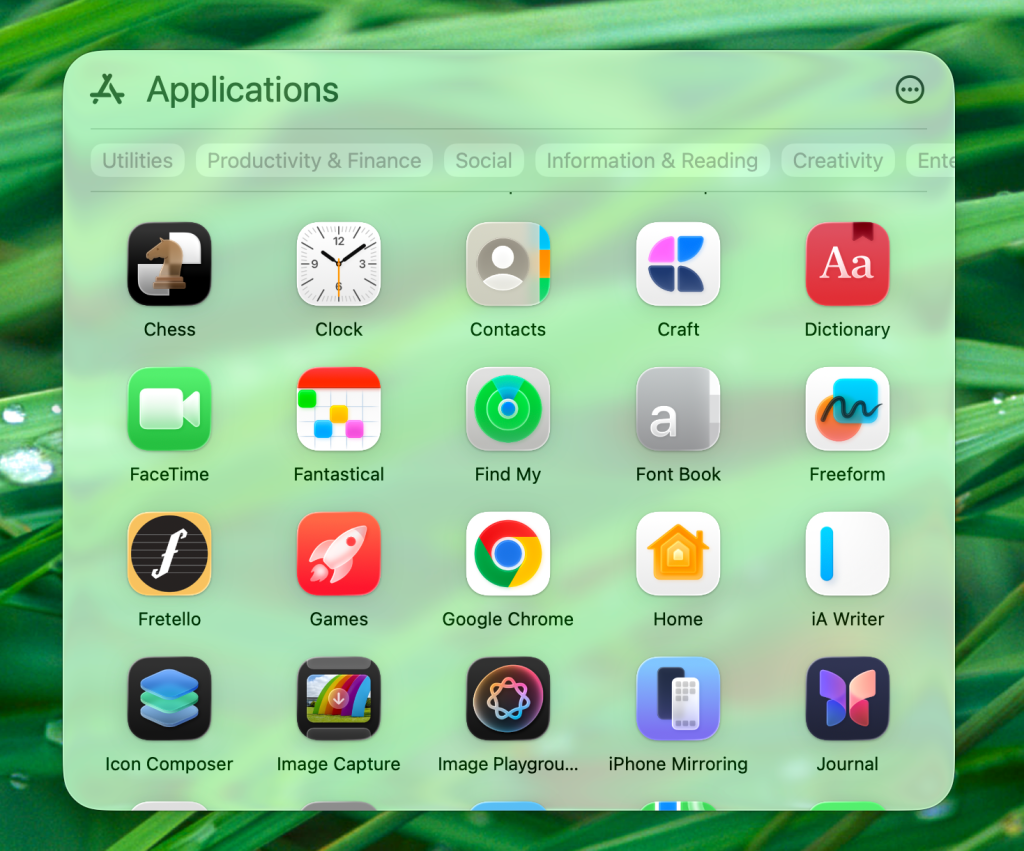
Apple also includes category filters across the top of the Apps interface. You’ll find groupings like Utilities, Social, Productivity, and others, which make it easier to narrow down a large collection of software. It’s not the same tactile, customizable grid that Launchpad fans came to love, but it is Apple’s bet on a more Mac-specific approach.
Bringing back the Applications folder
If you miss the grid of icons that Launchpad delivered, there’s an old-school trick worth revisiting. Long before Launchpad existed, many Mac users placed the Applications folder directly in the Dock.
Here’s how to do so:
- Open Finder
- Drag Applications from the sidebar to the Dock to the left of the Trash icon
- Right-click on the new Applications stack, and set “View content as” to grid
- Optionally, set “Display as” to Folder instead of Stack to view the Applications folder icon instead of the first app icon in the alphabetical stack of apps
By setting it to display as a stack and choosing Grid view, you get a quick, compact launcher that feels like a middle ground between Finder and Launchpad. It lacks the full-screen iOS-like presentation, but it’s efficient, familiar, and already integrated into macOS without third-party software.
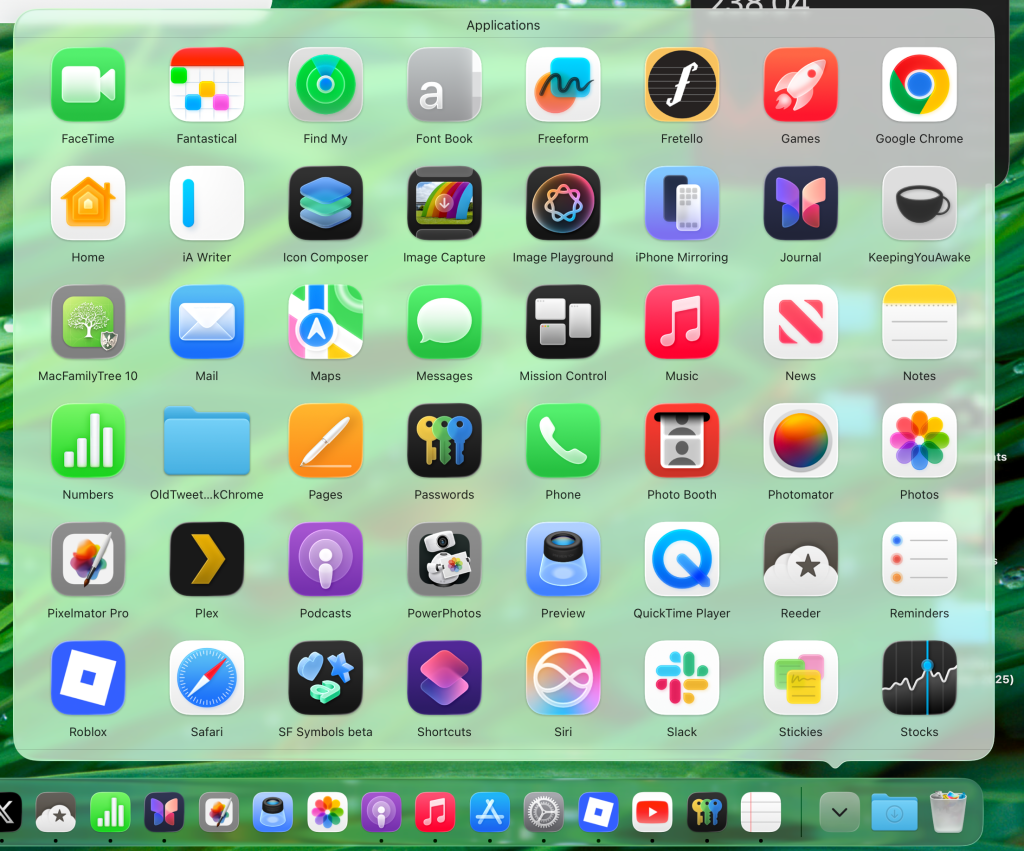
It’s also more dense than the new Apps experience, which notably lacks the icon display size and density of Launchpad.
For users who relied on Launchpad mainly as a fast way to scan through every app visually, this Dock-based method is the most straightforward fallback.
Third-party Launchpad clones
Of course, Launchpad’s removal also opens the door for third-party developers. Several apps already attempt to replicate the Launchpad experience with their own twist.
- Applications• / App Launcher (Mac App Store)
- Quick App Launcher (Mac App Store)
- AppSpace Launcher (Mac App Store)
- LaunchBack (GitHub)
These tools can go a long way toward scratching the Launchpad itch, but don’t expect the same level of system integration that Apple’s version enjoyed.
Still, if you can’t imagine using the Mac without a tile-based launcher, third-party utilities are worth exploring. Another option is trying to restore Launchpad at the cost of losing the new Spotlight, but that’s not recommended.
A feature that may have been under-appreciated
It’s possible Launchpad was more beloved than Apple realized. For more than a decade, it provided a uniquely Mac way to interact with apps—something between Finder’s file system and Spotlight’s search bar.

For some, Launchpad became muscle memory. For others, it was the bridge that made macOS feel more like iOS, especially for new Mac owners. Its sudden removal makes clear that Apple views it as a relic of the past, but that doesn’t mean it wasn’t valued.
The Apps replacement is functional, fast, and modern, but it lacks the personality and tactile customization that Launchpad brought to the Mac. If enough users voice their frustration, perhaps Apple will evolve Apps in a direction that restores more of Launchpad’s character. Until then, Dock stacks and third-party apps will have to fill the gap for those of us who still want to launch apps the old way.
9to5Mac is brought to you by iMazing: iMazing lets you back up, transfer, and manage your iPhone and iPad data like never before — including messages, photos, music, WhatsApp, voicemails, battery health, and more. No cloud required. Use code 9to5mac-20off to get 20% off, exclusively for 9to5Mac listeners. Visit iMazing.com/9to5mac.


FTC: We use income earning auto affiliate links. More.


Comments