
Apple Invites launched earlier this year as a brand new app for organizing events, and in iOS 26.2 there’s a new systemwide feature coming that makes using the Invites app more convenient.
iOS 26.2 uses data detectors as a new shortcut for creating Apple Invites events
iOS 26.2 is launching soon for all users, and another new feature was just discovered in the beta.
As found by 9to5Mac’s own Jeff Benjamin, the next iPhone update makes creating events in Apple Invites more convenient.
That’s because whenever iOS 26.2 detects a date or time inside a note, message, email, or any other written form of text, it offers a new ‘Invites’ option.
You may have noticed that whenever your iPhone detects an event date or time, it will underline the text to show that it’s actionable. Tapping the text then reveals options like ‘Add to Calendar’ or ‘Add to Reminders.’
Joining that menu in iOS 26.2 is a new ‘Invites’ option.
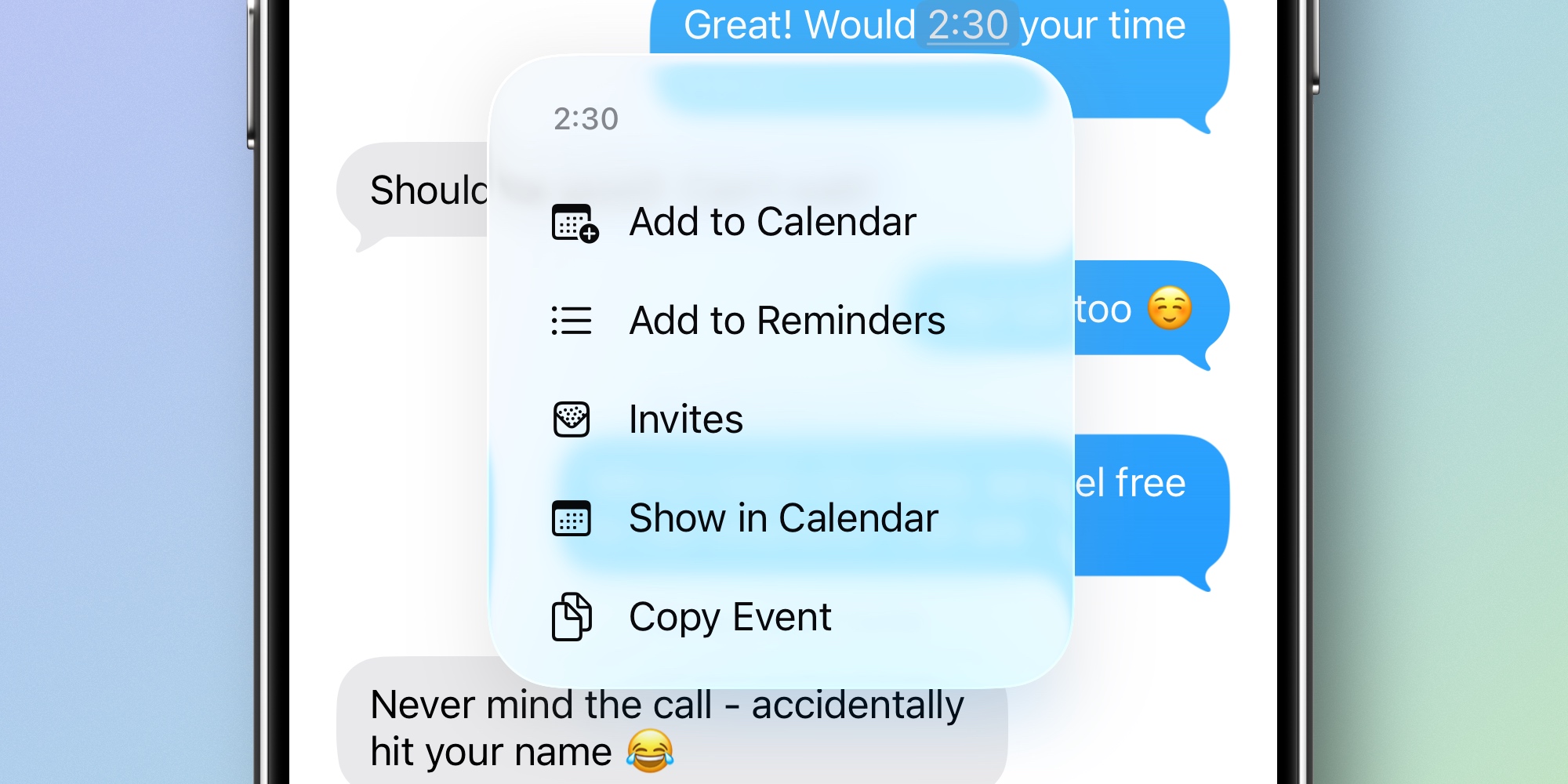
Tap ‘Invites’ and the Apple Invites app will open directly to the event creation screen.
Currently in the beta, the ‘New Event’ screen opens with a blank slate. But I suspect by the time iOS 26.2 ships, the auto-detected date and time will get pre-filled for your new event.
Overall, it’s a fairly small change. But as someone who has used the ‘Add to Calendar’ and ‘Add to Reminders’ shortcuts pretty often, I’m glad to see ‘Invites’ join the available options.
If you haven’t yet tried Apple Invites, it’s available on the App Store. You need an iCloud+ or Apple One subscription to create events, while RSVPing to events is open to all.
Have you used Apple’s Invites app since it launched? How do you like it? Let us know in the comments.
Best iPhone accessories
- AirPods Pro 3 (now only $219, down from $249)
- 10-year AirTag battery case 2-pack
- MagSafe Car Mount for iPhone
- 100W USB-C fast charging power adapter
- AirTag 4-pack (now only $65, down from $99)


FTC: We use income earning auto affiliate links. More.



Comments