
After several weeks of beta testing, iOS 26.2 is now available for all iPhone users. The update brings new features for Apple Podcasts and Apple Music, more Liquid Glass design updates, and more.
Head below for our full guide on all the new iOS 26.2 features.
Table of contents
iOS 26.2 new features
Reminders
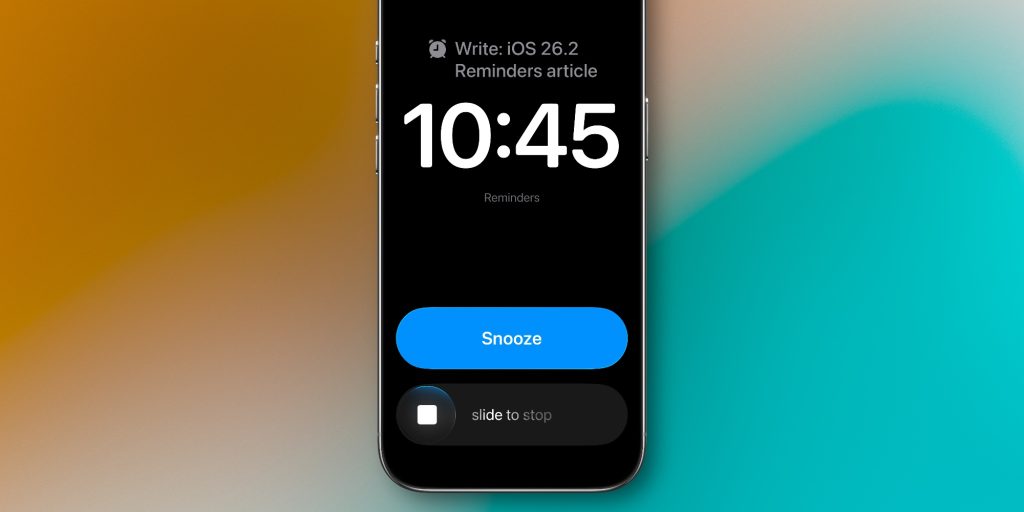
iOS 26.2 adds a highly-requested new feature to the Reminders app. With this update, you can now choose an “Urgent” option that will set an alarm on your iPhone for when the task is due. It’s essentially another way to make sure you don’t forget to do something on your task list.
Apple Music
Apple Music’s robust lyrics feature is getting even better with iOS 26.2. Now, you can access lyrics for songs in your Apple Music library even when you aren’t connected to Wi-Fi or cellular data. This includes the full breadth of lyrics features, such as translations and beat-by-beat syncing.
iOS 26.2 also makes it easier to access your Favorites playlist, and ensures that new releases are available to listen to right away.
- iOS 26.2 adds offline lyrics support to Apple Music
- iOS 26.2 adds new Apple Music features and fixes a viral bug
Apple Podcasts
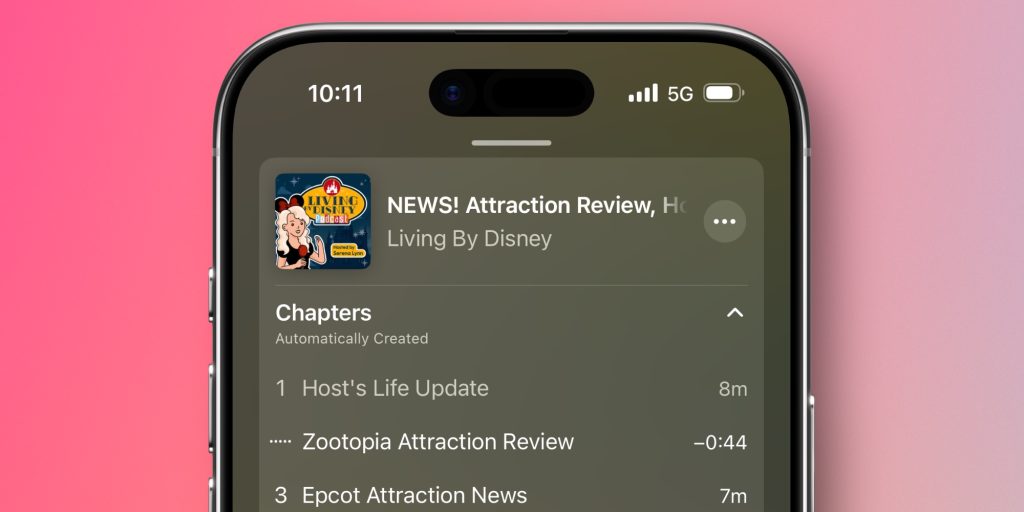
iOS 26.2 adds three new features to Apple Podcasts. First, the app will now automatically generate chapters for podcast episodes with artificial intelligence.
Podcast producers can continue to supply their own chapters for each episode, and those will override the AI-generated chapters created by Apple.
Second, the update brings a new Podcast Mentions feature. “See and follow mentioned podcasts right from the player and transcript,” Apple explains. This means that if you’re listening to one podcast and the hosts reference a different podcast, Apple Podcasts should automatically add a link to that other show in the episode’s description for easy access.
Sleep Score
Along with watchOS 26.2, iOS 26.2 also includes refinements to the Apple Watch’s Sleep Score. In response to people who said the Sleep Score feature was too forgiving, Apple has increased the criteria for each of the classification levels.
Here were the previous levels:
- Very Low: 0-29 points
- Low: 30-49 points
- OK: 50-69 points
- High: 70-89 points
- Excellent: 90-100 points
And here are the updated levels as part of watchOS 26. and iOS 26.2:
- Very Low: 0-40 points
- Low: 41-60 points
- OK: 61-80 points
- High: 81-95 points
- Very High: 96-100 points
Apple News
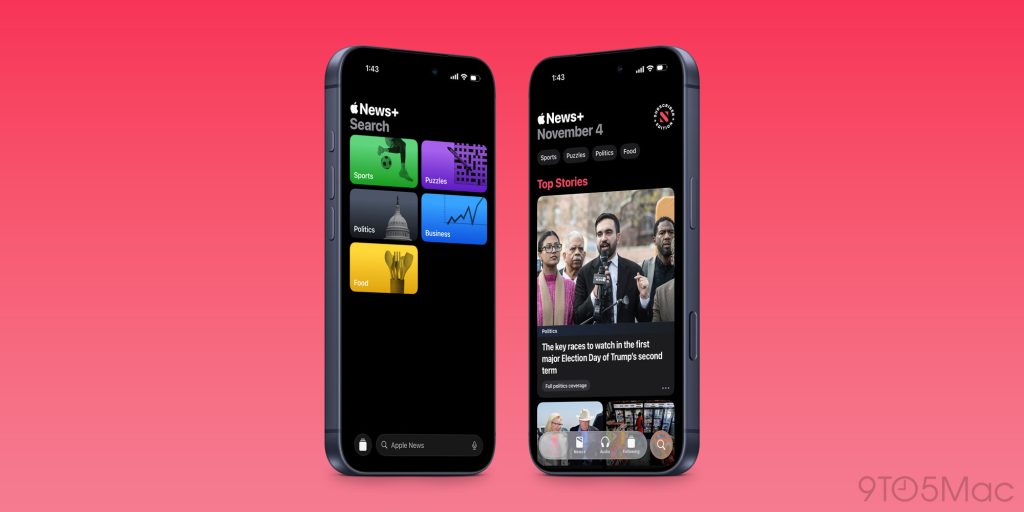
To accommodate the growing breadth of the Apple News service, iOS 26.2 makes key design changes to the News app. On the “Today” view, you’ll now find four dedicated buttons for quicker access to Sports, Puzzles, Politics, and Food sections of the app.
Additionally, there’s a new “Following” tab in the bottom navigation bar of the News app, which includes things like your favorites, saved stories, history, and more. The “Search” tab has been simplified to focus more on discovery.
iOS 26.2 EU changes
iOS 26.2 has good and bad news for iPhone users in the European Union. The good news is that iOS 26.2 expands Live Translation with AirPods to EU users for the first time.
This feature launched as part of iOS 26, but was delayed in the EU due to regulatory uncertainty of the Digital Markets Act. With iOS 26.2, Apple has seemingly received the go-ahead from regulators that it can release Live Translation with AirPods in the EU.
On the other hand, iOS 26.2 and watchOS 26.2 will remove a key feature in the EU. Due to interoperability requirements under the Digital Markets Act, Apple is removing Wi-Fi network syncing from the iPhone and Apple Watch.
This means that saved Wi-Fi networks from your iPhone will no longer automatically sync to your Apple Watch. Instead, you’ll need to manually sign in to each network.
Liquid Glass
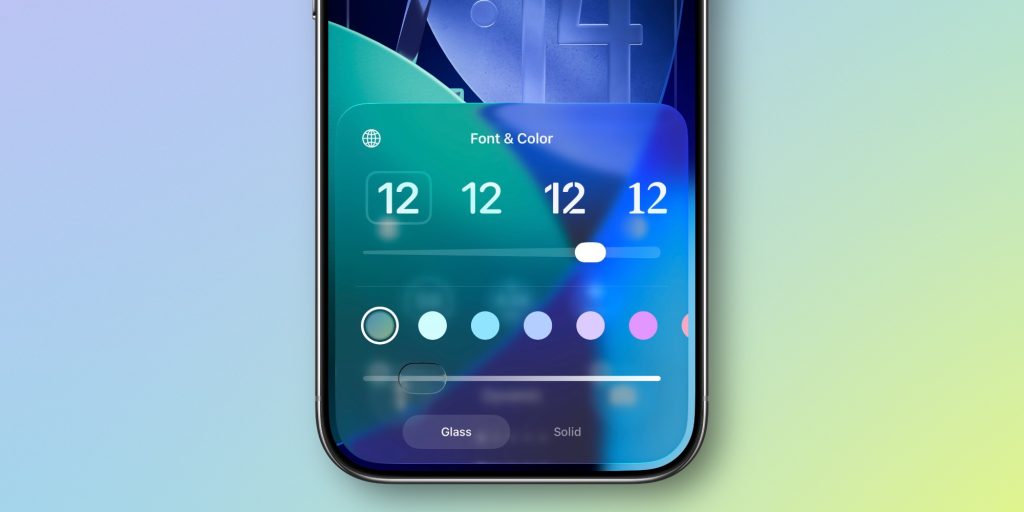
iOS 26.1 added a new system-wide Liquid Glass toggle for choosing between “Clear” and “Tinted” designs.
iOS 26.2 adds yet another way for people to customize Liquid Glass. On your iPhone’s Lock Screen, there’s an updated slider that lets you adjust the transparency of the clock. It’s available for all different font options, and you can choose between designs that are even more transparent or opaque than before.
In the Measure app, Apple has updated the Level tool with an incredibly fun Liquid Glass design. Check it out in action here.
Throughout iOS 26.2, Apple has added new Liquid Glass animations for popup menus and controls. There is more whimsy to these animations.
CarPlay updates
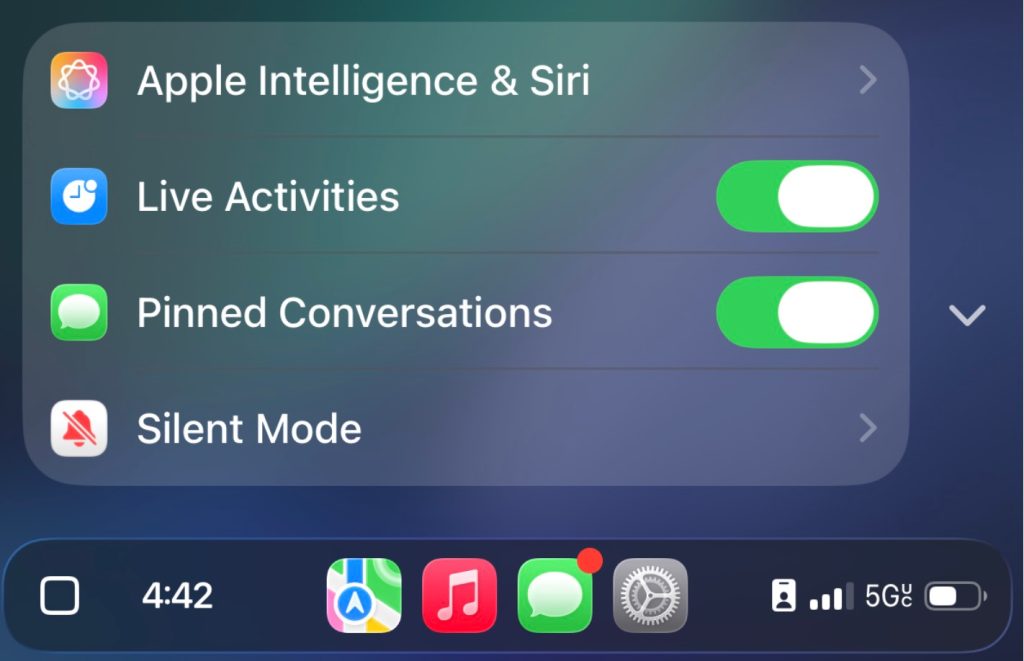
iOS 26.2 includes two notable tweaks for CarPlay users. First, you can now disable Pinned Conversations in the Messages app. You can find this option in the Settings app on your CarPlay screen.
Second, iOS 26.2 appears to expand the number of widget stacks available for some cars. It’s not really clear what the threshold is here, but some users who previously had two widget stacks are now available to create a third. Your mileage will vary.
And more…
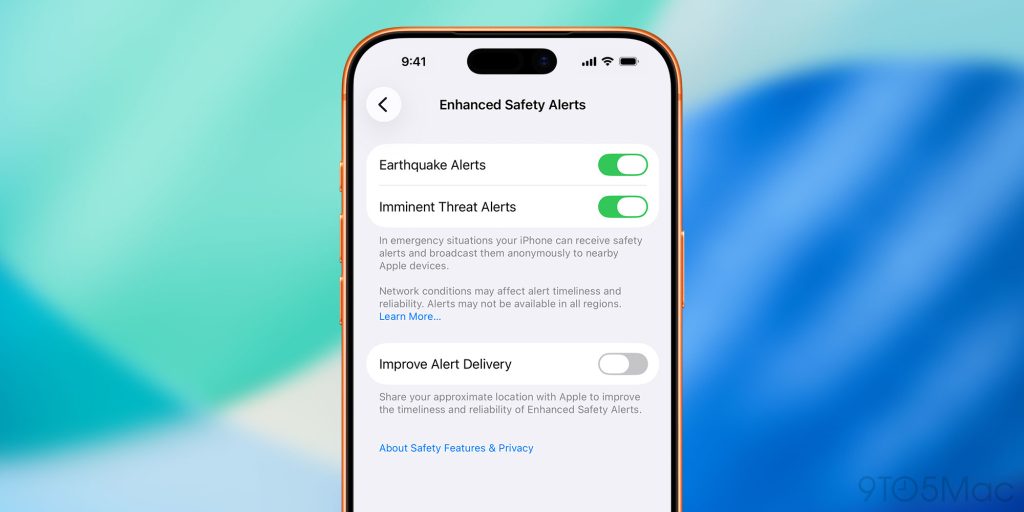
Other small changes to iOS 26.2 include:
- A new “Enhanced Safety Alerts” menu in Settings for toggling switches for earthquake alerts and imminent threat alerts. You also have the choice to share “your approximate location with Apple to improve the timeliness and reliability of Enhanced Safety Alerts.”
- Support for tables in Freeform
- A new “Excluded Websites” menu in the Passwords app
- There is a new Accessibility setting for “Flash to Alerts” that makes your screen flash
- The Games app adds sorting and filtering to library, controller navigation, and score updates
Apple’s official release notes
Here are Apple’s official release notes for iOS 26.2 in full:
Apple Music
- Favorite Songs playlist appears in Top Picks on the home tab
- Offline lyrics for downloaded songs so you can view them without an internet connection
Podcasts
- Automatically generated chapters make it easier to navigate episodes
- Links to mentioned podcasts let you see and follow other podcasts mentioned in the episode you’re listening to directly from the player and transcript
Games
- Filters in the Games library let you find games by category, size, and more
- In-game challenge score banners provide realtime updates when someone new has taken the lead
- Improved support for connected controllers such as Backbone and Razer
This update also includes the following enhancements and bug fixes:
- Additional Lock Screen time customization option lets you further adjust its appearance, giving the Liquid Glass material more or less opacity
- Enhanced Safety Alerts can inform you about imminent threats such as floods, natural disasters, and other emergencies, with rich information like a map of affected areas and links to additional safety guidance (available in the U.S.)
- Alarms for Reminders help you stay on top of urgent tasks, and provide snooze and Live Activity support if you’re not ready to check the reminder off
- AirDrop codes offer an additional layer of verification when using AirDrop with unknown contacts by providing a code on the receiver’s device that the sender must enter to complete the transfer
- Apple News Section links at the top of the Today feed offer easy navigation to popular topics like Sports, Politics, Business, and Food
- Multipack accessory pairing in the Home app lets you use the same setup code to easily enroll multiple accessories when sold together
- Flash for alerts in Accessibility Settings offers the additional option to have the device screen flash when you receive a notification
- Tables in Freeform can hold text, images, documents, and drawings, with cells that intelligently resize to fit, bringing structure to the infinite canvas
- Fixes an issue where pre-release albums in the Apple Music library were not immediately playable at their release time
- Fixes an issue where a Privacy and Security setting may incorrectly be marked as managed by an enterprise organization
iOS 26.2 wrap up
You can head to the Settings app on your iPhone to update to iOS 26.2 today. As always, the update also includes key security fixes, so we recommend updating as soon as possible.
What’s your favorite change in iOS 26.2? Let us know down in the comments.
My favorite holiday deals
- AirPods Pro 3: $210 (Reg. $249)
- Apple Watch Series 11: $299 (Reg. $399)
- 13-inch M4 MacBook Air 16GB/256GB $749 (Reg. $999)
- M4 Mac mini 16GB/256GB $479 (Reg. $599)
- 11-inch M3 iPad Air 128GB from $499 (Reg. $599)
Follow Chance: Threads, Bluesky, Instagram, and Mastodon.


FTC: We use income earning auto affiliate links. More.



Comments