
Today, Mozilla released Firefox 139.0, which brings an interesting AI-based feature: by pressing a keyboard shortcut, the browser opens a small pop-up with a preview of a link’s content. Here’s how to test it out.
A bit of context
Browsers are quickly becoming the next battleground for AI features. While companies like Perplexity work on the much-anticipated Comet, some more traditional players have started rolling out their own ideas of what a browser in the AI era should look like.
Recently, Google announced plans to integrate Gemini directly into Chrome, letting users interact with its LLM about the contents of any page.
Microsoft, meanwhile, says it will allow websites to access a local AI model in Edge to offer features like summarization and, eventually, translation.
Even Apple has implemented AI-based summaries in Safari, although they’re only accessible from Reader Mode, making them a bit inconvenient to use.
Link previews
Now, Mozilla has released Firefox 139.0 with Link Previews, an experimental AI feature that summarizes the key points of a webpage before you click on its link.
As Mozilla explains it:
“Link Previews is currently available as an experimental feature which can be enabled via Firefox Labs in the Firefox settings. After enabling, use the Alt+Shift keyboard shortcut when hovering over a link to see the previews in action!”
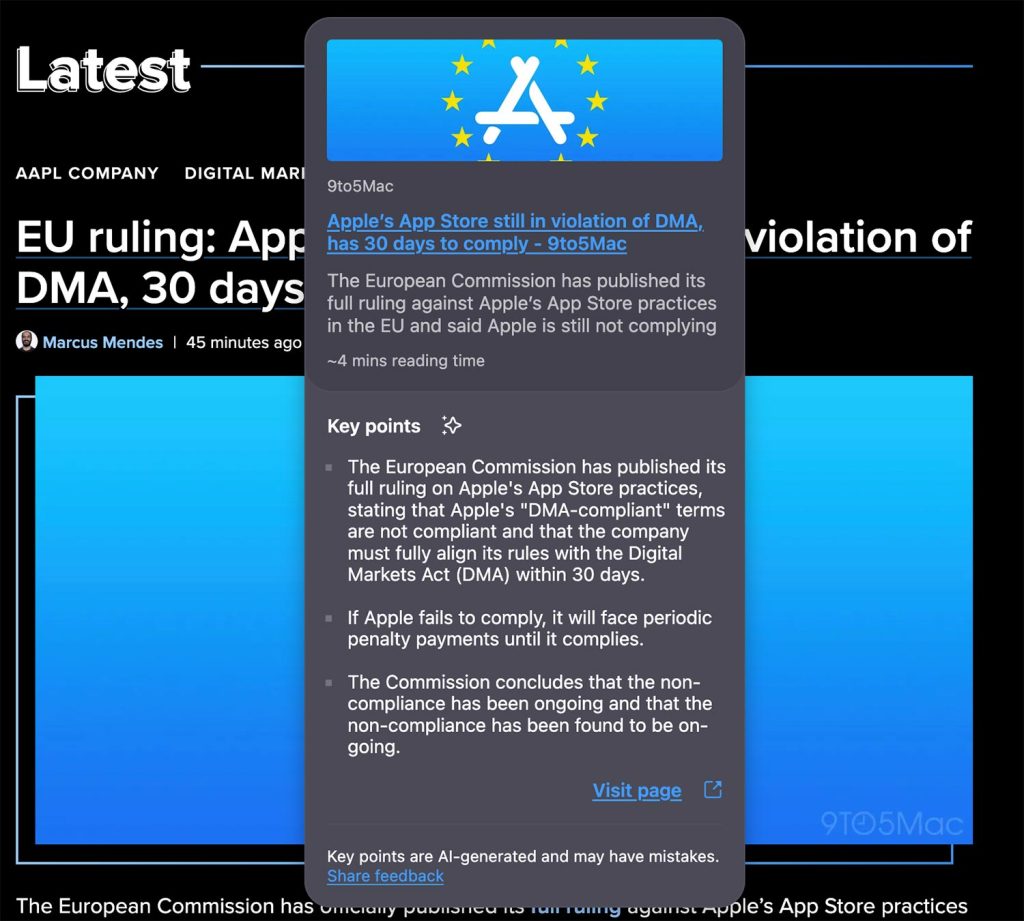
This feature was first announced las month as part of Firefox Labs 138, but it’s now more widely available. While it raises the usual questions about how AI previews might affect website traffic, this kind of low-key AI feature can make browsing feel faster and more useful to technical and non-technical users alike.
Via Tecnoblog


FTC: We use income earning auto affiliate links. More.


Comments