Author

Avatar for Jake Smith

Jake Smith

Lifehacker posts guide to building a Mini Hackintosh

Site default logo image

[youtube=http://www.youtube.com/watch?v=uayELibjHEA]

Lifehacker has posted a nifty guide to building a Hackintosh, Mini style. This Hackintosh is very similar to Apple’s Mac Mini in price but more burly in specs. Hackintoshes offer a great way to learn about the innards of computers and how they work.

The end product ran up a price tag of $599.65, which is a very fair price for what you’re getting.

Here’s what you’ll need:

  1. Gigabyte GA-H55N-USB3 Motherboard $104.99
  2. Intel Core i3 Processor i3-540 3.06GHz 4MB LGA1156 CPU $110.00
  3. ZOTAC nVidia GeForce GT240 512 MB DDR3 DVI/HDMI PCI-Express Video Card $84.99
  4. 2x2GB Corsair PC3-10666 1333Mhz Dual Chanel 240-pin DDR3 Desktop RAM $43.99
  5. Western Digital 1TB SATA III 7200 RPM 32MB Cache Desktop Hard Drive $59.99 (2TB: $79)
  6. SilverStone SG05BB-450 ALL Black Plastic/SECC Mini-ITX Computer Case with SFX 450W 80+ Bronze Certified/Single +12V rail Power Supply $119.99
  7. Sony Optiarc 8X SATA DVD+/-RW Slim Drive $34.99
  8. StarTech.com MCSATAADAP Micro SATA to SATA Adapter Cable with Power $11.71
  9. Mac OS X 10.6 Snow Leopard $29.00
  10. OPTIONALOCZ Agility 120GB SSD $199.99 (note: this is optional and not included in the total cost of the machine)

The squad over at Lifehacker used tonymacx86’s CustoMac Mini tool and a good suite of hardware. While this isn’t as small as a Mac Mini, it is very close and is a lot faster. Check out Lifehacker’s video above on how to set this up and visit their post for a list of hardware. We have to warn you, this isn’t for every computer user, because you need to know how to build your own computer and do a little tinkering.

If a Hackintosh Mini isn’t for you, check out tonymacx86’s guide to making a Sandy Bridge Hackintosh. Intel’s Sandy Bridge processor is rumored to be included in many of the new Macs. Why not go ahead and build one on the cheap? Tonymacx86 has all the answers.

Expand
Expanding
Close

Famous jailbreaker Geohot joins Facebook team

Site default logo image

[youtube=http://www.youtube.com/watch?v=9iUvuaChDEg]

TechUnwrapped is reporting that famous jailbreaker George Hotz, known as Geohot, is now working at Facebook. You may know Geohot for getting in a lawsuit by Sony for his Playstation hack and his jailbreaking tools like purplera1n, blackra1n, and limera1n. In recent months Geohot has been off the map after the Sony ordeal, but it appears now he is back (unfortunately not as a rapper).

Techmeme’s Gabe Rivera did some digging on Geohot’s Facebook to confirm TechUnwrapped’s story. It appears Geohot joined Facebook as a Software engineer in May, but he announced the news June 17th. June 22nd he said, “is Facebook is really an amazing place to work…first hackathon over.” What do you think he is doing as a Software Engineer? Perhaps he’s working on the secret Project Trojan…er Spartan.
Expand
Expanding
Close

Time Capsule doesn’t have server hard drive as advertised

Site default logo image

French website Macbidouille has published a teardown of the new $299 Time Capsule announced last week. Contrary to some rumors, it doesn’t have an A4 or A5 chip, and it doesn’t run a stripped down version of iOS.

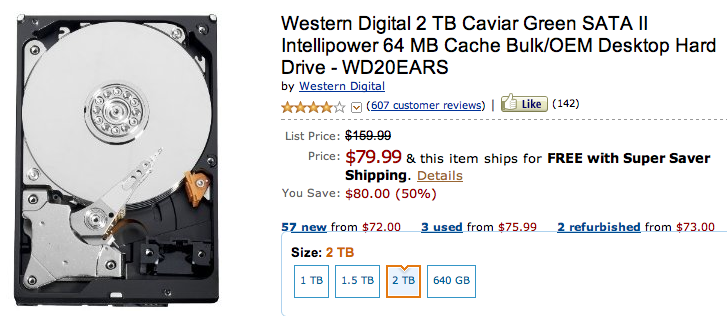
The not so big surprise is that Apple is still using the $80 Western Digital Caviar Green HDD –what most would consider a ‘consumer grade hard drive’.  ($80!) What’s weird, and a little sketchy, is that Apple continues to advertise their Time Capsule having a ‘server grade hard drive.’

And for those scoring at home, the 3TB equivalent of the above drive costs a whopping $133, a whole $67 less than the cost to upgrade to a $499 3TB Time Capsule (never mind the 2TB drive already thrown in).  Full rant on that here.

Hopefully Apple isn’t filling up North Carolina with these for iCloud.
Expand
Expanding
Close

iOS 5 beta 2 Build 9A5248d just hit, developers get downloading (update: changes!)

Site default logo image

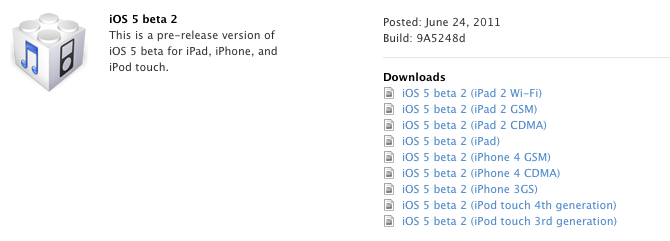
Weighing in at a hefty 817MB for the iPhone 4, build 9A5248d just hit the Developer site. There was some question as to whether Apple was going to deliver the update OTA but obviously that’s going to be later.

Update:

-WiFi sync now works with iTunes for Mac

-iCloud logo becomes silver in settings

-Lockscreen notifications got an update from the UI department

Feel free to comment on your experiences below:


Expand
Expanding
Close

RoaringApps tells you what apps are compatible with OS X Lion

Site default logo image

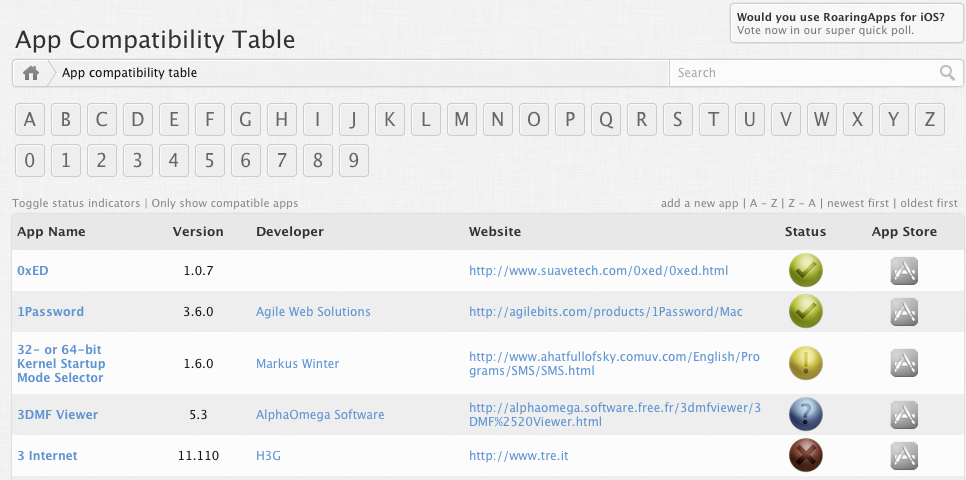
When upgrading from Snow Leopard to Lion, there is a chance of compatibility issues between app and the new OS. A new site called RoaringApps comes to the rescue by displaying what apps are compatible with the new OS. RoaringApps provides a long table of apps showing what apps are supported and if it is available in the App Store.

Other parts of the site include a forum and IRC chat to talk apps. This makes a great way to assure that all of your Mac applications are going to work, before you upgrade.

.
Expand
Expanding
Close

iUsers enables multiple user profiles on the iPad

Site default logo image

[youtube=http://www.youtube.com/watch?v=Tq8sjcOdAsc]

A jailbroken app called  ‘iUsers’enables the iPad to behave a little more like your Mac by supporting multiple user profiles.

The tweak puts a user profile button on the iPad’s homepage, where users can be switched fairly simply. For now only apps, music, and other content are shared between users, but the data inside the apps (game hi-scores, etc.) are user specific. iUsers’ developer is currently working on implementing more granular user data. The tweak is making its way to the Cydia marketplace, but if you’re eager you can find the instructions to installing iUsers over at BlogdoiPhone.

Hopefully we’ll see this natively in the iPad soon, and maybe Apple will decide to Sherlock it at some point in the future.

via Engadget
Expand
Expanding
Close

Dual SIM Cover gives the iPhone 4 two phone numbers

Site default logo image

A company called Vaveliero has developed an iPhone 4 case that gives you easy access to two different mobile accounts.

The kit replaces the iPhone 4’s microSIM tray with an external dual SIM adapter to give the iPhone 4 the capabilities of using two phone accounts from two different carriers. The external SIM is attached inside of the case, making the extra SIM appear like it isn’t even there. The two numbers can be switched in the settings or set on a timer to change as you wish.

Unfortunately, both can’t be used at the same time.  We’re also uncertain from the literature if you need to be unlocked to use this with non-supported networks.  Vaveliero operates in Europe where locking phones and other douchebaggery is frowned upon.  Perhaps in the US, this could be used for a separate AT&T Work and personal account.

There had been some sketchy rumors that the iPhone 5 would do this natively but we’re doubtful Apple has anything like this cooked up.

This case works with UMTS, HSDPA, WCDMA, GSM, GPRS, and EDGE. Head on past the break for more images.
Expand
Expanding
Close