Author

Avatar for Scott Buscemi

Scott Buscemi

@swb1192

Connect with Scott Buscemi

Site default logo image

A look at GV Mobile + 3 for Google Voice [Review & Giveaway]


ss3

Google Voice has had an interesting relationship with the iPhone. If you’re an avid user of the service, the tight integration found on Android devices is enviable. First downloadable in the App Store then taken down then available on Cydia in 2010, GV Mobile + has been the go-to app for many Google Voice users even with the launch of the official Google Voice iOS app.

Now, the app has matured into version three, a full-blown messaging and VoIP application contained within a sleek design.

New Design

GV Mobile + has always kept up-to-date with the latest design trends. In this third version, the app moves to a slick “flat” design. It’s not exactly in line with iOS 7 and makes use of the hamburger menu that has plagued many apps lately, but the design has a solid and complete feel to it.

Transitions between screens are also notable and appreciated. New pages fly up from the bottom or slide out from the top. When placing a call, the screen fades out and a new “in-call” screen fades in.

VoIP

While the option to make calls using your cellular minutes is still readily available, this is the first version that includes built-in VoIP. Even though I was extremely excited to use this feature since my data plan is still unlimited but I only have a few hundred minutes per month, I haven’t found this to be quite as reliable as I would hope. Even with a strong LTE connection, I usually receive complaints from the people I talk to and end up calling them back using my cell. In WiFi environments, it can be a viable choice and definitely saves you if you don’t have many minutes.

Ever since I placed my first FaceTime Audio call, every phone call sounds dull and mono, so any criticism of the sound quality from me is a bit skewed. VoIP in this application sounds like a regular phone call placed over the regular phone application.

In-App Notifications

Mirroring the same design as Facebook, this version also includes in-app notifications. This is definitely helpful if you’re having multiple SMS conversations.

The notifications are reliable and it’s definitely a great feature for power users of the app.

Roundup & Giveaway

A while back, GV Mobile + was updated with a nasty bug that made the app unusable. Although the developer, Sean Kovacs, pushed out an update very quickly, Apple was slow to push out the critical update. At that time, I tried using the free, official Google Voice app, but found it to be extremely lacking. To put it simply, it seems like Sean Kovacs cares more about Google Voice and the features in the iOS app more than the Google Voice employees do. Seeing that this is one of my most used applications on a day-to-day basis, I couldn’t live without it.

You can purchase GV Mobile + 3 in the App Store for just $2.99.

In addition, we’re giving away 5 promo codes for the app. Leave a comment below with your Twitter handle by the end of tomorrow  (7/15 at 11:59 PM PST) and we’ll announce the winners on July 16th. Good luck!
Site default logo image

Soundfreaq audio system, Hone key tracker, glif tripod mount [Review roundup]

9to5mac-review-roundup

Buying an iPhone isn’t just about the device. Instead, you are buying into the entire ecosystem of apps, accessories and add-ons available from third-party companies. In this review roundup, we’ll be looking at a small assortment of hardware accessories for iOS devices.

Soundfreaq Sound Step

The marketplace is full of iPhone/iPod docks and speaker systems. Lately, it seems that the trend is moving towards portable Bluetooth speakers rather than plug-in dock (and hopefully we’ll continue to see a trend towards AirPlay – one can hope!). So why would we spend any time with a docking station that needs AC power? It’s an all-around system.

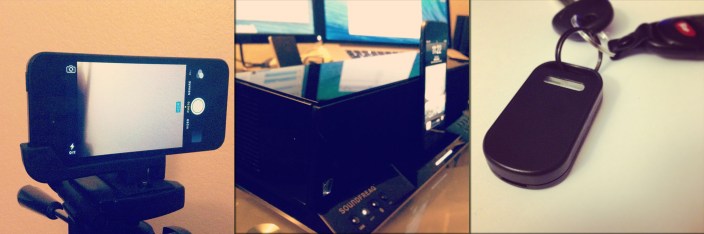
The Sound Step Lightning has many different inputs – Bluetooth, an auxilary jack, USB, and a dock connector. With the remote (or app which you’re prompted to download when you dock your device), you can switch sources at any time. Thus, the system could act as a small stereo system for your TV and a Bluetooth speaker for your device at the same time.

There’s still something special about a docking station. Not only does the lightning plug provide for a data connection for music playback, but it also charges your device. The lightning connector is strong enough to hold up even the iPad with Retina display.

The speakers themselves can get extremely loud and the bass is definitely strong. Even when the volume is on high, music is still clear and doesn’t become distorted. Make no mistake, this is a high-quality device with a sleek design and intelligent sound.

You can pick up the Soundfreaq Sound Step SFQ-02L on Amazon for $129.99.

Hone

IMG_1471

Losing your keys is extremely inconvenient. For me, I never leave the house without my phone, wallet, and keys, so if I’m in a rush and the keys seemed to drift off somewhere, I’m stuck until they’re found.

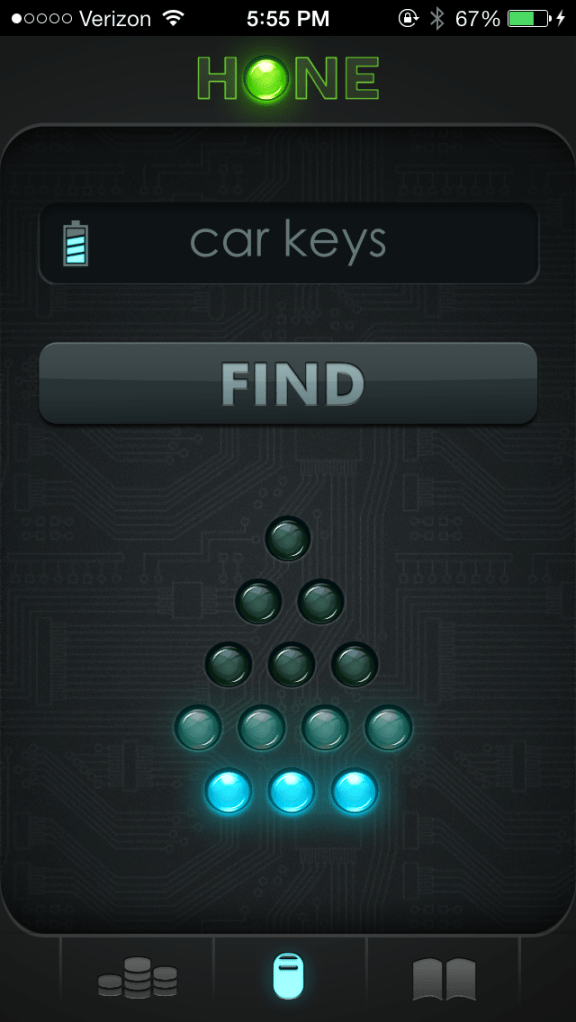
Hone is BiteMyApple’s solution to this problem. Through the use of Bluetooth 4.0 and the Hone app, an arrow in the app lights up as you get closer and closer to your keys. What’s more useful is the “Find” button, which makes the Hone light up and beep from up to 150 feet away.

The device itself is a little bit on the large side – just about the size of a key fob. However, it’s only half an ounce and the battery should last you about six months.

This device started as a Kickstarter with 1,132 backers. Today you can buy the Hone for $59.99 on the BiteMyApple’s website.

In fact, BiteMyApple is a web store that exclusively sells devices that started out as Kickstarter projects and reached their funding goals.

Glif

glif2_02_1024x1024.1_grande

The iPhone’s camera is incredibly powerful, and, as the saying goes, “the best camera is the one you have with you.” Since it’s so portable, taking pictures from an iPhone is extremely convenient. However, trying to take a steady video or a long-exposure photo (using a third-party app) doesn’t turn out so well when holding the phone.

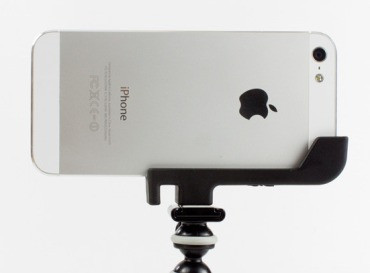
Enter Glif. Like the Hone, the Glif is sold by BiteMyApple. It’s a sturdy accessory that works with any regular tripod or mount. Simply twist the Glif into place, fit your phone into the Glif, and you’re ready to start taking pictures or videos. I’ve actually used the Glif in some of my videos and found it to be extremely simple and useful. In addition, it has a good enough grip on your iPhone that you can tilt your tripod at a 90° angle toward the ground and it’ll still keep the phone in place. The Glif is approved and used by me.

The Glif is available on BiteMyApple’s website for $19.99.

Site default logo image

A look at ‘Cal’, Any.do’s calendar app for iPhone (mini-review)

anydocalAs part of their plan to create a suit of productivity apps, the makers of the popular productivity app Any.do have launched a new calendar app called “Cal“. Available in the App Store, it makes it really easy to quickly find locations and invite others to events in a clean interface.

http://vimeo.com/69827636

Integrating right into your phone’s calendars and Facebook friends list, you can start taking advantage of the features right away. The best use I’ve found for the app is scheduling quick hangouts with friends. When you add an event, you can use natural language to type in something like, “Lunch with Josh at Cafe Luce.” Once you type in your friend’s name, their picture appears. Once you type in the location, it pulls data from Facebook Places and it places in the address and other information. You are also presented with buttons to email or message all event attendees – great for last minute changes or asking for directions to the venue.

Beyond the event creation functionalities, it acts as a nice calendar application with a sleek design. In fact, it closely resembles the upcoming iOS 7 calendar application. My biggest issue with the 30-day view

https://twitter.com/mitchell209/status/355500428638699520

As a free application in the App Store, I’d recommend giving Cal a shot. Just like most productivity apps, it really depends on the way you perform tasks and how closely the app mirrors that. It’s a step above the native calendar application and the flat design is extremely welcoming. As Any.do continues to build their product line, this application can act as a good sign of things to come.

Crowdfunding Roundup: GlassUp, Ziphius Aquatic Drone, Kickstand Projector, more

Site default logo image

Print

As the success stories keep piling up, so do the number of projects filling up crowdfunding websites with, among other things, neat hardware- and software-related products. Some projects, like Pebble, gain thousands of supporters as well as millions of dollars in funding (and end up at Best Buy’s retail stores). Other projects flop and don’t reach their necessary funding amount.

Rather than make you sift through all of these projects, we’re rounding up the best or most notable projects from around the web and delivering them to you in a simple roundup.
Expand
Expanding
Close

Site default logo image

Path 3.1 released: stickers in comments, new iPad interface, more

tumblr_inline_mpomnxYm4y1qz4rgp

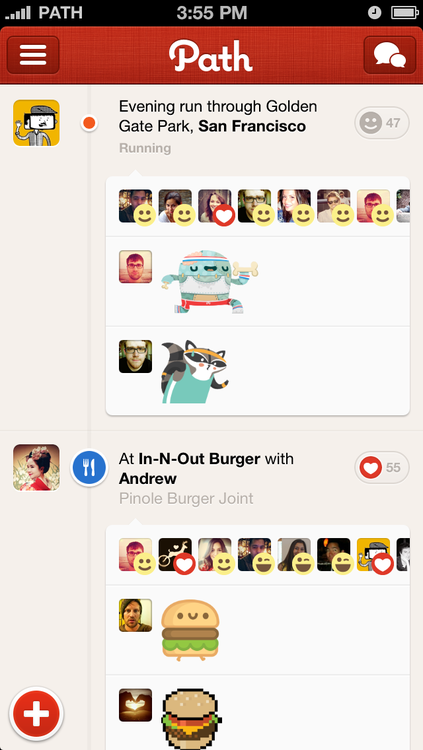
Path, the “personal social network”, has just released version 3.1 of their application. The company details out all of the new features on their company blog:

You told us you wanted more stickers in more places. So Path 3.1 is for you. Now, any sticker, whether you buy a new pack or use an old one, can be used to quickly respond to your friends’ moments, to add color and depth to your commentary. Now, stickers can be part of the full story. We are excited to bring you stickers in comments, a new way to express yourself.

We also used this release as an opportunity to update Path for iPad. Improved navigation in both landscape and profile views means you’ll never miss a moment or message. Landscape view now has a fully functioning composer button and feed, so you can share and view moments however you prefer. Plus, any conversations you’re having with friends are simply one tap away.

But we’re not done. Now it’s even easier to send a friend request to that friend you’re standing next to. We generate a QR code for you, your friend scans it, and voila, it’s official! And a refined friends list makes it faster to find and message your friends and family so you can quickly be in touch.

The application has been updated for both iOS and Android. Just a couple of months ago, users being complaining Path was sending spam messages to their friends, even though then company said it was a feature. Nevertheless, the app receives mostly 5-star ratings in the App Store.

Apple seeds OS X Mavericks Developer Preview 3

Site default logo image

Screen Shot 2013-07-08 at 6.46.26 PM

To go along with this morning’s third iOS 7 beta, Apple has released OS X Mavericks Developer Preview 3. This new preview arrives two weeks following Preview 2. Like Preview 2, it seems likely that Preview 3 focuses on bug and performance fixes.

OS X Mavericks launches for the general public this fall with new Maps and iBooks apps, significant battery life, scrolling, and overall performance adjustments, and power-user features like revamped multiple-monitor support, Finder Tags, Finder Tabs, and a faster Safari browser.

As readers discover changes in the new Mavericks preview, we will note them below. If you find anything new, you can reach us at tips@9to5mac.com.

The update comes in at 1.08 GB.


Expand
Expanding
Close

Site default logo image

Twitter for iOS and Mac updated with Direct Message syncing, more

Twitter for iOS and Mac have been updated with Direct Message syncing and other UI changes.

Here’s the changelog for Twitter for iOS version 5.8:

New to Twitter for iPhone and iPad: when you read a Direct message it will be marked as read in all of your official Twitter apps, including twitter.com, mobile.twitter.com, Twitter for Mac, Twitter for Android and TweetDeck. When you read a message on another official Twitter app, it will be marked as read on iPhone and iPad.

We’ve also made more improvements in this version:
• It’s easier to join conversations with a new reply composer in the Tweet details view on iPhone
• Find new accounts to follow by tapping the new people button in the navigation bar
• Richer search results indicate when there are new Tweets for your query and show account results with bios and social context
• Report unwanted Tweets via the “More” button

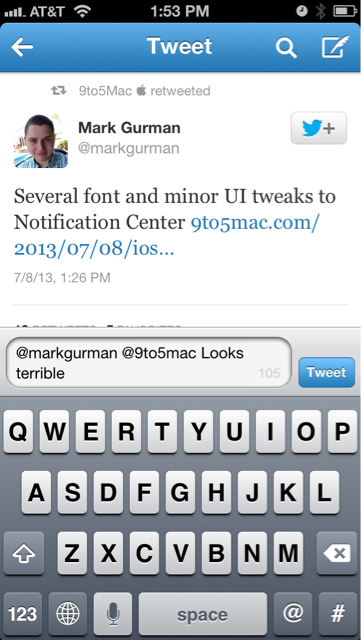
Here’s a screenshot of the new reply composer:

upload

Twitter for Mac has been updated to 2.3:

Now you can see when your Tweets have been retweeted or favorited, when you have a new follower, and when you’ve been added to a list in your @Connect timeline. You can also update your notification settings to see interactions in real time.

Other improvements and bug fixes in this version include:
* When you read a Direct message on Twitter for Mac it will be marked as read in all of your official Twitter apps, including Twitter for iPhone, Twitter for iPad, Twitter for Android, twitter.com, mobile.twitter.com and TweetDeck. When you read a message on another official Twitter app, it will be marked as read on your Mac.
* Support for 6 new languages: Danish, Swedish, Finnish, Norwegian, Thai and Filipino
* Real names and @usernames appear together in all parts of the app
* Fixed character counting bug in the Tweet composer
* Fix for unfavoriting Tweets
* Fix for Growl notifications
* Other nifty fixes and improvements

The official Twitter blog has a new post regarding these updates.

Site default logo image

Apple jumps 36 spots to #19 in Fortune Global 500 list

fortune-500-2011

Just two months ago, Apple ranked 6th in the Fortune 500 list – breaking in to top 10 for the first time. Today, the Fortune Global 500 list was revealed with Apple at #19. Apple was ranked at #55 last year and #111 the year before.

Fortune attributes the increase to the launches of the iPhone 5 and iPad mini, which helped bring annual revenues up 45% to $157 billion in 2012. Of note, Apple has already brought in $98.1 billion in revenue the first two quarters of this financial year.

Site default logo image

Top grossing app ‘Candy Crush’ raking in an estimated $633k a day

mzl.eilzffcn.320x480-75

So much for a simple Bejeweled knock-off. According to ThinkGaming (via Slate), the #1 Top Grossing app Candy Crush is currently pulling in an estimated $633,000 a day. At this rate, the creators of the game could bring in $230 million a year from the revenue of this one game.

Candy Crush is yet another success story for the freemium app model. Currently, 45 of the top 50 grossing applications in the App Store right now are free – one of which is Bejeweled Blitz at #45.

The Candy Crush craze is turning into a massive cash cow and incredible example of the potential success for freemium apps.

Site default logo image

The laptop backpack to rule them all: ‘Hercules’ from ECBC [Review]

ECBC_Kodra_5_Backpacks2

It feels like I’ve gone through dozens of laptop backpacks over the years. Either the zipper breaks in a disastrous way, the bottom tears, or the weight becomes hard to bear. But that may be about to change with the new Hercules Laptop Backpack from ECBC.

Right off the bat, I’m going to mention the biggest thing I love about ECBC: they offer a 3-year warranty with their products. Since most of my backpacks end up with some sort of a problem within the first year – I promise, I try to be nice to them! – this is a huge advantage.


Expand
Expanding
Close

Site default logo image

Twitter #music and Tweetbot for iOS updated

jpeg

Both Tweetbot and Twitter #music have released minor updates this afternoon, extending the capabilities of these social applications.

The two versions of Tweetbot, one for iPhones and iPod Touches and the other for iPads, have been updated to version 2.8.2 and now support Instagram video according to the release notes, although there have been some reports of the feature not working at all.

The Twitter #music update is a bit more substantial, bumping up the app to version 1.1 with the addition of genres:

Genres! Get hip-hoppy or get your metal on or get your dance beats grooving with Twitter #music genres! Tons of genres plus Superstars, Popular, Emerging, Unearthed and Hunted charts.

This build also includes:
• Fixes for some scenarios that could cause tracks to be unavailable.
• Rdio authentication now happens in-app, rather than kicking you out to Safari.
• We have stomped many bugs so that you don’t have to.

The free Twitter #music app is available in the App Store.

Demo of the first public website using Safari’s new native push notifications feature [Video]

Site default logo image

http://www.youtube.com/watch?feature=player_embedded&v=T4QrylM6th0

During the WWDC keynote, Apple introduced a new Safari 7 feature that allows developers to take advantage of native push notifications on their websites. Unlike HTML5 push notifications, which have been used by some browsers for some time now, native push notifications act like any other installed application’s notifications: they are branded for the web app rather than the browser, they can be used even when you aren’t on the website, and they can even pop up when Safari isn’t running.

Working with 9to5Mac, developer Connor LaCombe has developed the first public demo website that shows exactly how the feature works:


Expand
Expanding
Close

iOS 7 includes the ability to control your iPhone or iPad using head movements [video]

Site default logo image

IMG_1290

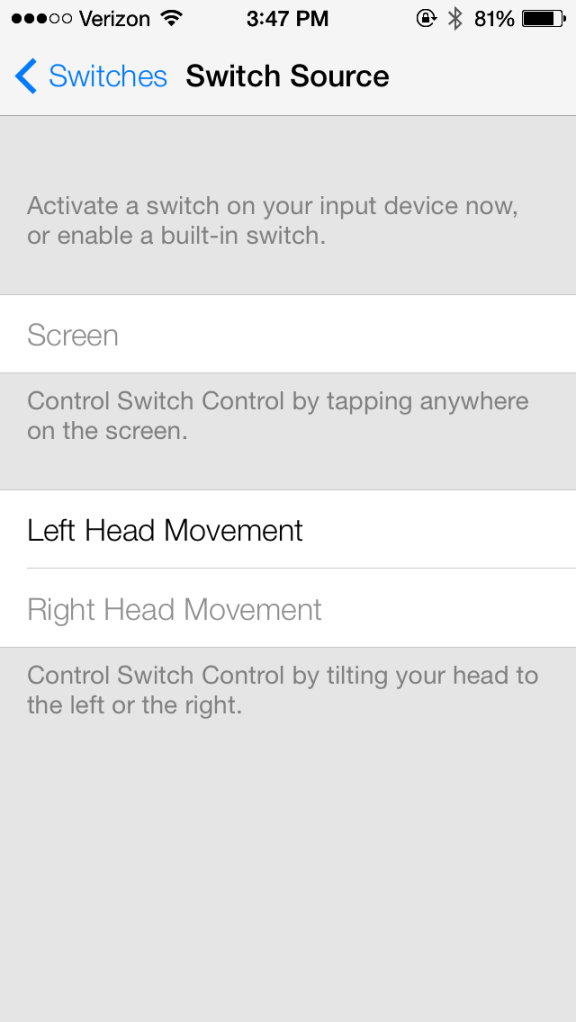
Discovered by an anonymous tipster, iOS 7’s “Accessibility” section now includes a feature that allows you to control your iPhone or iPad with left or right head movements. We’ve tested this ourselves and found it to be quite accurate, but it’s quite tedious to control your device this way since it cycles through all of the options on the screen and you move your head when it is bordering around the option you want.
Expand
Expanding
Close

Site default logo image

The micro-suction dock that appears to defy gravity [Review]

ORG-516-BX(2)_0 cropped 2

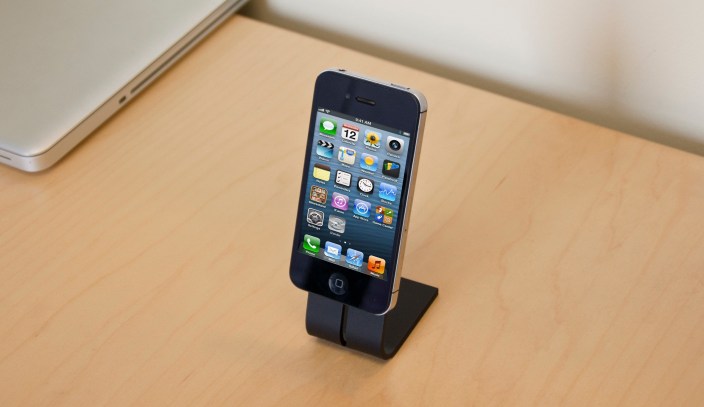
This morning, I received what appears to be magic in a box. Bracketron’s NanoTek Stand uses micro-suction technology to stick to flat surfaces and hold iPhones and iPad minis without a ledge or any magnets. This device was originally a Kickstarter project called the “SETA Smartphone Stand” and now Bracketron has partnered with SETA to offer the product to the masses.

From the Kickstarter project:

How It Works. SETA incorporates NanoSuction™ technology that synthetically emulates the adhesive qualities of gecko feet. Your phone magically clings to the NanoSuction™ SETA pad while another pad on the base secures the stand to most flat, non-porous surfaces.

When I put my iPhone or iPad mini on the dock, it feels like a tiny vacuum holds it in place. Swiping left to right or scrolling through webpages does not move the phone or the dock at all, but when you want to take your device off, it just takes a simple pull or tug to the left or right. The micro-suction leaves no residue or stickiness on the device.

swb1192_Photo_iphone

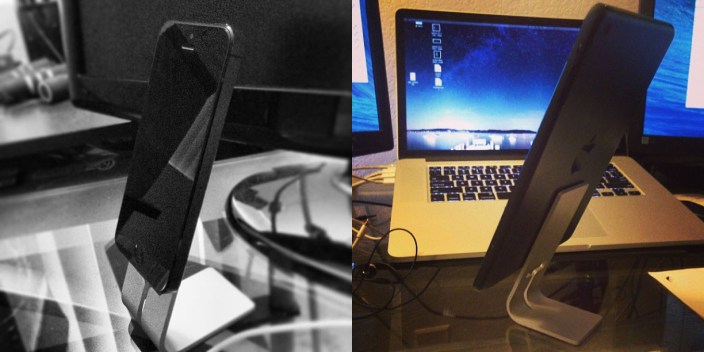
At first, the small size made it seem like the dock would only work with small phones like the iPhone. However, it has no problem holding up my iPad mini in the landscape or portrait position.

The angle is great for Facetime calls, sending snapchats, texting, or watching videos. Unlike some other docks that closely resemble the design, the NanoTek Stand does not use gravity as a factor (the angle is there just to make it easier to see) and the footprint is extremely small. In addition, there is a slot for a 30-pin or lightning connector.

Bracketron’s NanoTek Stand can be found on BestBuy.com for just $27.99 with free shipping. The durable construction and amazing technology makes it a steal at that price. In addition, the small size means you could fit both your iPad mini and iPhone on your desk, each with their own stand.

More images of iPhone 5S prototype emerge, complete with probable A7 chip and dual-LED smart flash

Site default logo image

iphone_5S_5_side_by_side-800x830

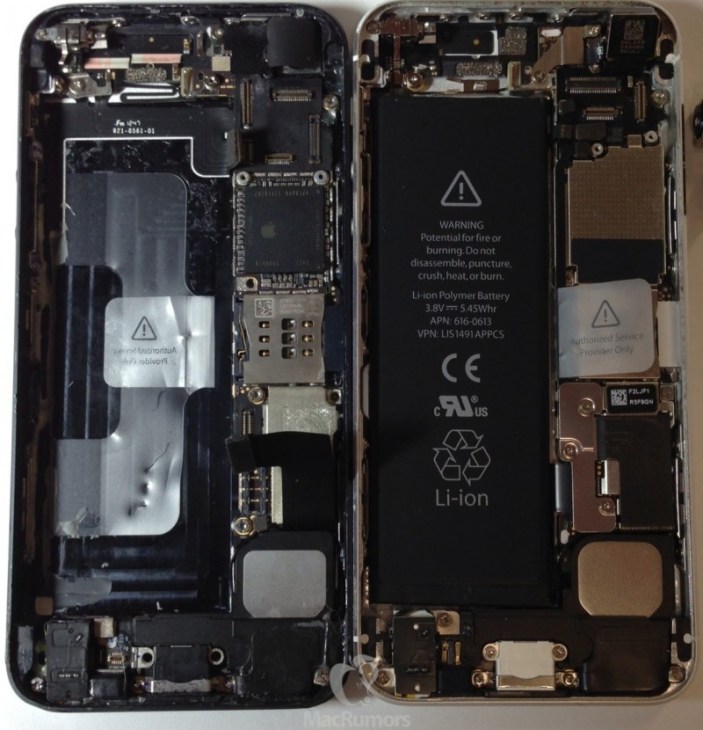
MacRumors has posted additional images of a prototype iPhone 5S this morning, adding to the increasing leaks of the upcoming device. Rather than using the A6X chip that is in the current-generation iPad, MacRumors speculates that the new processor’s model number means the next iPhone’s chip will be an A7.

In addition, the new iPhone will sport dual-LED flash. Of note, the two LEDs seem to be different colors:
Expand
Expanding
Close

Siri takes initiative to learn how to pronounce names in iOS 7

Site default logo image

Screen Shot 2013-06-23 at 10.39.27 PM

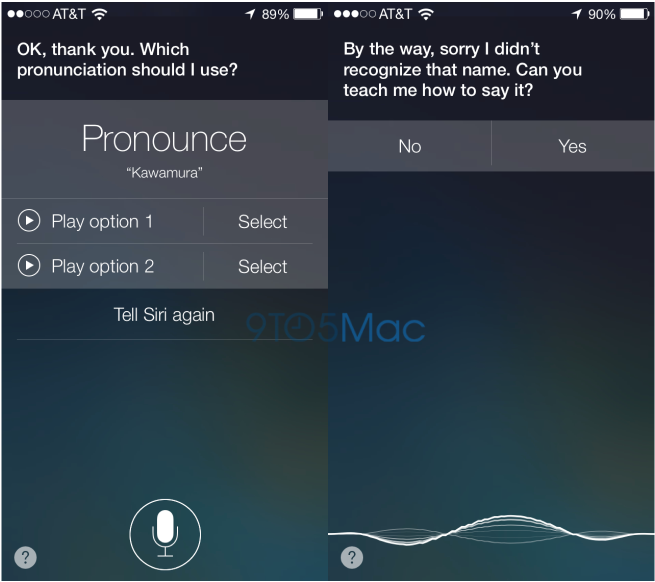
When Siri first launched, many users found lots of names were pronounced incorrectly and couldn’t do much beyond adding phonetic spellings manually for each contact. With iOS 7, it appears that Siri can now take initiative for learning proper pronunciations.

As discovered by 9to5Mac reader RY, Siri will ask for help pronouncing a name if it has trouble understanding you the first time you pronounce a name. In addition, we have found that you can simply say, “That’s not how you pronounce [any name]” and Siri will go through the learning process.

In that phase, it will ask you to say the name then present a few options of how it thinks you said it. Once you choose an option, it will save and always (try to) correctly pronounce the name.


Expand
Expanding
Close

Site default logo image

Cover your ears: the tiny Rocksteady XS 1.5 can get loud [Review]

IMG_0024

Bluetooth portable speakers are become more and more popular. Whether you’re having a party outside, working out, or just wanting some loud speakers wherever you move, these devices boast great battery life and the simplicity of Bluetooth connectivity.

Back in April, Seth posted a “Mega Review” of many of the Best portable Bluetooth speakers on the market. Jawbone’s Jambox was truly the first innovator in the market, but now companies like creators of the RockSteady XS, KillerConcepts, have brought in less expensive or more powerful alternatives. Today, we’re taking a look at the updated Rocksteady XS 1.5.

Look & Feel

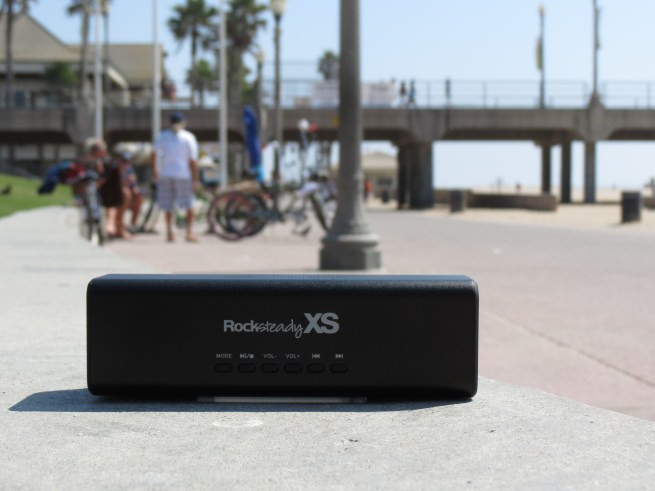
The device’s case is all-aluminum, which is pretty clear when you pick it up. It’s extremely lightweight – it almost feels like the battery is the only component inside. On the bottom of the device is the cover to the removal battery. The controls (mode, pause/play, volume, skip/back) are on the front of the device. In addition, there is a microphone for phone calls… but more on that later. The back of the device has the on/off switch, AUX line in, DC power, and USB plug (more on that port in just a second). The main speakers are on the sides of the device, but there is also a speaker on the top for additional sound.

The design and structure of the device get a big two thumbs up.

Sound

On the press sheet we received with the device, one of the questions they answer is, “Why is it so loud?” I read that question before I actually used the device and thought it was the weirdest “issue” for them to address. But after I turned up the volume, it all made sense. To turn up the volume to 100%, I had to set it down on my desk then walk into another room and increase the volume using my phone. I couldn’t sit right next to it without my ears falling off. Even in such a small casing, this device has no problem pumping out over 90dB. If you main concern with a portable Bluetooth speaker is volume, you have no need to worry about that with the Rocksteady.

Speakerphone Feature

New in this version, the Rocksteady boasts a speakerphone function and even has an “answer/hangup” button right on the device. This would be a great thing… if anyone could actually hear you. I called up my colleague Zac and he could not even hear a word of what I was saying even when I spoke right into the speakerphone. On the other hand, I could hear him just fine, although I couldn’t get his voice to be loud.

Additional Features

Other new features include the ability to connect two devices at the same time (up to four can be paired with the Rocksteady) and the dual function USB port that allows you to charge your phone. If you don’t take advantage of this feature, expect over 10 hours of battery life (and our real-world tests brought us to just about the same amount).

Conclusion

What started as a niche product is becoming increasingly popular as people discover new places where they can be handy. At just $99.95 on Amazon, the Rocksteady XS is a great choice for audiophiles and casual music listeners alike.

Apple notifies iTunes users of $100M in-app purchase settlement details, $5 credit to those inappropriately charged under $30

Site default logo image

Screen Shot 2013-06-23 at 6.28.57 PM

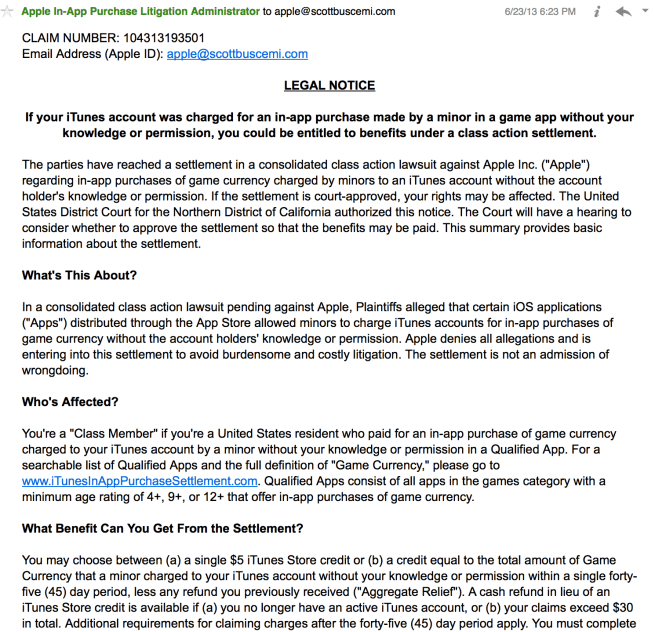
Parents of kids who racked up hundreds of even thousands of dollars in in-app purchases can now begin to seek compensation for their bills.

The “Apple In-App Purchase Litigation Administrator” just sent out an email with information regarding the settlement and deadlines for submitting payment requests.

In short, those with charges under $30 will receive a $5 iTunes gift card. Cash refunds will be distributed to those with bills exceeding that amount.

Here’s the email in its entirety:


Expand
Expanding
Close

Apple CEO Tim Cook moves to performance-based equity; some senior VPs cash-in

Site default logo image

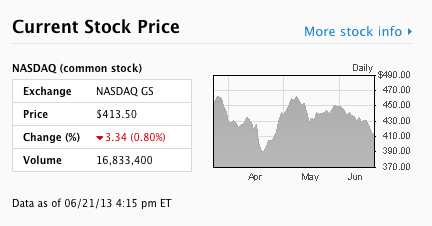
Screen Shot 2013-06-21 at 2.49.58 PM

Apple just posted a slew of new SEC filings to their Investor Relations site. Back in 2011, the company’s Board of Directors approved an amendment that requires all restricted stock unit (compensation not actually issued until vested a certain time later) to be performance-based, rather than stock price-based. In an effort to “lead by example”, Tim Cook worked with the Board to change his large 1-million RSU 2011 award into performance-based compensation. In return, the RSUs will convert to common stock sooner.

In addition, multiple Apple executives sold large amounts of stuck after their RSUs vested today:


Expand
Expanding
Close

Site default logo image

Messenger app IM+ puts “off-the-record” encryption feature on sale

giveaway _otrWith all of the privacy invasion news (read: PRISM) going around nowadays, lots of encryption and security solutions have been seeing record sales. iMessage uses end-to-end encryption, but the security of Skype, AIM and MSN are questionable.

The popular IM+ app (free version, pro version) is offering their $4.99 “off-the-record” feature for just 99 cents until the end of tomorrow. Rather than using a single, proprietary messaging services, IM+ uses the OTR standard that can be used with many messaging services and across many devices.

On their Facebook page, the company details OTR.

First of all, OTR is end-to-end encryption, which means that message is encrypted on sender’s side and decrypted on receiver’s side.

This distinguishes OTR from other encryption methods. For example, almost every messenger (including IM+) uses SSL encryption to connect to its own server. But what happens then, when it connects to AOL, Facebook, ICQ or any other IM server? There is no guarantee that messages are encrypted there and on the way to your contact.

But if you use OTR, no matter how many servers are used to pass message from you to your contact – none of them is able to decrypt the message, it may be decrypted only on your contact’s smartphone or computer.

In short, it’s an encryption system that works with any service by creating encryption/decryption keys that only last for a short amount of time. As detailed on the Facebook post, Pidgin (for Windows) and Adium (for Mac) support OTR.

If you want to keep all of your communications secure from all outsiders, definitely check out  IM+ in the App Store (free versionpro version).

Photoful takes an amazing gesture-based approach to organizing and sharing photos

Site default logo image

photoful

Even with upcoming improvements to the native Photos app in iOS 7, simple tasks like sharing, organizing and deleting a couple of photos can take quite a few taps. If you’d like to share multiple photos, you need to tap on literally every single picture then press the share button. In comes the new, free Photoful app – and it blows the native app out of the water. 
Expand
Expanding
Close

Site default logo image

Want to know who unfollowed or unfriended you? There’s an app for that.

That hurts, Zac.

That hurts, Zac.

mzl.zjuckizt.320x480-75

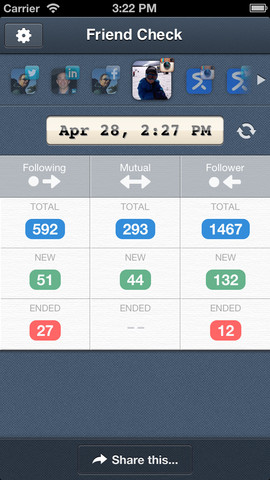
Your follow count is dropping fast, but who are the ones that are unfollowing you? Was it spammers who don’t matter or was it Scoble who grew tired of your tweets? With the free Friend Check app, you can find out.

Once you install the app and give it permission to access your Facebook, Twitter, LinkedIn, or Instagram account, it will take a snapshot of your followers, mutual, and following lists. At any time, you can create a new snapshot and compare that to the previous one. The screenshot above shows the exact snapshot where fellow 9to5Mac reporter Zac Hall decided to unfollow me (only to test the app, of course!).

The only “con” I’ve found with this app is that they give you step-by-step instructions for literally everything the first time you use it. It is tiresome at first, but from then on it’s smooth-sailing unfollower goodness.

Friend Check is currently free to download in the App Store. You can add one account of each service or pay the 99 cents in-app purchase to enable multi-account support.