Author

Avatar for Scott Buscemi

Scott Buscemi

@swb1192

Connect with Scott Buscemi

Sleek and slim: Signature Series Acrylic Signs for iOS devices [Review]

Site default logo image

lrg_5

As interactive signs and kiosks become more popular in retail and corporate environments, the search for the perfect secure stand seems to be never-ending. The design should be sleek yet quite – there’s no reason to distract from the device itself. It should be flexible, allowing for quick viewing angle adjustments. And most importantly, it should be extremely secure so no one goes running off with the device. 9to5Mac took a first-hand look at newPCgadgets’ Arcylic Sign display.
Expand
Expanding
Close

Site default logo image

Simple banking app updated with Goals

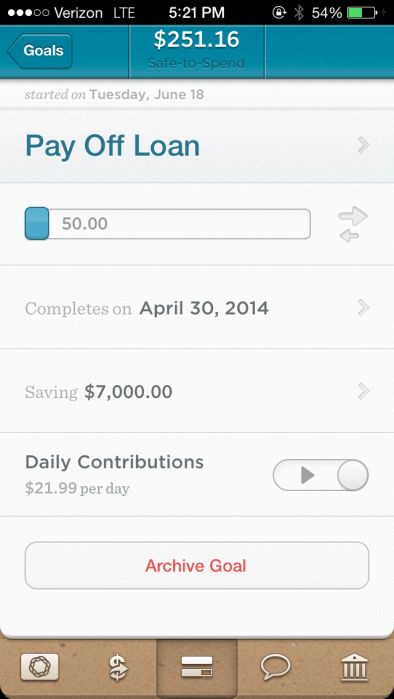
IMG_1198Trying to save up for a vacation? Or working tirelessly to pay off that pesky loan? Simple’s new app update will help.

Simple is an online bank replacement that has been in the App Store since January 2012. With no monthly fees, mobile check deposits and free ATM locations (through their banking partners), it’s definitely a great alternative to other banking solutions out there. Personally, I made the jump last month by canceling all of my other bank accounts and moving everything to Simple.

With the 1.6 update that came out today, their Goals section is now accessible with the app. Once you set a name, amount, and pay-off date, Simple will siphon off the necessary “daily contribution” from your Safe-to-Spend amount and put the contribution toward your goal. If need be, you can pause the automatic siphoning or change the payoff date, all within the app.

The new version is available right now in the App Store.

Site default logo image

New app displays timely ICE information as push notifications

mzl.ivhlscho.320x480-75

A long time ago, I would Photoshop my iPhone background with ICE (In Case of Emergency) information since my contacts are locked behind a passcode. It’s obvious how this solution became a hassle after I decided to switch my background a few times.

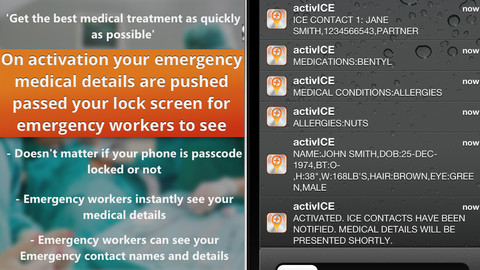
In comes the free activICE app. After the initial configuration, the app will use iOS’s built-in background geolocation services to check if you are in a hospital. If you do not deactivate the app’s alert system, it will push out a slew of notifications with your ICE contacts and important health information.

The app also provides in-app subscriptions for their notification system. Once purchased, you can configure up to 5 contacts to receive SMS or email messages with your hospital location (given you don’t deactivate the alert system).

If you’re looking for added comfort in your life and don’t want to go crazy ‘shopping your background every few weeks, be sure to check out activICE in the App Store.

Site default logo image

Want to try iOS 7 without bricking your phone? (Update: pulled)

Screen Shot 2013-06-18 at 11.56.12 AM

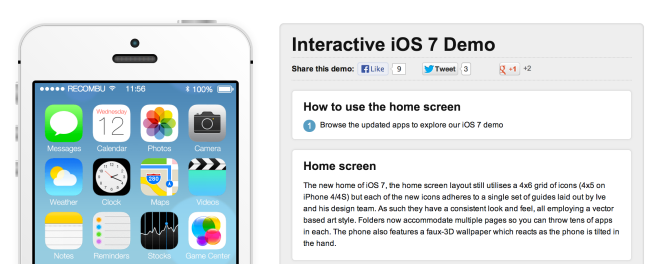
If you want to try out iOS 7 for yourself without the risk of bricking your phone or dealing with constant restarts, Recumbo is housing an interactive demo on the website. Besides the transitions between screens, it may feel like you’re staring at a bunch of screenshots, but it does a great job at demonstrating the newly designed iOS. If you’re using Firefox or Chrome, you can also use your webcam to take pictures in the Photos app. Be sure to check out Notification Center and Control Center while you’re at it.

Update: Not so fast! It looks like Apple asked Recumbo to remove the demo.

Site default logo image

Getting TextExpander, BetterTouchTool and Parallels to behave with Mavericks

Screen Shot 2013-06-15 at 8.37.46 PM

Since the new OS X Mavericks is just a few days old, bugs and incompatible applications are to be expected until developers have time to run through the new APIs and patch up their apps. In the meantime, some non-functioning apps can be fixed with simple work-arounds or downloads.

Over the next couple of months, expect a few sites to pop up with app compatibility charts for the new OS. If you’ve found an application that doesn’t work without an available fix, feel free to leave a comment below with the information.

TextExpander & BetterTouchTool

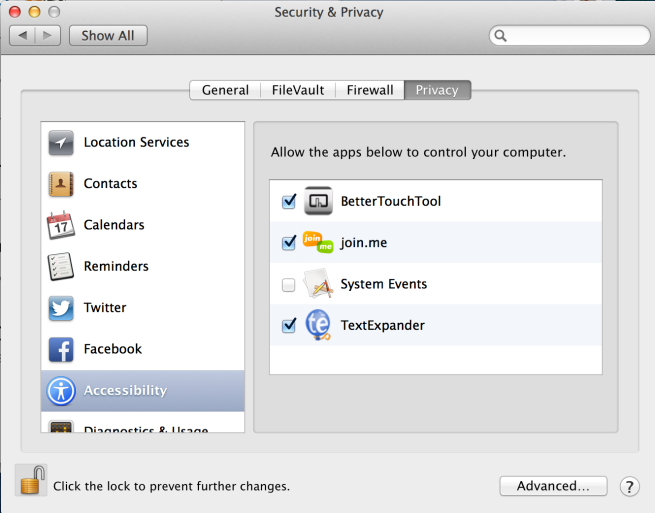
My dependence on TextExpander is insane. I have even set up my email signature through TextExpander (so I can choose when it displays with just a couple of key strokes). Finding out that TextExpander is thrown off by Mavericks was a bit disappointing, but iDownloadBlog posted the details on how to make it work. In short, the application tells you to go through “Universal Access” in System Preferences, but you actually need to go inside “Security & Privacy”.
Screen Shot 2013-06-15 at 8.41.24 PM

This work-around also works for BetterTouchTool, the app I use for simple Window Snapping and creating additional multi-touch gestures for the Magic Trackpad / Mouse. Check out iDownloadBlog’s step-by-step instructions.

Parallels

Parallels, my favorite operating system virtualization software, isn’t able to open any virtual machines when you first try opening up the application on Mavericks.
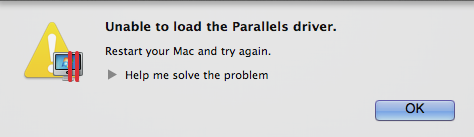
However, Parallels provides a simple workaround on their Knowledge Base until they can update the app in the near future. The company has provided a “startPD” script that gets the application and all associated virtual machines up and running again. Update: Parallels has been updated to work with Mavericks.

We’ll keep our eyes peeled for any other workarounds and update this post as they become available.

The era of unshackled Apple executives [Opinion]

Site default logo image
"Can't innovate anymore, my ass."

“Can’t innovate anymore, my ass.”

Over the past few months, it feels as if Apple is on a media and publicity roadshow. Tim Cook has appeared on Rock Centertestified at the Senate’s corporate tax hearing, and was interviewed at All Things D’s D11 conference. In addition, as was mentioned during today’s Happy Hour podcast, the Apple executives took many opportunities during the WWDC keynote to speak directly to recent criticisms about their design decisions and abilities to innovate in the tech industry.

This is, quite simply, the era of unshackled and vocal Apple executives. 
Expand
Expanding
Close

Microsoft Office 365 comes to the iOS App Store, iPhone only so MS doesn’t have to change its ads

Site default logo image

Screen Shot 2013-06-14 at 2.42.51 AM

Microsoft just released the Office 365 iOS application (iPhone only), allowing 365 subscribers to “access, view and edit … Microsoft Word, Microsoft Excel and Microsoft PowerPoint documents from virtually anywhere”.

http://www.youtube.com/watch?v=nDR150tAOkk

Of note, Microsoft is currently running a commercial and online campaign touting the Windows 8 RT tablets’ ability to edit Office documents (they claim that the iPad can only read documents rather than edit them). It seems that Microsoft violated the letter of this ad campaign and the spirit while somehow still giving Apple folks a sub-par experience.

http://www.youtube.com/watch?feature=player_embedded&v=pHg0ZEY4NXA

From the first look, it seems the formatting abilities are extremely limited – especially compared to other document editing iOS apps like Quickoffice Pro – but the integration with 365 will definitely be appreciated by subscribers of the service. In the meantime, you can find a quick gallery here: 
Expand
Expanding
Close

Site default logo image

A quick look at the iOS 7 video recording zoom feature

Prior to iOS 7, the native camera application’s video option could not zoom while recording. There have been many third-party applications, such as MoviePro, which have had zooming before, however, they usually require post-processing once the video is over and they don’t integrate right into the lock screen like the native app.

The quick video below shows the new zoom function in action. Be sure to enable HD mode to see just how crystal-clear the video is even with full zoom. The video zoom doesn’t pan in as close as the still image zoom, but it still manages to work up to about 2-3x or so. To top it off, there is no post-processing necessary after the video is taken. It saves to your device just like a regular video and can be replayed instantly.

[youtube http://www.youtube.com/watch?v=7YDWdv9kR0M]

Site default logo image

Want to know what makes you happy? There’s an app for that! [giveaway]

Screen Shot 2013-06-13 at 5.09.02 PM

I have a confession to make. For the past two months, I have been receiving a push notification at 9 PM that asks me for my mood. With a quick swipe, I scroll through the various faces and describe my mood for the day. The app also gives me the option to leave a quick comment or reason for my mood.

Now why would I do such a silly thing? Because the Mr Mood app allows me to view my moods over time and look through the notes to find out what makes me happy or sad. In addition, the new 2.0 version that was released last night brings with it new mood calculations for different time ranges. You can see if your “average mood” for the past month is higher than the past week and look through the comments to investigate.

The interface is extremely straight forward and you can set a reminder for any time of the day to receive a quick push notification that asks for your mood. It may sound crazy, but this app has actually helped me to become happier, understand what I need to do every day to stay smiling, and what needs to be gone from my daily life.

You can find Mr Mood on the App Store for just $0.99. It’s well worth it and receives an A+ from this happy guy. Check out the gallery below for some screenshots.
Expand
Expanding
Close

Site default logo image

Re-thinking CRM with the Stride app

mzl.imstizjg.320x480-75

Lead management services are usually quite complicated. In fact, I probably have ten neglected accounts out on the interwebs from my attempts of finding a simple, straight-forward CRM or lead management system. Thankfully, I ran across Stride when they launched their website beta a few years ago and recently stumbled across their free iOS app. In a few short words, it’s “spectacularly simple”.

I spoke with Stride’s Kevin Chau about the company’s mission and how they’re tackling the CRM world. It’s quite obvious that their go-simple-or-go-home approach extends to every part of the application:

We designed Stride around simplicity because we wanted to highlight focus on the deal pipeline. Before Stride, all of us tried other CRM solutions on the market, and they were overly complex, and took away from focusing on what we feel to be most important – deals. So we set out to build our own tool, make it intuitive, pretty, and easy to use. We tell ourselves that if we need to do an on-boarding walkthrough, we went in the wrong direction of simplicity.

After spending some time manage leads with the application, I’ve found that it’s nice to be able to add tasks or update the status of a lead with just a few taps rather than waiting to get to a desktop browser. Plus, everything syncs seamlessly with strideapp.com (not using iCloud, so it’s actually reliable – zing!) for managing the information on a browser.

If you currently manage your leads on paper, don’t track leads at all, or you are simply tired of your current CRM system, give the Stride iOS app a shot! The app itself is free with an account. Their pricing starts at $12/month or they have a free plan if you want to manage less than 5 deals a month.

Site default logo image

Square Wallet 3.0 just released: faster checkout than ever

mzl.gxfyguhy.320x480-75

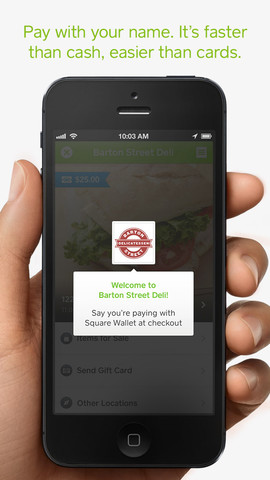
Square has just released a redesigned version of their Square Wallet, their local directory and checkout app. By opening up the application (or setting the app to auto-check in when you’ve entered your favorite store), the cashier can see your name on the Square Register app and take your payment without having to swipe a credit card. Prior to the newest 3.0 version, users had to open the app, find the store they’re in, and press the “Pay Here” button. Now, the last step has been taken out. Just tapping on the store checks you in and puts you on the customer list. For Starbucks locations, tapping on the location pops up a very large QR code that can be scanned to pay.

The new design is very media-rich, with pictures from the merchants taking front stage. Rather than having a table view of the local vendors, it takes on a gallery design to show the logos and products. This is definitely a much-welcomed update.

Site default logo image

Want to control living cockroaches? There’s an app for that: RoboRoach

A new Kickstarter project gives you the tools and technology you need to control a real, living cockroach. According to the RoboRoach campaign, which is currently sitting at $4,300 of its $10,000 goal, touts itself as “world’s first commercially available cyborg”. The kit itself requires a pledge of at least $100 – cockroaches not included.

From the company videos, they show how to perform cockroach “surgery” and install the system onto roaches. Once you’ve gotten through that, you can use their app to move the cockroach left and right. It doesn’t always work perfectly – in fact, some species of roaches just stop in their tracks when you press the button – but this technology definitely has a futuristic feel to it.

Put on your tin foil hats, as it seems dogs and cats will be next… then primates… then humans!

Site default logo image

Former Apple SVP and Palm CEO Jon Rubinstein responds to iOS 7: ‘the Mac has webOS stuff, too!’

Yesterday, FierceWireless published an interview with former Palm CEO Jon Rubinstein. Palm released its webOS operating system in 2009 to much fanfare, however, the sales were abysmal and led to the eventual HP acquisition.

Rubinstein still remains very proud of the innovation behind webOS and believes the technology is slowly being “adopted” by other companies. With the introduction of iOS 7, many have said that features like multitasking cards resemble webOS, but Rubinstein believes the webOS influence extends even further into other operating systems like OS X and those of other companies:

FierceWireless: It seems like iOS 7 is taking lots of multitasking cues from webOS. How do you think that platform, webOS, influenced other mobile platforms?

Rubinstein: It’s not just mobile platforms. If you look at the notifications on Mac OS X, it looks just like webOS, too. We did a lot of things that were very, very innovative. Obviously, multitasking, notifications, Synergy, how we handled the multiple cards. There’s a long list of stuff we did that has been adopted by Microsoft, Apple and Android. Our over-the-air updates and mechanism has been updated by everybody. Our whole Synergy concept is now becoming much more common. I don’t think anyone has implemented it as well as we did yet, but clearly they’re all heading down that direction.

Read the entire interview here.

Fitbit Flex band: a replacement for self-motivation? [Review]

Site default logo image

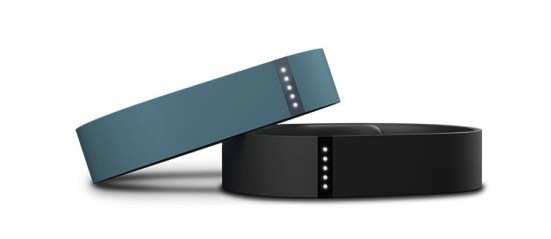
For the past three weeks, I’ve been wearing the new Fitbit Flex, a new competitor in the health wristband market. As a former unofficial beta tester of the original Jawbone Up, I was excited to start using a new wristband to track my steps and sleep. With great battery life promised and a sleek design, I had high expectations. Did Fitbit pull it off? Read on to see my full review:
Expand
Expanding
Close

Site default logo image

Downloadable WWDC Keynote now online

After every Apple event, the company posts the video to their Apple Keynotes video podcast channel. While yesterday’s event was live streamed and the stream was available on Apple.com shortly thereafter, the video download allow for offline viewing.

Apple introduced iOS 7 and OS X Mavericks yesterday during the 2013 WWDC Keynote. We’re still finding new features like offline dictation and live feedback for the Mac and compiling them in this post. In addition, they teased a new Mac Pro, released upgraded Macbook Airs, and introduced the much-anticipated iTunes Radio.

Subtle features & details in iOS 7 and Mavericks

Site default logo image

12508_460_m_d66334fc996d57f3ff55f6c6bd2695c1

The WWDC keynote may have dragged on for two hours, but there were many features and subtle details that weren’t mentioned by any of the Apple executives. We’ll be updating this post with all of the small features and details that have been discovered. If you find something that’s not on this list, feel free to ping @9to5mac or @swb1192, or leave a comment after the break.

Mavericks

– In Notification Center, the Facebook and Twitter share buttons now have a new roommate – Messages. Clicking on the Messages button brings up a Share sheet-style interface where you can type in the recipient’s name and message then shoot them a message without actually having to open the Messages app.

– LinkedIn integration has been added, but all of the Chinese websites (including mail.qq.com and 126.com) have been dropped from the English version of Mavericks.

– Text shortcuts have been added to the Mac, just like iOS. The default text shortcut is “omw” which is automatically replaced with “On my way!” These also seem to sync over iCloud (thanks, @Dexwell_)

– Along with the new offline & live feedback dictation, you can now edit text while  dictating.

– Do Not Disturb has been added to the Notifications preferences pane.
Expand
Expanding
Close

Site default logo image

New Maps icon centers around new spaceship campus location

spaceship-map

While some have noted that the new Maps icon doesn’t suggest you drive off a bridge like the old iOS 6 icon, we noticed something else. The blue line follows along the perimeter of the new Spaceship Campus that’s planned for 2016. It’s definitely a subtle detail, but it’s neat to see Apple embracing their new location in Cupertino and preparing their mapping application’s icon to reflect the new home.

OS X Mavericks allows for offline dictation and live feedback [Video]

Site default logo image

Screen Shot 2013-06-10 at 8.27.47 PM-1

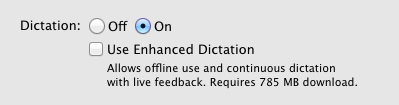
Digging through the System Preferences on the new OS X Mavericks, we’ve found a couple of Dictation features that are bound to make many users happy. With the check of a box and a 785 MB download, “Enhanced Dictation” makes it possible to speak your words without requiring an Internet connection. In addition, you can get live feedback. With live feedback, you can see what Dictation is interpreting before you press the enter key.

It doesn’t seem that the feature works in this beta… yet. Since it’s already built into the OS, they may set up the downloads before the next beta hits.

New Update: Enhanced Dictation can now be downloaded and installed. Of note, live feedback works even when you’re offline and seems to be working perfectly. The screen recording below was taken with the new Enhanced Dictation (Dictation didn’t like when I said “yet”).

[youtube http://www.youtube.com/watch?v=e3DQCtbuGP0]

Site default logo image

“Draw Something” creator OMGPOP closes down

omgpop

Just 16 months after being acquired by Zynga for a reported $200 million, the OMGPOP team, creators of the once-popular “Draw Something” app, has been laid off along with many other Zynga employees. To top it off, it looks like employees weren’t properly notified of their new employment status.

Zynga has been struggling to turn a profit, so the mass lay-offs may come as no surprise. However, it doesn’t look like they were provided with great post-Zynga assistance.


Expand
Expanding
Close