Camera

See All Stories

HTC reportedly working on an iOS compatible camera to compete with GoPro

Site default logo image

HTC is reportedly working on a new GoPro-like waterproof camera that can be used to capture footage of extreme sports and other activities, according to Bloomberg. Such a device would be the company’s first camera that’s not permanently attached to a smartphone. Little is known about the unannounced gadget, however it’s said to feature a wide-angle lens, a 16-megapixel sensor and compatibility with both iOS and Android.


Expand
Expanding
Close

Withings’ new HomeKit-integrated video monitoring & environmental sensor device detects crying

Site default logo image

Withings, a company well-known for its line of iPhone-connected health and fitness tracking accessories, today announced a new video monitoring device with environmental sensors called  Home. While Home is a video monitoring solution that can be used for security, the company is also including some pretty unique features that it hopes will make your home both a healthier and safer environment.
Expand
Expanding
Close

Mini-review: Lensbaby LM-10, a fun if pricey accessory for iPhonography fans

Site default logo image

It took a while for Lensbaby’s Kickstarter-funded selective focus lens for the iPhone to make it into production, but the LM-10 is now here and I took it out for a play.

For those not familiar with Lensbaby, the company makes lenses for DSLRs with a bellows lens that provides a small in-focus area, with the rest of the image out of focus. It’s not the same effect as the shallow depth-of-field achieved with a wide-aperture lens, but a less-controllable effect designed to provide fun and unusual images … 
Expand
Expanding
Close

Review: Simplicam, the Dropcam HD competitor that adds face-detection

Site default logo image

[youtube=https://www.youtube.com/watch?v=WdAVvyvLwbg]

Home security cameras that send you alerts when they detect movement have been around for a while now. We reviewed Dropcam, one of the better-known names in the business, last October.

The problem, though, is that most movement isn’t likely to be of interest – especially if you have pets or are susceptible to changes in nature from sunlight/wind. What we really want to know is when a person arrives, and that’s what Simplicam aims to deliver through face-detection software. You can thus choose to be notified about any one or more of three types of event: movement, sound and face-detection … 
Expand
Expanding
Close

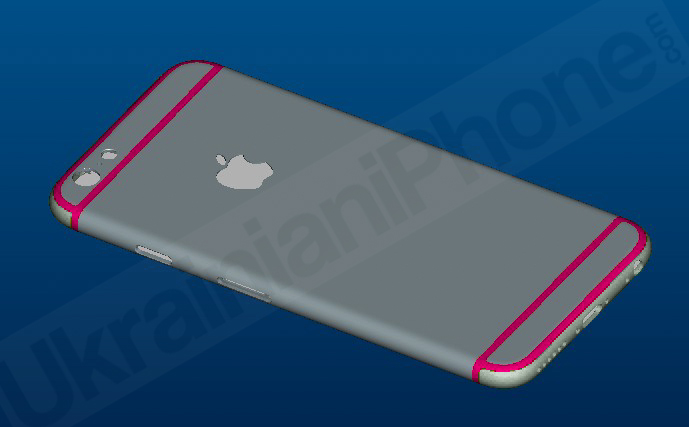
Claimed schematic again raises suggestion iPhone 6 will have sub-1mm protruding camera lens

Site default logo image

A claimed schematic of the 4.7-inch model of the iPhone 6 appears to support suggestions that the camera lens will protrude, though only by 0.77mm. Posted by Apple Club in Taiwan, it appears to show a 7mm thick casing with the thickest part of the camera extending 0.77mm beyond this.

Suggestions that the quest for thinness might result in an iPod Touch-style protruding camera lens on the iPhone 6 date back to March, and have been supported by claimed backplate photos as recently as this month. There have, though, been conflicting reports, with one suggestion that Apple would be able to avoid this by restricting optical image stabilization to the larger 5.5-inch model … 
Expand
Expanding
Close

KGI: 4.7″ iPhone’s camera may not support optical image stabilization, 5.5″ likely will

Site default logo image

A new research note from KGI indicates that the 4.7-inch model of the iPhone 6 won’t support optical image stabilization due to constraints in the production of VCM suppliers. The larger 5.5-inch version is expected to support the feature, while the smaller device will employ a cheaper motor that’s similar to the one found in the iPhone 5s.

Rather, we predict it will use a middle-mount type of open-loop VCM updated from the one used in the existing iPhone 5S. The 5.5” iPhone 6 is more likely to be equipped with OIS VCM due to lower estimated shipments and the need for more product features to differentiate itself from the 4.7” iPhone 6.

The difference will reportedly be one of the factors that sets the two devices apart, lending further credence to the idea that these will not simply be two internally-identical devices with different display sizes as is currently the case with the iPad its “mini” counterpart.


Expand
Expanding
Close

Site default logo image

Safari in iOS 8 uses camera to scan and enter credit card info

In iOS 8, Apple has a new feature in Safari that allows users to scan a credit card with the device’s camera rather than manually entering the number when making a purchase online.

When entering a credit card number into a form online to, for example, make a purchase, Safari already allowed users to quickly select credit cards stored in its Passwords & AutoFill settings. You can still do that, but in iOS 8 you’ll now also have the option to select “Scan Credit Card” and snap a picture of the card. Apple then uses optical character recognition of sorts to input the number into the text field in Safari. There’s also a way to scan and save cards using the camera directly from within the Passwords & AutoFill settings.

Website developers don’t have to do anything to enable the feature, as Safari appears to automatically detect when a credit card number is being requested and presents the option to scan above the keypad.

Safari received some other updates announced this week at WWDC too, including a redesign in OS X Yosemite on the Mac, and highly requested features on iOS like the ability to request a desktop site and a tab view for iPad.

Mini-review: Lockscreen Wallpaper Designer, the simple iPhone app for creating prettier lockscreens

Site default logo image

You’d think choosing a photo to use on your iPhone lockscreen would be a pretty simple task. Scroll through your Camera Roll, choose a photo you like, hit Set and you’re done.

The reality is a little different. Half the time the photo you really want to use is landscape format (horizontal) and you need a vertical image. The iPhone will automatically crop it, and allow you to slide the image around to get a crop you like, but the result rarely does justice to the original shot.

The other half of the time, you find a portrait (vertical) photo which looks great on its own but then clashes with the clock and slide to unlock text when you set it as your lockscreen. Lockscreen Wallpaper Designer is a very simple app that aims to solve these problems … 
Expand
Expanding
Close

Site default logo image

Facebook Poke and Camera pulled from the App Store

Even though Facebook seemingly wants to break as many of its functions out into separate apps as possible—see Messenger and Pages Manager, for example—it appears that not every function is worthy its own App Store listing. Earlier today the social network pulled two of its iOS apps from sale: Poke (a Snapchat-like photo messenger) and Camera (which is exactly what it sounds like).

Both apps launched in 2012 and didn’t see many big improvements after that. Camera got a few small updates, though they didn’t seem to be much of a priority for the company. At one point a bug left the app’s internal employee settings exposed to all users for several months before being fixed.

Poke, on the other hand, was virtually ignored by Facebook from the day it went live until it was removed from the store. Most of the Camera app’s features were eventually rolled back into the main Facebook app, but Poke was not so fortunate.

Facebook hasn’t provided any reason for pulling either app, but it’s safe to assume that neither was being used that much anymore. The company now seems more focused on its messaging platform, with the recent acquisition of WhatsApp for $19 billion and the announcement that soon messaging would be removed from the main Facebook client in favor of the free Messenger app.


Expand
Expanding
Close

Site default logo image

Dropcam adds $29 motion sensors (and teaches its cam to recognize cats)

[youtube=https://www.youtube.com/watch?v=fPkxt0QpRD8]

Dropcam, whose Wi-Fi video security system impressed us when we previously tried it, is now adding separate motion sensors to its product range. Costing just $29 each, Dropcam Tabs are small, weather-resistant devices that can be attached to doors, windows, and valuables. They use Bluetooth LE to connect to your existing Dropcam Pro camera which then sends push alerts when motion is detected, turning it into a much more comprehensive security system.

Dropcam says battery-life is rated for around two years, making Tabs close to fit-and-forget. Tabs can be pre-ordered today, and will be shipped in the summer.

The company has also made the Dropcam Pro suitable for more households by allowing it to recognize and ignore cats. Previously, the system would send push alerts any time it detected any movement, creating lots of false alarms as Tiddles engaged in her hectic schedule of moving from the sofa to the food dish and back.

Detecting pets usually requires 3D sensor systems which can measure the size of moving things, but Dropcam says that it has analyzed many hours of publicly-shared video in order to teach the system to recognize cats using only analysis of the visual data.


Former iPhone camera engineers create 360-degree video camera

Site default logo image

CENTR, a startup created by a group of former iPhone camera engineers, has developed a video camera that creates 360-degree views, allowing viewers to pan around the image during playback.

CENTR allows you to capture your experiences and share them in a whole new way. Capture 360° video in real-time on a camera that fits in the palm of your hand. With decades of experience working on cameras at Apple, the CENTR team knows what it takes to bring beautiful design and groundbreaking technology together in one product …


Expand
Expanding
Close

Site default logo image

Analyst suggests iPhone 6 will favor thin design over optical image stabilization, camera will be flush in chassis

A post on Weibo from a Chinese analyst (via GforGames) suggests that the new iPhone design will not feature a protruding camera, which would have seemingly enabled optical image stablization, as Apple has instead opted to focus on a super-thin profile for the new device.

Apple’s current line of iPhones take advantage of the embedded SoC’s processing power to enable software-based image stabilization. Whilst optical image stabilization is generally considered to be superior, it also requires the camera components to be physically much larger. According to this report, Apple does not seem to have wanted to make this tradeoff.


Expand
Expanding
Close

Site default logo image

Lensbaby planning to bring its DSLR selective focus lens to the iPhone

Lensbaby is planning to make an iPhone version of its popular selective focus lens range. The company’s existing lenses for DSLRs allow a small focal point to be positioned in a scene, creating some whacky burred effects in the rest of the image. I’ve used one on my DSLR, and it’s fun to play around with.

A magnetic attachment system means that you’ll be able to combine the Lensbaby with any existing magnetic iPhone lenses you already own.

It’s currently just a Kickstarter project, but with half of the modest $20,000 goal already reached just one day in, it seems pretty certain to make it into production. As of the time of writing, you can reserve one for $50, a $20 saving on the planned retail price.

Sample images below.


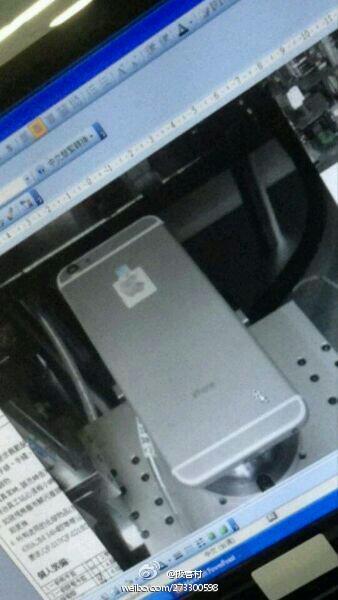
Purported iPhone 6 pictures show protruding camera, rounded edges

Images posted on Weibo claim to show an iPhone 6 under testing at Foxconn, via GforGames. The validity of these images cannot be confirmed, but the shots do line up with previous rumours. The iPhone 6 depicted here has a protruding camera (similar to the current design of the iPod touch), rounded edges and a considerably thinner profile than the current iPhone 5s.

Supposedly, these photos come from inside Foxconn itself. Drawings published on Friday reflect these images somewhat. A protruding camera component is part of the schematics, for example. Evidence of a thin chassis for the next-generation iPhone were originally found in January, albeit those pictures were as sketchy as these latest images.


Expand
Expanding
Close

Want to upgrade your iPhone 5s camera to 2k video? All you need is this app …

Site default logo image

[vimeo 90202587 w=800 h=451]

If you like to use your iPhone to shoot video and Apple offered to upgrade your iPhone 5s from 1080p HD to 2k video for just $7, the decision wouldn’t require much thought. That’s exactly the trick Ultrakam has pulled off with its new iPhone app.

If you’re wondering how a mere app can convert your camera to a higher resolution, it doesn’t: it simply allows the software to use more of the hardware capabilities of your camera. Apple may say that your iPhone 5s has a 1080p HD videocamera, but that’s not quite true: the camera hardware itself is capable of anything up to 3264×2448, it’s just that the software can’t process that many pixels at a sensible frame-rate … 
Expand
Expanding
Close

Site default logo image

Camera+ iPhone app adds 16×9 widescreen shooting mode, improved filters & editing

The popular Camera+ iPhone app from developers tap tap tap was updated today with a number of new features and improvements. On top of a “a bunch of refinements to The Lab” and photo editing, the app gains a new BOOST feature for setting filters to 200% intensity and widescreen 16×9 shooting mode. The update to version 5.1 also includes a number of bug fixes.

Camera+ for iPhone is available on the App Store now for $1.99.

Full release notes for the update below:

What’s New in Version 5.1

For Camera+ 5.1 we’ve made a bunch of refinements to The Lab, making the best photo editing on a mobile phone even better. We’ve made several usability tweaks to further streamline the whole experience. One slightly hidden, but handy addition is that you can now tap & hold an adjustment to reset it.

We’ve added a new setting so that you can choose whichever section you’d like to begin in when you edit your photos. This is nice if you always want to go straight to The Lab, for instance.

For those times when you want to go more intense with filters, we’ve added a new BOOST feature. You can now bump the intensity up to 200%.

You can take widescreen photos with the new 16×9 shooting mode. Bring out your inner Scorcese. Or Fellini.

Many of you were hitting a pipe too often while flapping, causing you to lose all your photos. That’s now fixed, thankfully.

And we’ve spent a good amount of time fixing bugs for this version. Many were esoteric and only occurred on particular hardware, but we did our very best to try and resolve all known issues for this release. If any of you experience any further issues, please report them to us.

Take 2: The API issue that was causing apps like Day One to not work properly with Camera+ is fixed now. For realsies this time. Thanks to the chaps at Day One for helping us to resolve this.

Site default logo image

Eye-Fi announces software for direct camera-to-Mac transfers

Wifi-equipped cameras have long been one of those things that promise more than they deliver. In theory, you can take a photo on your camera and have it instantly and wirelessly transferred to your Mac. In practice, not so much. You either need to go via an iOS device, or go via a router with ridiculously-convoluted networking configuration required to make it work. 

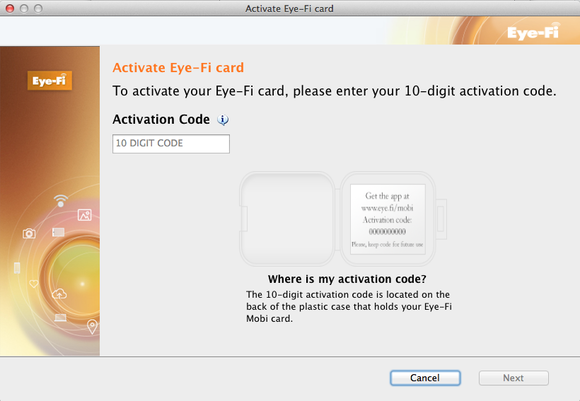
Eye-Fi seems to be getting one step closer to the theory, announcing beta software at the Showstoppers CES event that allows photos to be sent direct from camera to Mac. The beta version is free, though you have to register for the company’s labs project to get access, but it seems the release version will be chargeable.

The app is only compatible with Mobi cards – earlier versions won’t work. Hopefully the reliability of the cards has improved since I last tried them.

Apple reportedly acquires SnappyLabs, the company behind the rapid-fire iOS camera app

Site default logo image

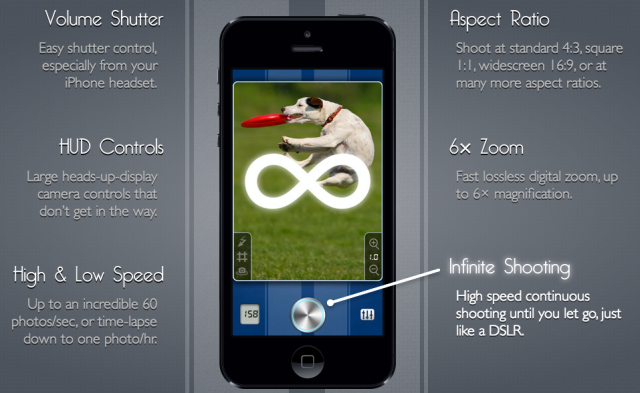
According to a new report from TechCrunch, Apple has acquired the photo technology startup SnappyLabs. SnappyLabs is a one-man development team known for creating the SnappyCam app. As the name implies, the big feature of SnappyCam is its ability to take full-resolution images at 20 to 30 frames per second, which is considerably faster than the native Camera app on iOS. The app was sold for $1 on the App Store and was relatively popular, reaching #1 on the paid app chart in nine countries.

SnappyCam, on iPhone, is the fastest smart-phone camera on earth. With it you can easily get that impossible, perfect shot, every time. SnappyCam also shoots unique living photos that capture the entire moment, not just a single snapshot in time. It’s like an interactive flip-book, in full 8 Mpx glory and at high-speed.


Expand
Expanding
Close

Starbucks now supports redeeming Pick of the Week cards with iOS 7’s camera feature

Site default logo image

Starbucks, this week, updated their iconic Pick of the Week promotion to take advantage of iOS 7’s ability to use the device’s camera to redeem iTunes gift cards. Before that, customers had to pick up a physical card featuring a promo code to redeem the Pick of the Week app and manually type the code into the iTunes Store. Earlier this year, Starbucks began offering the promotion via an App Store app. The pick of the week promotion allows customers pickup cards from participating Starbucks locations and download an app or other piece of iTunes media for free:


Expand
Expanding
Close

Site default logo image

Camera+ 5 launches with iOS 7 redesign, wallpaper composer, more

Coincidentally with the debut of Photos+ (and no affiliation), popular photography app for iPhone Camera+ released a major overhaul of its app today bringing an all new design optimized for iOS 7 and a handful of new features.

Aside from the new flatter app icon and icons within the app, Camera+ now features what it calls The Lab, which is a suite of additional editing features including the ability to edit and crop images for an iOS 7-style wallpaper.

Camera+ 5 for iPhone is a free update to existing users and $1.99 on the App Store for new customers. Full release notes below:


Expand
Expanding
Close

After the (RED) Leica, the (RED) desk (in aluminum, of course)

Site default logo image

Following the interview in which Jony Ives and Marc Newson talked about their collaborative design of the one-off Leica M camera for the (RED) charity auction, the one-of-a-kind desk designed by the two has also been unveiled.

As you might expect, it’s made from machined aluminum, fabricated by renowned aluminum specialists Neal Feay Studio. The design is, though, not quite as minimalist as I’d expected, featuring a mosaic pattern on its surface. More photos below the fold …


Expand
Expanding
Close

iOS 7 How-to: Redeem iTunes gift cards with your device’s camera

Site default logo image

iTunes gift cards are a great gift for iOS Device users. They can be used to purchase content from the iTunes Store, App Store, and iBookstore. However, entering in the string of characters to redeem the gift card balance has typically been a pain with the touch keyboards on iPads, iPhone, and iPod touches. Like iTunes 11 on the Mac, iOS 7 moves to solve this problem. You can now use your device’s camera to scan in the code.

Go to the main/featured page in whichever store you choose and to get to the redemption screen, scroll all the way down, and press on redeem:


Expand
Expanding
Close