Camera

See All Stories
Site default logo image

iOS 7 How-to: Use Control Center to quickly manage settings

Control Center is one of iOS 7 brand new easy to use features that makes it very efficient to toggle on and off certain settings. To activate and get into Control Center, you swipe up from the bottom of the screen.

You are now able to quickly access Airplane Mode, Wifi, Bluetooth, Do Not Disturb Mode and Lock Rotation. You are also able to easily adjust the brightness of your display by adjusting the slider next to the suns. You also have controls for playing your music, with a volume slider below the controls. Below that you do have the option to AirDrop (only available on iPhone 5 or later, iPad fouth generation and newer, and iPod Touch fifth generation and newer) and AirPlay which allows you to wirelessly project the device’s display using an Apple TV or to project music to Bluetooth speakers or AirPlay speakers.

For quick easy access you now do have a flashlight. Even if your phone display goes to sleep, the flashlight still stays on, so make sure you actually do tap the flashlight again, to turn it off. You don’t need to have a Flashlight app anymore as it is built in. You do also have easy access to the Clock app, so you can set alarms, timers, or use the stop watch. You have access to the calculator app. You also have a new way to open up the Camera app.

For example, Control Center is great because now I do not have to unlock my iPhone, type in my password, go into Settings, turn on Bluetooth and have it connect again with my car system. Now I just swipe up to open up Control Center, tap on Bluetooth and it automatically pairs up with my car speakerphone.

However, not everybody might want to access Control Center from their lock screen. You can control where on your phone you want to be able to activate Control Center. For example, you can decide whether or not you want to be able to access control center on your lock screen, and while you are in apps. To set this up, go into settings.
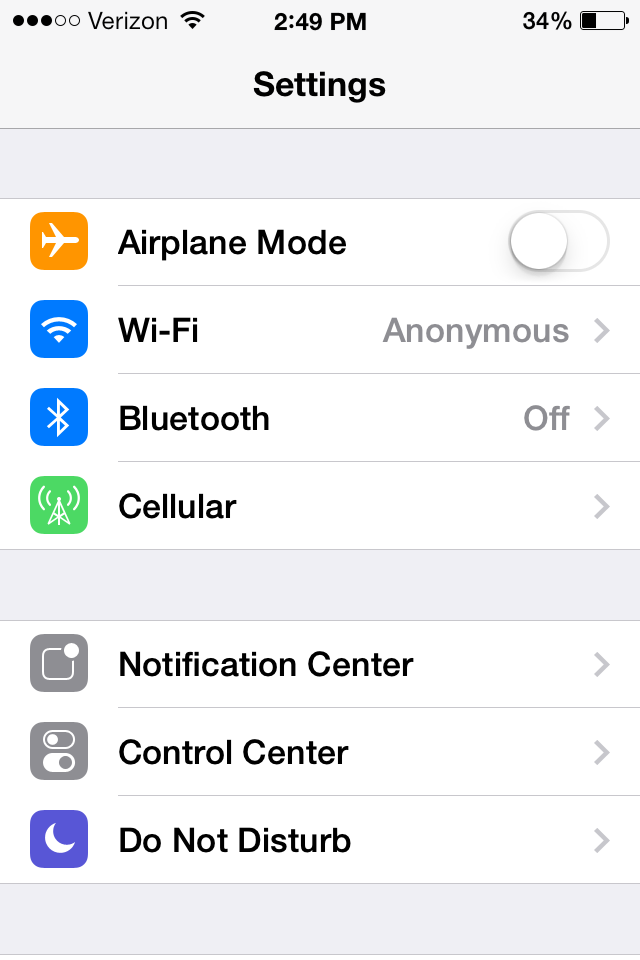
Then press on Control Center.
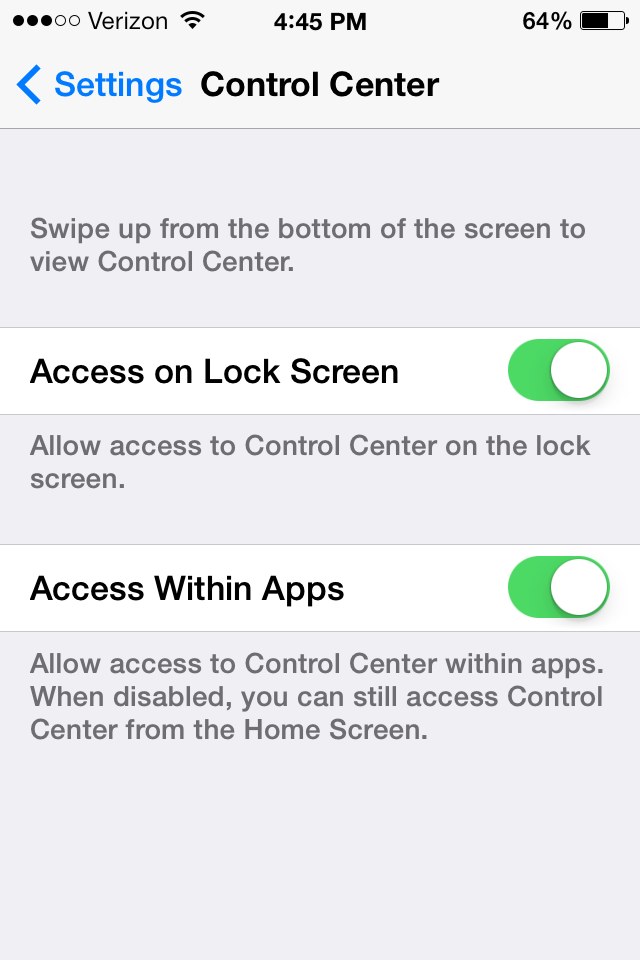
You can then toggle to access Control Center on the Lock Screen on and off. Same thing with accessing it within apps.


Burberry to capture its London fashion show with new iPhone 5s next week

Site default logo image

Apple and fashion retailer Burberry have announced that Burberry’s London-based fashion show next week will be captured entirely with the new iPhone 5s. Apple’s iPhone 5s, which was announced earlier this week, includes major camera enhancements with an improved aperture, dual-LED flash, and new camera software like slow-motion and burst modes.

“iPhone 5s makes it even easier to take great photos with the world’s most popular camera,” said Greg Joswiak, Apple’s vice president of iPhone & iOS Product Marketing. “We’re thrilled to see the amazing photos and HD video Burberry has captured with the incredible all-new iSight camera.”

While the iPhone 5s will officially hit stores on Friday, September 20th, Burberry’s show is on September 16th, so they will be getting early access to the device for this special partnership.

http://www.youtube.com/watch?v=4iL5ceRxp4A

Update: Burberry has posted a new video (below) on their Instgram feed which spotlights the slo-mo feature of the iPhone 5s.
http://instagram.com/p/eUvd7NxJCC/

The full press release is available below:


Expand
Expanding
Close

Site default logo image

Details and video of Sony’s upcoming QX lens-shaped camera leaked: two versions coming later this month

[youtube=http://youtu.be/HKGEEPIAPys]

Details of the rumored smartphone-compatible, Carl Zeiss lens-weilding camera attachment from Sony, set to be announced tomorrow, have been leaked by sonyalpharumors. The promotional video above shows the features of the QX100/QX10 “lens-style cameras”.

For devices with NFC, a simple tap hooks up the camera/lens and makes it ready to share or save files right on the spot:

For added convenience, the app can be activated using NFC one-touch with compatible devices. Once pictures are taken, they are saved directly on both the phone and the camera*, and can be shared instantly via social media or other common mobile applications.

The device will take advantage of the PlayMemories Mobile app available for iOS and Android devices. The device will come with a piece to attach to a phone, however, it is also detachable as seen in the video.

The QX100 and QX10 will be available some time later this month for $500 and $250, respectively.

Site default logo image

Macs in surprising places: Slumdog Millionaire was filmed with a camera containing a Mac Mini

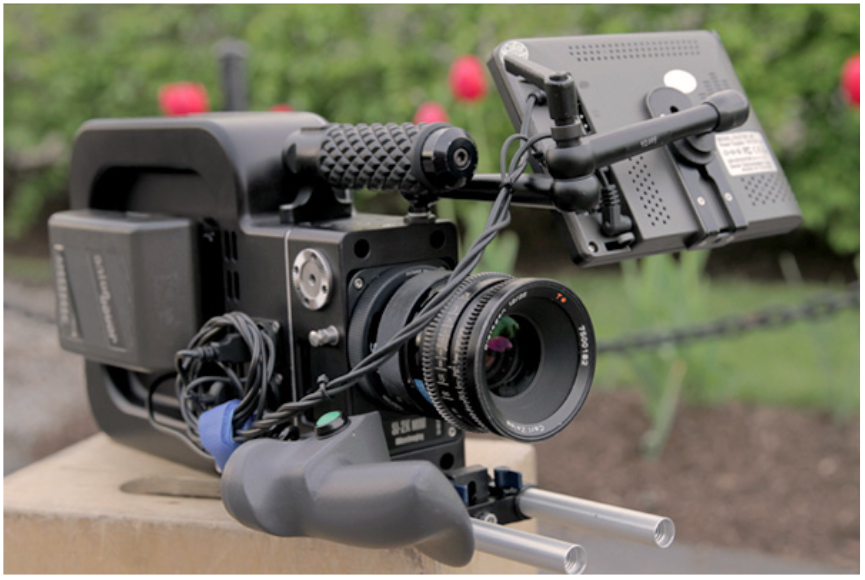
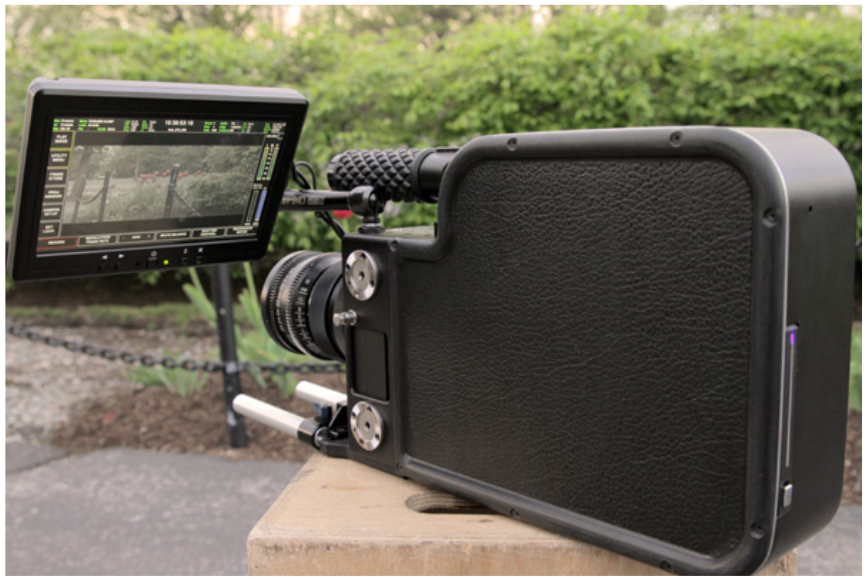
It looks rather like a steampunk version of a traditional 16mm cinema camera, and that was indeed the inspiration behind the SI-2K Black Betty, a camera aimed at independent film-makers and used as a secondary camera in the movie Slumdog Millionaire.

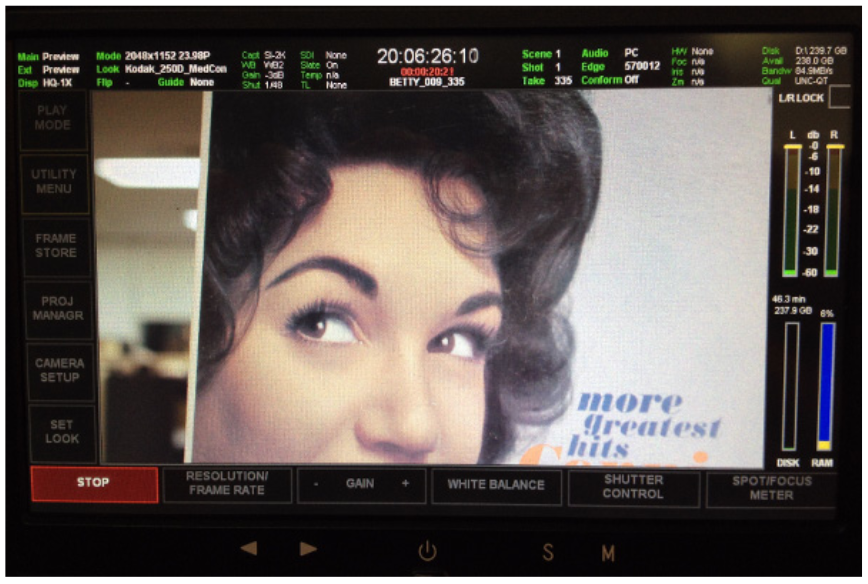
It combines a Silicon Imaging 2K camera head, with its film-like 2/3″ CMOS Imager, with an SSD-equipped Mac Mini inside running Silicon Imaging SiliconDVR software. A 7-inch touchscreen monitor completes the package. The result is a self-contained camera that allows the film-maker to shoot, edit and upload.

As the name suggests, it’s capable of shooting 2K video at 30fps. If you know your videography, it shoots CineForm compressed RAW files with up to 11-stops of dynamic range at up to 500ISO. If you don’t, well, let’s just say it’s a very capable camera.

The Mac Mini was likely chosen because it offers the capability of a desktop machine in something with very low energy requirements: the complete system uses only 40 watts.

The Black Betty has only two physical buttons: on/off and start/stop: everything else is controlled via the touchscreen.

Sadly for Mac fans, the Mini isn’t running OSX: the SiliconDVR software is Windows-based, so that’s what the machine runs – but that’s one of the beauties of a Mac, you can run OSX, Windows or both.

The camera isn’t available to purchase, but you can rent one via Rule Boston Camera.

Via Engadget

Leaked press shots show Sony’s upcoming 20.2MP, Carl Zeiss camera lens attachment for iPhone & Android

Site default logo image

Sony-Camera-Lens-01

Last month a report from often reliable sources claimed that Sony was readying a new Carl Zeiss camera lens with a 20.2 MP sensor that would attach onto a smartphone and connect over WiFi or NFC. Today, SonyAlphaRumors is back with more details on the new products and this time has high-quality images of the upcoming “Lens-camera” accessory with what appear to be leaked press shots.

What you see on these images are the DSC-QX10 and DSC-QX100 lenses. Actually these are not normal lenses! They have built-in sensor, Bionz processor, Wifi/NFC wireless connection and SD card slot. These lenses have no LCD screen and no usual camera controls. You will be able to control them through your smart phone or tablet.

The report claims that Sony will be launching two models “soon”, one with a RX100MII sensor and Zeiss lens, and another that features a “10xzoom lens with 1/2,3 inch 18 megapixel CMOS sensor” (pictured in the image with the f/3,3-5.9 lens). It also says the camera lens will be available for both Android and iOS devices. 
Expand
Expanding
Close

An in-depth look at fingerprint sensor technology amid ‘iPhone 5S’ rumors

Site default logo image

Motorola Atrix Fingerprint Sensor (via DigitalTrends)

As this fall approaches, both rumors and actual evidence have pointed to the next iPhone’s marquee feature being a fingerprint sensor for authentication purposes. We previously provided iOS 7-based evidence and information regarding Apple’s work on implementing a fingerprint sensor in future products.

While we reported that Apple is actively developing fingerprint solutions that sit within a display for products a few years into the future, it seems that this year’s iPhone fingerprint sensor could be integrated into the iconic home button.

In light of these rumors, Geppy Parziale, a biometric authentication expert from InvasiveCode, has compiled in-depth look at the technology that powers miniature fingerprint sensors:


Expand
Expanding
Close

Digitimes: Initial ‘iPhone 5S’ shipments to be constrained as fingerprint sensors hit low yield-rates

Site default logo image

<a href="http://9to5mac.com/2013/06/21/apple-patent-application-describes-fingerprint-sensor-tech-rumored-for-iphone-5s/">Apple fingerprint sensor patent</a>

Digitimes, which is notorious for its mixed track record, is out with a new report claiming that initial shipments of Apple’s next-generation iPhone will be in tight supply. The reason being low yield rates for the production of the sensor for the device’s rumored fingerprint scanning technology. That’s in addition to some chips required to power the new iPhone’s LCD.

Poor yields of fingerprint-recognition chips and LCD driver ICs will likely force Apple to reduce first-quarter shipments of the rumored iPhone 5S, which is slated for launch in September 2013, according to industry sources. Volume production of fingerprint-recognition and LCD driver chips for the iPhone 5S should have started at the end of June or early in July, but issues related to yield rates will delay commercial production of the two chips to the end of July, therefore affecting the initial supply of the iPhone 5S, the sources explained.

Furthermore, the site says that production of said device’s sensors should have begun late last month or earlier this month, but production won’t actually begin until later this month. This in turn will affect initial shipments of the new iPhone come September. Digitimes says this will result in 3 million delayed units…


Expand
Expanding
Close

Site default logo image

A look at the changes to Apple’s new Camera app in iOS 7 [Video]

Just like the rest of iOS 7, Apple completely redesigned the camera app that it ships on all devices. Moving away from metaphors that resemble a real camera, Apple has reworked the interface and added new features, such as camera filters and a new square photo option.

Also noteworthy is the removal of shutter animation, which has been replaced by a stark fade animation when you snap a photo. Rather then describe it any further, take a look at the video above to get an idea of what you’ll see this fall when iOS 7 is released to the public.

Preview of Analog Camera for iPhone by Realmac Software

Site default logo image

Analog Camera for iPhone by <a href="http://click.linksynergy.com/fs-bin/click?id=jZ6GP8Fu9UU&subid=&offerid=146261.1&type=10&tmpid=3909&RD_PARM1=https%3A%2F%2Fitunes.apple.com%2Fnl%2Fartist%2Frealmac-software%2Fid310591643%3Fl%3Den" target="_blank">Realmac Software</a>

From the wonderful folks who brought you Clear for iPhone and Mac, Realmac Software announced today it will bring a few of its stunning filters from Analog for Mac to the iPhone with Analog Camera.

Analog Camera for iPhone resembles the simplistic, gesture based UI of Clear for iPhone, featuring soft square or rectangle buttons that pop up upon contact and prompt fun, clever sounds.

Check out my observations of the app and a teaser video below:
Expand
Expanding
Close

Atom for jailbroken iPhones is a welcome lockscreen overhaul

Site default logo image

The iPhone lockscreen hasn’t changed much in the past six versions of iOS, with the exception of the addition of a camera slider. Atom is a new jailbreak tweak that seeks to completely redesign the lockscreen and add new functionality, and it does not disappoint.

Keep reading to find out how Atom can make your lockscreen even more useful.


Expand
Expanding
Close

iPhone 5S to reportedly come with 12-megapixel camera, improved low light mode

Site default logo image


Image via Gizmag

Tinhte.vn is reporting this afternoon that Apple’s next-generation iPhone (assumed to be dubbed the iPhone 5S) will include an all new 12-megapixel camera as well as an improved night shooting mode. Interestingly, MacRumors notes that the report originates from “Wonderful Saigon Electrics in Binh Duong, which specializes in providing camera modules for the iPhone.”


Expand
Expanding
Close

Site default logo image

‘LookAway Player’ brings Samsung’s Smart Pause-inspired feature to iPhone

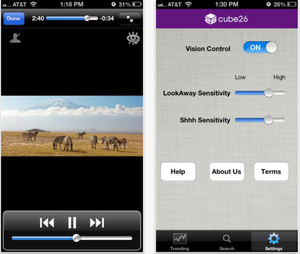
Sensitivity and Settings menu of LookAway Player

Samsung’s new eye-tracking features on its Samsung Galaxy S IV are arguably some of its coolest yet.

One of them, Smart Pause, is built right into the video player on the device and recognizes when you are watching a video. If you look away from the screen while it is playing, the GS4 automatically pauses the video for you and starts playing it again when you look back.

Many are wondering when or if a similar feature will launch on iOS. While Apple may never implement such a feature, iOS users can try out the feature.

LookAway Player for iOS is a YouTube player that includes the same look-away-pause, look-back-play features found on the Galaxy S IV. LookAway uses a technology developed by Cube26, which utilizes the front-facing camera to track eye movement.

While it is not yet clear how well the player actually works, it is available to try out yourself on the App Store.

New quick app switching & other concepts show options on the table for iOS 7 [Videos]

Site default logo image

With the recent departure of longtime iOS chief Scott Forstall, many expect some big changes in iOS 7. Not only is Jony Ive taking over design responsibilities related to iOS, but also Apple is increasingly coming under criticism for its aging core iOS apps and highly requested features already available on other platforms that it has yet to implement. We discussed some of the big software features iOS 7 might have in store, but today we present a roundup of the best iOS 7 concepts we could find starting with a new one from the creator of jailbreak tweak Auxo.

Sentry, the original designer behind the popular Auxo jailbreak tweak, yesterday posted the new Quick App Switching concept above (via iFun). While Auxo provided a screenshot of running apps integrated into the iOS multitasking tray, the concept above takes a different approach and aims to add speed to the app switching process.

This next concept comes from YouTube user imjeanmarc and shows a tray accessible from the lock screen, providing quick toggles for Bluetooth, Wi-Fi, etc.:


Expand
Expanding
Close

3-in-1 Lightning Camera Connection Kit enables photo importing via USB, SD and microSD

Site default logo image

The folks at iPhone 5 Mod now offer a 3-in-1 Lightning Camera Connection Kit just for the photo geeks in the crowd, allowing you to upload pictures and video to a Lightning-enabled iPhone or iPad. Available for $23.90, the connector packs a USB cable that connects directly into a camera via USB, an SD card, or micro-SD card. While Apple offers a camera connection kit —not supporting Lightning— that connects with a camera via USB or an SD card (better value 30-pin versions on Amazon), this seems like the better offering because it supports three formats and Lightning for a cheaper price. iPhone 5 Mod also offers the 3-in-1 Cable Pro, supporting users to charge their devices with Apple’s Lightning, 30-pic technology, or standard microUSB, for $13.90. We received a number of Lightning items from iPhone5mod.com that worked well.

Source: iPhone 5 Mod (1), (2)


Expand
Expanding
Close

Site default logo image

Not a joke: Will.i.am iPhone camera accessory throws pixels and keyboard onto iPhone BOOMBOOM POW

We told you last week that musician Will.i.am would soon launch an iPhone accessory, called “i.am+”, and now the world has its first look at the product line that transforms the smartphone’s camera into a 14-megapixel powerhouse.

According to the Telegraph, the four models, respectively called “C.4”, “V.4”, “C.5”, and “V.5”, feature interchangeable lenses, such as standard, fish-eye, wide, and zoom, with a built-in flash. An iOS app further enables the hardware to have an Instagram-like experience, with photo editing, filters, and sharing options built-in. Folks will also have access to individual online profiles at www.i.am.

The Black-Eyed Peas frontman said his accessories enhance both the clarity and definition of photographs: “We have our own sensor and a better flash. You dock you phone into our device and it turns you smartphone into a genius-phone. We take over the camera.”

The i.am+ accessories basically fit over the iPhone 4 and iPhone 5 in contemporary and vintage flavors, as seen in the picture gallery below, but they also come with a hefty price tag. The line ranges from £199 (roughly $318 USD) for the modern black model to £299 (roughly $477 USD) for the gold model. The i.am+ V.4 unit with gold trim and a “Vintage Look”  are the most expensive but boast a slide-out keyboard.

The iPhone 4 versions will launch Dec. 6, while an iPhone 5 version, which bulks the iPhone’s camera with a new sensor and flash, will not ship until 2013.

A gallery is below.


Expand
Expanding
Close

Camera+, imo messenger, DataMan Pro for iPad, djay goes FREE, Palringo Group Messenger, more

Site default logo image

Camera+ version 3.6: A ton of new features for the Camera+ iPhone app (as well as the iPad version) including Front Flash, Horizon Level for taking straight photos, Live Exposure to see and change exposure parameters like ISO and shutter speed, Accurate iPhone 5 Framing, and much much more. Both apps are also on sale for a limited time to celebrate the updates.

imo messenger version 3.3: We gave you a preview of imo’s newly redesigned app last week and now the updated app is officially available in the App Store.

DataMan Pro for iPad: Just released on the App Store, the popular DataMan Pro app for getting real-time alerts on data usage is out with an iPad version today. To celebrate, both the iPhone and and new iPad version are 50% off for a limited time.

Palringo Group Messenger version 5.4.1:

• iPad support
Palringo now looks amazing running full-screen on your iPad, with benefits such as a bigger keyboard and split panels for chat and contact lists.
• Updated Themes
We’ve thrown in a new “Dark” theme for free, and another for Premium Account holders. What’s more is they’ve been expanded to many more screens around the app!

Expedia Hotels version 2.0:

• Check the home screen for beautiful pictures of the best hotels deals near you.
• Lightning-fast checkout lets you book in under 30 secs. Faster than a TSA scan!

Deals:


Expand
Expanding
Close

Site default logo image

Facebook product manager talks Facebook for iOS & retooling the mobile development process

Facebook has been doing a lot of work to improve its mobile experiences, most notably the release of a faster, rebuilt native Facebook for iOS app in August and the more-recently promised timed release cycles for its mobile apps.

Today, Facebook product manager Michael Sharon took to the company’s blog to share more on how it has retooled its development process and integrated features from its standalone apps into Facebook for iOS. If you’ve ever wondered the focus behind Facebook’s strategy on iOS, Sharon provided some good insights…

On Facebook’s mobile development process:

By retooling our development process–from making every product team responsible for their experience across desktop and mobile, to switching to native code and timed release cycles–we’ve been able to make sure the best of each standalone app is represented in the core app experience…

Facebook has historically had a small, nimble engineering team with separate groups dedicated to desktop and mobile experiences. In fact, the first core iOS app was originally built and maintained by one person, and later developed by a single small team…Within the last year, our engineering teams have taken ownership of their product experiences across both desktop and our mobile apps. These teams know their product, features, and users better than anyone and are sensitive to the nuances of developing and adapting these experiences across multiple platforms. 

On integrating features from standalone apps:

Not every feature from the standalone apps makes sense for the core app, so as the Facebook for iOS PM, one of my jobs is to make sure that the features we share across apps result in the best user experience. So while the swipe gesture to reveal the camera roll works really well within the Camera app – we chose not to include this in the core app because the gesture doesn’t make sense with our persistent top navigation bar. To make it into the core app, a feature has to add significant value to the integrated experience, regardless of how critical it is in one of our standalone apps.  

The core app is not just composed of features from standalone apps – there are many teams that own key portions of the core app and continue to iterate on them. Timeline, Groups and Events are sections that are completely owned and maintained by their respective teams.

As we continue to develop Facebook across platforms, we will continue to use our standalone apps to push the limits of each product and leverage new, battle-tested features to create the best possible core app experiences on every platform.

Mophie announces Outride, a waterproof action sports camera kit & app for iPhone

Site default logo image

There are more than a few hardware camera kits and peripherals on the market that extend the capabilities of the iPhone’s built-in cam. We recently reviewed the Olloclip camera lens kit that provides three external lenses for iPhone 4S. Today we introduce you to another that has just been announced by Mophie and combos with a dedicated companion app for managing and sharing footage. According to Mophie, the goal of its new action sports “Outride” camera kit, which integrates a wide-angle lens with 170 degrees viewing angles and a waterproof, impact resistant casing, is to eliminate “the need for a dedicated device such as a GoPro or Contour camera.” The kit will also include several custom, quick-release mounts for attaching the device to a variety of sports equipment and capturing footage at various angles.

To go along with the camera kit, Mophie will also launch the Outride iOS app that provides users with a profile and the ability to capture and share footage with other users:

Expand
Expanding
Close

Apple patent details replaceable back panels for adding lenses and advanced camera features

Site default logo image

According to an Apple patent application published by the U.S. Patent and Trademark Office and detailed by PatentlyApple, Apple is at the very least conceptualizing a device that sports a removable back panel for easily replaceable components such as lenses or optical solutions.

While it is unclear whether the invention would be used in a standalone camera, next-generation iPod or iPhone, or a different device entirely, the patent detailed several methods of upgrading a device with supplementary optics:

The digital imaging subsystem is typically enclosed within the case of the device to protect the digital imaging subsystem. The enclosure generally prevents direct access to the lens of the digital imaging subsystem for the purpose of providing any sort of supplementary optics, especially if the supplementary optics must be precisely aligned with the image sensor… It would be desirable to provide a structure for a compact device that allows the end user to reconfigure the optical arrangement of the device while retaining the benefits of assembling the device using a pre-assembled digital imaging subsystem.

Apple detailed several features that could be added through the easily swappable supplementary optics, including: improved zoom capabilities, better shutter control, removable close-up lenses, and the addition of motion sensors, flashes, or a lens baffle. As an example, the report explained a removable IR cut-off filter that would allow “capturing black and white images at very low light levels. Without the IR-cut filter the camera’s light sensitivity may extend to 0.001 lux or lower.” The report also broke down how the removable back panels could be implemented:


Expand
Expanding
Close

Is this the coolest Leica-ish iPhone camera case of all times?

Site default logo image

Here is something that falls squarely in the “like” category (for $70):

The ultimate iPhone case has just been reborn. Taking you back to the days of Military Photographers and their Leica rangefinders, the iCA Military Edition has arrived in solid black.

Transform your iPhone 4/s into a classic photojournalist’s rangefinder complete with viewfinder and top mounted shutter button. Attach the available wide, macro or fisheye lenses to create incredible effects unavailable in the iPhone by itself.

Step back in time to the days of classically proportioned cameras that fit your hand like a glove, and do it all with one product : the Gizmon iCA Military Edition.

Constructed of 23 Durable Polycarbonate pieces, the Military iCA wraps itself around your iPhone completely, creating an entirely new Camera. The iCA blurs the line between phone and camera by combining them both.

A detachable tripod mount is great for longer exposures and the soft fabric bag will protect the Camera when not in use.

It also comes in the less-awesome silver-trimmed orange, white or black for $5 less.
Expand
Expanding
Close

iPad 3 w/8 Megapixel camera pictured by Apple Daily publication

Site default logo image

Apple Daily today has images of what it claimed is the next iPad compared to an iPad 1 and an iPad 2. You will notice increased tapering and a bigger camera lens. The publication said the camera is a whopping 8-megapixels, which would likely mean it is the same Sony camera found in the iPhone 4S that CEO Howard Stinger first leaked in April of last year. Apple will likely bring some of its optics over, as well.

We first heard reports of 5- to 8-megapixel cameras in the next iPad at the end of last year in a wide-ranging set of reports.

Apple.pro grabbed some images of the print version that seem to show the tapering better.

The iPad 3 picture seems to be coming together but that does not mean there are not going to be some surprises.

Apple Daily also noted new cabling (pictured below):
Expand
Expanding
Close

iLounge editor claims to have held the next iPad, reports changes are mostly internal

Site default logo image


The above image is used for illustrative purpose and does not represent iPad 3 case mockup.

iLounge editor Jeremy Horwitz, who at last year’s Consumer Electronics Show scooped an iPad 2-mockup case that eventually proved legit, is back with another exclusive. According to his article, yesterday he was shown what purports to be a next-generation iPad at the CES 2012 show in Las Vegas, Nevada.

Even though he did not snap a photograph of it (the above image represents just a pair of iPad 2s), he published some interesting observations that largely support what iLounge heard in November. For starters, iPad 3 might in fact be a bit thicker than the current-generation tablet to make room for new parts:

The new iPad’s body is so slightly thicker than the iPad 2 that the change is unnoticeable on first inspection; a roughly 1mm increase will barely be perceptible to users. We’ve heard that the only accessories that might have issues are cases, and then, only cases that were precisely contoured to fit the iPad 2’s back. […] Switch, button, speaker, and other elements located on the side edges are all the same, as are the headphone and Dock Connector ports. In other words, last year’s accessories should generally work properly with the new model, which is great.

The editor got the impression that what he saw “seemed to be more than half a year old” rather than just manufactured. It is conceivable Horwitz was holding in his hands a pre-production prototype. Looking at the back, Horwitz noticed visual changes that suggest an enhanced camera system…


Expand
Expanding
Close

$11,700 RED Scarlet-X 4K: The camera you’ve always wanted

Site default logo image

The folks over at Cinema5D had the chance to review the $11,700 RED Scarlet-X 4K camera, and boy is it fine. Not only does the Scarlet-X boast a 4K resolution, but also it has a body that is ready to withstand anything. At its film-grade 25FPS, the camera shoots a whopping 4096 x 2160 resolution. Obviously, this is not anything for amateurs (hence the price tag), but it is fun to look at nonetheless. Check out the first part of the review above and the second part after the break. (via Engadget)


Expand
Expanding
Close