Chrome

See All Stories

Apple patched a major SSL bug in iOS yesterday, but OS X is still at risk

Site default logo image

Update: Apple says an OS X fix is coming soon.

Yesterday Apple released iOS update 7.0.6 alongside new builds for iOS 6 and Apple TV  that it said provided “a fix for SSL connection verification.” While Apple didn’t provide much specific information on the bug, it wasn’t long before the answer was at the top of Hacker News. It turns out that minor security fix was actually a major flaw that could in theory allow attackers to intercept communications between affected browsers and just about any SSL-protected site. Not only that, but the bug is also present in current builds of OS X that Apple has yet to release a security patch for.

Researchers from CrowdStrike described the bug in a report:

“To pull off the attack an adversary has to be able to Man-in-The-Middle (MitM) network connections, which can be done if they are present on the same wired or wireless network as the victim. Due to a flaw in authentication logic on iOS and OS X platforms, an attacker can bypass SSL/TLS verification routines upon the initial connection handshake. This enables an adversary to masquerade as coming from a trusted remote endpoint, such as your favorite webmail provider and perform full interception of encrypted traffic between you and the destination server, as well as give them a capability to modify the data in flight (such as deliver exploits to take control of your system),”

Adam Langley, a senior software engineer at Google, also wrote about the flaw on his blog ImperialViolet and created a test site to check if you have the bug (pictured above):
Expand
Expanding
Close

Google releases tool to let devs bring Chrome apps to iOS & Android

Site default logo image

After letting us know last month that it was getting ready to release a toolkit to let developers easily bring their Chrome web apps to iOS and Android, today Google released a developer preview of the tool. In its blog post, Google explains the tool is based on open-source framework Apache Cordova, which allows devs to build native apps for iOS and Android using CSS, HTML, and Javascript. It’s also making a lot of its own core Chrome APIs available to developers through the preview. It essentially means devs will be able to bring their Chrome web apps to the App Store and Google Play, but it will also let them build new cross platform apps in CSS, HTML, and Javascript. Google explained how it works:
Expand
Expanding
Close

Site default logo image

Google developing “Chromoting” remote desktop management app for iOS

Google has been working on a remote desktop management app for Android devices called “Chromoting” since last year, but today an entry in the Chromium issue tracker has revealed that an iOS version is also under developement. The issue, which was opened on Wednesday, indicates that the iOS version is still very much in the design stage, while its counterpart on Android is much further along in its development.

According to the post, the iOS version is is expected to be released much later than the Android client. The features of the app have mostly been kept under wraps, but it looks like a fairly straightforward piece of software that allows you to access and manipulate remote machines using Chrome as a condiut for the connection. The biggest advantage Chromoting would have over similiar solutions would be the low, low price of $0.00.

Google Now comes to the Mac in the latest Chrome Canary release

Screen Shot 2014-01-16 at 13.25.19

There have been indications for a long time that Google Now was eventually coming to the Chrome browser. Via the Google Operating System Blog, the service has finally surfaced in the most recent release of Chrome Canary (Google’s name for the app’s ‘alpha’ channel builds).

As expected, Google Now in Chrome closely mirrors Google Now on Android. The contextually-relevant cards (which show information such as weather, news or upcoming flights) appear in Chrome’s Notification Center on the desktop. The notification area can be accessed in the menubar, represented by a bell icon.


Expand
Expanding
Close

Google releases desktop Chrome App Launcher to all Mac users

Site default logo image

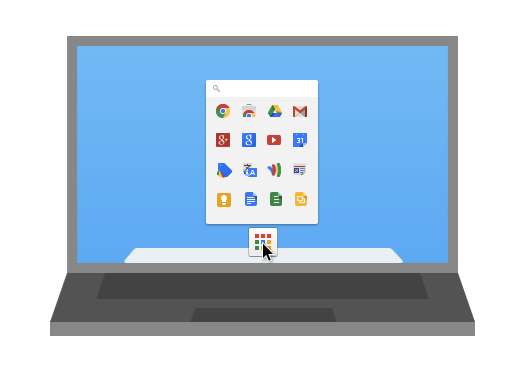
Looking back at late May Google released a beta version of Chrome Apps for Mac, which should not be confused with Chrome OS or Chrome’s browser apps. These ‘Chrome Apps’ are full-fledged applications complete with offline support and include apps like Any.do, Pocket, and many more available in the “For your desktop” collection in the Chrome Web Store. Google initally released the desktop app launcher as part of a Chromium release back in May. With the app launcher, a grid icon lives in your dock and with a click a tray appears showing all your installed Chrome apps and services.


Expand
Expanding
Close

Site default logo image

HBO GO for iOS picks up Chromecast support

[youtube https://www.youtube.com/watch?v=M9jA2km9TKM]

Google announced today Chromecast support for the HBO GO apps for iPhone, iPad, and iPod touch.

This means HBO GO subscribers can now push content from their iOS Devices to their Chromecast-connected HDTVs. HBO GO casting is also available from the website from Chrome browser.

The actual Chromecast hardware is only $35 on Amazon (and if that’s not cheap enough, keep an eye on 9to5Toys for more deals) and offers a comparable experience in many ways to AirPlay on Apple TV. HBO subscribers can download and use the HBO GO apps at no additional charge from the App Store.
Expand
Expanding
Close

Site default logo image

Google Chrome iOS app updated w/ synced Autofill, long press for related image search

Google today released an update to its Chrome app for iOS that it first announced last week and released for Android. As promised, Google has added a new synced Autofill feature that allows users to autofill forms in a few taps and also sign into their Google account on Mac or other iOS devices to sync the data.

Version 31 of Chrome for iOS also adds a new long press feature for images. When holding an image with a long press, Chrome will now automatically run a search for related images.

In addition, Google says the update brings stability and security enhancements.

What’s New in Version 31.0.1650.18

• Fast form completion with Autofill
Tired of filling out web forms with the same information time and time again? The Autofill feature lets you complete forms with just a few clicks. Sign in to sync this data from your computer to your iPhone or iPad and save even more typing.
• Long press on an image to search for related images
• Stability / security improvements and bug fixes

Site default logo image

Oops – watch those ‘Incognito Mode’ web searches, Chrome’s latest iOS upgrade no longer forgets

http://www.youtube.com/watch?v=61SzHpGGFRs

If you’ve been carrying out any dodgy searches in Incognito Mode in the iOS 7 version of Google Chrome, you may want to wander casually into settings to delete the search history (looking toward the sky and whistling helps): it appears that Incognito Mode currently isn’t. All searches performed in the private browsing mode are available in search history once you return to normal browsing.

The above video is rather swift, and has no commentary, but what it shows is erasing history to start with a clean slate, entering Incognito Mode, visiting a website, returning to normal browsing and then viewing search history at Google – where the supposed private web session shows up.

Note that you do need to visit Google to see the history: it doesn’t show up when simply using the combined URL/search bar.

Google updated the app last month. The company has not yet made any statement on the bug.

Thanks, Robin

Site default logo image

Chrome on iOS reduces mobile data by up to half – but only for invited users

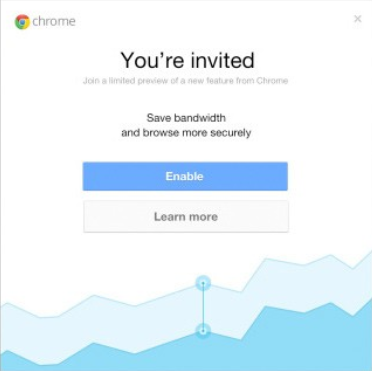
If you use Chrome on your iPhone or iPad, and you’re not running the latest version, you may want to update it. Google has started inviting selected users to enable the data-compression feature it first launched on Android back in March.

For an average web page, over 60% of the transferred bytes are images. The proxy optimizes and transcodes all images to the WebP format, which requires fewer bytes than other popular formats, such as JPEG and PNG. The proxy also performs intelligent compression and minification of HTML, JavaScript and CSS resources, which removes unnecessary whitespace, comments, and other metadata which are not essential to render the page. These optimizations, combined with mandatory gzip compression for all resources, can result in substantial bandwidth savings.

Or, in less technical terms, Chrome strips out everything not needed to display webpages properly, so you get the same experience but with up to 50% less data usage. For those who do a lot of browsing on 3G/4G, that can make a big difference to your monthly data bill.

So far, only a relatively small number of users appear to have been invited to participate, but that number is likely to grow over the next few weeks.

Via TechCrunch

Site default logo image

Chrome for iOS adds faster search results, data cost savings features & voice search pronoun support

Google is rolling out an updated version of its iOS app for iPhone and iPad today that brings a few new features including faster search results. Google says after clicking back in Chrome to return to a search results page results will now “instantly appear, ready for you to choose the next one.”

The update also adds data cost savings features, rolling out to all users shortly, that provides a view of data savings in Bandwidth Management settings. Also new is voice search pronounce support:

Try queries like: “Who is the president of the United States?” followed by “Who is his wife?”

The updated version of Chrome for iOS also includes improvements to Single Sign On for other Google Apps, bug fixes, and other performance and security improvements.

How to enable the Google+ Photos Chrome app on Mac

Site default logo image

Last month we reported that Google’s slick new “Google+ Photos” app that launched exclusively on the Chromebook Pixel could possibly be making its way to Mac. The proof came from a newly posted listing on the Chrome Web Store that made references to auto-uploading features specifically for OS X. Unfortunately, launching the app would give Mac users a “not supported on this platform” error message. While Google has yet to officially launch the Mac and PC versions of the Chrome app, there is a way to bypass the error message and enable the app now.
Expand
Expanding
Close

Site default logo image

Security flaw in Chrome browser reveals plain-text passwords without authentication

Image: thehayden.org

The Guardian reports that a security flaw in Chrome allows anyone with access to a computer to view all of the saved logins without requiring any form of authentication.

A serious flaw in the security of Google’s Chrome browser lets anyone with access to a user’s computer see all the passwords stored for email, social media and other sites, directly from the settings panel. No password is needed to view them.

Besides personal accounts, sensitive company login details would be compromised if someone who used Chrome left their computer unattended with the screen active.

Passwords are accessed by clicking the menu icon (top-right), selecting Settings, clicking Show advanced settings at the bottom of the screen and then, in the Passwords and forms section, clicking Manage saved passwords. Passwords are initially obscured, but clicking the obscured password displays a Show button which then reveals the plain text password.

We’ve just tried it here, and it works. Bizarrely, Google’s Chrome developer team, Justin Schuh, is cited as saying Google is aware of the weakness but has no plans to fix it. Worldwide web inventor Tim Berners-Lee described Google’s response as “disappointing”, describing it in whimsical terms as “how to get all your big sister’s passwords.”

Although someone would need physical or remote access to the computer to do this, there are many shared computers in both home and work environments. Although it could be argued that access to the machine allows you to simply login to any of the stored sites directly, the difference here is that you’d be able to note a login and then use it later on a different machine.

Most browsers have a similar password-reveal function, but require a master password to be entered before passwords are displayed. In Safari on a Mac, logins are stored in Keychain, and your Mac password is required to reveal website passwords.


Site default logo image

Google Drive for iOS adds option to open links in Chrome & Safari

Google has just updated its Google Drive app for iOS with a couple new features and performance enhancements. After adding support for opening links in native Google apps from the Chrome iOS app last week, it has now updated the Drive app with an option to open links within files in Chrome and Safari.

Also new in version 1.5.0 of Google Drive for iOS is support for inserting rows and columns via the “+” button within Google Sheets, as well as stabilization and other bug fixes:

What’s New in Version 1.5.0

  • Clicking on links from within files gives you the option to open in Chrome and Safari
  • Insert rows and columns using the “+” button in Google Sheets
  • Stabilization & bug fixes

Chrome for iOS adds support for opening links in Google apps, voice & text-to-speech enhancements, fullscreen iPad, & data cost savings

Site default logo image

Google has just issued a big update to its Chrome app for iPhone and iPad that brings new “interoperability with other Google Apps” and a number of other notable features. That means that you’ll now be able to open all links for YouTube, Maps, Google+ and Drive in their native apps instead of in the browser. You’ll also now be able to access the apps with a single tap from within Chrome.

The update also brings enhancements to the newly introduced voice search capabilities, including: always visible controls from the toolbar and text-to-speech support for “all variations of English, Spanish, German, Italian, French, Japanese, and Korean.”

Other improvements in today’s update include fullscreen support on iPad, easier access to browser history, and, according to Google, data cost savings:

Reduce data usage and speed up page load times. View data savings in Bandwidth Management settings. This feature is being rolled out and will be available to all users over time.

Google explained the experimental data cost savings feature in a whitepaper when it was first introduced on Android. In the document, Google says its tests showed the feature can reduce data usage by up to 50%:
Expand
Expanding
Close

Site default logo image

Chromium-based Opera browser officially released for OS X

Back in May, Opera released a ‘sneak peak’ of its latest browser, Opera 15. The big selling point behind it was the engine under the hood. For the first time ever, the browser was powered by Chromium rather than Opera’s classic Presto engine. Today, the company has officially released the browser for both Mac and Windows in its final state to the public.

The new Opera for Windows and Mac runs on a Chromium engine, so you can access all your websites in a blink of an eye and have a smoother experience when you get there, thanks to improved site compatibility.


Expand
Expanding
Close

Google updates Chrome for iOS with conversational voice search, improved voice recognition & performance enhancements

Site default logo image

As expected, Google updated its Chrome for iOS app to version 27 today after releasing updates for both desktop and Android late last month. The update includes a number of new improvements, the most notable of which is voice search that allows users to take advantage of the conversational voice search features Google already rolled out to Mac. Google previously announced the feature (pictured above), would be arriving on iOS, but today the updated app is officially available to all on the App Store.

With today’s update you will not only be able to search with your voice right within Chrome (a feature already available to users through the Google Search iOS app), you’ll also get “answers spoken back to you” for specific search results. Google first showed off the new conversational search features at its I/O event last month.

Other improvements in today’s update include faster voice recognition “with text streamed on the fly,” faster page reloads even on slow networks, and the usual stability and security enhancements.
Expand
Expanding
Close

Site default logo image

Google rolling out voice search for Chrome on iPhone and iPad in coming days

Google announced today on its Chrome blog that a new update will soon be rolling out to its Chrome app for iPhone and iPad that will allow users to access voice search features previously limited to the Google Search app. Using the same omnibox currently included in the app, Google will soon allow users to tap a microphone icon to search using only their voice with a UI similar to the recently redesigned voice search on Mac.

Google said the updated Chrome app should be landing on the App Store in the coming days.

Google also noted that the updated iOS app would provide faster reloading of web pages and an option for third-party apps “to open links in Chrome and then return to the app with just one tap.”

Earlier today Google began rolling out revamped voice search functionality in the Chrome app for Mac users.

Google begins rolling out revamped conversational Voice Search features in Chrome

Site default logo image

During its Google I/O keynote earlier this month, Google announced that it would be bringing conversational, Google-Now like voice search to the desktop. Using a UI similar to voice search and Google Now in its mobile apps, Google would soon allow Chrome users to search and drill down further into results using only their voice.

Today, Google appears to have finally started rolling out the feature for Chrome users on the stable and beta channels of Chrome.

After updating to the latest version 27.0.1453.93 of Chrome, users can navigate to Google.com, click the microphone icon, and choose to allow the new Google Voice search feature to begin listening. Google will only ask for permission to listen once and from then on users can simply speak in order to search. For certain search results such as questions Google will also provide audible results.

Not all of the functionality seems to be available as of yet. For example, when Google first showed off the feature users weren’t required to click at all. Google execs were activating the feature by simply saying “Ok, Google” and were able to continue searching with their voice, hands-free, from on the search results page. The feature as it’s currently implemented now requires users to click the mic icon in order to start a voice search.
Expand
Expanding
Close

Google beats Siri to the Desktop with Google Now-like voice search for Chrome

Site default logo image

Google today announced that it is revamping the Google voice search feature available in Chrome on the desktop. While users have always been able to search with their voice through Chrome, Google is attempting to make the service work more like it does through Google Search apps and Google Now on mobile devices.

Chrome will now include “conversational search” with a brand new interface that doesn’t require users to click in order to search with their voice. Like on mobile devices with Google Now, users will now be able to simple say “Google” in order to activate voice search.

Today, we previewed what this conversational experience will look like in Chrome on your desktops and laptops. Soon, you’ll be able to just say, hands-free, “OK Google, will it be sunny in Santa Cruz this weekend?” and get a spoken answer. Then, you’ll be able to continue the conversation and just follow up with “how far is it from here?” if you care about the drive or “how about Monterey?” if you want to check weather somewhere else, and get Google to tell you the answer.

The new interface, as pictured above from Google’s demo of the feature, is much like the voice search interface for Google Now on Android devices.

The new feature will be coming to Macs and PCs through Chrome soon.

Google also briefly showed off some new content coming to Google Now including new cards for Reminders, Music Albums, TV Shows, Books, Public Transit, and Video games rolling out today:

Expand
Expanding
Close

Google announces Google Play game services coming to Android, iOS & web today

Site default logo image

From 9to5Google:

We knew from leaks in the weeks leading up to I/O that Google was planning some gaming related announcements and today the company has officially announced the service in a press release ahead of its Google I/O keynote taking place now. Not only will the service allow Android developers to build in real-time multiplayer, social features, achievements, and leaderboards while storing game saves and settings in the cloud, the SDK for Google Play game services will also be available to iOS and web developers.

Google noted a few titles for Android have already been updated with the feature including World of Goo, Super Stickman Golf 2, Beach Buggy Blitz, Kingdom Rush, Eternity Warriors 2, and Osmos.

Not surprisingly, the cross-platform gaming service will also build in Google+ integration to track high scores, achievements and more:

-Achievements that increase engagement and promote different styles of play.

-Social and public leaderboards that seamlessly use Google+ circles to track high scores across friends and across the world.

-Cloud saves that provide a simple and streamlined storage API to store game saves and settings. Now players never have to replay Level 1 again.

-Real-time multiplayer for easy addition of cooperative or competitive game play on Android devices. Using G+ Circles a game can have up to 4 simultaneous friends or auto-matched players in a game session together with support for additional players coming soon.

Google’s full press release below:
Expand
Expanding
Close

Site default logo image

Google adds ability to open Microsoft Office files directly in Chrome on Mac

Previously only available to Chromebook users, Google announced today on its Chrome blog that Mac and Windows users will now have the ability to open Microsoft Office files directly within Chrome. The functionality works for users running the latest Chrome Beta and requires installation of the Chrome Office Viewer (Beta) extension.

In addition to saving you time, the Chrome Office Viewer also protects you from malware delivered via Office files. Just like with web pages and PDFs, we’ve added a specialized sandbox to impede attackers who use compromised Office files to try to steal private information or monitor your activities.

Site default logo image

Chrome for iOS gets updated scroll, AirPrint/Cloud Print and save PDF to Google Drive options

Google updated its iOS browser today with a number of fixes and feature improvements. Notable changes include the ability to save webpages as PDFs in your Google Drive account or print web pages to either Google Cloud Print or AirPrint printers.

iPhone and iPod touch users can now go full screen in Chrome giving you access to more of the web page. Perhaps most interesting is a new scroll feature that lets you scroll the toolbar off the page and then scroll back to get the Omnibar again.

Also Google says it has done some  stability / security improvements and bug fixes.
Expand
Expanding
Close

Site default logo image

Safari’s mobile browser market share lead increases past 61 percent in March

According to the latest data from Net Applications for the month of March, Apple is steadily increasing its lead for mobile browser share over Android and many other platforms with Safari capturing 61.79-percent of mobile browser web traffic during the month. That’s a nice jump up from the 55.41-percent it had in February, while the stock Android browser lost market share by dropping from 22.82-percent in February to 21.86-percent in last month.

Opera Mini maintains its third position while dropping from 12.72-percent in February to 8.40-percent in March, with Chrome slowly closing the gap jumping from 1.96-percent in February to 2.43-percent in March.

(via AllThingsD)