Facebook

See All Stories

Facebook is the most popular social media service in the world with 2.32 billion monthly active users as of December 31, 2018

Facebook is the most popular social media service in the world with 2.32 billion monthly active users as of December 31, 2018. It also averages 1.52 billion daily active users as of December 2018.

Facebook was launched in February of 2004 (as The Facebook) for college students and then rapidly grew as it opened the service to more than those with a .edu email address. It was the subject of the 2010 movie called “The Social Network“.

In 2012, the social media giant offered its IPO and Facebook earned the title of the fastest company to grow to $250 billion market capitalization in the S&P 500.

In recent years, the company has been at the center of attention related to its role in the Russian interference in the 2016 US election. Since then, it’s been a continual stream of negative news for the company. They recently had all of their enterprise certificates for iOS revoked after it was discovered they had repackaged Onavo VPN as a ‘Research’ app and were paying teens $20/month to sneakily sideload it.

In early 2019, CEO Mark Zuckerberg announced a “privacy shift” for the company. He outlined a detailed vision for the future of the social media platform, specifically its messaging services. Notably, in contrast to how the company operates today, he says the future of the platform will be privacy-focused with features like end-to-end encryption, interoperability between its various apps like Facebook, Instagram, and WhatsApp, reducing how long it holds data, secure storage of personal data, and more.

Chart provided by TradingView

META Chart by TradingView

Facebook rolling out new location-sharing feature for iPhone called Nearby Friends

Site default logo image

Facebook announced today it will be rolling out a new social feature to its mobile app called Nearby Friends. The feature allows Facebook users to occasionally receive notifications when common friends are in similar locations similar to features offered by Foursquare and Apple’s Find My Friends service.

If you turn on Nearby Friends, you’ll occasionally be notified when friends are nearby, so you can get in touch with them and meet up. For example, when you’re headed to the movies, Nearby Friends will let you know if friends are nearby so you can see the movie together or meet up afterward.


Expand
Expanding
Close

Vine adds private video messaging, profile theming in latest update


Vine has just released its ‘biggest update yet’ to the App Store, bringing one-on-one video messaging to the service for the first time. Analogous with Twitter DM’s, Vine’s VM’s work in the same way — hosting private conversations outside of the main stream. As you might expect, conversations can include short video clips as well as text messages.

You can start a conversation directly to a recipient, or bounce off a public Vine for inspiration. Just share the Vine to as many as friends as you want to start a message. It’s important to note you cannot have group conversations (yet). If you share a Vine to more than one person, a separate thread is created for each recipient.

Version 2 also adds some new customization options for your Vine profile. In Settings, you can theme your profile with a specific color which then shows to all other Vine users.

Vine can be downloaded on the App Store, for free.

Site default logo image

Facebook Messenger for iPhone updated with free calling support

Just a week after Facebook added group management to its Messenger app, the social network is out with yet another update to the messaging service: free calls for everyone.

The feature allows you to call your Facebook friends who also have the app over WiFi for free (you can call over cellular as well, but this uses data, of course). Free calling is especially beneficial to users who communicate internationally as calling rates tend to get pricey in that area.

Messaging threads now include a phone icon for prompting calls from the app, and the actual phone user interface resembles the native iOS Phone UI prior to iOS 7.1 introducing a tweaked design to the Phone app.

Facebook-owned Whatsapp is poised to introduce VOIP support in an upcoming update as well. Screenshots of Whatsapp in-app calling leaked earlier this year.

Facebook Messenger 4.1 is available for free on the App Store.

Site default logo image

Facebook Messenger updated to version 4.0 with groups and message forwarding

Facebook has updated its Messenger app for iPhone to version 4.0. The new update introduces the ability to create and manage groups of contacts within the app. You can find all of your groups in a new tab and quickly select one to send a message to everyone at once.

Also new in this update is the ability to select a message to forward to a new recipient, much like you can do with an iMessage in the native Messages application. The usual general bug fixes and improvements round out the 4.0 update.

You can grab the app for free on the iPhone App Store. The full change log is below:

What’s New in Version 4.0
Groups: Now you can create groups for the people you message most. Name them, set group photos and keep them all in one place

Forwarding: Want to send a message or photo to someone who isn’t in the conversation? Just tap to forward it

Plus, continued improvements to make the app faster and more reliable

Site default logo image

Facebook reaches 1 billion active mobile users, 200 million Instagram accounts

During a call with investors today, Facebook CEO Mark Zuckerberg announced that the social network had reached over one billion mobile users. That’s up from only 945 million active users in the last quarter of last year, putting the total gain since then at about 55 million mobile users.

The Facebook-owned photo app Instagram also announced a milestone today on its blog as it passed the 200 million user mark. A quarter of those users joined in just the last six months. Instagram also announced that users have shared over 20 billion photos on the network since it launched.

Facebook releases ‘Tweaks’ tool to help devs iterate on their apps faster

Facebook has today open-sourced its rapid prototyping tool ‘Tweaks’, a framework that helps application developers quickly iterate on their projects and test out different possibilities for their iOS apps.

The best way to improve an app is to use it every day. Even when ideas can be tested out in advance — for example, with Origami — it can still take some time with the app to see how it works in practice.

Occasionally, it’s perfect the first try. Sometimes, the idea doesn’t work at all. But often, it just needs a few minor adjustments. That last case is where Tweaks fits in. Tweaks makes those small adjustments easy: with no code changes and no computer, you can try out different options and decide which works best.

Tweaks makes it really simple for developers to adjust parameters and properties in their application and then test them out in realtime. This is particularly useful for rapid user interface development, which often consists of merely tweaking parameters (like colors or durations) than any involved work.  Normally, developers have to recompile application binaries in order to change animation curves, durations or other parameters. This is relatively slow and inefficient.


Expand
Expanding
Close

Screenshots of WhatsApp’s upcoming VOIP feature surface, design similar to iOS 7’s Phone app

Shortly after being acquired by Facebook for $19 billion dollars, WhatsApp announced that it was planning to integrate VOIP into its messaging app in the coming months. Today, iPhoneItalia has picked up images of what it claims are screenshots of the VOIP feature in action.

In line with the iOS 7 redesign the app received in December, the VOIP functionality closely reflects the design of iOS 7’s native phone interface. The interface uses the same circular buttons and blurred background image; even copying the circular ‘end call’ button from iOS 7.1.


Expand
Expanding
Close

Adobe VideoBite, a bite-sized video editor for iPhone, now allows titles, photos & music

Site default logo image

Adobe VideoBite, an iOS app designed to make video editing as quick and easy as possible, has been updated to allow titles, photos and music to be added, turning it into a fully-fledged editor while retaining its simple user-interface.

Heartwarming Apple ads aside, I’ve always been rather skeptical of the real-world practicality of video editing on a phone, but I have to confess that VideoBite does make it a very slick process. Trimming clips, for example, involves nothing more than pressing a heart icon at the beginning and end of the bit you want to keep. Adding transitions and music is just as easy, and your finished masterpiece is saved to your camera roll, with exports to Facebook, YouTube and email also supported … 
Expand
Expanding
Close

New official Paper app aims to turn Facebook into a beautiful, magazine-style experience

Site default logo image

Update: Now available

[youtube=http://www.youtube.com/watch?v=IhrbT9O6kW8]

Facebook has made many changes to its newsfeed over the years (each usually generating howls of protest on launch and then viewed as business as usual within a week or two), but the interface on web and iOS app alike has seen only minor tweaks. Popup photos aside, it’s essentially remained a clean but uninspiring scrolling layout.

All this is set to change with the launch of Paper, a new iOS-only app set to launch in the U.S. on 3rd February.

Paper makes storytelling more beautiful with an immersive design and fullscreen, distraction-free layouts. We’ve also made it easier to craft and share beautiful stories of your own …


Expand
Expanding
Close

Site default logo image

Facebook update allows you to hide certain stories and people from your news feed

A Facebook for iOS update that was released earlier today includes the ability to hide certain people from your main news feed. To do so, just tap the downward arrow on any post and select the “I don’t like this post” option. From there you can select from a few different options for hiding the post or the user that posted it.

The iPhone version of the app also allows you to see all of your videos in a single album. This feature didn’t make it to the iPad version for some reason, but it might make the jump in a future update.

You can grab the updated app for free on the iOS App Store.

What’s New in Version 6.9

• Choose whose posts you see in News Feed
• See all the videos you’ve uploaded in one album (iPhone only)

New leaked docs show NSA collects personal data from smartphone apps

Site default logo image

New documents leaked by Edward Snowden and reported by The New York Times, The Guardian and ProPublica detail how the NSA and its British counterpart can collect users’ personal data through smartphone apps. The reports specifically mention popular apps like Angry Birds, Twitter, Google Maps and Facebook and claim the NSA is capable of intercepting information ranging from location, age, and sex of users to address books, buddy lists, phone logs, geographic data and more:

The N.S.A. and Britain’s Government Communications Headquarters were working together on how to collect and store data from dozens of smartphone apps by 2007, according to the documents, provided by Edward J. Snowden, the former N.S.A. contractor. Since then, the agencies have traded recipes for grabbing location and planning data when a target uses Google Maps, and for vacuuming up address books, buddy lists, phone logs and the geographic data embedded in photos when someone sends a post to the mobile versions of Facebook, Flickr, LinkedIn, Twitter and other services.

At least one of the app developers, Rovio, is not surprisingly unaware of any of the activity mentioned in the documents, but it will be up to the app developers, Apple, and Google to address the issue and clarify for users if their personal data is safe. In a recent interview with ABC, Apple CEO Tim Cook commented on the controversy over surveillance programs and promised he would press congress for more transparency:
Expand
Expanding
Close

Site default logo image

Review: Bubble Chat for iPhone is a colorful alternative to Facebook Messenger

A few weeks ago, Facebook updated its Messenger app to match iOS 7’s visual design. Unfortunately, the update is a bit bland, with no real embellishments in terms of UI or animation. This week, a new Facebook chat client for iPhone was released that aims to address those complaints with a colorful interface and slick animations.

That app is Bubble Chat.

Bubble Chat is one of the most creative iOS 7 designs I’ve seen, leveraging the new OS’s physics to animate every transition and movement in the app. By default, most of the interface is blue, but a $.99 in-app purchase allows you to customize the background color for each contact individually or globally. You can also choose a photo from your device to use as the background.

The app has two main views for managing your conversations. The first is a list of your Facebook contacts. The other is a list of recent conversation threads. The contact list makes use of each friend’s photo not only as an avatar next to their name, but also as a background for each row in the list, providing a bit more texture than a standard blue background. The chat list provides a quick look at each thread’s most recent message.

Tapping a contact’s photo from the conversation list or with in a thread brings up a contact-specific settings sheet that allows you to customize the design of that conversation or mute all message notifications from that user. From with a conversation you can send photos and videos, plus custom drawings you can create with a variety of brushes and colors.

Speaking of contact photos, Bubble Chat has a clever trick that detects faces in photo and automatically centers them. No more oddly-cropped profile pictures where an off-center face gets cut off! In my testing, I found that the detection system worked every single time, showcasing my contacts automatically instead of whatever happened to be centered in the photo.

The app supports push notifications for new messages, though they seemed a bit unreliable in my testing. My first message came through the main Facebook app, but not Bubble Chat. After I opened Bubble Chat and viewed the new message, notifications started functioning normally for the most part. A few seemed to show up late or not at all.

Overall, Bubble Chat is a solid app that just needs a little work. Aside from the notification issue, I noticed a few graphical glitches, especially when quickly moving between conversation threads and the chat list. These always resolved themselves within a few seconds, though, so there’s no reason to worry about them right now. My single biggest issue with the app is that autocorrect does not seem to work when typing a message. The developers have informed me that several bug fixes and improvements are being made very soon.

If you’re looking to replace Facebook Messenger with something that has a little more personality, Bubble Chat is a great alternative. You can get it on the App Store for free. As mentioned before, theme customization options are available as a $.99 in-app purchase.

Photos+ debuts on iPhone with EXIF info support, improved grid view, more

Site default logo image

Way back in May, Justin Williams’s Second Gear teased an unannounced app via Passbook using an in-house system called Pit Pass. The Passbook pass updated to reveal the icon and name of the app released by Second Gear today: Photos+.

What the app does is really simple but useful in a big way. Photos+ displays your images from your Camera Roll and other albums found in Photos.app, but it takes a different approach to displaying thumbnails and most importantly includes EXIF info like timestamp and location hidden in the native photo browser…


Expand
Expanding
Close

Site default logo image

Facebook Pages Manager for iOS updated with iOS 7 design and new tagging features

Facebook has updated its Pages management client for iOS. The new app has been redesigned for iOS 7 and now more closely resembles the mail Facebook app. The updated app also allows page administrators to tag other pages and people in posts and comments.

You can get Facebook Pages Manager on the iOS App Store for free.

What’s New in Version 2.2

• Optimized for iOS 7
• Tag other Pages in sharing tool
• Tag people in comments

Instagram announces Instagram Direct: photo and video sharing to private groups

Site default logo image

http://vimeo.com/81527238

During its press event held in New York City today, Instagram announced a new sharing feature called Instagram Direct that will allow users to share images and videos to other users privately.

The new sharing model will require users to follow each other to send photos and messages privately to individuals or groups of up to 15 people. A pending requests inbox will catch photos and messages from users who are not mutually connected.

Instagram also noted its growth from 80 million users to 150 million users worldwide from the start of 2013 to today. Kevin Systrom, co-founder of Instagram, boasted that over half of Instagram’s users use the service daily…


Expand
Expanding
Close

Site default logo image

Apple only the 16th best tech company to work for, say employee reviews

Photo: valuewalk.com

Apple dropped to only the 16th best tech company to work for, and 35th overall, in Glassdoor’s annual ranking of the 50 Best Palaces to Work – down from 3rd in tech and 10th overall last year.

Based on over half a million reviews written by employees, Apple took 35th place, with fifteen tech companies ahead of it in the list, with Twitter taking the top tech slot, and LinkedIn and Facebook completing the top three.

Fortune did some sampling of Apple employee reviews to give a sense of why the company didn’t rank more highly, with retail staff particularly critical.

  • Creative (Apple Store): It’s busy. All. The. Time.
  • Packaging Engineer: High stress, long hours, too much security.
  • Genius: Difficult to move up. Interactions with customers can be trying. Understaffed and overworked. Hours can feel long and are inconvenient to a proper work life balance.
  • Mac Specialist (Apple Store): Hard to internally grow into management. Too touchy-feely at times. Managers pulled in too many directions.
  • Front End Engineer: Long hours during project launches and work/life balance takes a backseat at some points.
  • Apple Solutions Consultant: You have no authority to make any real decisions but you are still required to make them.
  • Senior Network Engineer: People always watching you. There are people that want to put you down. No respect for contractors. Tough work.
  • Manager: Expect to deal with a lot of ambiguity and shift gears in the dark. Some in-between senior management are a disappointment.

Apple was, however, rated for offering “great pay at a highly admired company,” offering a “diverse set of challenges and products to work on” and having “many opportunities for career growth, technically and managerially.”

Site default logo image

Steam Mobile iOS app (partly) updated for iOS 7, gets offline chat & more

Steam Mobile, the iOS app that lets you buy games and stay in touch with the Steam community from your iPhone or iPad, has been given a new UI for iOS 7. It also adds some new features (notably offline chat) and stability improvements.

The user-interface retains the dark color scheme, but has a flatter feel and cleaner typography in line with the iOS 7 look. The revamp is a partial one, however – the app still has the iOS 6 keyboard and some non-flattened elements such as the 3D chat bubbles seen above.

The full change-log is:

– New look and feel
– Offline chat
– Improved push notifications and icon badging
– Moved invites to a separate screen
– Streamlined interface for responding to friend invites
– Display friend nicknames
– Added iconography to indicate that friends are on mobile or using Big Picture
– Include Facebook suggested friends in invites list
– Improved stability and performance

The app is a free download from iTunes.

Apple joins tech titans in calling for government spying reform and limitations

Site default logo image

The Wall Street Journal reports that Apple has joined Microsoft, Twitter, Google, Yahoo!, Facebook, and other giants in the tech industry in calling for a reform of the NSA’s surveillance tactics. Earlier this year it was revealed that the National Security Agency was using information from these companies and more to monitor citizens across the nation without warrants.

The companies allegedly involved in the “PRISM” program denied turning over any user data to the government, but a leaked NSA slidedeck (seen above) seemed to imply the opposite.

The new collaborative campaign, called Reform Government Surveillance, cites five driving principles in its drive to curb excessive government spying:


Expand
Expanding
Close

As predicted, Apple’s Black Friday ‘deals’ go live and are gift card only, no discounts

Site default logo image

As we predicted, Apple’s Black Friday deals take the form of gift cards rather than discounts. The Australian store is first to come online with the promotion.

Buy a Mac, and you get a gift card for AUS$150 ($137), an iPad gets you AUS$75 ($68) and an iPod AUS$50 ($45) – with a range of gift card values on selected accessories. It’s likely these amounts will be rounded in the USA.

There appears to be no gift card with the Retina iPad Mini (only with the non-Retina model), likely a reflection of the limited supplies available and that Apple knows it will sell well into the holiday season without incentives.

While the gift card amounts are slightly more generous than past discounts (last year Apple offered $100 discount on a Mac), the fact that you have to lay out the full amount for a credit that has to be spent later may limit appeal …

We’ve posted some answers to common questions about the deal. 


Expand
Expanding
Close

Site default logo image

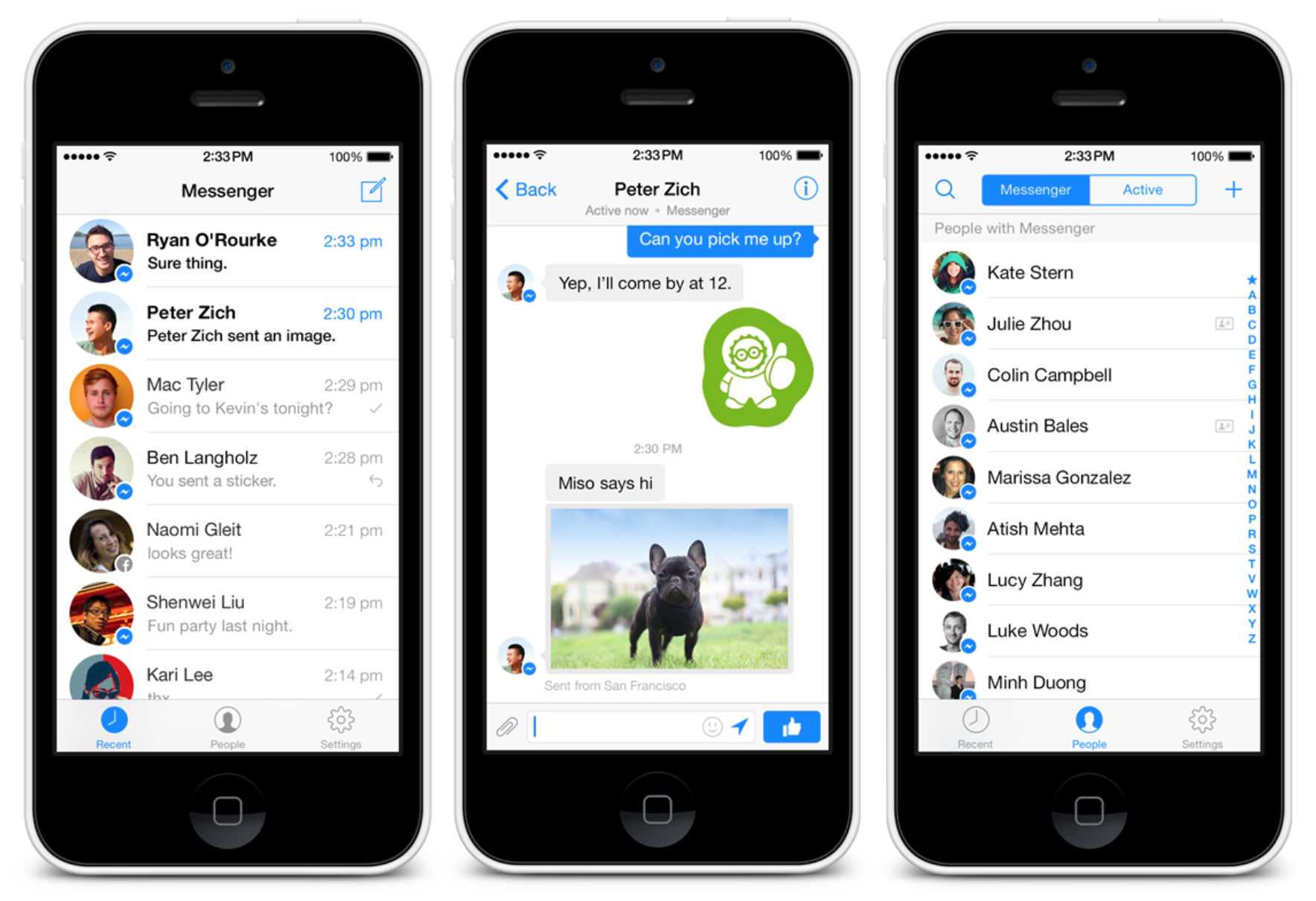
Redesigned Facebook Messenger for iPhone launches with phone number integration

In line with our report from early-October has launched a completely redesigned version of its Facebook Messenger app for iPhone and iPod touch. The new design is in-line with the new, simpler aesthetic of iOS 7, and a similar design launched for Android a few weeks ago. In addition to the new design, the new app brings some new functionality:

  •  The ability to see which friends are using the app
  • Capability to message others through Messenger as long as you have their phone number
  • A fresh new look with navigation to see recent conversations, people on Messenger, and your settings

The update is available via the App Store now as version 3.0. Also in the works, sources say, is a version of the main Facebook application with support for Graph Search. It appears the company has let the interface for that update slip at a developer event:


Expand
Expanding
Close

Site default logo image

YouTube Capture updated for iOS 7 with simple sign-in, more editing features

YouTube Capture, which is essentially a dedicated video camera app by Google, delivered version 2.0 today bringing with it an iOS-7 friendly user interface and new features for editing what you record. Getting started is made easier now with support for Google’s single sign-in across its iOS apps; alternatively, you can use the app without logging in sans YouTube sharing.
Expand
Expanding
Close

Site default logo image

Many users reporting Facebook app crashing following latest update

Update: It looks like Facebook is pushing out version 6.7.1 of the app now, with “Bug fixes”, although some users are currently reporting issues downloading the update.

Following a small update to the Facebook app for iOS yesterday that let users edit posts on the iPad for the first time, many users are reporting that the app seems to be inexplicably crashing.

Twitter users have been voicing their frustration about the update today, as they discover the app attempt to launch, and immediately crash. The problem effects both iOS 7 and iOS 6 users, as verified by our own tests. It’s currently unknown whether the bug is on the app side or the server side, but it’s likely that Facebook will release a fix soon.

Some users are reporting that simply deleting the app from your device and reinstalling it will fix the issue:

https://twitter.com/CiRoCoHoLiC661/status/398899650351996928


Expand
Expanding
Close