Firefox

See All Stories

How-To: Make Gmail the default mail app in Safari, Chrome, and Firefox on Mac

Site default logo image

I’ve never been a fan of the stock Mail app in OS X, so I generally find myself relying on Gmail inside of Chrome for all of my email needs. In fact, I don’t have any email accounts configured inside of the stock Mail app at all. With this in mind, I always get frustrated when I inadvertently click a mailto link inside of a browser window. Doing so forces the Mail app, which is set as the default mail client in OS X, to open without purpose.

Wouldn’t it be nice if you could configure Gmail to play the role of the default mail client inside your browser of choice? In this video tutorial, I’ll show you how easy it is to configure Chrome, Safari, and even Firefox to use Gmail as the default mail client.
Expand
Expanding
Close

Firefox for iPhone and iPad now available in the App Store for free

You can now get the alternative web browser Firefox for iPhone and iPad in the App Store. Except its not really Firefox as you know it on the desktop, because the underlying engine is all WebKit, not Mozilla’s Gecko renderer like it is on the Mac. This is the same as the iOS Google Chrome app — the App Store rules require browsers to use the Safari WebKit engine. This isn’t really a bad thing, the WebKit rendering core is the industry leading mobile (and desktop) engine.

You might want to use Firefox for iPhone and iPad if you use Firefox on the Mac, due to UI similarities for the browser chrome or just for syncing convenience. The Firefox app will sync bookmarks, open tabs across all your devices by logging into your Firefox account. These are the main differences between Firefox and the native Safari app.


Expand
Expanding
Close

First Firefox for iOS preview now available in New Zealand ahead of public launch later this year

Firefox today has released the first public preview version of its browser for iOS. Unfortunately, the company is first making the preview version of the browser available to users in New Zealand only. Firefox notes, however, that it will expand the preview to a few more countries as time progresses, before ultimately launching the browser to the public.

Firefox says that it is primarily using the first preview to collect feedback from users to help it improve the features and stability of the browser before a widespread launch. One notable feature that the company is collecting data on is Intelligent Search. This feature, built into Firefox, provides suggested search results and the choice of search providers, as seen in the middle screenshot above. Another notable feature of the app is support for Firefox Accounts, which allows you to keep all of your browser history, passwords, and tabs synced between your various devices. Finally, the app also supports Visual Tabs, which makes it easy to keep track of the tabs you have open at any given point.

If you’re interested in being notified when Firefox for iOS launches in your country, you can sign up here. It’s unclear how long it will be until Firefox for iOS expands to more countries for testing, but the company says it will launch on the App Store by the end of this year.

Flash’s demise continues as Amazon stops accepting Flash ads due to browser settings

Amazon may have been Apple’s target when it unveiled its iBooks Store alongside the iPad in 2010, but the digital retail giant’s latest move is helping fulfill Steve Jobs’ vision of a web without Flash. Amazon Advertising issued an update to its technical guidelines today declaring that it will stop accepting Flash-based ads starting next month. Adobe cited “recent browser setting updates from Google Chrome, and existing browser settings from Mozilla Firefox and Apple Safari” that interfere with displaying Flash ads.
Expand
Expanding
Close

Mozilla blocks Flash in Firefox browser as Adobe issues emergency patch for latest security exploits

Site default logo image

It’s been a rough week for the fate of Adobe’s Flash Player plugin. Yesterday we told you about Facebook’s security chief pushing Steve Jobs’ anti-Flash message and calling on Adobe to announce an end-of-life date for the plugin, and today a major web browser has opted to actually block Flash to protect users from security issues. Mozilla said today that it is temporarily disabling Flash by default until Adobe is able to address recent exploits discovered in the plugin…
Expand
Expanding
Close

Site default logo image

Mozilla begins seeking beta testers for iOS version of Firefox

Firefox may be waning in popularity as a desktop browser, but development team Mozilla is pushing ahead to release a version of the software for iOS devices. In a new survey discovered by TechCrunch, the company reveals that it’s currently searching for people who can beta test the upcoming app.

Just about anyone can sign up for the beta, though Mozilla hasn’t made it clear how many people will be chosen, or when the selection process will start. Users interested in testing will need to answer a few basic questions about the types of devices they own and their proficiency with iOS software.

Once you’ve answered all of the questions and supplied an email address, the only thing left to do is wait and see if you’ve been chosen.

Mozilla launched a version of Firefox for Android several years ago, but thus far has not released a version for Apple’s platform.

Site default logo image

Apple releases Safari updates for OS X Yosemite, Mavericks, and Mountain Lion (Update: pulled)

Update: Apple appears to have pulled this update. Apple previously pulled a Safari update when it accidentally released a beta to the general public, but this doesn’t seem to be the same type of situation. The security document for the update is still live.

Apple has released a small patch for the three most recent versions of Safari running on OS X Yosemite, Mavericks, and Mountain Lion. The new versions are 8.0.1, 7.1.1, and 6.2.1, respectively.

The updated builds include fixes for features like WebGL graphics running on Macs with Retina displays, and problems with iCloud Keychain and syncing of browsing history. There is also a new option for importing saved usernames and passwords from the Firefox browser.

You can download the updates from the Software Update tab of the Mac App Store. There are no standalone installers, as Safari is now bundled with OS X.

Mozilla confirms Firefox for iOS to be released in the future

For over four years, Mozilla has expressed that it has no interest in porting its Firefox web browser to the iPhone, iPad and iPod touch. Under the leadership of new chief executive Chris Beard, however, that mindset appears to have changed, as TechCrunch reports that Mozilla has recognized a need to release Firefox for iOS in the future.
Expand
Expanding
Close

Site default logo image

Google Chrome crashes hard with Mac OS 10.10.2 beta, here’s the fix

…Use Safari! (lol,)

Google Chrome 39 had started to crash for me as soon as I updated to 10.10.2 Beta. I tried all of the normal things (trashing Google prefs, using Canary, etc etc). Nothing worked except downgrading back to Mac OS 10.10.1 stable.

[tweet https://twitter.com/llsethj/status/538403705201377281]

It turns out that the new 10.10.2 has depreciated some Trackpad APIs that cause an immediate crash.

The answer comes via Reddit today:

https://www.youtube.com/watch?v=hMVte93tgTM

Obviously use at your own risk: an Automator app has also been built to speed up the below process.

Workaround that was found on the Apple dev forums – this is not my code – use at your own risk – I’ve used it and it works fine.

1) Open up text edit and paste this code – save it as “patch.m”

#import <AppKit/AppKit.h>

__attribute((constructor)) void Patch_10_10_2_entry()
{
NSLog(@"10.10.2 patch loaded");
}

@interface NSTouch ()
- (id)_initWithPreviousTouch:(NSTouch *)touch newPhase:(NSTouchPhase)phase position:(CGPoint)position     isResting:(BOOL)isResting force:(double)force;
@end

@implementation NSTouch (Patch_10_10_2)
- (id)_initWithPreviousTouch:(NSTouch *)touch newPhase:(NSTouchPhase)phase position:(CGPoint)position     isResting:(BOOL)isResting
{
return [self _initWithPreviousTouch:touch newPhase:phase position:position isResting:isResting force:0];
}
@end

2) Run this command in Terminal

clang -dynamiclib -framework AppKit ~/Desktop/patch.m -o ~/Desktop/patch.dylib

3) Run this command in Terminal to open Chrome.

env DYLD_INSERT_LIBRARIES=~/Desktop/patch.dylib "/Applications/Google Chrome.app/Contents/MacOS/Google Chrome"

Notes: This will leave Terminal open in the background, do not close it or Chrome will quit out. This doesn’t modify anything permanently just fixes it temporarily. To reopen chrome a second time all you have to do is repeat step 3.


Site default logo image

Mozilla developing streaming stick in bid to compete with AirPlay and the Apple TV

[youtube http://www.youtube.com/watch?v=VS0VUOfrycw]

Video gia GigaOm

Mozilla, the company behind the Firefox web browser, is working on a stream stick set to directly compete with the Apple TV and other similar products, according to GigaOm. The device runs Mozilla’s own Firefox OS, originally designed for smartphones, and is apparently referred to as “Netcast” within the Firefox browser.

Unlike Apple’s current offering, the Netcast would allow developers to integrate the technology into applications on a wide variety of operating systems and hardware devices, including many platforms not currently supported by the Apple’s AirPlay feature. In a statement to GigaOm, Mozilla noted that anyone is welcome to work with Firefox OS and that hardware running that system does not necessarily have to come from that company.


Expand
Expanding
Close

Site default logo image

Firefox 28 released w/ Mac OS X Notification Center support for web notifications

Firefox today released the latest version of its desktop browser for Mac, Linux, and Windows and in the process added one much welcomed feature for Mac OS X users: support for Notification Center. This means that web apps and sites taking advantage of Firefox’s web notifications feature will now also appear for Mac users in the Notification Center.

Version 28 of Firefox also introduces a few new behind the scenes improvements including VP9 video decoding, volume control for HTML5 audio/video, and a number of other fixes.

Firefox 28 for Mac is available to download from the Mozilla website now.

Nuance announces Dragon Dictate 4, with pre-recorded transcription features and Gmail integration

Nuance has just announced the next major version of its Mac dictation software, Dragon Dictate 4. The new version improves recognition accuracy as well as several new features, including the ability to machine transcribe from a pre-recorded audio file. You no longer have to be recording a voice live to get transcription.

[youtube=http://www.youtube.com/watch?v=RRfbZ0h4yBo]

We’ve had a quick play with the software and the accuracy is almost scary good compared to older versions of the software. Speaking in a normal voice gives you almost 100% accuracy and even mumbling seems to work. While Mavericks uses the same Nuance speech engine, Dictate 4 has a better interface for transcription and tons of extra features as outlined in the videos above and below.

Dragon Dictate software has also been updated for modern system architectures — it is a 64-bit app now.  This results in better performance and better memory management over its predecessors. The company says it has drastically reduced latency when interpreting speech.

[youtube=http://www.youtube.com/watch?v=YnGKb854CNI]


Expand
Expanding
Close

Site default logo image

Farewell Windows Safari, as Apple excludes its homegrown browser from iCloud bookmark sync

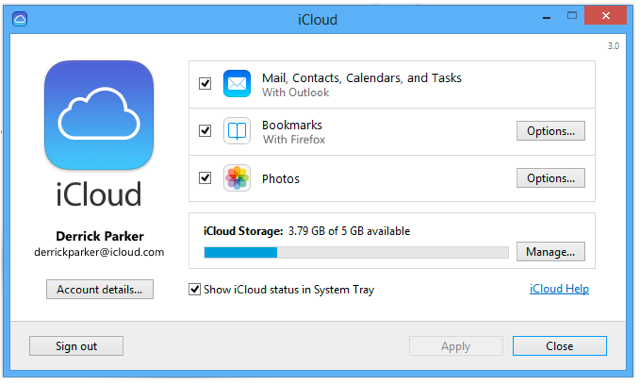
We knew that Apple’s attempt to expand Safari’s reach into the Windows population was at an end when the company stopped updating the Windows version a year ago, but the browser has now been erased from history as Apple’s bookmark sync tool drops support for it. iCloud Control Panel 3.0 for Windows, released yesterday, supports only Internet Explorer, Firefox and Chrome.

iCloud keeps mail, contacts, and calendars up to date between your iPhone, iPad, iPod touch, Mac, and Windows PC, and lets you share calendars and task lists.

iCloud also keeps your Internet Explorer, Firefox, or Google Chrome bookmarks on Windows in sync with your Safari bookmarks on iPhone, iPad, iPod touch, and Mac.

On OS X, however, Apple is keep to ensure we don’t use anything else. The iCloud Bookmarks extension for Chrome, allowing bookmark syncing with Safari, works only on the Windows version of Chrome. C’mon, Apple, make us want to use your software by making it better than anyone else’s, not by this kind of move …

Site default logo image

Mozilla releases Firefox beta featuring Retina display support

Mozilla released a new beta for Firefox this afternoon, featuring Retina display support that is sure to appease the Firefox devotees out in the crowd. Release notes below:

This update includes JavaScript improvements that make Web apps and games perform better and support for W3C Touch Events. Firefox Beta also supports Retina Display for Mac users.

  • IonMonkey: IonMonkey is a new JavaScript JIT compiler that provides a more efficient way for Firefox to process JavaScript. With IonMonkey, Firefox will perform faster with Web apps, games and other JavaScript-heavy pages.
  • Retina Display Support: Firefox Beta supports Retina Display for Mac users to make Firefox even sharper when watching movies, playing games and browsing the Web.
  • Disable Insecure Content: Firefox Beta can disable insecure content on HTTPS secure websites to maintain the privacy of your communication with the website. You can enable the feature in about:config.
  • Support for W3C Touch Events: Firefox Beta supports standard W3C touch events in addition to MozTouch events.

[Download via iClarified]
Expand
Expanding
Close

Firefox is now the most popular browser in Europe

Site default logo image

Here’s some interesting news from the periphery.  In Europe, where Microsoft was forced to institute a ‘browser ballot ‘upon the installation of Windows (giving Opera, Safari, Chrome, Firefox and IE equal billing), Firefox has just passed IE as the most popular browser on the continent.

That’s according to Statcounter who told Reuters “This appears to be happening because Google’s Chrome is stealing share from Internet Explorer while Firefox is mainly maintaining its existing share. We are probably seeing the impact of the agreement between European Commission competition authorities and Microsoft, to offer EU users a choice and menu of browsers from March last year.”

Given equal footing with other browsers, users just don’t pick IE (remember this ballot is only a year old and it will likely get much worse for Microsoft.

Full graph below:
Expand
Expanding
Close