Google Chrome

See All Stories

Chrome 58 likely to include Touch Bar support, currently being tested in canary build

Site default logo image

Apple’s MacBook Pro gained a new feature with its last refresh, the Touch Bar. Since the announcement in October, third-party applications have slowly been gaining support for the capability and now one of the more popular apps, Google Chrome, is adding support for Touch Bar…

Earlier today, Google quietly released the first canary build of Chrome 58. One thing quickly noted by MacBook Pro users was the added support for Touch Bar support, something that hasn’t been present in any version of Chrome released since the MacBook Pro was updated last fall.


Expand
Expanding
Close

Chrome 52 for Mac introduces Material Design w/ new icons & flatter, transparent interface

Version 52 of Google Chrome is now rolling out to all users via Google’s stable channel with the usual bug fixes and security patches. For Mac, the update notably adds Material Design to the browser’s top bar and other UI elements. Other changes include removing the ability to use the backspace key as a return shortcut.


Expand
Expanding
Close

How-To: Make Gmail the default mail app in Safari, Chrome, and Firefox on Mac

Site default logo image

I’ve never been a fan of the stock Mail app in OS X, so I generally find myself relying on Gmail inside of Chrome for all of my email needs. In fact, I don’t have any email accounts configured inside of the stock Mail app at all. With this in mind, I always get frustrated when I inadvertently click a mailto link inside of a browser window. Doing so forces the Mail app, which is set as the default mail client in OS X, to open without purpose.

Wouldn’t it be nice if you could configure Gmail to play the role of the default mail client inside your browser of choice? In this video tutorial, I’ll show you how easy it is to configure Chrome, Safari, and even Firefox to use Gmail as the default mail client.
Expand
Expanding
Close

Google disables support for third-party keyboards in Chrome due to ‘crashing issues’

Third-party keyboards have been supported on iOS since version 8 shipped last year, but even today they’re still often plagued by poor performance and other issues related to Apple’s implementation. Today, Google has released a Chrome for iOS update that disables support for third-party keyboards entirely because of such issues.


Expand
Expanding
Close

Chrome 44 for iOS brings beacon-powered Physical Web closer to reality, new gestures

The Physical Web is an open source web specification from Google released last year with the aim to make interacting with smart devices in the real world as easy as clicking a link, just as we do on the web. Now with the company having released its Eddystone beacon technology and APIs for making this communication between devices in the same proximity easier, it’s integrating Physical Web directly into Chrome for iOS.

The latest version of Chrome for iOS, version 44 available now in the App Store, brings Physical Web content to the “Today” view. The Today view, for those who don’t know, is a section within the iOS Notification Center panel, accessed by dragging down from the top of the screen, which contains quick glance information that you may want to access often, such as weather information, calendar events, etc. But developers can also make their own widgets for this section which could include this same sort of quick glance information pulled from their own apps, as well as action buttons to perform quick tasks – like checking into a location on Swarm, for example.

What this means for Physical Web is better visibility and increased potential for adoption. While beacons have yet to heavily saturate the world, they face a chicken and egg problem: without a way for end-users to actually receive information from devices they pass by in the physical world, developers and manufacturers don’t have the same kind of incentive to design, manufacturer, and sell, and invest in beacons, and vice-versa. Physical Web, though, takes advantage of Eddystone-URL, a language that Google’s Eddystone beacon technology can send information to end-user devices in. Now that the company has a full end-to-end beacon solution – the beacon software that device manufacturers can use in their beacon hardware, as well as deeper integration into end-user devices – it will be possible for web developers to get more native-like proximity functionality out of their apps.

In addition to support for Physical Web, today’s Chrome for iOS update also adds new swipe gestures for making navigation throughout the app easier. The app is available now in the App Store.
Site default logo image

Apple to begin offering web-based chat support for Beats hardware (update: live)

Apple will expand its support capabilities for Beats by Dre hardware products, like headphones and speakers, next week by launching web-based chat support, according to sources. Customers in need of support for their Beats devices will be able to instant message with a support representative via Apple’s support website beginning on Monday, February 23rd. In January, Apple began moving Beats phone-based support wholly in-house after still using the headphone maker’s outsourced support for most of last year. Apple began servicing Beats products in its retail stores late last year.


Expand
Expanding
Close

Site default logo image

Google Chrome crashes hard with Mac OS 10.10.2 beta, here’s the fix

…Use Safari! (lol,)

Google Chrome 39 had started to crash for me as soon as I updated to 10.10.2 Beta. I tried all of the normal things (trashing Google prefs, using Canary, etc etc). Nothing worked except downgrading back to Mac OS 10.10.1 stable.

[tweet https://twitter.com/llsethj/status/538403705201377281]

It turns out that the new 10.10.2 has depreciated some Trackpad APIs that cause an immediate crash.

The answer comes via Reddit today:

https://www.youtube.com/watch?v=hMVte93tgTM

Obviously use at your own risk: an Automator app has also been built to speed up the below process.

Workaround that was found on the Apple dev forums – this is not my code – use at your own risk – I’ve used it and it works fine.

1) Open up text edit and paste this code – save it as “patch.m”

#import <AppKit/AppKit.h>

__attribute((constructor)) void Patch_10_10_2_entry()
{
NSLog(@"10.10.2 patch loaded");
}

@interface NSTouch ()
- (id)_initWithPreviousTouch:(NSTouch *)touch newPhase:(NSTouchPhase)phase position:(CGPoint)position     isResting:(BOOL)isResting force:(double)force;
@end

@implementation NSTouch (Patch_10_10_2)
- (id)_initWithPreviousTouch:(NSTouch *)touch newPhase:(NSTouchPhase)phase position:(CGPoint)position     isResting:(BOOL)isResting
{
return [self _initWithPreviousTouch:touch newPhase:phase position:position isResting:isResting force:0];
}
@end

2) Run this command in Terminal

clang -dynamiclib -framework AppKit ~/Desktop/patch.m -o ~/Desktop/patch.dylib

3) Run this command in Terminal to open Chrome.

env DYLD_INSERT_LIBRARIES=~/Desktop/patch.dylib "/Applications/Google Chrome.app/Contents/MacOS/Google Chrome"

Notes: This will leave Terminal open in the background, do not close it or Chrome will quit out. This doesn’t modify anything permanently just fixes it temporarily. To reopen chrome a second time all you have to do is repeat step 3.

Google silently launches Chrome 64-bit Canary and Dev channel for Mac OS X users

Site default logo image

Google recently released a 64-bit version beta version of Chrome for Windows 7 and 8 users and for an encore the company has turned its efforts towards Apple’s OS X. The search giant has silently added 64-bit support to its Chrome Canary and Dev channels for Mac users. If you’re running the latest version of Canary on your Mac, the software should read as 64-bit capable in its About tab.


Expand
Expanding
Close

Google Chrome for iOS update adds Cast support to web pages, gets a tweaked icon

Site default logo image

Google has released an updated version of the Google Chrome application for iOS today, bringing at least one interesting new feature to the app: mobile websites that have Cast support will now work with all of your Cast-capable devices. It’s unclear how the feature works at the moment, but according to the release notes, developers are going to need to add support to their webpages before they can take advantage of the feature.

Also, as will likely be praised by iOS users everywhere, the version 36.0.1985.49 update goes the way of Google Hangouts and finally gets rid of the infamous “lip” located at the bottom of the app icon:


Expand
Expanding
Close

Site default logo image

Google Translate updated w/ iOS 7 keyboard, additional handwriting language support including Arabic & Hebrew

Alas, we’re one step closer to an App Store not filled with iOS 6 keyboards. Google released Translate 2.1 today, bringing support for the iOS 7 keyboard released last September to the iPhone and iPad.

The update also expands support for its new handwriting input method to a number of additional languages including Arabic, Esperanto, Gujarati, Hebrew, Javanese, Maltese, Maori, Marathi, Persian, Punjabi, Telugu, and Zulu.

Google first introduced its handwriting input method last September. Google Translate 2.1 is available now on the App Store.
Expand
Expanding
Close

Google Now comes to the Mac in the latest Chrome Canary release

Screen Shot 2014-01-16 at 13.25.19

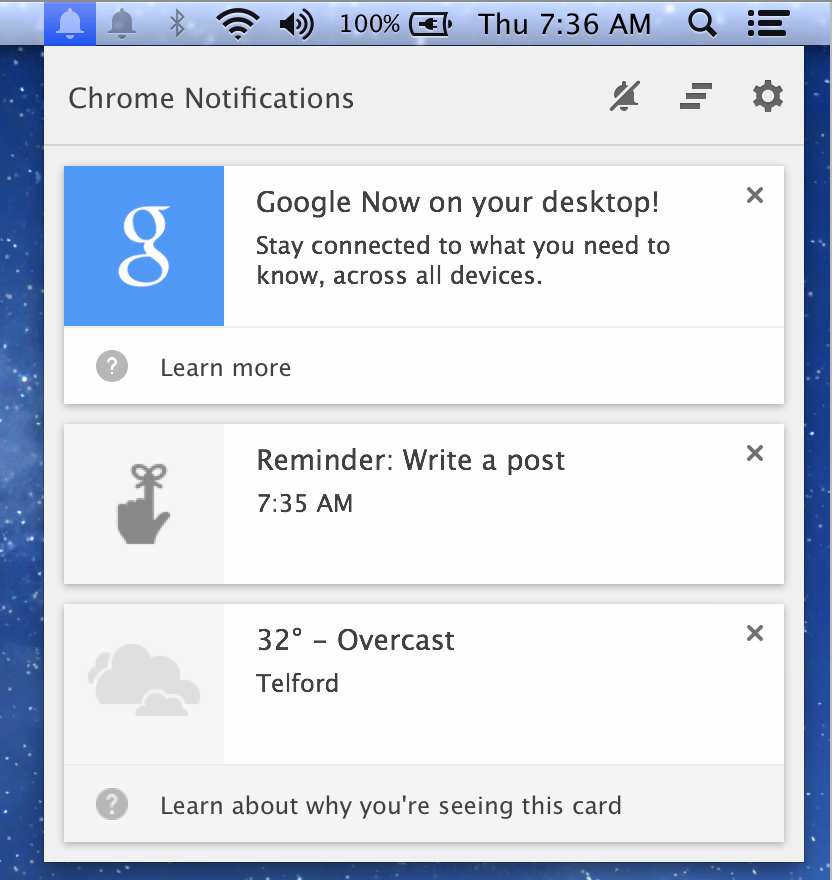
There have been indications for a long time that Google Now was eventually coming to the Chrome browser. Via the Google Operating System Blog, the service has finally surfaced in the most recent release of Chrome Canary (Google’s name for the app’s ‘alpha’ channel builds).

As expected, Google Now in Chrome closely mirrors Google Now on Android. The contextually-relevant cards (which show information such as weather, news or upcoming flights) appear in Chrome’s Notification Center on the desktop. The notification area can be accessed in the menubar, represented by a bell icon.


Expand
Expanding
Close

Site default logo image

Chrome for iOS getting automated form-filling, synced to your desktop browser

Google’s Chrome Blog has announced that Chrome for iOS will be getting autofill functionality shortly, enabling automated completion of web forms. If you already use Chrome on a desktop machine, the iOS app will sync data between the two.

For iPhone and iPad users, Chrome for iOS will soon include Autofill to help you quickly fill out forms on-the-go just as you can on desktop and Android. When you sign into Chrome on your iPhone and iPad, you can quickly complete online forms using your synced Autofill info from other devices you’ve signed into.

Google says that it is “starting to roll out” the feature from today, but the version of the app on iTunes hasn’t been updated at the time of writing.

Safari introduced iCloud Keychain, offering synchronised logins and credit card data, with Mavericks and iOS 7.