How-to

See All Stories

A collection of tutorials, tips, and tricks from the 9to5Mac team helping you fix and get the most out of your favorite gear.

9to5Mac How To tutorials

Top tutorials and guides

iPhone how-tos

Mac how-tos

iPad how-tos

Apple Watch how-tos

These iPhone and Apple Watch apps help you create and achieve New Year’s resolutions

Create habits and achieve New Year resolutions with iPhone and Apple Watch

2021 holds a lot of anticipation as the world hopefully recovers from the pandemic and people around the world have more clarity than ever about their priorities. Let’s take a look at some of the best apps to create habits, set stakes, and achieve New Year resolutions with iPhone and Apple Watch.

Expand Expanding Close
How to use HomePod Intercom feature

Unwrap a new HomePod? Here’s how to set up the Intercom feature

One of the biggest new features to arrive for HomePod this year is Intercom support. And the handy feature is now available to more people than ever with HomePod mini arriving and many likely being gifted one over the holidays. Follow along for how to set up and use the HomePod Intercom feature on the smart speakers and your other Apple devices.

Expand Expanding Close

How to customize your new iPhone’s home screen with Smart Stacks and Siri Suggestions

iOS 14 siri widgets

Widgets have proven to be the most popular iOS 14 feature, allowing users to give their home screens an added layer of personalization. iOS 14 includes two built-in widget options that aim to use Siri intelligence to help further personalize your iPhone home screen widgets.

If you’ve just unwrapped a new iPhone this holiday season, here’s how to take your iPhone’s home screen to the next level with Smart Stacks and Siri Suggestions.

Expand Expanding Close

How to change your Apple Watch move, exercise, and stand goals with watchOS 7

apple watch rings

One of the changes in watchOS 7 that went under the radar is support for changing your Apple Watch activity rings. While Apple has long allowed you to customize your red move goal, only this year did it add support for changing the green exercise ring and blue stand ring. Here’s how it works and how to set it up on your new Apple Watch.

Expand Expanding Close

Best tips and tricks for using your new iPhone, iPad, Mac, Apple Watch, more

There are a lot of great new features included with Apple’s latest products. Whether you just got one new Apple device or several of them, follow along with a roundup of our most popular tutorials and videos to learn the best tips and tricks for your new iPhone, iPad, Apple Watch, Mac, Apple TV, AirPods, HomePod, and more.


Expand
Expanding
Close

How to use Apple Fitness+ detailed guide

How to use Apple Fitness+: Apple Watch requirement, sign up, start workouts, more

Apple Fitness+ is now available to Apple Watch users with 180 workouts across 10 different categories. While the service is available across iPhone, iPad, and Apple TV, there are some differences between getting going depending on which device you’re using. Let’s dig into a detailed look at how to use Apple Fitness+.

Expand Expanding Close

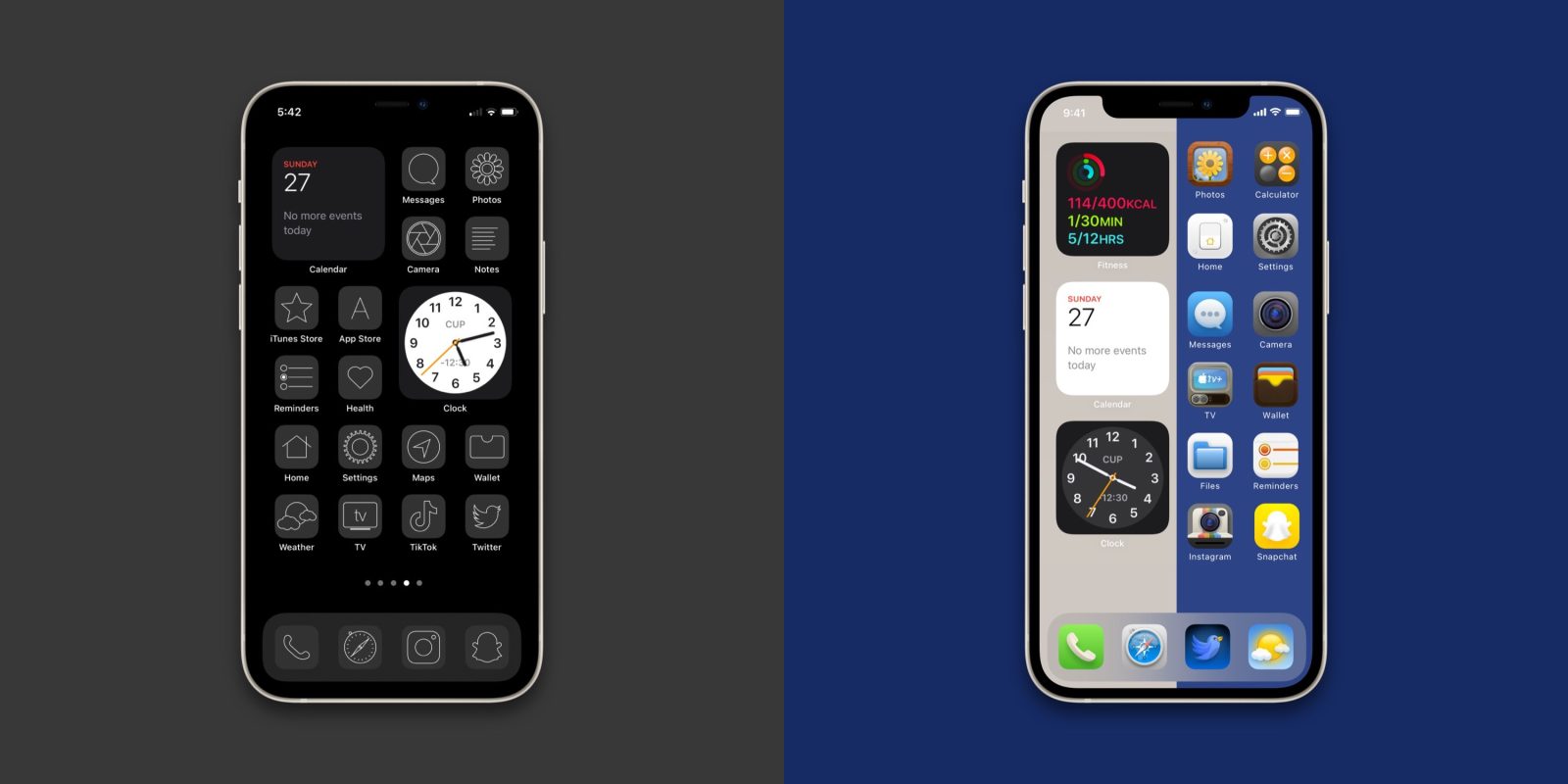
[Update: New with iOS 14.3] How to give your iOS 14 home screen a custom aesthetic with unique app icons

How to create custom iOS 14 aesthetic iPhone walkthrough

iOS 14’s most popular feature has quickly become the all-new widgets that can give your iPhone a personalized touch. However, going further than that, custom iOS 14 aesthetics have become a huge trend. We’ve already covered how to create ultra-customized widgets with Widgetsmith. The other big part is making your app icons tie everything together. Follow along for how to make an iOS 14 aesthetic with custom app icons.

Expand Expanding Close

Video details ARM Windows virtualization on M1 Macs, nearly 2x faster performance than Surface Pro X

Windows on M1 Macs: ARM virtualization

Last week we saw the first successful virtualization of ARM Windows 10 on an M1 Mac. The good news is that it even appeared to be “pretty snappy.” Now we’ve got a look at a helpful walkthrough and peek at real-world performance in a new video, including the M1 Mac mini blowing away Microsoft’s Surface Pro X.

Read more