MacBook

See All Stories

Light. Years ahead.

Check out our top stories on MacBook:

Originally released April 10, 2015 and last refreshed April 19, 2016, the all-new MacBook ($1,299 and up from the Apple Store) is the thinnest and lightest Mac laptop ever made. It’s also the first MacBook to be offered in four color options: classic silver, space gray, gold and rose gold.

Currently offered only with a 12″ screen, it represents the future of Apple laptops. Following a refresh in April 2016, it now includes a 2304×1440 (226ppi) Retina display, 8GB of RAM and up to 512GB of SSD storage, coupled with ultra-low-power Intel Core M processors. The base model includes a 1.1GHz dual-core Intel Core M chip with an Intel HD Graphics 515 GPU; and upgraded models offer to 1.2GHz dual-core Intel Core m5 or 1.3GHz dual-core Intel Core m7 processor with Turbo Boost up to 3.1GHz.

With a redesigned chassis that’s only slightly wider than the keyboard, the new MacBook’s 0.14″–0.52″ thickness was achieved in part by dropping all external connectivity ports save for a 3.5mm headphone port and a new reversible USB-C port, which can be used for power, data connectivity, and video output. Most of the MacBook’s connectivity is handled wirelessly with 802.11ac and Bluetooth 4 support. It promises 9-10 hours of battery life depending on how the computer is being used.

A redesigned Force Touch trackpad now can sense multiple levels of pressure rather than just one, using four pressure sensors and a haptic feedback pad to replicate the clickiness of a traditional trackpad. Additionally, the keyboard has been completely redesigned to retain the expected clicks, precision, and travel of conventional keys, while cutting their depth and width to fit the chassis. An ultra-thin top lid has only enough depth for a 640×480 FaceTime camera, a compromise for the smaller size.

Just like the first-generation MacBook Air, the new MacBook is aimed at users whose computing needs don’t demand incredible horsepower, yet benefit from a slim, light chassis with a really nice screen. Though you’ll do better in raw dollar terms and power by buying a comparably priced 13″ Retina MacBook Pro, you’ll have nearly twice the weight to carry around (2.03 pounds versus 3.48 pounds) and a larger footprint to manage. The choice of which is best for your needs will be highly personal.

Current Lineup:

  • MacBook (12-inch, Early 2016)

Related Guides:


Review: Logitech Ultrathin iPad Keyboard Cover will kickstart your transition from consumption to creation

The one standout feature of the Microsoft Surface Tablet in our eyes was the keyboard cover. But is it that great? No one outside Redmond knows because Microsoft did not let anyone touch it at the press event.

But, if you can handle a paltry extra 4mm of thickness with the addition of real keys, an iPad aluminum-matched protective cover, and a built in stand, Logitech already has Microsoft beat in my eyes.

Enter the $99 Logitech Ultrathin iPad Keyboard Cover for iPad 2 and the new iPad. It uses the same magnets as Apple’s “smart” accessories to clip on and activate the iPad, but it is a rigid enclosure that matches the back of the iPad and turns it into the proverbial Apple netbook. It offers screen protection, but the back and sides are not protected.› So, you will not want to drop test this setup.

[youtube=http://www.youtube.com/watch?v=zsIJUiTlrGI]

This is not just a repurposed PC/Mac keyboard either. It has dedicated iPad keys across the top including the very useful home button, volume keys, editing keys, and play/pause.

I have been using it since it unveiled two months ago. Here is my take:


Expand
Expanding
Close

Modbook Pro: Pen-based OS X tablet returns as a converted 13-inch MacBook Pro running Mountain Lion

Site default logo image

Almost three years before Apple launched the original iPad in 2010, a company by the name of Axiotron unveiled the first “Mac tablet” with the launch of the Modbook—a stylus-based tablet running OS X that is made from a converted MacBook Pro. Today, the Modbook is officially returning thanks to one of its original developers and designers. Former co-founder of the now-defunct Axiotron, Andreas Haas, and his new company LA-based Modbook Inc., today announced the new Modbook Pro- “the world’s most powerful and largest-screen tablet computer.”

Like past generations of the Modbook, the Modbook Pro uses the guts of one of Apple’s new MacBook Pros. The company will offer two configurations, both with a 13.3-inch, 1,280-by-800 flush-mounted display, based off the specs for the recently refreshed non-Retina MBPs running Mountain Lion:

The Modbook Pro’s configurable base system includes a 2.5GHz dual core Intel® Core™ i5 processor or 2.9GHz dual core Intel Core i7 processor, up to 16GB of RAM, a 2.5–inch SATA drive (up to 1TB HDD or up to 960GB SSD), an 8X SuperDrive® DVD burner, an Intel HD Graphics 4000 chipset, 802.11n Wi-Fi and Bluetooth 4.0 wireless connectivity capability

The company is promising seven hours on a full charge from a built-in 63.5-watt-hour lithium-polymer battery (Modbook will also utilize a 60W MagSafe adapter). As for the digitizer and included stylus, Modbook will once again use Wacom tech:


Expand
Expanding
Close

Retina MacBook Pros run three external displays, refreshed Airs get dual external display support

Site default logo image

Picture by Gabor Cselle

While Apple already recognized in its support documents for Thunderbolt that the new Retina MacBook Pro supports up to three external displays (as pictured above from Other World Computing’s recent tests of the setup), it has yet to confirm official support for the refreshed Ivy Bridge MacBook Airs. Today, we get word that the new MacBook Airs indeed support two external Thunderbolt displays thanks to the recent “Mac OS X Lion Update (Mid-2012 MacBook Air)” update that “improves external display support.” Apple has not updated the device’s specs page to reflect support for dual external Thunderbolt monitors.

The image below from OWC shows two iMacs running at 2,560-by-1,440 as Thunderbolt displays, and it shows an LG monitor at 1,920-by-1,200 via HDMI. The post noted “moving images and media didn’t create any lag and we were able to play video on all four displays simultaneously.” This makes the new MacBooks the first to support up to four displays at their native resolution. Note: You could theoretically add even more space with AOC DisplayLink displays.

The refreshed MacBook Air with dual external Thunderbolt displays is pictured above, while the MacBook Pro with three displays is below:

Expand
Expanding
Close

Site default logo image

iFixit tears down the refreshed MacBook Pro, compares repairability to Retina MBP

Since the introduction of Apple’s refreshed Mac lineup earlier this month, iFixit has torn apart the new machines one at a time starting with the new 13-inch MacBook Air, then the Retina MacBook Pro, and finally the Retina display itself (which it later confirmed is made by Philips). Today, it is venturing inside the refreshed MacBook Pro and comparing it to the Retina model:

As for the tear down itself, iFixit found the refreshed MacBook Pro lineup, which has the same overall design and is largely unchanged on the inside too. More interesting is how the Retina MBP (1/10 repairability score) and refreshed last-gen MBP (7/10 repairability score) compare:

The regular MacBook Pro is always cited first, compared to the MacBook Pro with Retina Display:

* Use of regular vs. proprietary screws. This is a no-brainer in our books — there’s absolutely no benefit from using a proprietary pentalobe screw type in any electronic device, aside from keeping users out of it.

* The battery is exactly the same capacity as last year’s model: 77.5 Wh at 10.95 V. It’s the same size as well, a solid 13.8 mm in thickness. The MacBook Pro with Retina Display’s battery varies in thickness from 5.25 mm to 8.60 mm depending on which cell you measure, and it has a plastic frame around some of the cells. Although the discrepancy is large between the two battery thicknesses, the Retina MacBook Pro’s battery (seen here http://bit.ly/retina_battery) is spread out over a much larger surface area. It would’ve taken some engineering, but Apple could expand the frame in the Retina MacBook Pro to encompass the whole battery, and allow it to come out as a singular, non-glued unit.

* Here’s a big difference: the regular MacBook Pro 2.5″ SATA hard drive is 9.45 mm thick, compared to 3.16 mm for the SSD found in the Retina Display MacBook Pro. But the SSD is one of the few things that is actually removable from the Retina version, and Apple *could* use a non-proprietary mSATA connector so folks could replace the drive with an off-the-shelf unit.

* While the individual RAM modules are thin (~3.15 mm), the “stacked” RAM slots in the regular MacBook Pro are a whopping 9.15 mm thick. Yet the entire Retina MacBook Pro is only 18 mm thick, and allocating half of that dimension to RAM slots would be a big sacrifice. But, an individual RAM slot is only 4.27 mm thick; if the design of the logic board featured the RAM slots side by side (like older MacBooks), folks could still replace their RAM for years to come.

* While the regular MacBook Pro display may not be Retinalicious, a cracked LCD will still be the most expensive repair (aside from the logic board) on this machine. Thankfully, users can replace just the LCD instead of the entire assembly. Incorporating a removable LCD into the MacBook Pro with Retina display would increase the thickness by less than a millimeter, while still preserving the awesome Retina resolution.

* We love the optical drive in the regular MacBook Pro because we appreciate the additional space given by adding a second hard drive (using one of our SATA enclosures: http://bit.ly/sata_enclosure). A significant portion of the weight savings in the Retina MacBook Pro comes from Apple’s removal of the optical drive. While the lack of an optical drive won’t be major imposition for many, the inability to inexpensively add a secondary, high capacity spinning drive is definitely a significant loss in terms of upgradability.

iFixit: MacBook Pro’s amazing Retina Display is made by LG Philips

Site default logo image

[Image credit: iFixit]

We covered iFixit’s Retina Display teardown this morning, but the report left out one very important detail: Who makes the display? There had been some discussion by DisplayMate’s Raymond Soneira on whether Sharp’s IGZO display technology was used:

An IGZO Retina Display? Traditional high PPI displays (with amorphous Silicon) are inefficient with both brightness and power. As a result, the new iPad 3 with a Retina Display needs a 70 percent larger battery than the non-Retina Display iPad 2, but the MacBook Pro with Retina Display has only a 23 percent larger battery with the same 7 hour running time as the non-Retina Display MacBook Pro. How can this be? You may recall that IGZO technology has been making headlines for months, first rumored to be the technology used in the Retina Display for the new iPad 3. IGZO is significantly more efficient than amorphous Silicon. It wasn’t ready in time for the new iPad 3, but Sharp announced that production of IGZO LCDs with up to 300 PPI started in March of 2012… Just in time for the MacBook Pro… These facts lead me to speculate that the MacBook Pro is using a Sharp IGZO Retina Display…

Apple, Sharp, and Foxconn are rumored to be working together on something bigger as well.

Nope…
Expand
Expanding
Close

iFixit tears down the new MacBook Pro’s Retina display, an ‘engineering marvel’

Site default logo image

They first took apart the new Retina MacBook Pro and called it the “least repairable laptop” ever, but today our friends at iFixit took apart the device’s most impressive new component: its Retina Display. Here is what they found:

The Retina display is an engineering marvel. Its LCD is essentially the entire display assembly. Rather than sandwich an LCD panel between a back case and a piece of glass in front, Apple used the aluminum case itself as the frame for the LCD panel and used the LCD as the front glass. They’ve managed to pack five times as many pixels as the last model in a display that’s actually a fraction of a millimeter thinner. And since there’s no front glass, glare is much less of an issue.

The major downside to the design noted in the report: the LCD is not replaceable. It is attached to the entire assembly, so this means you will likely have to replace the entire assembly if something goes wrong. It also noted that getting into the display is quite difficult, claiming, “Obliterating the front panel of the display was the only way to get it out.” Some highlights:


Expand
Expanding
Close

Retina MacBook Pros selling on eBay for $1700 premium over retail due to scarcity

Site default logo image

The new 15.4-inch MacBook Pro with Retina display is either out of stock, coming soon, on pre-order, or experiencing delayed shipping on almost every retail website, but it appears one seller is offering the latest Cupertino notebook on eBay—for roughly $1,700 more than Apple’s asking price.

Check it out: Apple MacBook Pro 15.4-inch MC975LL/A (June, 2012) with Retina Display

The above eBay deal comes with same day, free shipping and includes insurance (if this is even considered a deal). Another eBay listing offers the base model MacBook Pro for $3,199 USD, but another $95.80 USD is required for USPS priority shipping from Canada.

It is probably safe to say these puppies are in high demand, as evident by the exorbitant price markups.

Expand
Expanding
Close

Site default logo image

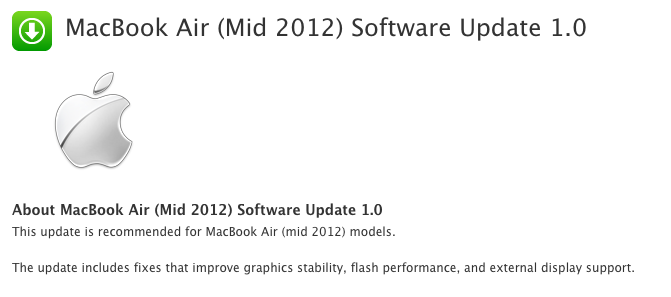
Apple releases Software Update 1.0 for new MacBook Air

Apple just released an update (link) for the newly launched MacBook Air.

Software update 1.0 weighs 1.06GB and fixes several issues, including: graphics stability, flash performance, and external display support. The tweak accompanies more recent updates for the new MacBook Pro and MacBook Pro with Retina display, which unveiled earlier this week at Apple’s Worldwide Developers Conference.


Expand
Expanding
Close

Giant Retina MacBook Pro window display goes up at Apple Store

Site default logo image

Apple has created oversized window displays in the past following its latest product launches, including the iPhone 4S, and we snapped some photos today of the new Retina MacBook Pro signage.


Expand
Expanding
Close

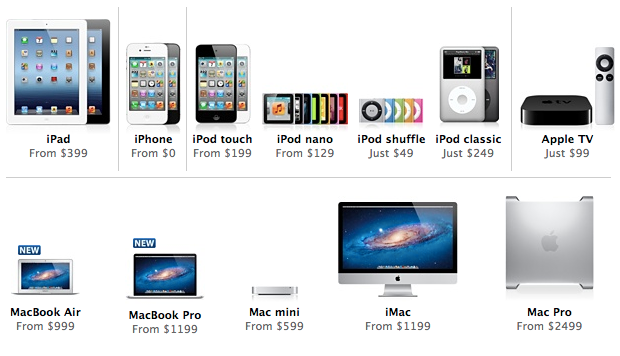
Apple rescinds: New Mac Pro is no longer ‘new’

Site default logo image

Apple’s website listed the refreshed Mac Pro as “new” after the opening keynote at the Worldwide Developers Conference yesterday, but complaints from critics, including an ex-Apple engineer, likely spurred the company to remove the alerting icon.

Former Apple engineer and current Google employee Andy Hertzfeld expressed his disappointment in the new Mac Pro through a Google+ post this morning. He said the high-end desktop “seems like it’s stuck in time in 2010” and only received an “inconsequential processor clock bump.”

Apple unveiled an all-new MacBook Air and Pro lineup during its keynote, but the company did not announce any updates to its Mac Pro. The blogosphere jumped online to gobble up the notebooks, where they finally discovered the Mac Pro’s minor spec-bump listed under the familiar “new” notation. Since then, the Cupertino, Calif.-based Company has been under-fire for displaying the machinery as new when it only boasts a few slight changes.


Expand
Expanding
Close

New MacBook Pro’s Retina display reviewed and benchmarked

Site default logo image

After posting initial benchmark data yesterday for the new Retina MacBook Pro’s SSD and USB 3.0, AnandTech published a longer analysis today about the notebook’s display. The report first took a closer look at the new resolution preferences for Retina MBP users and described the advantages of the different scaling options displayed in the gallery above:

Retina Display MBP owners now get a slider under OS X’s Display Preferences that allow you to specify desktop resolutions other than 1440 x 900. At 1440 x 900 you don’t get any increase in usable desktop resolution compared to a standard 15-inch MacBook Pro, but everything is ridiculously crisp… Even at the non-integer scaled 1680 x 1050 setting, the Retina Display looks a lot better than last year’s high-res panel. It looks like Apple actually renders the screen at twice the selected resolution before scaling it to fit the 2880 x 1800 panel (in other words, at 1920 x 1200 Apple is rendering everything at 3840 x 2400 (!) before scaling… Everything just looks better.

As illustrated in the images above showing benchmark data, the review found greatly improved viewing angles, black levels, and contrast when compared to the previous generation high-res MacBook Pro model. AnandTech then looked at Apple’s claims that the new MacBook Pro display reduces glare by 75 percent from previous generations:


Expand
Expanding
Close

Site default logo image

iFixit delves inside refreshed 13-inch MacBook Air [Photos]

iFixit is hardcore when it comes to breaking open our favorite electronics to see what’s inside, and the website did it again today with the refreshed MacBook Air that unveiled at the Worldwide Developers Conference yesterday.

The updated 13-inch MacBook Air, equipped with USB 3.0 and MagSafe 2, sports a few new sizes for those pentalobe screws on the back. It also houses the same battery found in the preceding MacBook Air. Moreover, at first sight, its 128 GB SSD looks strikingly similar to the mid-2011 module:

“But upon closer inspection, the connector for this model’s flash memory module is slightly different than last year!”

The adjusted SSD form factor also shifted to a fresh flash controller. The current unit is SandForce SATA-III controller chip-based, but displays Toshiba marks. The tweaked notebook further boasts Intel Ivy Bridge Core i5 processor, Intel HD Graphics 4000, 128 GB flash memory, 4 GB 1600 MHz DDR3L RAM, and Broadcom BCM 943224. iFixit said, again, that the wireless board is identical to the mid-2011 flavor, but this one carries rotated stickers (sarcasm intended).

Lastly, the RAM is still not upgradeable. Oh, and that MagSafe 2 connector is thinner and wider, and it is not compatible with Apple’s current Cinema displays unless paired with its $10 adapter.

Go to iFixit for the entire teardown.  


Expand
Expanding
Close

Site default logo image

Andy Hertzfeld: The only thing that’s still high-end about [Mac Pro] is the bloated price

[tweet https://twitter.com/9to5mac/status/212275242318561281]

Update: MacRumors received a tip from a reader who claimed Apple’s CEO Tim Cook responded to his email to confirm new Mac Pros are coming next year. We received a tip last year detailing a similar email exchange between a Pro customer and the late chief Steve Jobs. Cook’s response to the reader is below:

Our pro customers are really important to us…don’t worry as we’re working on something really great for later next year.

We were not too shocked when Apple quietly updated its Mac Pro lineup following its WWDC keynote yesterday. We had previously revealed the spec-bumped Mac Pros, but many were skeptical Apple would release such a minor refresh for the product that otherwise had not received an update in two years.

Was it really an upgrade, or did Intel simply run out of the older CPUs? USB 2 and no Thunderbolt seem like a bad joke to high-end Mac Pro users.

Not surprisingly, many are calling out Apple for its decision to not release a major refresh to the Mac Pros. Perhaps most notably is former Apple engineer and current Google employee Andy Hertzfeld. In a Google+ post, Hertzfeld congratulated Apple on its new Retina MacBook, while expressing disappointment in the new Mac Pros:

The next generation MacBook Pro announced today at WWDC looks fantastic. I ordered one immediately and can’t wait to start using it. Unfortunately, the euphoria was negated by my deep disappointment with the meagre, lame update that was silently bequeathed to the Mac Pro today… The specs for the “new” Mac Pro had hardly changed, except for a tiny, inconsequential processor clock bump. Still no Thunderbolt, still no USB 3.0, no SATA III or RAM speed improvements – it seems like it’s stuck in time in 2010. The only thing that’s still high-end about it is the bloated price… Even though I’m well aware that Apple’s future lies increasingly with mobile iOS-based devices, it still makes no sense to drop the ball on your high end desktop Mac so thoroughly, and to utterly disappoint your most loyal customers like yours truly.

As for complete refreshes for the iMac and Mac Pro lineups, David Pogue for the New York Times claimed an Apple executive confirmed they are in development and likely set for a 2013 release:

Many Apple observers also wonder if Apple thinks that desktop computers are dead, since not a word was said about the iMac and Mac Pro. An executive did assure me, however, that new models and new designs are under way, probably for release in 2013

New MacBook Pro with Retina display shipping in ‘2-3 weeks’ [Video + Photos]

Site default logo image

[youtube=http://www.youtube.com/watch?v=zQaN8IC_rSY&feature=youtu.be]

Update: Apple’s website is now listing the Retina MacBook Pros as available in “3-4 weeks”.

Apple’s updated MacBook Pro with Retina display made a huge splash at yesterday’s opening keynote for the Worldwide Developers Conference, but droves of Mac-lovers will have to wait a few weeks before they can get their eager paws on one of these divine notebooks.

Senior Vice President of Worldwide Marketing Phil Schiller noted the super-high resolution MacBook Pro would ship immediately while on stage at WWDC, but those taking a peak at Apple’s online store today will find a “2-3 weeks” shipping notice listed under the 15-inch Retina-optimized computers

The delay in shipping is likely due to high demand, but CNET pondered the alternative reasons:

It’s not immediately clear if the delay is due to miscommunication, a shipping snag, or simply that the first batch has sold out. In previous Apple launches, the company has promised a particular shipping time, only to find that the first group of units sell out, forcing it to modify the timetable for future orders.


Expand
Expanding
Close

Site default logo image

Benchmarks for SSDs and USB 3.0 performance in new MacBooks

Even before Apple’s unveiling of the all-new Retina MacBook Pros, refreshed previous-generation MacBook Pros, and MacBook Air lineups today, we knew most of Apple’s new Macs would receive performance improvements courtesy of new SSDs and USB 3.0. We are now getting our first look at benchmark data for the two new features—thanks to a Retina MacBook review unit benchmarked by AnandTech.

As for SSDs, we told you before that the new MacBook family would probably receive Samsung’s speedy 830 series. AnandTech’s report seems to narrow down the 830 series as the most likely scenario noting his review unit appears to be running a Samsung drive approaching read speed of 500MB/s, and writes close to 400MB/s:

The same updated SSD is present across all of Apple’s lineup: from the MacBook Air to the next-gen MacBook Pro. Based on the model number in Apple’s System Report I’d guess my review sample features a Samsung based drive… I ran a few tests using Quick Bench to validate Apple’s claims. In general it looks like read speed approaches 500MB/s, while sequential writes are closer to 400MB/s

When it comes to initial benchmarks for USB 3.0 performance, the chart to the right speaks for itself by showing a remarkable jump in performance over USB 2.0 on the early 2011 MacBook Pro:

USB 3.0 performance is much improved over the previous generation MacBook Pro. I used an Apricorn SATA to USB 3.0 adapter to measure copy time to/from a 512GB OCZ Vertex 4 SSD. The performance gap between USB 2.0 and 3.0 is nothing short of significant.

Site default logo image

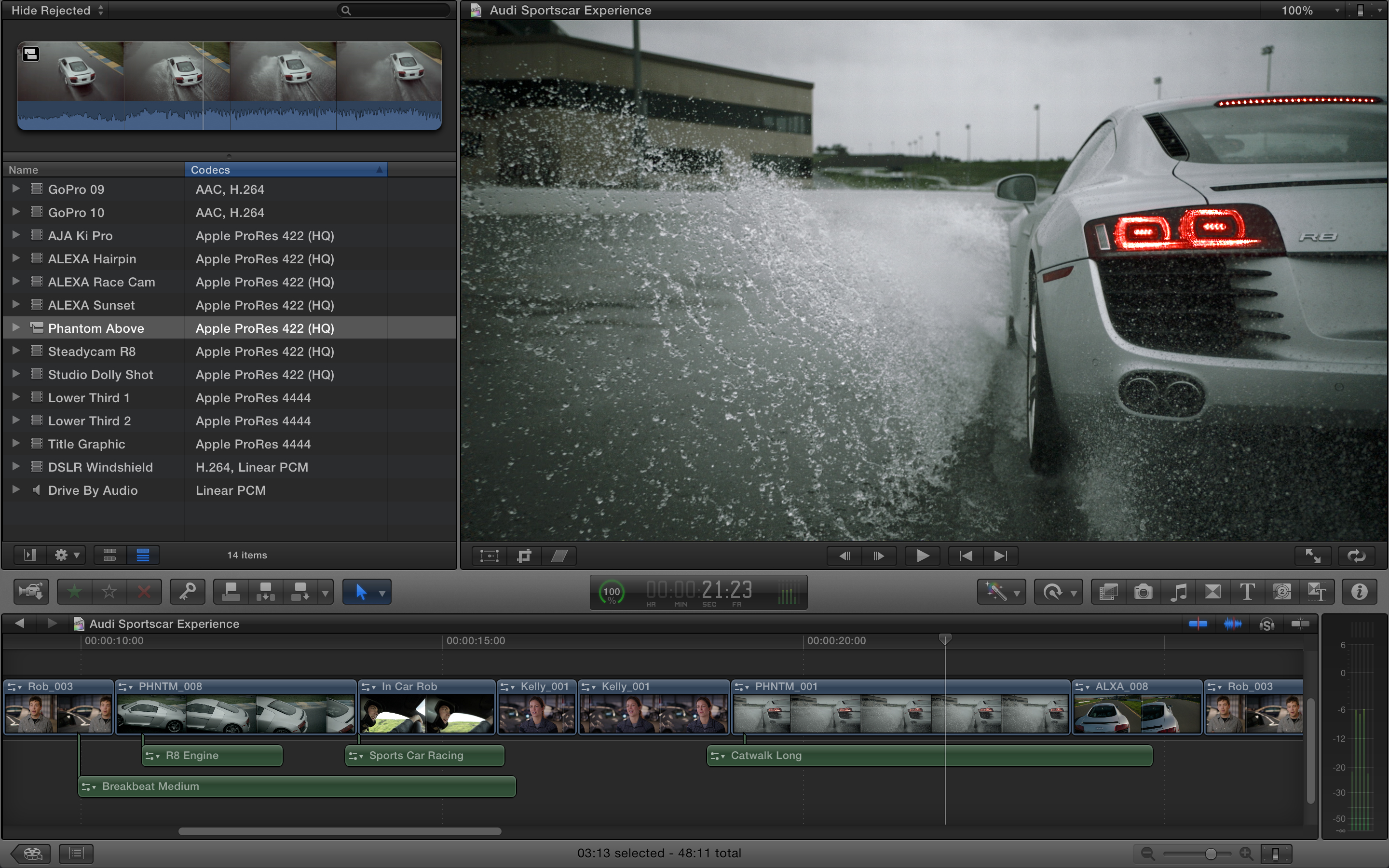
Apple updates Final Cut Pro, Aperture, and iPhoto with enhancements for Retina MacBooks

Click image for Retina display resolution

Several of Apple’s popular Mac apps received updates today after the opening keynote at the Worldwide Developers Conference. Many of the updates help apps take full advantage of the new 15-inch Retina MacBook Pro’s display. The details for Final Cut Pro, Aperture, and iPhoto are below.

Final Cut Pro: Final Cut Pro received a small update today that included enhancements for the MacBook Pro’s Retina display and improvements to overall stability. Version 10.0.5 of Final Cut Pro is available from the Mac App Store now.

iPhoto: Version 9.3 of iPhoto was released on the Mac App Store today with a number of new features and improvements, including: iPhoto libraries are now accessible in Aperture 3.3, support for AVCHD video, and new Export options that auto-organize images into event subfolders.

Aperture: The biggest update of all apps today is version 3.3 of Aperture. Other than being “fully optimized for the Retina display on the new MacBook Pro,” the update includes the following new features and fixes:

What’s New in Version 3.3

• New unified photo library for both iPhoto (v 9.3 or later) and Aperture; no import/export required; Faces, Places, slideshows, albums and web sharing work across both applications
•Support for AVCHD video has been added
• Aperture now lets you use camera-generated previews for faster browsing of RAW files immediately after import
• Highlights & Shadows tool has been updated to deliver higher-quality results and work with extended range data
• A new Auto Enhance button has been added to the Adjustments panel
• White Balance tool now includes Skin Tone and Natural Gray modes to simplify color balance
• Auto button has been added to the White Balance tool for one-click color balancing
• Set Desktop command has been added to Share menu so you can set a desktop background from within Aperture
• A new Manual option allows you to drag and drop projects to customize sort order in the Projects view
• New preference allows you to set the background brightness of the full screen browser
• Facebook, Flickr, and MobileMe albums are now displayed as thumbnails in the main window when accounts are selected in the source list
• Minor terminology changes, including “Original” instead of “Master” and “Info” instead of “Metadata”
• Source list includes a new “Recent” section, showing Last Import and recently-viewed projects
•Raw Fine Tuning is no longer displayed in the Adjustments panel by default
• Faces can now be named by dragging them from the Unnamed Faces browser to existing snapshots on the corkboard
• The Faces corkboard now includes a menu that allows you to set the order of face snapshots
• Newly designed monochrome source list and toolbar icons
• Addresses numerous issues related to overall performance and stability

WWDC: Apple unveils the refreshed MacBook Air lineup, shipping today

Site default logo image

Apple just unveiled a refreshed MacBook Air lineup while on stage at its Worldwide Developers Conference keynote. Much of the information matches what we previously revealed: the lineup of refreshed Airs will receive Ivy Bridge processors up to the 2.0GHz dual core i7, USB 3.0, up to 8GB of RAM, and “60 percent faster graphics” with the Intel HD Graphics 4000. The new MacBook Airs ship starting today.

The new 11-inch MacBook Air: There will be two variants of the 11-inch Airs. Both will sport a 1.7GHz dual-core i5 and 4GB of RAM. The $999 entry model will get you 64GB of storage, but an extra $100 will upgrade you to the 125GB option. Aside from this, the two models appear to be identical.

The new 13-inch MacBook Air: The new 13-inch MacBook Air will start at the same $1,199 price point and come with a 1.8GHz dual-core i5, 4GB of RAM, and 128GB of onboard storage. The $1,499 price tag will get you the 265GB storage option.

Stay tuned to our live blog for the latest updates.

New Mac spec sheet leaks out, WWDC launch pricing and naming included

Site default logo image

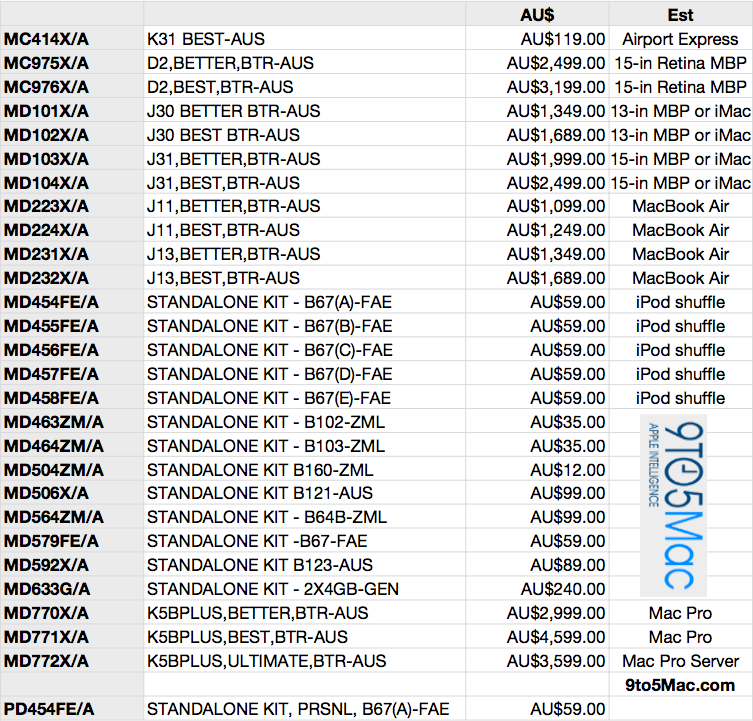
The image above represents the full pricing matrix for new devices expected to unveil in a few days at the Worldwide Developers Conference. You will notice the Mac Pros, Retina MacBook Pros, MacBook Airs, and iMacs that we discussed before at length.

We have more notes on the unlabeled parts below—including the newly identified RAM update:
Expand
Expanding
Close

MacUpdate Bundle: Parallels 7, BusyCal, Screenflow, Civ V, lots more, 11 Mac Apps: $49.99

Site default logo image

From 9to5Toys.com:

[youtube=https://www.youtube.com/watch?v=pdv0A5J0vy0]

MacUpdate has one of the better bundles we’ve seen on a wide-ranging set of Mac software. If you are like us and getting a new MacBook next week, you can load it up with software: You are getting a solid deal with the Parallels 7 headliner ($30 off retail), but then you get some great apps up and down the lineup basically for free including:

1) Parallels Desktop 7 ($79.99)
2) BusyCal ($49.99) (first 10,000 bundles)
3) ScreenFlow 3 ($99.00)
4) Civilization V ($39.99) Gods & Kings expansion pack for just $20
5) Jaksta ($49.95)
6) Espionage 3 ($19.99)
7) Attachment Tamer 3 ($14.99)
8) Speed Download 5 ($25.00)
9) KeyCue 6 ($28)
10) A Better Finder Rename 9 ($19.95)
11) My Living Desktop 5 ($29.95)

The total value is $456.80 — MacUpdate is $49.99, as always.

Full release follows:


Expand
Expanding
Close

After nearly two years without an update, Apple to finally revamp Mac Pro next week

Site default logo image

Yesterday, we reported that Apple has an incredible WWDC surprise: major updates to four of its Mac lines. We were able to affirm that three of these updates would cover the redesigned MacBook Pro with a Retina Display, refreshed 11-inch and 13-inch MacBook Airs, and new iMacs in two screen sizes. Besides those three Mac lines updates, we were unsure if the either the Mac mini or the Mac Pro would make it as the fourth update. We speculated that it could be the Mac mini due to the newly available Ivy Bridge processors, but now, reliable sources are reporting that Apple will, in fact, unveil a new Mac Pro at WWDC next week.

Sources have also been able to provide some part numbers and prices to prove this:

MD770LL/A – K5BPLUS,BETTER, BTR-USA

MD771LL/A – K5BPLUS,BEST,BTR-USA

MD772LL/A – K5BPLUS,ULTIMATE,BTR-USA

The pricing is similar to current Mac Pro models. What’s interesting here is that we’ve seen updates to every other line of Macs that Apple carries….except one…The Mac Mini.

Our sources are currently unsure of the feature-set coming with the new Mac Pro, but these sources say that there will likely now be three configurations. Two standard versions of the Mac Pro and a third version with OS X Server capabilities. In early 2011, we reported on some of the work that Apple engineers had been prototyping up for a future version of Apple’s Pro desktop line. For that report, sources said that Apple had been experimenting with a new Mac Pro design that is rackable and stackable. These prototype machines also included space for more storage drives, an important feature now that the Xserve has been long discontinued. With a year having passed since we heard about these prototype Mac Pros and the ability of Thunderbolt to offload a lot of the expandability, the final new Mac Pro designs could be different than the current designs but we haven’t yet heard definitively either way.

MacRumors reported that Apple has begun pulling Mac Pro stock from some of its retail stores. We’ve heard the same from tipsters, left.

With Apple adding the super-fast USB 3.0 technology to its next-generation MacBook Pro, and with Apple’s latest Macs including the even faster Thunderbolt I/O technology, Apple will likely add these faster connection ports to their latest Pro desktop. Since the Mac Pro is Apple’s most high-end machine for professional workers of all types, the most important features are the internals. Earlier this year, Intel released a series of Xeon E5 chips that would seem like a lock for a new Mac Pro. These new Mac Pros will likely also likely feature the latest graphics chips.

Apple last updated the Mac Pro in July 2010, making this upcoming update significant. It is unclear why Apple had left the Mac Pro in its 2010 form for so long, but a reader email from 2011 might explain that. According to the Apple executive who replied to a 9to5Mac reader inquiring about the Mac Pro’s status, Apple had been “investing heavily” in the professional desktop computer. We are unsure what investing heavily will mean for the final product, but it should surely be an incredible update over the nearly two year old model.

The Mac Pro’s demise: greatly exaggerated, indeed.
Expand
Expanding
Close

Decidedly un-exciting new 13-inch MacBook Pro spec sheet leaks?

Site default logo image

.

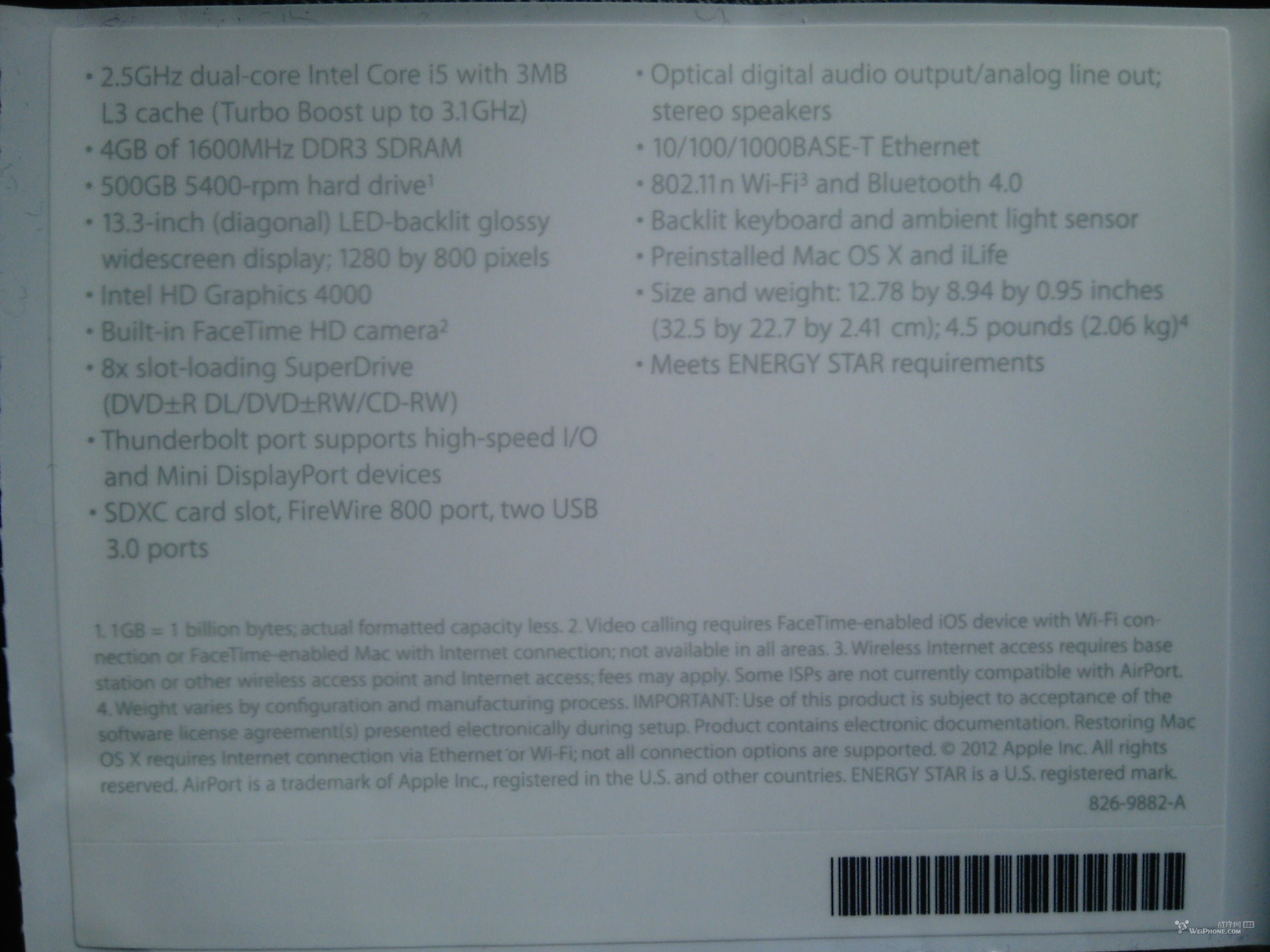
Weiphone forum member shows a purported new MacBook Pro spec sheet ripped right from a unit. The notables are Intel HD 4000 video, USB 3.0, and a faster 1600MHz DDR3 RAM.

Perhaps more notable is the same .95-inch thickness (in fact it has the exact same dimensions as the current 13-inch MacBook Pro), optical drive, and sad 1,280-by-800 display that is not even as dense as the 2010 13-inch MacBook Air’s display.

This base model (if this is indeed real) is not going to be on our shopping list. Do you know what is?

Update: If this is indeed true, this base model MBP would be running a Intel® Core™ i5-3210M Processor (3M Cache, up to 3.10 GHz),


Expand
Expanding
Close

Matrox goes back to the future with DS-1 Thunderbolt Dock—USB 3.0, DVI, GigE for $249

Site default logo image

.

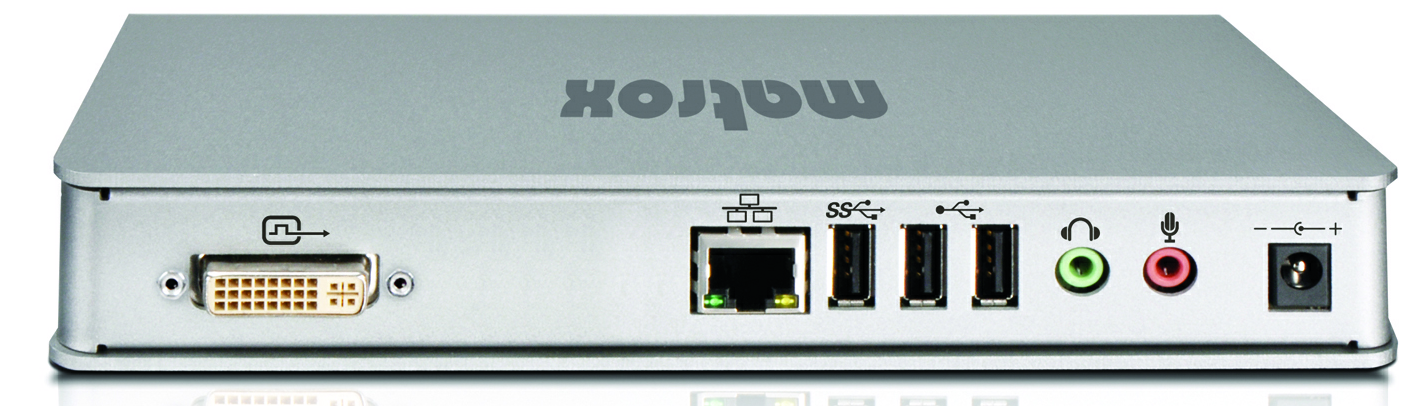
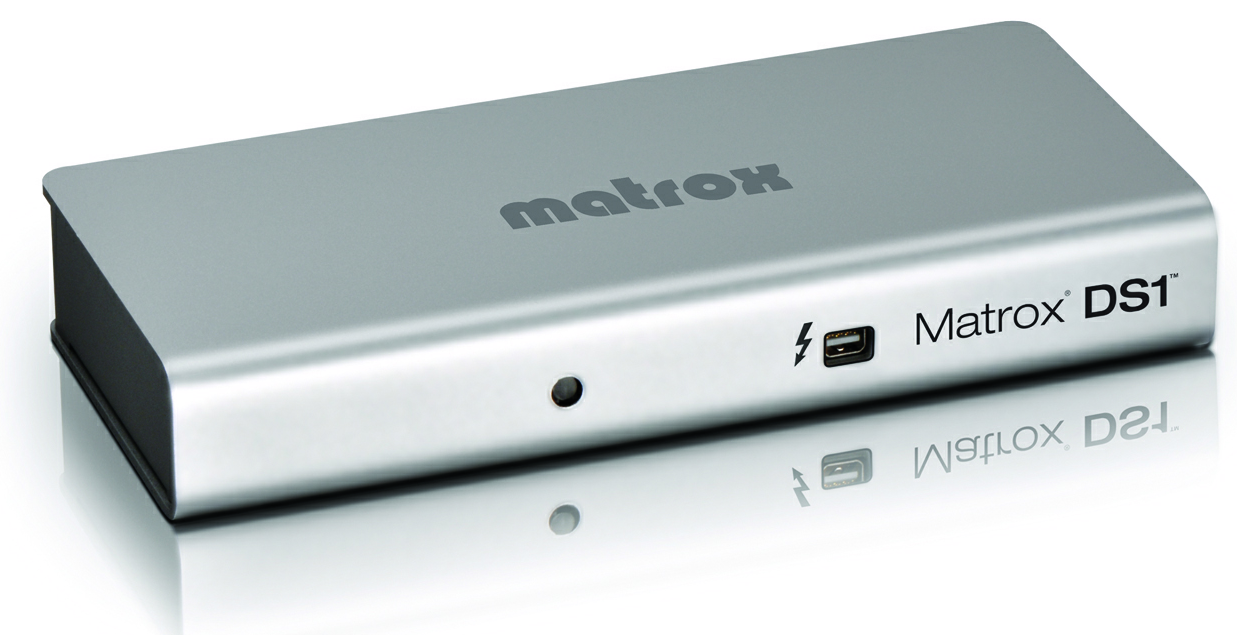
Do you remember all of those ports you used to see on Macs? DVI, Gig Ethernet (har), and separate analog stereo for in and out? Matrox, a company that used to make mad graphics cards and other video devices, is coming to DubDub with a new $249 piece of kit called the “DS-1.” This box brings you all of those old school ports and even throws in a “superspeed” USB 3.0 port, so you can match the speed of the new MacBooks.

Matrox makes a bunch of other highly rated, high-end Thunderbolt breakout boxes that retail for much more. If you are looking for a (relatively) cheap Thunderbolt dock to hide away from sight and hook up to an old DVI monitor, this may be a good pick up. We should have a review unit to play with next week.

The press release follows:
Expand
Expanding
Close

Amazon Trade-In program conveniently now lists MacBook lineup, other laptops

Site default logo image

Amazon’s Trade-In program now accepts laptops and netbooks, which means Mac users are eligible to swap their MacBook Pro, MacBook Air, or MacBook before the upcoming refresh. How convenient—especially with the new MacBooks likely just weeks away from launch!

Starting today, those who are interested can visit www.amazon.com/tradein to search for electronics worth trading-in. After finding the item, click the Trade in button. After the trade-in submission is accepted, Amazon offers free shipping through UPS Ground or U.S. Postal Service to eliminate the headache and cost of the trade-in process. All items have to ship within seven days of submitting the transaction.

The online retailer deposits a Gift Card into the seller’s account after the deal finalizes. Unaccepted trade-ins either will receive a lower Gift Card amount or simply be returned. The return method adheres to the seller’s preference, which is selected upon completing the initial transaction online.

A quick glance through the MacBook price tags reveal an Apple MacBook Pro MD322LL/A 15.4-Inch Laptop (NEWEST VERSION) for a trade-in value up to $1,230, while an Apple MacBook MC516LL/A 13.3-Inch Laptop (OLD VERSION) fetches a trade-in value up to $360. An Apple MacBook Air MC966LL/A 13.3-Inch Laptop (NEWEST VERSION) earns a trade-in value up to $74o. The amount offered per trade-in varies depending on the model and condition.

9to5Mac first reported earlier this month that Apple is prepping a new 15-inch MacBook Pro for this summer that features an ultra-thin design, a “jaw-dropping” Retina Display, and super-fast USB 3. Our sources also indicated the MacBook Retina Display will début at the Worldwide Developers Conference next month, but it will not stay exclusive to Apple’s Pro notebook. The first-class, high-resolution display is also coming to the MacBook Air family.
Expand
Expanding
Close

Site default logo image

WSJ: Analysts now agree we’re going to see new Retina Macs in June

A newly redesigned 15-inch MacBook Pro was all but rumor until we reported earlier this month that Apple indeed has a slimmed down, all-new MacBook Pro sporting a Retina display, Ivy Bridge, and speedy USB 3. We followed that up with a report revealing Apple’s new MacBook Airs and iMacs will both likely include super-high resolution Retina displays. At the time, we reported Apple’s WWDC in June would be expected for at least the unveiling of the new slim MacBook Pro; although, a gradual roll out of Retina iMacs and Airs following the Pros would not be much of a surprise. Apple typically rolls out new Mac features such as higher-res displays gradually.

Following those reports, The Wall Street Journal published a story today quoting analysts who now all seem to agree that we will see upgraded Macs this summer. Ben Reitzes of Barclays Capital claimed the new Retina Mac lineup would debut at WWDC in June:

Reitzes said it is likely the Mac line will feature the retina-display technology used in the iPad, as well as the new Ivy Bridge quad-core processors from Intel Corp. (INTC) He also estimates that Apple’s new operating-system upgrade, called Mountain Lion, and the new MacBook Airs should be on the market before the first Ultrabook laptops with Microsoft Corp.’s (MSFT) Windows 8 operating system hit the shelves in the fall… “We believe recent data reflect a pause ahead of new products, which we believe will be released this quarter in June,” according to Reitzes, who has an overweight rating and $750 target price on Apple’s stock.