MacBook

See All Stories

Light. Years ahead.

Check out our top stories on MacBook:

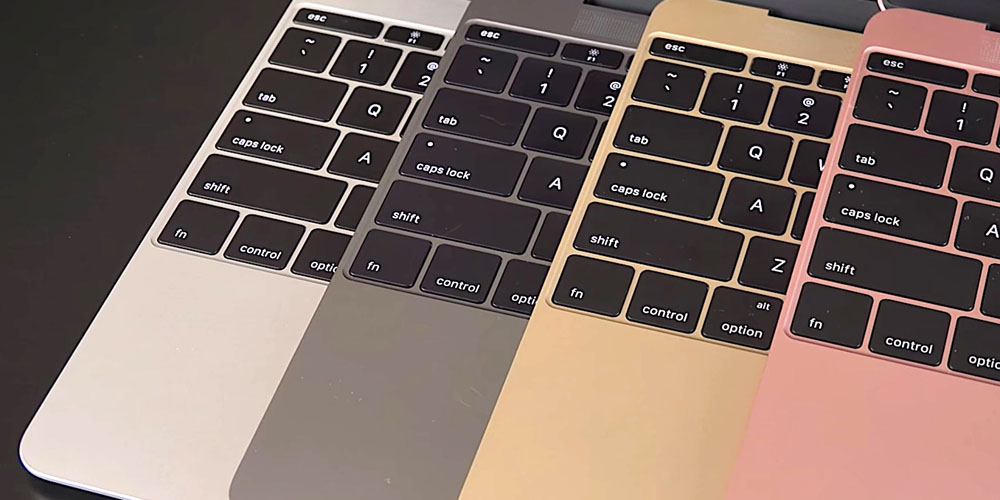
Originally released April 10, 2015 and last refreshed April 19, 2016, the all-new MacBook ($1,299 and up from the Apple Store) is the thinnest and lightest Mac laptop ever made. It’s also the first MacBook to be offered in four color options: classic silver, space gray, gold and rose gold.

Currently offered only with a 12″ screen, it represents the future of Apple laptops. Following a refresh in April 2016, it now includes a 2304×1440 (226ppi) Retina display, 8GB of RAM and up to 512GB of SSD storage, coupled with ultra-low-power Intel Core M processors. The base model includes a 1.1GHz dual-core Intel Core M chip with an Intel HD Graphics 515 GPU; and upgraded models offer to 1.2GHz dual-core Intel Core m5 or 1.3GHz dual-core Intel Core m7 processor with Turbo Boost up to 3.1GHz.

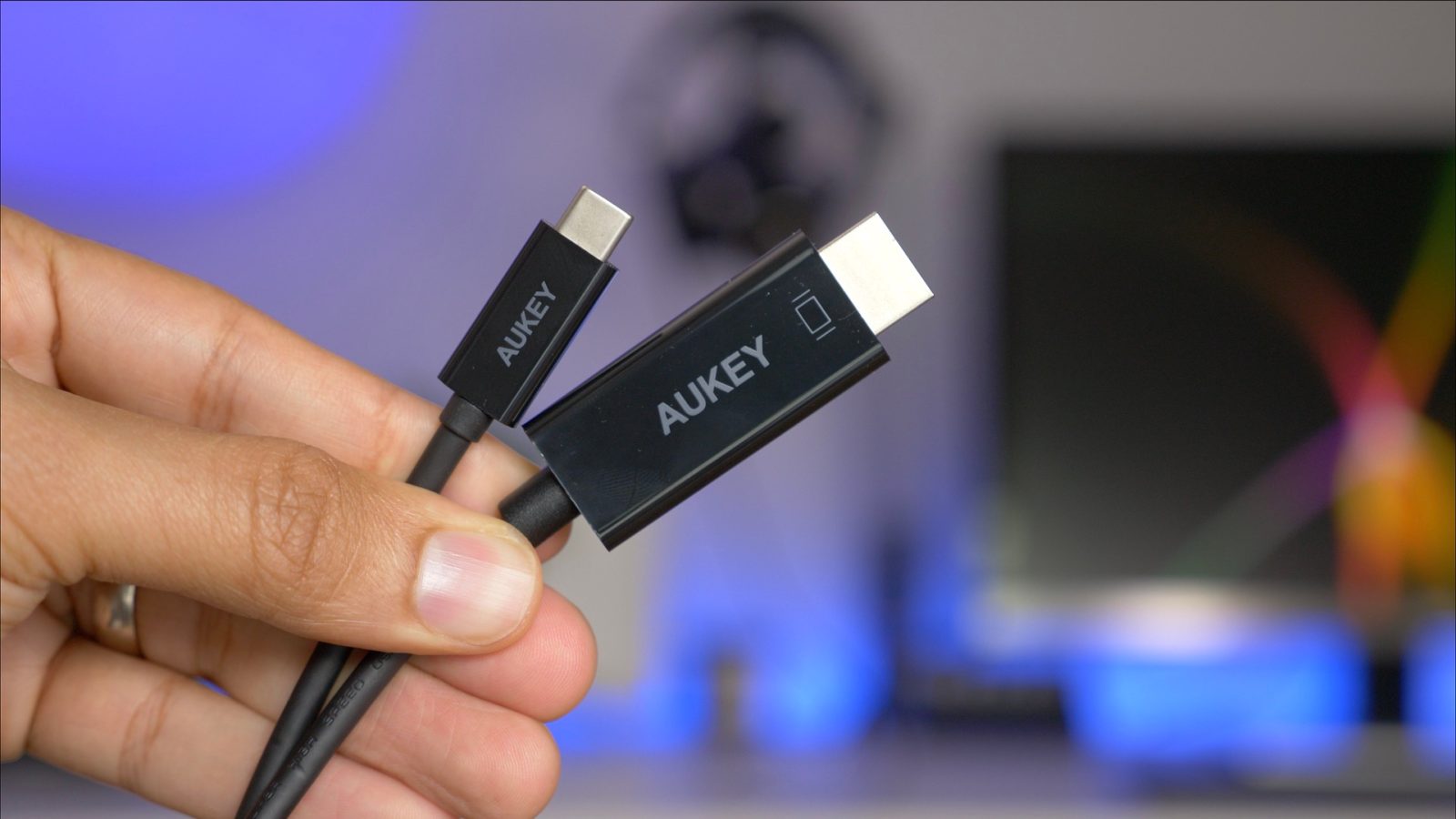
With a redesigned chassis that’s only slightly wider than the keyboard, the new MacBook’s 0.14″–0.52″ thickness was achieved in part by dropping all external connectivity ports save for a 3.5mm headphone port and a new reversible USB-C port, which can be used for power, data connectivity, and video output. Most of the MacBook’s connectivity is handled wirelessly with 802.11ac and Bluetooth 4 support. It promises 9-10 hours of battery life depending on how the computer is being used.

A redesigned Force Touch trackpad now can sense multiple levels of pressure rather than just one, using four pressure sensors and a haptic feedback pad to replicate the clickiness of a traditional trackpad. Additionally, the keyboard has been completely redesigned to retain the expected clicks, precision, and travel of conventional keys, while cutting their depth and width to fit the chassis. An ultra-thin top lid has only enough depth for a 640×480 FaceTime camera, a compromise for the smaller size.

Just like the first-generation MacBook Air, the new MacBook is aimed at users whose computing needs don’t demand incredible horsepower, yet benefit from a slim, light chassis with a really nice screen. Though you’ll do better in raw dollar terms and power by buying a comparably priced 13″ Retina MacBook Pro, you’ll have nearly twice the weight to carry around (2.03 pounds versus 3.48 pounds) and a larger footprint to manage. The choice of which is best for your needs will be highly personal.

Current Lineup:

  • MacBook (12-inch, Early 2016)

Related Guides:


Review: CalDigit’s ‘Tuff’ USB-C portable hard drive is a good choice for on-the-go MacBook owners [Video]

Site default logo image

I’m always on the lookout for new USB-C-equipped MacBook accessories, especially external drives, because space is at such a premium on these diminutive machines. CalDigit’s Tuff line of 2.5-inch external USB-C portable drives fit the bill. Not only do these drives add a significant amount of space to your MacBook, but they’re bus-powered, meaning that you only need a single USB-C cable to enjoy its benefits.


Expand
Expanding
Close

Comment: Still holding out hope for my dream MacBook

Site default logo image

I came across a tweet from 2012 in my Timehop feed this week where I declared my intent to buy a 15-inch MacBook Air assuming one would exist eventually. The first MacBook Pro with Retina display was introduced earlier that year and had a 25 percent thinner design, but it was still pretty hefty.

My hope has been for a MacBook that prioritizes “thinness” over power to deliver a larger display in a lightweight casing. Bigger MacBooks are heavier MacBooks and 11-, 12-, and 13-inch screens just aren’t ideal for me full-time. With new MacBooks way overdue, I’m still holding out hope for something close to my dream MacBook (and at the current rate it might even be the powerful one).


Expand
Expanding
Close

Report: New MacBook Air, iMac & 5K display coming in October, new iPad Pro features in 2017

Site default logo image

We already know a lot about Apple’s upcoming iPhone and MacBook Pro refreshes, but a new report today from Bloomberg details a bit more about what the company has up its sleeve for the rest of the year. The report claims that in addition to the new iPhone and MacBook Pro lineups, Apple is planning to refresh the iMac and MacBook Air and will also introduce a new 5K display, as we’ve reported in the past, in partnership with LG. On the software side of things, Apple is reportedly working on a variety of new features for the iPad Pro.


Expand
Expanding
Close

Apple granted a further patent for MacBooks with built-in LTE connectivity

Apple has been toying with the idea of MacBooks with built-in cellular connectivity since 2007. Although Steve Jobs said a year later that the company had ‘considered’ it but decided against it at the time, the company continues to file patents for the idea, the latest one filed last year and granted today.

The patent describes how the gap between the main and lid section of a MacBook could be used to provide an aperture for what Apple describes as Isolated Cavity Antennas …


Expand
Expanding
Close

Review: G-Technology 1TB G-Drive mobile USB-C portable drive for 12″ MacBook [Video]

Site default logo image

As a MacBook owner, USB-C peripherals are still a little hard to come by, but the accessory situation has improved significantly over the past year. One of the latest USB-C-centric peripherals to hit the scenes is an external bus-powered hard drive from the folks over at G-Technology. If you’re looking for a way to quickly offload files to and from your MacBook, the G-Drive is a good option.
Expand
Expanding
Close

Review: Minix NEO C USB-C Multiport Adapter [Video]

Site default logo image

If you own a MacBook, then chances are you’ll need some way to connect traditional USB devices and SD Cards. And what about connecting to external displays via HDMI, or to routers and hubs via Ethernet?

The MacBook, with its single USB-C port, is quite limited when it comes to connectivity, but an external adapter can help. Enter Minix’s NEO C USB-C Multiport Adapter. It features two USB 3 ports, an Ethernet port, HDMI port, SD Card slot, and a microSD slot. It also features a USB-C input for pass-through charging.

Is it a good choice for MacBook owners? Watch our hands-on video coverage for the details.
Expand
Expanding
Close

9to5Toys Last Call: 13-inch MacBook Air 256GB $970, Seagate 5TB External Hard Drive $110, JBL Speakers $18, more

Keep up with the best gear and deals on the web by signing up for the 9to5Toys Newsletter. Also, be sure to check us out on: TwitterRSS FeedFacebookGoogle+ and Safari push notifications.

TODAY’S CAN’T MISS DEALS:

Last Call Updates:

Review: At just $24, this Leather Loop Band for Apple Watch looks great and won’t break the bank [Gallery]

Save nearly 20% on Apple’s latest 13-inch MacBook Air 1.6GHz/8GB/256GB: $970 (Reg. $1,199)

Give your Mac or PC a little breathing room: Seagate 5TB External USB 3.0 Hard Drive $110 shipped (Reg. $130+), more

Daily Deals: JBL Jembe 2.0 Computer Speakers $18, Canon PIXMA All-In-One Printer w/ AirPrint $80, more

Sling TV offers new users a 32GB Apple TV for $89 when you pre-pay for 3 mos. of service ($209 value)

Best Buy is taking up to $200 off Apple Watch Stainless Steel: 38mm from $349, 42mm starts at $399

Pebble Steel Smartwatch for iOS and Android $80 shipped, Apple Watches up to $200 off, more

Start your week with a $100 discount on iPad mini 4 & Air 2, priced from $300 shipped

App Store Free App of the Week: Drop Flip puzzler goes free for the first time ever (Reg. $2)

Rovio’s Bad Piggies for iPhone/iPad goes free for the first time in years (Reg. $1)

AngerOfStick2 and its brutal beat’em up action goes free on iOS (Reg. $1)

Square Enix brings human augmentations and hacking to iOS with the new Deus Ex Go

MORE NEW GEAR FROM TODAY:

Logitech’s Harmony Smart Remote brings simplified control to your TV, stereo system and home: $70 shipped (Reg. $94)


Expand
Expanding
Close

Review: Kanex’s GoPower USB-C Portable Battery for MacBook [Video]

Site default logo image

I wouldn’t normally describe a portable battery as being beautiful, but Kanex’s just-released $99 GoPower USB-C Portable Battery fits that description. Its aluminum body is like a mix of Apple’s space gray and silver colors, but it’ll look good when paired with any 12″ MacBook.

Good looks are nice, but the real world performance of a battery pack is crucial. How does Kanex’s offering stack up? Check out our hands-on impressions.
Expand
Expanding
Close

MacBook OLED bar concept with multiple USB-C ports & monster trackpad…just…take my money

Site default logo image

KGI analyst report from two weeks ago broke the news that a new Apple MacBook, due later in the year, would debut a new OLED touch screen technology above the keyboard that will replace the function row keys. A leaked shell of a MacBook days later seemed to at least confirm the report along with showing 2 USB-C ports on the sides and a huge touchpad. The MacBook OLED bar rumor has been a controversial one for us and many of you generating lots of opinions.

However, one of our readers Cameron did a mockup that changed all of that for me and many others. Taking a look at the possibilities with Siri, many of our readers came up with excellent ideas for apps that would use the bar. 3D designer Martin Hajek has done a few better with some amazing renders that take the OLED display from gimmick to “TAKE MY MONEY.”


Expand
Expanding
Close

‘Reliable’ supply chain source says Apple announcing new MacBook Air this month, but probably minor refresh

Site default logo image

Japanese blog Macotakara is citing a ‘reliable Chinese supplier’ as saying that Apple is planning to announce a new MacBook Air this month, with the model going on sale in August.

While the blog does have a reasonable track-record, there are a couple of reasons for not expecting this to be too big a deal if it happens at all …


Expand
Expanding
Close

Setups: My hardware setup for podcasting and voiceovers [Video]

Site default logo image

As someone who regularly does voiceover work and records podcasts, I need a setup that allows me to easily record on a whim. Any modern Mac could work for this setup, but I’m especially fond of the 12″ MacBook with its USB-C port. That single port, which handles data transfer, power, and display output, helps to simplify my configuration because all it requires is one cable to get started.

In this post, I’d like to share with you my setup for voiceovers and podcasting. What you’ll find is a rig that’s extremely easy to use and happens to look decent as well.
Expand
Expanding
Close

How-To: Drive a 4K display at 60 Hz with the 2016 MacBook

Site default logo image

The 2016 MacBook is capable of driving a 4K display at 60 Hz via a single USB-C cable. Such a feat is achievable via an easy-to-apply IOKit patch.

One of the great things about the new Intel hardware inside of the 2016 MacBook is that it’s capable of supporting 4K resolution at 60 Hz. The jump in refresh is a big deal, as anyone who’s tried to put up with running a 30 Hz refresh rate can attest to.

Operating at 30 Hz results in jerky and choppy cursor movement, and in some cases can induce headaches after prolonged use.

Sadly, the MacBook only supports 30 Hz out of the box for 4K resolution. It’s not immediately clear as to why this is, but on its support page, Apple makes it known that 4K resolution is limited to 30 Hz.

The good news is that it is possible to enable 60 Hz at native 4K resolution and 1080p (HiDPI/Retina) resolution on a 2016 MacBook. In fact, I just did so on the LG 27UD88 4K USB-C monitor that I recently reviewed. Watch the step-by-step process in our video tutorial for the details.
Expand
Expanding
Close

Review: LG’s USB-C-enabled 4K Monitor lends single cable simplicity to 12″ MacBook owners, but not without some compromises

Site default logo image

If you’re looking for a 4K display that can be paired with your 12″ MacBook via a single USB-C cable, then your options are fairly limited. It seems that LG is one of the few display makers that has such a monitor available for sale.

LG’s 27UD88-W is a 27″ USB-C-enabled display. Its USB-C port allows MacBook owners to connect a single cable to drive the display, charge the machine, and facilitate data transfer.

As I alluded to in my recent 2016 MacBook post, the 27UD88-W isn’t perfect, but it’s one of the only games in town if you desire a 4K monitor with USB-C connectivity in tow.

If you’re a MacBook owner, should you consider purchasing one? Have a look inside for the details.
Expand
Expanding
Close

OS X 10.12 & Mac: What will Apple show off for Mac at WWDC 2016?

Apple’s WWDC 2016 will be light on new hardware announcements this year, but that will give the company plenty of stage time to show off big new releases on the software side. Siri for Mac, a Siri SDK for developers, an Apple Music and iTunes refresh, Touch ID features, and possibly a first look at new Macs, Apple has a lot of interesting in-development projects it could show off for Macs and OS X 10.12 at WWDC 2016. Below we roundup the rumored features for the next release of Apple’s Mac operating system and explore some of the possible new hardware we might see at the event later this month.


Expand
Expanding
Close

Next-gen Intel Kaby Lake processors on track to launch this year as Samsung unveils new super-small SSDs

Site default logo image

We can usually get a decent idea of what the insides of an upcoming Mac will look like thanks to announcements from part manufacturers. A report last week detailed some of the changes that Apple has planned for its MacBook Pro refresh in the fourth quarter of this year and now Intel and Samsung have both made announcements that could offer a glimpse into what else Apple will introduce…


Expand
Expanding
Close

Review: IXCC’s USB 3.0 to Type-C Adapter is a cheaper way to connect legacy USB devices to your MacBook

Site default logo image

If you own a MacBook and you wish to interface with legacy USB-A connections, you have several options. Apple itself produces a USB-C to USB Adapter, and it’s available for around $19. There’s also no shortage of third-party options available on Amazon and other resellers.

One such option, IXCC’s USB 3.0 to Type-C Convertor Cable, is a cheap and easy way to garner legacy USB device support on USB-C only MacBooks. Have a look at our brief hands-on video to witness the adapter in action.
Expand
Expanding
Close

10 tips for new and prospective MacBook owners [Video]

Site default logo image

As someone coming from a 15″ MacBook Pro with Retina display, adjusting to the smaller form-factor of the 12″ MacBook takes some getting used to. But as brought out in our post highlighting 10 favorite MacBook features, the effort is worth it.

I’ve been using the 2016 MacBook as my primary computer since last week, and I’ve learned a lot about this little machine during my hands-on time. If you’re thinking about purchasing a new MacBook, or if you already own one, consider these tips to get more out of this tiny wonder.
Expand
Expanding
Close

Pixelmator for Mac update adds Magnetic Selection, Retouch brushes extension for Apple Photos app, more

The team behind Pixelmator has today released yet another free update to its Mac photo editor, Pixelmator version 3.5 ($29.99 in the Mac App Store). Alongside the usual round of performance improvements and bug fixes, the app includes a few handy new end-user features. There’s a smarter Auto Selection tool and a brand new Magnetic Selection tool to accurately and quickly cutout objects from a scene in a photograph. There’s also a brand new Retouch extension for the native OS X Photos app, integrating refined brush-style edits into iCloud Photo Library. Video demo after the break …


Expand
Expanding
Close

Opinion: Wouldn’t it be nice if the new MacBook Pro had built in 4G like this patent shows?

Site default logo image

Earlier this week it was reported that an upcoming MacBook Pro refresh would bring a thinner design, Touch ID support, and an OLED touch bar above the keyboard. One of the longstanding requests by MacBook users, however, has been an option for cellular connectivity and now it looks like we might be one step closer to that coming to fruition. As noted by PatentlyApple, Apple has recently been granted a patent for a MacBook with cellular connectivity.

This isn’t the first time we’ve heard whispers that Apple is working on MacBook with cellular connectivity. In 2011, a MacBook Pro with 3G connectivity and a SIM card slot from 2007 was put up for auction on eBay with the seller claiming it was an unreleased prototype model, but is it still possible that Apple is considering finally adding the feature?


Expand
Expanding
Close

Apple & Maine Dept of Education swapping out iPads for MacBooks, iPads dismissed as ‘toys’

Apple and the Maine Department of Education are swapping out iPads for MacBooks after a survey found that students and teachers alike favored laptops for older students. The deal means that there will be no additional cost to schools for exchanging the devices, reports the Lewiston-Auburn Sun Journal.

Auburn School Department Technology Director Peter Robinson said that the success of iPads in primary grades had make them look like the right choice at the time, but they have turned out to be less than ideal for older students …


Expand
Expanding
Close

10 reasons to seriously consider the 2016 Retina MacBook

Site default logo image

Yesterday, I bought a 12″ MacBook, and after playing with it for 10 minutes, I immediately knew that I made the right decision. 24 hours later, I’m convinced that this is the best laptop for me, and a much better portable workhorse than something like a 12.9″ iPad Pro. Here are 10 reasons why you should consider going with a MacBook if you’re in the market for something powerful, yet portable.
Expand
Expanding
Close