MagSafe

See All Stories
MagSafe

MagSafe was originally a method used to attach charging cables to MacBooks, the branding was subsequently re-used by Apple for the magnetically-attached wireless charging system introduced with the iPhone 12.

MagSafe (Mac)

MagSafe was originally Apple’s branding for its own-design method of attaching power cables to MacBooks. It was first introduced with the MacBook Pro in 2006. The design was revised in 2012 to suit thinner laptops, and known as MagSafe 2. An adapter was available to allow newer chargers to work with older Macs.

The idea was two-fold. First, attaching a cable was really easy as you just held it somewhere near the port and it would automatically snap into place.

Second, if someone accidentally walked into the power cable, it would pull free from the MacBook, avoiding accidents where the MacBook would be sent flying off a table onto the ground.

MagSafe became a hugely popular feature of MacBooks, and there was some dismay when Apple abandoned it as part of a redesign which saw a switch to USB-C ports for power. However, it was subsequently found that USB-C cables also pull out if someone catches a cable, and most users now appreciate the ability to charge from either side, as well as from a wide range of power banks.

MagSafe (iPhone)

Apple re-used the term to describe the wireless charging system introduced with the iPhone 12. A ring-shaped pattern of magnets in the iPhone is used to automatically align the phone with a charging pad for optimum efficiency.

The underlying charging system is just Qi, so MagSafe chargers are effectively Qi ones with a ring of magnets, but they also have a chip designed to allow the phone to recognize the charger and allow 15w charging.

Apple’s own MagSafe charger looks and acts like a larger version of the charging puck for the Apple Watch. The magnets are also strong enough to allow MagSafe charging stands where the iPhone ‘floats’ in the air.

A secondary use of MagSafe is to allow accessories to be magnetically attached to the iPhone and/or a compatible case. Apple and other companies offer MagSafe wallets, for example, while third-party brands also offer things like snap-on power banks.

Be careful when buying MagSafe chargers

Care is required when buying MagSafe chargers and power banks, as some ordinary Qi chargers with magnets will describe themselves as ‘MagSafe compatible,’ but do not support the faster charging speed. Always check they state that they offer 15w charging with an iPhone.

Photo by Brandon Romanchuk on Unsplash

Site default logo image

NY Times reporter David Pogue’s iPhone was stolen, enlists Twitter to help ‘Find my iPhone’

Are there any readers in Maryland that want to help? It could be fun/interesting (and probably dangerous, so do not blame us if you get shot)! Map center is here.

[tweet https://twitter.com/pogue/status/231047069647904768]
[tweet https://twitter.com/pogue/status/231053778411991040]

Update: With help of Gizmodo, Pogue got his phone back

[tweet https://twitter.com/PGPDJulie/statuses/231128575150002176]

[tweet https://twitter.com/pogue/status/231133334200270848]

[tweet https://twitter.com/PGPDJulie/status/231132656505593857/]

Site default logo image

iFixit delves inside refreshed 13-inch MacBook Air [Photos]

iFixit is hardcore when it comes to breaking open our favorite electronics to see what’s inside, and the website did it again today with the refreshed MacBook Air that unveiled at the Worldwide Developers Conference yesterday.

The updated 13-inch MacBook Air, equipped with USB 3.0 and MagSafe 2, sports a few new sizes for those pentalobe screws on the back. It also houses the same battery found in the preceding MacBook Air. Moreover, at first sight, its 128 GB SSD looks strikingly similar to the mid-2011 module:

“But upon closer inspection, the connector for this model’s flash memory module is slightly different than last year!”

The adjusted SSD form factor also shifted to a fresh flash controller. The current unit is SandForce SATA-III controller chip-based, but displays Toshiba marks. The tweaked notebook further boasts Intel Ivy Bridge Core i5 processor, Intel HD Graphics 4000, 128 GB flash memory, 4 GB 1600 MHz DDR3L RAM, and Broadcom BCM 943224. iFixit said, again, that the wireless board is identical to the mid-2011 flavor, but this one carries rotated stickers (sarcasm intended).

Lastly, the RAM is still not upgradeable. Oh, and that MagSafe 2 connector is thinner and wider, and it is not compatible with Apple’s current Cinema displays unless paired with its $10 adapter.

Go to iFixit for the entire teardown.  


Expand
Expanding
Close

First Apple 27-inch Thunderbolt Cinema Displays begin arriving (photos)

Site default logo image

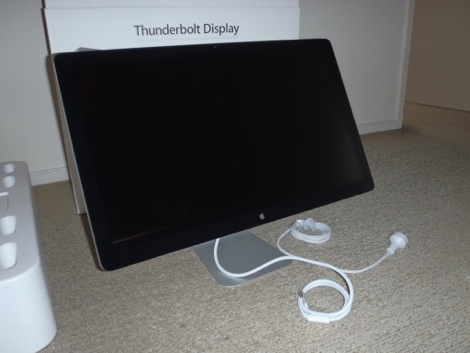
Apple’s 27-inch Thunderbolt Cinema Displays have begun arriving to customer’s homes. The display looks virtually identical to the previous generation of the giant 27-inch Cinema Display from Apple, and includes USB ports, a Thunderbolt port, a FireWire 800 port, and an Ethernet port.

More photos courtesy of reader Scott are after the break.


Expand
Expanding
Close

Apple requests safe return of its 3G MacBook Pro prototype

Site default logo image

We told you a couple weeks ago about the possibility Apple was testing 3G MacBook Pro designs back in 2007 after a prototype popped up on Ebay recently. After reaching nearly $70,000 in bids, it looks like Apple is stepping in and requesting the device be returned.

A report from CNET today sheds a little more light on the current situation of the seller, who was allegedly contacted by Apple to return the machine to local Apple employees after the company had the eBay listing removed citing copyright, trademark, and IP infringement.

A little more back story surrounding the device and it’s eBay auction also emerged in the report…
Expand
Expanding
Close

New Apple hardware: What you need to know

Site default logo image


The old Cinema Display (left) had three USB ports on the back and required a cable with separate power, USB and Mini DisplayPort connections. The new Thunderbolt  display (right) adds Gigabit Ethernet, FireWire 800 and Thunderbolt, all fed to a computer via a single Thunderbolt cable (in addition to three USB ports, built-in microphone and FaceTime HD camera).

We take it you’re still digesting the new hardware Apple has released this morning. Before you grab that credit card, here are some observations you may wanna take into consideration.

MacBook Airs

• Built-in FaceTime camera has not been upgraded to high-definition. As a result, you are not able to FaceTime in HD with people who use the latest iMacs or MacBook Pros, which sport a FaceTime HD camera

•Based on the description from Apple  “And because we place the flash chips directly on the logic board, they take up much less space — about 90 percent less, in fact.” , it sounds like the SSD is probably no longer upgradable via OWC and others (thanks commenter)

• Just as previous, RAM is soldered directly on the motherboard so configure your machine carefully because you won’t be able to upgrade RAM yourself later
• Just like with the previous generation, the 11.6-incher lacks an SD card slot found on the 13-inch model
• Last year’s models got a significant discount today 

• New Airs sport Bluetooth 4.0 compatibility versus Bluetooth 3.0 in the previous generation, which gives you low-energy wireless Bluetooth transfer within a short range of up to 50 meters, per this Wikipedia article
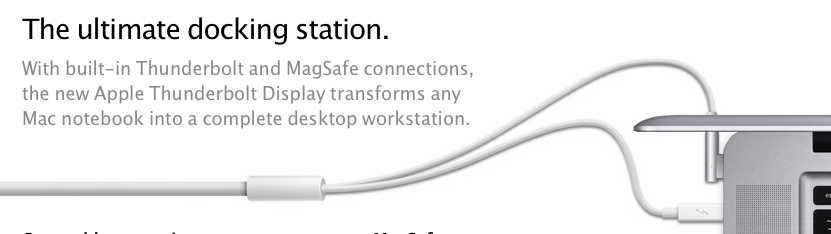
New MacBook Airs can use Firewire and Gig Ethernet! If you hook up your new MacBook Air to that latest Apple Thunderbolt Display, you will enjoy the ultimate simplicity because a single Thunderbolt cable is all you need to charge your notebook and transfer data from your monitor’s Gigabit Ethernet, FireWire 800, an additional Thunderbolt port, three USB ports, a FaceTime HD camera, 2.1 stereo sound and a built-in microphone.  Perhaps Apple will release a Thunderbolt to GigE, Firewire, etc. standalone adapter.

• On the Thunderbolt Displays, the old MagSafe would have been a better match, because the new one has to be bent around (see the image below) for MacBook Pros

• Additionally, On MacBook Airs, the Thunderbolt port and MagSafe are on opposite sides of the keyboard meaning that cable is going to Y-Out behind the computer.

The new Thunderbolt Display comes with a new MagSafe adapter, which has to be bent around the computer rather than going straight on, like the old MafSafe adapter could have

Mac Minis:


Expand
Expanding
Close