OS X

See All Stories

Ultracompact universal audio/MIDI interface announced for recording on Macs & iOS devices


Site default logo image

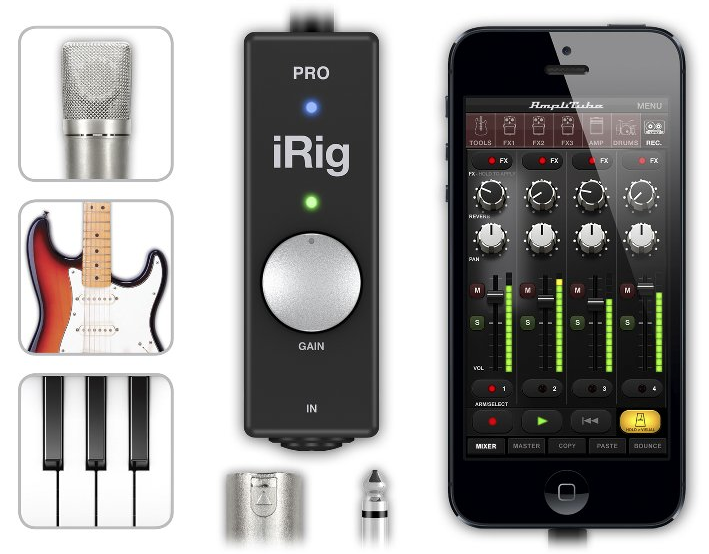
IK Multimedia has announced what it claims is “the most versatile compact audio interface on the market”. iRig is a small battery-powered box that allows musicians to connect microphones, guitars, line instruments or MIDI devices to a Mac, iPhone, iPad or iPod touch.

iRig PRO is designed to give mobile musicians and songwriters an interface that can handle the widest variety of audio input signals, so they can create music and audio on the go anywhere, any time.

It accepts virtually every type of audio and MIDI input. Users can plug in a dynamic or condenser microphone; a guitar, bass or other Hi-Z instrument; or any line-level source.

Additionally, iRig PRO is equipped with a MIDI input for keyboards, pads and controllers, making it a truly universal compact interface for recording and composing on the go or in the studio. Its audio and MIDI inputs can be used simultaneously, for example, to control guitar or vocal software with MIDI foot controllers or pedals, for switching presets or controlling effects levels … 
Expand
Expanding
Close

Apple releases OS X Mavericks Developer Preview 7

Site default logo image

A couple of weeks following the previous seed, Apple has released OS X 10.9 Mavericks Developer Preview 7 to registered developers. The update is available via Software Update in the Mac App Store. If you find anything new, you can let us know at tips@9to5mac.com. We’ll be updating this post as changes are discovered. A new Apple Remote Desktop 3.7 seed has also been issued.


Expand
Expanding
Close

Apple releases OS X Mavericks Developer Preview 6

Site default logo image

Apple has seeded the sixth Developer Preview of the upcoming OS X Mavericks. The new preview is available via Software Update in the Mac App Store. This preview comes a few weeks after Developer Preview 5. Preview 5 added iBooks to Mavericks.

Also available today for developers are updated Remote Desktop apps, an updated SDK, and a new Safari 6.1 seed for OS X Mountain Lion.

Mavericks will be available for the general public this fall. We will be updating this post as changes in the new preview are discovered.


Expand
Expanding
Close

How to enable the Google+ Photos Chrome app on Mac

Site default logo image

Last month we reported that Google’s slick new “Google+ Photos” app that launched exclusively on the Chromebook Pixel could possibly be making its way to Mac. The proof came from a newly posted listing on the Chrome Web Store that made references to auto-uploading features specifically for OS X. Unfortunately, launching the app would give Mac users a “not supported on this platform” error message. While Google has yet to officially launch the Mac and PC versions of the Chrome app, there is a way to bypass the error message and enable the app now.
Expand
Expanding
Close

A look at what an iOS 7-inspired OS X could look like [Gallery]

Site default logo image


In light of the upcoming launch of iOS 7, designer Stu Crew and other designers have imagined what a version of the OS X operating system with iOS 7 design principles could look like. Crew’s design matches iOS 7 by removing the heavy, metaphoric textures from OS X. The image above showcases a look at a desktop with many of the apps, and you can see how Finder, Calculator, Contacts, and iTunes received inspiration from iOS 7.

With iOS 5, iOS 6 and OS X Lion, OS X Mountain Lion, Apple moved to unify both the feature-sets and user-interfaces of its mobile and desktop operating systems. This fall, due to a leadership change at Apple, iOS and OS X will see different design philosophies. iOS 7 is “flat,” lacks heavy textures, while OS X retains its long-existing silver/metal design, keeps the green felt in Game Center, but drops the leather in Calendar and Contacts.

With integrated experiences and uniformity embedded into Apple’s DNA, it would not be surprising to see OS X look like iOS again in coming years. Below is a full gallery from Crew (in addition to some more mockups from other designers) of what an iOS 7-inspired OS X could look like.


Expand
Expanding
Close

BioShock Infinite for Mac set for release on August 29, preorders start today

Site default logo image

Back in March, when the latest installment in the popular BioShock franchise was released on consoles, Mac gaming heavyweights Aspyr announced they would be bringing the game to Mac this summer. Today it has finally announced an official release date for BioShock Infinite, as well as details on pre-order bonuses, DLC, and SteamPlay support.

BioShock Infinite for Mac will officially become available starting August 29th and, yes, the title will support SteamPlay, allowing users to purchase the game once and play on both PC and Mac through Steam. It will also be available on the Mac App Store. However, Aspyr’s own distribution service, GameAgent, is offering some pretty enticing pre-order bonuses if you pick up the title through them.

Not only will pre-orders through GameAgent get you the “Columbia’s Finest DLC,” but Aspyr is also promising an extra 20% off the $59.99 price tag for GameAgent customers. The “Clash in the Clouds” DLC will be available to purchase at launch, and plans are in place to support any additional DLC for the title following its release.

You might have noticed that Mac versions of many big games have been arriving a lot sooner after their initial release than in the past. For that we have Aspyr to thank, the company that ports the majority of big titles that eventually end up available for OS X. Earlier this year we sat down with Aspyr to talk about the process of porting games to Mac:
Expand
Expanding
Close

Parallels 8 Bundle: $50, includes Snagit, Typinator, WinZip Mac, xPlan, Boom, Leap, more

Site default logo image

From 9to5Toys.com, comes one of our favorite Mac app bundles. For $30 less than the price of the Parallels 8 headliner app (Give Windows 8.1 a free spin?), you get another 9 solid applications valued at $482 for $49.99. These are available for immediate download without shipping or tax charges worldwide.

Details and video below or on Specials.9to5Toys.com


Expand
Expanding
Close

Apple adds auto-renewable subscriptions for Mac App Store apps in OS X Mavericks

Site default logo image

Just like app developers have the ability to sell subscriptions as in-app purchases in iOS apps and Newsstand, they will soon be able to offer the same auto-renewable content through in-app purchases in Mac App Store apps.

Mac apps on the latest releases of OS X already support non-subscription based in-app purchases. For example, items that are purchased once and automatically applied to a user’s account. Up until now, developers offering an auto-renewable or non-renewing subscription in their iOS apps couldn’t do the same in the Mac App Store equivalents.
Expand
Expanding
Close

Roundup: Early OS X Mavericks Previews/Reviews hit the web

Site default logo image

Unknown to many people, Apple handed out devices running its latest OS X Mavericks operating system to select members of the press and media after announcing it back at WWDC, and early reviews and previews are starting to flow in.

As soon as the developer preview hit the web, we dove in and looked for subtle changes from Mountain Lion and found things such as LinkedIn integration, a Messages tab in Notification Center, an option in the menu bar to see what apps were draining your battery power, and much more. We also covered new dictation features in Mavericks. Via an option in System Preferences, there is now the ability to download a file and have offline dictation capabilities. One of the biggest selling points about Mavericks are the new multi-display capabilities, such as the ability to access the dock and menu bar across all of your monitors.

David Pierce of The Verge says that in Mavericks, multiple display support works like it always should have:


Expand
Expanding
Close

Parallels 8 for Mac updated with experimental support for OS X Mavericks

Site default logo image

Parallels announced an update to Parallels Desktop 8 for Mac today that introduces experimental support for OS X Mavericks. That means developers with access to Mavericks will be able to run Parallels Desktop 8 on the OS and also install the OS X 10.9 preview in a virtual machine.

The company has an article available to walk devs through getting Desktop 8 for Mac running on Mavericks and another outlining best practices for installing it as a virtual machine. While you can’t yet install Mavericks into a blank virtual machine, you will be able to update an existing OS X install to the developer preview. Those error messages some users were getting when attempting to run Mavericks on Parallels Desktop 8 should also be taken care of with the latest build.

Parallels hinted more news about Mavericks and its integration with Parallels Desktop 8 for Mac is on the way and is answering questions in its forums here and here.

Good news if you don’t yet own a copy: Parallels Desktop 8 for Mac is currently 25% for a limited time.
Expand
Expanding
Close

New for accessory makers in iOS 7: Open AirPlay audio, Apple-designed hearing aid tech, device management, much more

Site default logo image

We already told you about a few big new features in terms of improvements to Bluetooth coming in iOS 7: Developers will now have a standardized controller framework for hardware game controllers and new features for BLE devices that will bring Notification Center support and always-connected apps. That’s not all Apple has planned for accessory makers in the near future, below developers have reached out to explain some of the other big new features that will be available to accessory manufacturers with iOS 7 and Mavericks…
Expand
Expanding
Close

How to: Create a bootable OS X Mavericks USB Flash Drive from original App Store package

Site default logo image

On Monday Apple finally unveiled to the world the next iteration of OS X, Mavericks.  A developer preview of the new operating system is available now as a Mac App Store download for registered developers.  Delivering Mavericks via a download is super conveient and easy for everyday users but can be unhelpful in several troubleshooting or advanced OS modification situations.  The only way to obtain a bootable OS X Mavericks USB flash drive is to create your own:
Expand
Expanding
Close

Site default logo image

An in-depth look at Maps for Mac in OS X Mavericks [Video]

Following the introduction of Apple Maps to replace Google Maps in iOS with iOS 6, it seemed like only a matter of time before Apple brought its in-house Maps to OS X as well. Late last year we reported that Maps would be coming to the Mac, and with WWDC yesterday, Apple delivered.

In the above video, we give you an in-depth look at what Apple is planning to release on the Mac later this year in OS X Mavericks, along with a few interesting Maps features on OS X that aren’t shared with iOS.

Wishlist: 10 things Apple should, but likely won’t, announce at WWDC 2013

Site default logo image

We’ve got a pretty good idea of what Apple intends to give us at WWDC. Even the things we’re not so sure about seem on the radar.

But what does Apple need to do long term to tighten up the ecosystem and bring some excitement back into its hardware, software and services? I’ve got a few things…


Expand
Expanding
Close

Apple displays extremely sparse iOS 7 banner at Moscone ahead of WWDC (Updated: OS X banners going up)

Site default logo image

Apple has been steadily preparing the Moscone Center in San Francisco for its Worldwide Developer Conference all week long. Today banners for iOS 7 appeared featuring a very colorful and thin “7” denoting the version of the software Apple will preview on Monday. The dots in the banners above likely represent the transparent nature of the OS.

We’ll be in San Francisco bringing you the latest news from WWDC all next week!

Thanks Andrew Stern and Nick!


Expand
Expanding
Close

The good news and bad news on that ASUS 31.5-inch 4k monitor for Mac users

Site default logo image

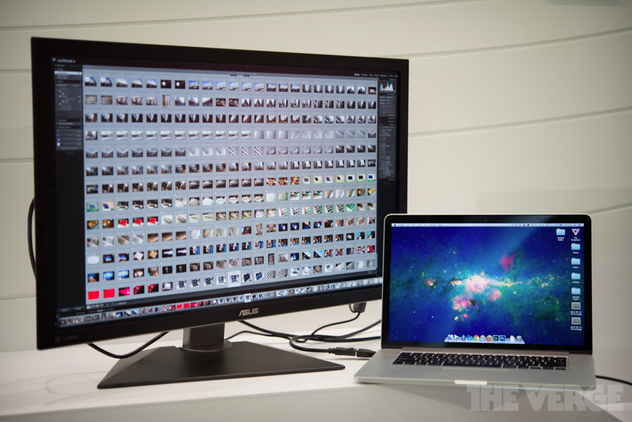
We told you a few days ago about ASUS launching a 31.5-inch 4k monitor, and predicted that today’s Macs would struggle to drive it. The Verge has now confirmed this, by briefly hooking it up to a 15-inch MacBook Pro with Retina display.

Tangible lag was introduced when working in more demanding applications like Adobe’s Lightroom, while the mouse cursor also exhibited a troublingly low refresh rate …

Expand
Expanding
Close

Apple debuts WWDC 2013 app for iOS, will feature session videos, Passbook support, more

Site default logo image

Apple has rolled out its WWDC 2013 app for iPhone, iPad, and iPod touch (via MacRumors) this morning as WWDC quickly approaches. Apple has promised to push out session videos much quicker this year and will be available online as well as via its WWDC 2013 app for iOS.

Apple’s Worldwide Developer Conference kicks off a week from today in San Francisco where we’ll be covering the event.

Apple is set to preview new versions of its iOS and OS X operating systems at its keynote, which we’ll be live blogging from location, and has already promised to deliver beta releases of both operating systems to developers so they can prepare their apps for the new operating systems:

“We look forward to gathering at WWDC 2013 with the incredible community of iOS and OS X developers,” said Philip Schiller, Apple’s senior vice president of Worldwide Marketing. “Our developers have had the most prolific and profitable year ever, and we’re excited to show them the latest advances in software technologies and developer tools to help them create innovative new apps. We can’t wait to get new versions of iOS and OS X into their hands at WWDC.”

WWDC attendees can use the app to organize their session priorities, navigate around Moscone West, and save their registration information in Passbook.

Check out the details below:
Expand
Expanding
Close

Site default logo image

Twitter for Mac updated with Notification Center integration, performance improvements, more

Twitter for Mac is continuously receiving updates and today it received a highly requested feature: Notification Center integration. Users can configure the setting in the preference window within the app.

OS X already offered Twitter integration, but notifications deferred to the web rather than its native client. It was less than a month ago when the app received its first update in countless months, and today’s update demonstrates Twitter’s dedication to its continued development.

Twitter 2.2.1 is now available in the Mac App Store:


Expand
Expanding
Close

Yahoo’s new Flickr now comes with redesigned Homepage/UI, 1TB of free storage

Site default logo image

All of a sudden Flickr is back. Yahoo CEO Marissa Mayer’s Tumblr (that was quick!) post on the matter:

Photos tell the stories — stories we’re inspired to relive, share with our friends, or capture simply to express ourselves. Collecting these moments is a part of our everyday. Since 2005, Flickr has become synonymous with inspiring imagery. Today, we’re thrilled to take Flickr even further with a beautiful, completely re-imagined experience that puts photos front and center. When it comes to photography, technology and its limits shouldn’t hinder the experience. So we’re also giving our Flickr users one terabyte of space — for free. That’s enough for a lifetime of photos — more than 500,000 original, full-resolution, pixel-perfect, brilliant photos. Flickr users will never have to worry about running out of space.

1TB is “I no longer have to think about where to store photos,” and full res quality means no compromise. Oh, and we’ve heard there will be some even bigger things coming up from Yahoo/Flickr for iOS users next month. Flickr is currently integrated into OS X and Apple TV software.

Site default logo image

Yahoo’s new Tumblr for iOS updated with “stacks” like post type chooser, app attribution

Tumblr, which was purchased by Yahoo today for a cool $1.1 billion, received an update for iPhone and iPad today that introduces a new post type chooser that resembles fan stacks on the dock in OS X but still includes a 17+ rating. The update also includes attributing app sources to posts shared on Tumblr. This update doesn’t seem to reflect any changes from Yahoo as the social blogging platform was just acquired this morning.


Expand
Expanding
Close

Site default logo image

Apple releases Flash Storage Firmware Update 1.0 for mid 2012 MacBook Air

Apple has released a new firmware update for the mid 2012 MacBook Air today that helps to address problems with the device recovering from a crash. Apple release notes said the update addresses “a storage firmware issue that, in rare cases, may cause a system to fail to recover from crash.”

The MacBook Air Flash Storage Firmware Update 1.0 is available to download on Apple’s website here and should be hitting Software Update soon. The 1.69 MB update is available for mid 2012 MacBook Airs running OS X 10.7.5 or OS X 10.8.3.

Site default logo image

Gear up for new Macs, D-Link releases four next generation ultra-fast 11AC WiFi routers


From 9to5Toys.com:

Last month we were tipped to some clues in the latest OS X 10.8.4 beta which indicated that Apple is ramping up to release new Macs and accessories sporting the next generation wireless technology, 802.11ac. It’s entirely possible that we could see these Macs introduced as early as next month at Apple’s WWDC. If you’re planning to upgrade your Mac, you’re going to need an AC compatible router to take advantage of this new wireless technology. Below are four new options for you to consider when making the switch.

D-Link announced the immediate availability of four new 11AC wireless routers, starting at just $80.  The next generation wireless technology, 11AC delivers more coverage and up to 3 times the speed of the current wireless standard “N.” The proliferation of mobile devices and streaming content has necessitated the move towards AC wireless as a faster, more reliable wireless connection for home and businesses users.

The new D-Link wireless router lineup consists of the AC750 (DIR-810L), AC1000 (DIR-820L), AC1200 (DIR-860L) and AC1750 (DIR-868L), ranging from $80 up to $170. These cloud routers offer remote network management via the free D-Link Lite iOS app, which “enables users to see what websites are being visited, block unwanted connections, and set up automatic email alerts when unauthorized connections are made.”  The top of the line AC1750 and AC1200 feature four ultra fast Gigabit Ethernet ports.

Even though most devices we have aren’t AC compatible yet, if you’re currently in the market for a new router it may make sense to go AC in an effort to future proof your network.

All four of these routers are now available for order from D-Link or major retailers like Amazon.

Amazon announces standalone Cloud Player desktop app, Mac version coming soon

Site default logo image

Amazon today announced that it is launching a standalone desktop app for its Cloud Player cloud music service that was previously only available through a web app and mobile apps. The desktop app brings offline support and, like the service on other platforms, will offer its usual unlimited storage of songs purchased through Amazon plus 250 imported songs for free. Unfortunately, today’s roll out only includes an app for PC with Amazon promising Mac users “we’re working on a version just for you.” 
Expand
Expanding
Close