9to5Mac Reviews
All the products that the 9to5Mac team has reviewed.

All the products that the 9to5Mac team has reviewed.
All the products that the 9to5Mac team has reviewed.
All the products that the 9to5Mac team has reviewed.



Apple is adding a convenient new feature for developers today in iTunes Connect. Following a refresh to the Payments and Financial Reports pages a fortnight ago, Apple is now letting developers opt-in to a weekly summary report email of their apps. The email will summarize important business metrics for the developer’s apps, including information on App Store views, unit sales, sessions and crash rates. The email will also show the comparisons of these statistics to the previous seven-day period.


Regular readers will know that I’m a sucker for wood. Show me something well-crafted from an attractive chunk of wood and I’m on board.
I’d previously admired Grovemade’s wooden iPad sleeve, and the company’s iPhone cases were featured in our ‘best of iPhone 6/Plus cases’ roundup, so I thought I’d check out its recently-announced MacBook Dock. The dock is available in a range of sizes to suit the 12-inch MacBook, 11- and 13-inch MacBook Air, and 13- and 15-inch MacBook Pro. I tested it with my 11-inch MacBook Air …

It’s been a while since we’ve checked in on the state of iPhone and iPad controllers, but I have seen some improvements since we first covered some of the shortcomings with the early batch of game controllers that came out under Apple’s Made-for-iPhone licensing program. Today I’m taking a look at the new Tt eSports Contour MFi controller, a new $65 option that includes a classic Xbox-style design and a built-in stand to hold your iPhone and turn it into a true handheld game console.


The Zand is a desktop stand designed to be used with the iPad. It is constructed out of brushed aluminum. To use the stand, there’s no adhesives, clamps or hooks used to make the device stick to it. Instead it uses nanoparticle adsorption to keep the iPad in place.
The base of the stand lifts the iPad a couple of inches off of the desk, so that it sits slightly higher at eye level, which makes it easy to see. The base mimics the look and feel (texture wise, obviously it’s a lot lighter at 8.5 oz) of the base of the iMac.
Just like the base of the iMac, there’s a hole on the back for the Lightning cable. Most of the time, I used the Zand in the upright mode so I was able to use Duet Display (review here) on my iPad mini and MacBook Air.
While using the iPad on the Zand, at first I was skeptical about how well the iPad would stay on.

Since watchOS 2.0’s announcement I’ve known that I would want to use the Photo Album watch face. The ability to have my favorite photos display every time I looked at my Apple Watch’s display made me think the device was about to get more personal. Facer’s launch today takes that personality one step further.

Apple’s Cards app introduced in 2011 and discontinued two years later remains one of my favorite iPhone apps to date. The service was fantastic: snap photos on your iPhone, then turn them into personalized letterpress cards sent through the mail to friends and family. Stamp and envelope included, you’d pay $2.99 for anywhere in the US or $4.99 for anywhere around the world. You can still send personalized letterpress cards using Photos on the Mac, but the service was perfect for me as an iPhone app.
I’ve tried a handful of similar iPhone apps since Cards shut down with Postly being the latest and perhaps most modern. Available for iPhone and iPad, Postly lets you create personalized postcards from your iPhone that deliver worldwide for $1.99.
If you’re looking to upgrade your home appliances and add Siri control, then HomeKit is a key feature you’ll want to look for when buying new hardware. The number of HomeKit-compatible smart thermostats is continuing to grow with Honeywell’s Lyric Round Wi-Fi Thermostat (2nd-gen) as the latest to hit the market.
Among competing thermostats, the basic premise is the same: Wi-Fi connectivity lets you remotely control heating and cooling from mobile apps, and intelligence using location and the Internet let you add some home automation. The pay off is potentially a lower energy bill and the cool factor of controlling the temperature with Siri.
Having recently reviewed the ecobee3 HomeKit thermostat as well, I’ll be using it as a comparison below to highlight what makes Honeywell’s Lyric Round smart thermostat different.
There are now a ton of third-party Apple Watch bands on the market of varying quality, but at $69, this alternative to Apple’s pricey stainless steel link band from Hyper is worth a closer look.
The bands are made out of the same 316L stainless steel that Apple uses, and nothing about them indicates why there would be an almost $400 gap between these and Apple’s.
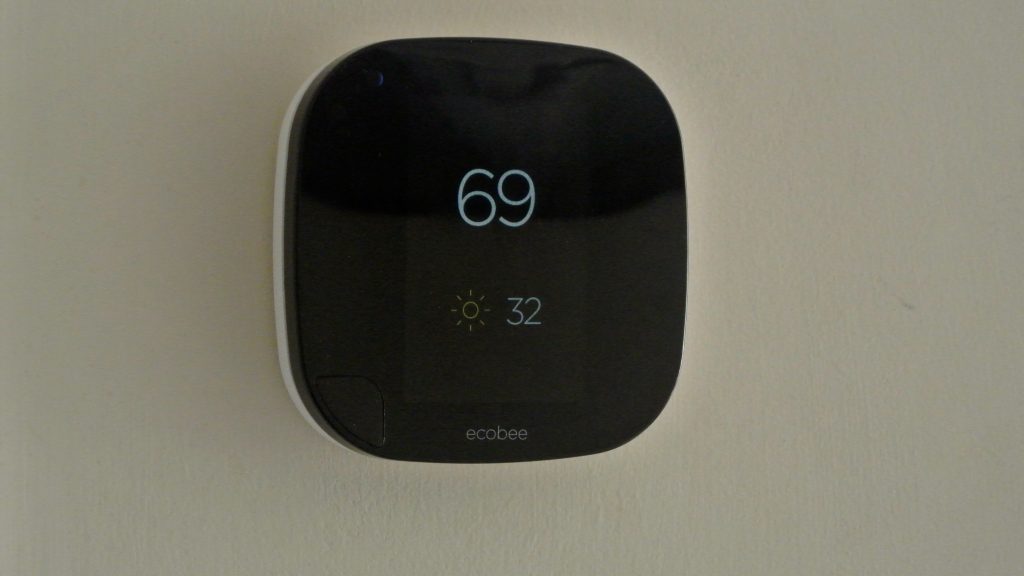
A smart thermostat that you can control from your iPhone is nice, but if you’re a fan of Siri then HomeKit-compatibly is a must. The ecobee3 Wi-Fi thermostat can be controlled using Siri on your iPhone, iPad, or Apple Watch, and it uses remote sensors to determine temperature and presence around your home to be smarter about automating your HVAC system. Overall, the thermostat itself is rather slick and the software experience behind it holds up well. If you’re curious about HomeKit and in the market for a smart thermostat, the ecobee3 just might be the best option yet …
Expand Expanding Close
Earlier this year at CES, I got the chance to stop by Bluelounge’s booth and discovered a product announced late last year that I hadn’t seen before, the Kosta Apple Watch Charging Coaster. What caught my attention is that it’s designed similarly to Apple’s Magnetic Charging Dock, but comes in three non-white colors including dark grey and costs $15 instead of $80. There are a few key differences to consider with Kosta compared to other Apple Watch docks …


While iPhone photography keeps on improving thanks to the advancement of tiny camera sensors and image processors, it’s still nowhere near as fully-fledged as DSLR or Micro 4/3rd photography. You can’t swap out interchangeable lenses for different types of imagery, and have to rely on third-party manufacturers producing clip-on accessories. That’s where the Aukey 18mm HD wide angle clip-on lens comes in.
An amateur astronomer friend has a motorized telescope that allows you to tap in the name of the object you want to see – a constellation, a planet, a deep-sky object – and it automatically locates them in the sky. Universe2go offers an equally hi-tech but more casual approach to stargazing suitable for beginners – including kids.
Universe2go is an augmented reality system that uses your iPhone to do the clever stuff. In essence, it’s a more sophisticated version of Google Cardboard. You open the companion app on your iPhone, snap your phone into the plastic enclosure and then look through the goggles at the night sky. An angled mirror overlays your actual view of the sky with labels from the app.
Pause with the green pointer over a planet or constellation, and the app provides visual data and an audio commentary. Alternatively, choose an object in advance and the app uses the display to direct you to the correct part of the sky before using the augmented reality system to highlight it …

Naim Audio isn’t a household name outside of audiophile circles, but this British company has for many years made some of the most respected amplifiers in the business. Naim long had an informal partnership with Linn, and if the standard audio system fitted to Bentley’s ultra-expensive cars isn’t good enough for you, the optional audio upgrade is to a Naim system. You’ll also find it available through the Apple Store.
The company is notoriously conservative when it comes to new technology, refusing to even consider making a CD player for most of the 1980s, relenting only in 1989, when it felt the technology had developed sufficiently to allow it to deliver the quality it sought. It’s therefore no surprise that Naim has waited so long to launch its first wireless speaker system, the mu-so – nor that it has done the job properly when it finally did so.
The price is also no great surprise …

iPad cases these days come in so many forms. You can get ones that only cover the back and ones that only cover the front (like Smart Covers). You can get hefty book-style cases or even cheap Chinese amalgamations from Amazon; I was using this $10 cheap wraparound one until very recently.
Today’s review is about the Oxford from Pad & Quill ($129). The Oxford is a premium Folio for the iPad Pro, described as a luxurious case and stand combo with an integrated pocket for the Apple Pencil. First impressions online are positive, but great iPad cases require a combination of style, features and practicality. I’ve been trying Oxford out for the last few weeks to decide how it stacks up for me. Does it deliver on these points? Read on for my full review …

The iRig Keys Mini is an electronic MIDI music keyboard that connects to iPhone and iPad with a Lightning cable. Although it isn’t regularly advertised, iPhones and iPads have had great support for MIDI input instruments and other devices for a long time. Since iOS 4 in fact, Apple gave the developers the ability to interact with MIDI peripherals. Simultaneously, the App Store has bloomed a wide ecosystem of sophisticated music creation and audio production apps. This makes for a perfect storm of capability and functionality: not only are MIDI accessories possible, they can really be used to make music on iPhone and iPad.
Read on for my full review of the iRig Keys Mini piano keyboard for iOS ($79.99).
Today we’re taking a quick look at two Incase sleeves made specifically for Apple’s 12″ Retina MacBook. Neoprene Classic Sleeve ($39.95) comes in five colors and zips the 12″ MacBook in a low-profile soft carrying case. ICON Sleeve ($69.95) has a slightly larger profile that makes it thinner and ditches zippers for a tight-fitting opening at one end. We compare both MacBook sleeves in detail below:
For a while, Scotland-based audio company RHA was known primarily for delivering audiophile-grade sound in affordable earphones. With the T20, that’s not exactly how they played it. In fact, this set of headphones is not anywhere near cheap enough to be classed as an affordable pair, but I still feel that in terms of design, audio and versatility, they comfortably give you your money’s worth. That’s despite the fact they’d set you back $240/£180 if you decided to splurge on them…
Backpacks are as convenient a way to carry things around a city as they are when hiking in the great outdoors, keeping your hands free and spreading the load across two shoulders, but they can be a little worrying when you’re carrying expensive gadgets. The reason? All the zips are behind you. Standing on an escalator, in an elevator or on a platform waiting for a train, you always have the worry of a thief quietly unzipping the compartments to make off with your hard-earned technology.
A messenger bag feels safer, because you can carry it at your side with an arm across it, but it’s less convenient and less comfortable than a backpack. This is the problem Riut set out to solve, with a secure backpack designed specifically to keep your gadgets safe from sneak thieves – so I thought I’d give it a try …


Ever since I upgraded from an 11″ MacBook Air to a 13″ Retina MacBook Pro, I’ve been hunting for the perfect hybrid computer and camera bag — a compact backpack that could hold my laptop, DSLR, lenses, and accessories at the same time. Six months ago, I covered several MacBook/camera bags from Incase, including the DSLR Sling Pack I’ve loved for years, and larger “Pro” options for bigger laptops. Each hybrid bag makes different compromises: for my needs, the Sling Pack’s too small, and the Pro bags are too large. But users of 11″ MacBooks might find the Sling Pack “just right.”
Seeing potential in a new alternative, I jumped at the opportunity to test Booq’s upcoming Slimpack ($195), a MacBook-sized evolution of its earlier iPad/DSLR backpack $145 Python Slimpack. Booq makes excellent bags, but apart from offering a multipurpose camera/headphone compartment in Boa Flow, it hasn’t taken a deep dive into the camera-laptop hybrid category. While the new Slimpack’s laptop compartment is just a hint too small for the 13″ MacBook Pro and iPad Pro I’m currently using, it’s right-sized for 12″ or smaller MacBooks, as well as 10″ or smaller tablets, any of which can be paired with a full-sized DSLR, three or four lenses, and accessories. Bundled with a rain shield and Booq’s standard Terralinq loss recovery protection system, it’s a very nice bag, and one I would certainly use if I switch to a 12″ MacBook next year…
Between confusing implementations and unappealing prices, the first wave of iOS game controllers had a very rough launch, nearly killing a new accessory category that had the potential to be huge for Apple. Some of the earliest iOS game controllers only fit smaller iPhones and iPod touches, others had limited buttons, and most were originally priced at $70 or more. With the exception of Mad Catz’ more affordable, device-agnostic C.T.R.L.i series of Bluetooth controllers, iOS gamepads quickly racked up mediocre reviews and wound up in discount bins. The message to Apple and controller makers: follow Mad Catz’ template, and price the controllers more reasonably, or no one’s going to buy them.
Currently an Apple Store exclusive, Hori’s new HoriPad Ultimate ($50) is the latest acknowledgement that the lesson’s been learned: it’s the second Made For Apple TV game controller, including full MFi/iOS 7+ compatibility for use with iPads, iPhones, and iPod touches, plus Mac support. The pricing, design, and basic feature set are substantially similar to SteelSeries’ Nimbus, though Hori — a respected Japanese developer of game controllers — has outdone SteelSeries on the specifics. For the same price as Nimbus, you get a more PlayStation 4-like controller design with superior hand grips, twice the battery life, better-feeling buttons and a more substantial weight. HoriPad Ultimate uses a Lightning cable to recharge its battery, too…
Portable Bluetooth speakers are a dime a dozen these days – Amazon lists more than 37,000 of them! Though our shootout should help narrow the choice if you’re in the market for one. But portable AirPlay speakers are rather rarer, pretty ones even rarer and the Sugr Cube goes one step further in its bid to stand out from the crowd: it offers gesture-based control.
You tap the top of the speaker to pause/play, tilt it 45 degrees left to return to the previous track or 45 degrees left to skip to the next.
When I saw this on our sister site 9to5Toys, I wondered whether this would be a gimmick that you use a few times, or a genuinely useful form of control. There was only one way to find out, so I took delivery of one earlier this month to put it to the test …
Thanks to Nest and other “smart home” accessory developers, wirelessly controlled appliances and security accessories are rapidly becoming mainstream. Garage and home doors have gone wireless, adding Bluetooth locks and remote controls, so it’s no surprise that the same features are beginning to appear in portable locks, as well. Since the ability to unlock doors without carrying old-fashioned keys is undeniably convenient, the only question is whether wireless locks are worthy of the premium prices they carry.
Best known for Apple device cases, Australian developer Dog & Bone has released Locksmart ($90), billed as a “keyless Bluetooth padlock.” Made from a zinc alloy with a 1.5″ stainless steel shackle, Locksmart is imposingly substantial, holding a Bluetooth 4 LE chip and two-year rechargeable battery inside a weatherproof frame. While it sells for a higher price than a basic weatherproof padlock with a key, or the sort of basic Bluetooth padlock one might use on a school locker, Locksmart is bolstered by a legitimately worthwhile app that enables it to work like $110 fingerprint-scanning padlocks — and arguably much better, since Dog & Bone’s app has several cool features that aren’t found in other padlocks…
The Elgato Avea Flare is an egg-shaped mood light with an iPhone and Watch app available to control the scene and colors displayed. It sits in the corner of a room or garden and discreetly glows. I tested the standalone unit, but you can also buy the Avea Bulb which is the same concept in a different form. The Elgato Eve Room ($78) is an indoor climate detector — it measures air quality, humidity and temperature. This data can then be reviewed through an iPhone app to act upon or using your voice with Siri questions. The Eve sensor (pictures below) is meant to be tucked away and out of sight, on a shelf or wall, silently checking up on your interior air quality.
These two products are from the same manufacturer, but they sit at opposite ends of the spectrum in terms of smart home gear; one has a clear functional purpose and the other is a ‘smart’ whimsical decoration. Both integrate with iOS via an iPhone app and both make cool additions to your life. I’ve been using both for a few weeks; read on for my full review of these smart home devices from Elgato …
The iPads are not actually vertical – it’s just the angle of the shot …
I reviewed the Brydge Keyboard for the iPad Air/Air 2 back in March. At the time, I found it hard to choose between this and the ClamCase Pro, and for a while switched between them. However, the Brydge won the battle in the end, becoming my daily driver for my iPad Air 2.
Brydge has two models for the smaller iPad, one for the iPad mini 1/2/3 and a second version coming out next month for the iPad mini 4. Both have the same all-aluminum construction, the same matching colors (silver, space gray and gold), the same three-month battery life and weigh the same 300g.
One of the beauties of the original is that you pretty much get a full-size MacBook keyboard for your iPad, with key sizes and spacing very close to that of a MacBook Air. They keys are slightly narrower and a touch closer together, but the typing experience is very similar. With the much smaller footprint of the iPad mini, however, I wondered how the BrydgeMini would compare …