9to5Mac Reviews
All the products that the 9to5Mac team has reviewed.
All the products that the 9to5Mac team has reviewed.
All the products that the 9to5Mac team has reviewed.
All the products that the 9to5Mac team has reviewed.



I’ve been interested in iBeacons — proximity-based wireless transmitters — ever since they were first announced by Apple alongside iOS 7 at WWDC in 2013. The idea of walking into a store, restaurant, or other public space and receiving (opt-in) wireless notifications based on proximity to a Bluetooth sensor struck me as a potentially compelling next step forward for both retailers and smartphone users. Even more exciting was the opportunity to receive incentives, such as coupons or free apps, just for being in proximity to the store. iBeacons have been added to Apple Stores, Macy’s, MLB baseball parks, and even bars, offering giveaways of free apps and magazines, as well as everything from locations of products to seating directions.
In a twist, iBeacons aren’t being sold directly by Apple. The name is being used across a variety of third-party products that meet an Apple specification, and sold by different companies throughout the world. When I heard that a European developer named Beaconic was dropping its prices on iBeacons to levels any small retailer could afford — around $107 for two “Power” beacons or $141 for four “Retail” beacons, each with an unlimited software license — I reached out to the company so I could see what the retailer and customer experience was like. Here’s what I learned…


One of my absolute favorite Bluetooth speakers got a huge update today. The UE Boom 2 is an upgraded version of the iconic portable Bluetooth speaker from Logitech’s Ultimate Ears division. Originally released in 2013, the Boom set a new standard for Portable Bluetooth speakers with its “cupholder friendly” and colorful design, great acoustics, and iOS/Android apps.
In recent months UE has released a much bigger, more expensive MegaBoom and a much smaller, cheaper UE Roll. Both are waterproof and extremely rugged and if you’d had to have guessed, you’d be right in assuming the Boom would get these same features.
And it has. IPX 7 waterproofing means you can not only take it with you into the shower but you can drop the Boom 2 in the pool or bathtub without damage. It is also more powerful with a 100-foot wireless range, 15 hour battery life, and 25% louder and better sound than its predecessor. The UE Boom 2 also now includes a new tap control that allows you to start, pause and skip songs, without needing to have your phone in-hand.
I’ve been using the UE Boom 2 for the past week and I think this speaker is a big deal…
Expand
Expanding
Close

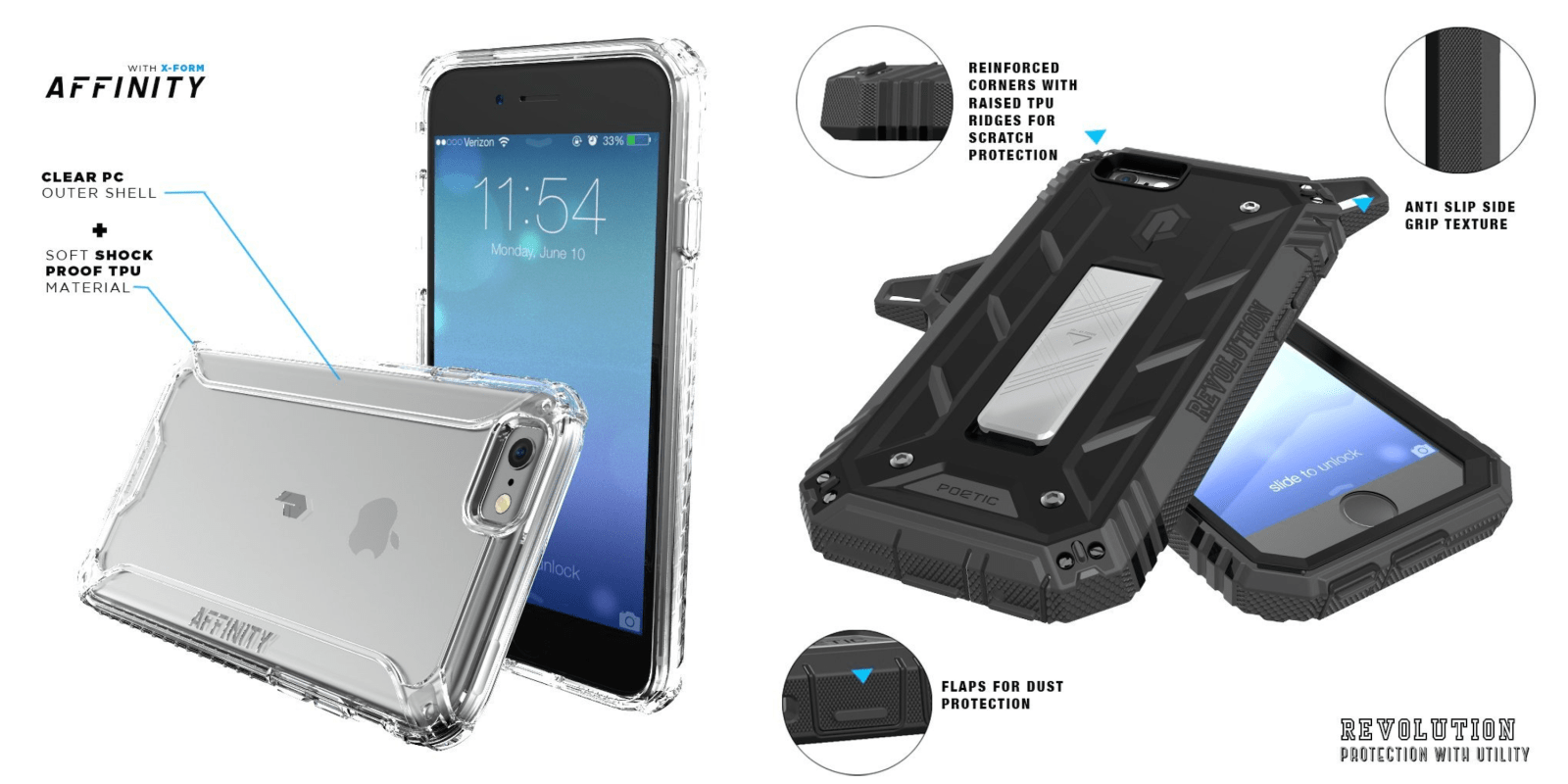
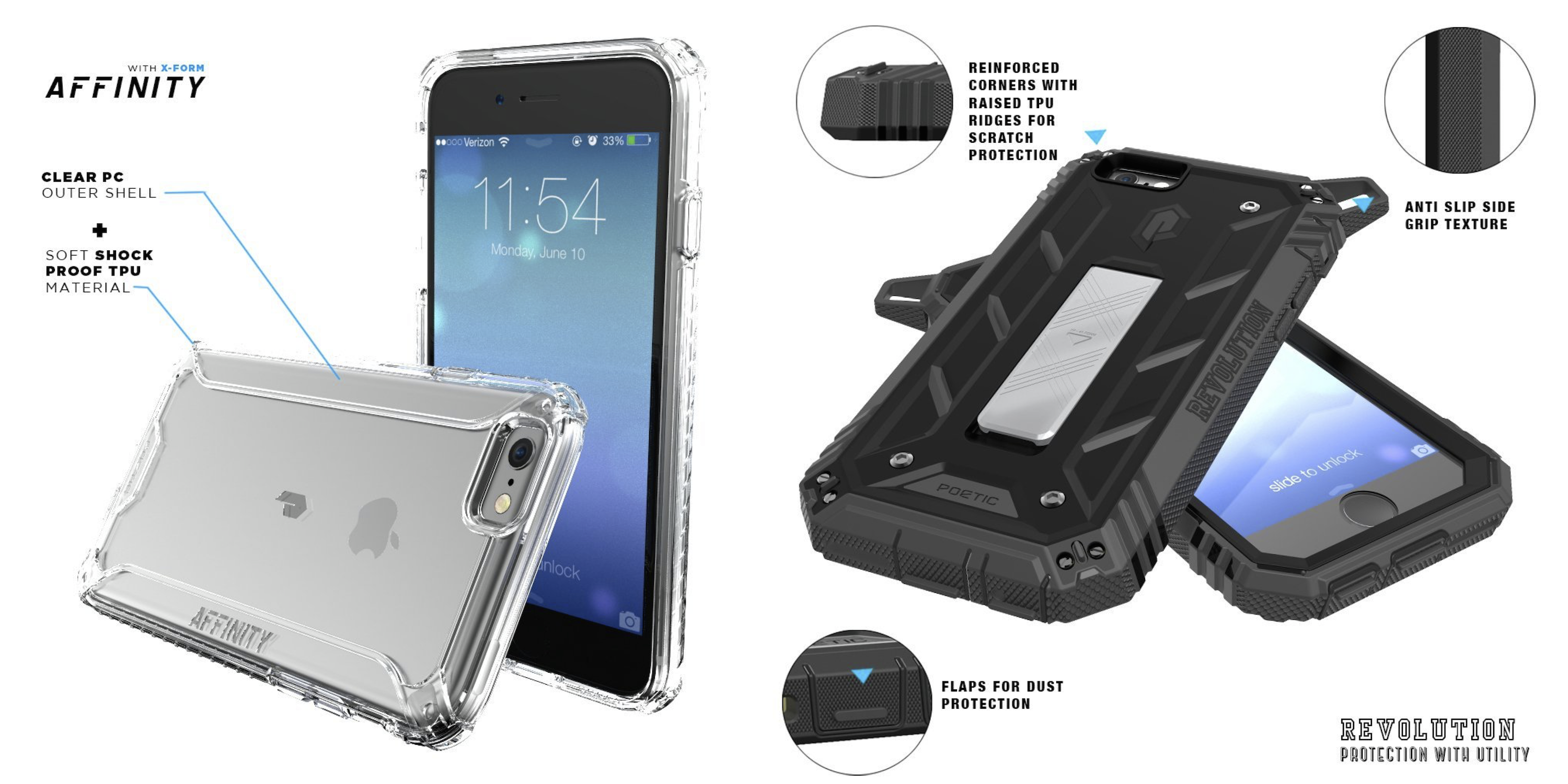
If you don’t want to spend $50 for a case every time Apple announces a new device, you still have great options: cases with comparable quality are available for much less money if you do your research. One of the best brands for that is Poetic, maker of an Apple Watch stand we loved, and today the company has released brand new, sub-$20 iPhone 6s and 6s Plus cases called Revolution and Affinity.
They are both available to order now in anticipation of the new iPhone launch later this month. Here’s the rundown…
Expand
Expanding
Close


Keep up with the best gear and deals on the web by signing up for the 9to5Toys Newsletter. Also, be sure to check us out on: Twitter, RSS Feed, Facebook, Google+ and Safari push notifications.
[tweet https://twitter.com/9to5toys/status/641698383128850432 align=’center’]
[tweet https://twitter.com/9to5toys/status/641694204079525888 align=’center’]
[tweet https://twitter.com/9to5toys/status/641711274225717249 align=’center’]

Apple’s AirPlay wireless audio protocol didn’t really take off in standalone speakers, but that doesn’t mean every company has abandoned it. Moshi’s Spatia, which recently launched after first being unveiled at CES 2015, relies on AirPlay for wirelessly streaming and playing audio from iTunes and iOS devices. Spatia packs five dedicated drivers and two amplifiers behind a fabric speaker cover to deliver impressive sound within a standout design. AirPlay has some well-known benefits and issues, so is it worth investing $399 in a speaker that depends on Apple’s sometimes-shaky technology?
Expand
Expanding
Close
By now, Nest’s story is quite well known: founder Tony Fadell left Apple after co-inventing the original iPod, founding Nest to re-imagine neglected home devices with modern designs and features. Nest started with the Nest Learning Thermostat, which made HVAC programming and remote management easy — really for the first time — then released the Nest Protect smoke and carbon monoxide alarm, and after acquiring Dropcam, the Nest Cam home security camera. Now owned by Google, Nest has closely followed Apple’s strategy of refined iteration upon past designs, releasing the Nest Learning Thermostat 2nd Gen and Nest Protect 2nd Gen as modestly but meaningfully tweaked sequels to address rough edges and omissions.
Yesterday, the company announced and released the Nest Learning Thermostat 3rd Gen ($249), which looks familiar at first glance. Still shaped like a metal-clad circle, Nest’s latest Thermostat is a hint thinner than its predecessors, yet sports a larger, higher-resolution screen that can optionally be used as an analog or digital clock. As a satisfied user of the 2nd Gen Thermostat for my home’s downstairs heating system, I bought the 3rd Gen Thermostat to replace the old control panel I had upstairs. Here are my thoughts on Nest’s latest product…
I keep a box with around 20 iPad styluses next to my desk, so every time a new stylus arrives, I can easily compare it against its predecessors and rivals. There hasn’t been much functional innovation in the category for a couple of years, but stylus form factors, batteries, and buttons have changed, generally getting simpler and smaller after each generation. Even so, Adonit’s new Jot Dash ($50) surprised me. It comes less than 6 months after the release of Jot Script 2 (reviewed here), but looks and feels a lot different from its predecessor. Jot Script 2 costs $25 more, feels fairly thick, and uses Bluetooth 4 for (somewhat iffy) palm rejection. Jot Dash cuts both its price and size by dropping the Bluetooth hardware, while keeping the 1.9mm fine writing tip that made Script special.
Why would Adonit simplify its prior electronic styluses by removing Bluetooth? Perhaps because relatively few developers have been willing to add Bluetooth stylus support to their apps. Today, a stylus would be considered to have “good” software support if 30 of the 1.5 million iOS apps included hooks for its special features; Jot Script 2 lists just under 20 fully supported apps. So, like the $60 Lynktec Rechargeable Apex I recently reviewed, Jot Dash doesn’t require special software support — it has a simpler feature set that works with all apps and all iPads, including the iPad Air 2. It similarly includes a rechargeable battery, which gets topped off with any available USB port. The differences are the $10 lower price, and the fact that it feels a lot more like a standard-sized pen…


Today we’re taking a look at what might be the best Apple Watch dock in the business. If you’re tired of just plopping your iPhone or Apple Watch on a table at night, this is a much better alternative. Meet Enblue Technology’s Premium One W2 dual dock and charging stand. Quite possibly one of the longest accessory names I’ve heard, but I’ll easily forgive that for the functionality it brings along…

Belkin’s three latest products in its Wemo line of Wi-Fi connected, smartphone-controlled products for the home include a white bulb starter kit, a versatile strip light, and garden lights for outdoor use. The last two are both tunable to thousands of colors and all three connect to Belkin’s Wemo ecosystem and companion app for remote control from your iPhone. All three of the products are through a partnership with OSRAM SYLVANIA, who provided the lightning products that Belkin has integrated into its Wemo platform. We took the three new starter kits for a test drive to get a second look at the growing Wemo platform and see if they are worth the investment before support for Apple’s HomeKit…
Expand
Expanding
Close


A lot of Apple Watch owners who splashed out on a nice charging stand must have been swearing at Apple when watchOS 2 was announced. Most existing charging stands out there position the watch vertically, which was the obvious thing to do at the time – but then along came watchOS 2, with Nightstand mode one of its headline features.
Nightstand mode allows the watch to serve as a bedside clock while charging – but only when on its side, with the buttons on top. Bad news for anyone who already laid out the cash for a vertical stand, and worse news for manufacturers whose stock was effectively rendered obsolete overnight.
For those who haven’t yet bought a stand, the good news is that manufacturers have been quick to respond. Zac Hall reviewed Spigen’s low-cost Apple Watch Night Stand, and now FŪZ Designs has launched a similarly-priced alternative in the form of the FŪZ Dock for Apple Watch …
Expand
Expanding
Close

Email apps are dime-a-dozen these days, and every single one claims it brings some incredible new tool to the table that will change the way you do email forever. Usually this just means you can attach images from Dropbox or some other otherwise unremarkable feature.
Geronimo is the latest in a long line of email clients for the iPhone, but unlike many others, it actually does manage to introduce a new management paradigm to the decades-old communication platform. Keep reading for details on its creative new inbox view and gesture-based management message management system.
Like a lot of 9to5Mac readers, I’m generally a purist when it comes to matching Apple hardware with accessories: I prefer iPhones and iPads without cases unless using one of Apple’s iPhone 6 Leather Cases or iPad Air Smart Covers and I can’t resist their overpriced Lightning Docks. If Apple made an Apple Watch Charging Stand, I’d be tempted to toss my Spigen Nightstand in a drawer in favor of the official solution.
And while I own both the Classic Buckle and Milanese Loop Apple Watch bands, I wear the simpler black Sport band on most days aside from a nice dinner or more formal occasion. Both are fine bands, but Classic Buckle can feel a bit too dressy with a t-shirt and shorts and Milanese Loop isn’t as comfortable as the other bands. For myself, I’ve found that there’s a space in between completely casual and totally formal for Apple Watch bands. Pad & Quill’s Classic Apple Watch Band takes a more traditional strap approach than even Apple’s Classic Buckle and fits this space, with four leather color options and two metal finishes that match stainless steel Apple Watches or Space Gray/Space Black Apple Watches.
I’ve been eager to try the Classic Apple Watch Band since Pad & Quill began transitioning their expertise in fine leather bag and case making toward prototyping Apple Watch bands a few months ago. After finally getting my hands on a Whiskey-colored American leather version, I’ve settled on a few first impressions on what is now my first favorite third-party Apple Watch band. Read on for details:

In this week’s episode of The Logic Pros, we are taking a look at the Moog Sub 37. Another analog instrument from legendary synth powerhouse Moog, the Sub 37 takes it up a notch offering a much deeper feature set and refined workflow compared to its baby brother, Sub Phatty.
In last week’s review we found that Sub Phatty was a more than capable instrument that brings Moog’s world famous sound at an, all things considered, affordable price tag. While the Sub 37 will certainly be reaching into your pockets a little deeper, it comes with just about everything the Sub Phatty has to offer, and then some. I might even make the argument that in some ways, for the price, it outshines Moog’s $3,000 – $5,000 Minimoog Voyagers:
Expand
Expanding
Close

The iPad accessory market is full of keyboards. Most of them double up as cases, they’re about as big as the iPad and they’re not well optimized for other devices. The Microsoft Universal Foldable Keyboard is different. It’s small enough to carry around in your pocket when folded, and works with iOS, Windows and Android devices. What’s more, you can have it paired to two devices at once and switch between them with the press of a button. It’s safe to say that this is one of the most versatile and portable Bluetooth keyboards on the market. This review was written entirely on it.
Smart plugs aren’t exactly new. Belkin has its WeMo platform of connected home devices including its Wi-Fi-enabled ‘Insight Switch’, an iPhone app-controlled outlet, and others have similar competing products. But iHome’s new SmartPlug is one of the first arriving for Apple’s recently launched Siri-controlled HomeKit platform. I’ve been testing out the product in recent weeks to see exactly what HomeKit adds to the experience and to get a real world taste of Apple’s home automation platform in general for the first time with an actual product. Now that it’s officially available for purchase, here’s what you need to know…
Expand
Expanding
Close
Everyone knew the iPad Air 2’s marquee features — a thinner, lighter body, Touch ID, a gold color option and much faster A8X processor — but fewer people realized that Apple also made subtle changes to the new tablet’s screen, not only improving its visibility outdoors but also changing the way it registered touch input. All of the tweaks added up to a noticeably better user experience, but one category of accessories unexpectedly wound up broken: digital styluses. As it turns out, fine-tipped styluses use tiny electrical pulses to trick touchscreens into thinking they’re fingers, and the pulses needed to be recalibrated to work reliably with the iPad Air 2’s new screen. Adonit was the first to release an iPad Air 2-compatible digital stylus, the $75 Jot Script 2 (reviewed here), and now there’s a second, more affordable option.
Lynktec is one of several stylus makers that have sought a middle ground between expensive $80-$100 Bluetooth styluses and entry-level $20-$30 styluses that lack electronic hardware. The second-generation Rechargeable Apex Stylus ($60) is, like its predecessor, a mostly silver pen with a battery inside and a shirt clip on its edge. It loses the plasticky black top and bottom in favor of a more thoroughly metallic appearance, retaining five rubber finger grips near its tip for comfort. And while it keeps the 2mm polymer writing tip of the original Rechargeable Apex, it’s now backed by electronic circuitry that works properly with the iPad Air 2, as well as all earlier iPads and iPhones…
With a lot of compromised designs due to the rush to get Apple Watch docks and stands to market, I wasn’t initially all that impressed with the often overpriced options available. That’s why I opted for a DIY mod of my own Apple Watch box. But at just $15, this new charging dock from Poetic is one of the first dock products I’ve received that I can confidently recommend to those of you currently window shopping for a watch stand. Here’s why you shouldn’t waste your time with pricier options…
Expand
Expanding
Close
Today we’re taking a look at some of the best Bluetooth earbuds on the planet. These are the Jaybird X2 earbuds and they are simply amazing. I suppose this review is a bit backwards as I’ve just given you the verdict here, but let me tell you why these are so great…
“Bigger and better” has been a safe sequel strategy for years, but “smaller, lighter, and slightly more affordable” sequels began to take off when Apple debuted the iPod mini and iPod nano a decade ago. Anker relied upon “bigger and better” for its insanely powerful 25,600mAh Astro E7 battery, and now is using “smaller and lighter” with PowerCore 20100 ($40), a sequel with nearly 80% of Astro E7’s power. But Anker’s diverging from Apple’s formula on one key point: PowerCore 20100 sells for only 50% of Astro E7’s price. It’s still capable of recharging many iPads twice, which is more than enough portable energy for most people. Given its more manageable size and excellent price point, it’s likely to be an even bigger hit than its predecessor.
Anker has also released a “you’ll never need another USB charging port again” solution called PowerPort 10 ($40, shown above). PowerPort 10 steps up from Anker’s excellent 60W 6-Port USB Charger (reviewed here), which was recently renamed PowerPort 6. For only $4 more than PowerPort 6, PowerPort 10 gives you 4 additional USB ports for charging. Ten ports is enough for a family full of iPad, iPhone, and Apple Watch users to simultaneously recharge all their devices. The only hitch: PowerPort 10 has the same 60W power output as PowerPort 6, the details of which I’ll explain further in the review below…
In this week’s episode of The Logic Pros, we are taking a hands-on look at Moog’s Sub Phatty synthesizer to see how it stacks up against some of its much more affordable virtual counterparts.
Moog instruments have been used on many of the most popular and historic records over the years, having become as legendary in their own right in the process. The company is widely considered to be one of, if not the premiere synth makers on the planet. Producing the fattest sounding oscillators and filters around since the late 60’s, Moog’s instruments certainly come at a premium, and there’s a good reason for it. In the past few years the company introduced a couple new synthesizers in its Phatty line, that brought Moog’s flagship features and famous ladder-style filter down to a fairly affordable price point. At just under $1,000, cheap certainly isn’t the word to use to describe Moog’s monophonic, all-analog Sub Phatty synthesizer. But it might be the closet thing to a Voyager you’ll get without seriously breaking the bank.
Expand
Expanding
Close
Spigen already created one of the most minimal and affordable Apple Watch charging stands with the Apple Watch Stand S330 — a design that fits right in next to an iMac, and works with both open and closed bands. But then Apple announced watchOS 2 and Nightstand Mode, which will will turn the Apple Watch into a proper alarm clock during charging, but only when it’s positioned on its side with the Digital Crown and side button facing up. Spigen’s new Apple Watch Night Stand S350 ($20) offers an even more minimal design with Nightstand Mode support, and an especially budget-friendly price. Check out my impressions below…
Early in the life of the Apple Watch, offering a single, nicely-designed stand was enough for most developers; our guide to the best Apple Watch Stands compiles many such options. Just Mobile’s first entry was the aluminum, tube-shaped TimeStand, which I reviewed last month, and now the company’s back with a second and entirely different stand called the Lounge Dock ($40). Lounge Dock addresses TimeStand’s most conspicuous omission, adding support for watchOS 2.0’s upcoming Nightstand Mode, while adapting Just Mobile’s classic iPhone and iPod stand Lounge for a smaller Apple device.
Unlike TimeStand, which machined a single piece of aluminum into a tube-like stand, Lounge Dock is a multi-piece design connecting a silver metal base to a silver metal arm and a black plastic Apple Watch holder. Just Mobile’s primary pitch is that the plastic holder pivots, letting you adjust the Apple Watch’s screen angle for easier viewing while charging. If that’s appealing to you, or you want to use your Apple Watch as a small bedside clock with Nightstand Mode, you might like this new design…
While I wasn’t immediately convinced of the need to ever hide a beautiful Apple Watch under an arguably unattractive protective case, seeing my wife’s experience accidentally damaging the sapphire display solidified my spot in Apple Watch Case Camp in some contexts.
Because Apple Watch materials — aluminum, stainless steel, gold, Ion-X glass, and sapphire glass — are strong but not entirely resistant to scuffs, scratches, shatters, and all the same ailments that strike our iPhones in normal use, it makes sense that accessory makers want to apply the same formula used to produce iPhone cases when making protective solutions for Apple Watch.
But Apple Watch has to look good, so does porting that same formula actually work? That’s the question I’ll tackle with my hands-on experience with Speck’s $29 CandyShell Fit hard shell case for Apple Watch.
Expand
Expanding
Close
I’m not a fan of hyperbole, nor am I the type of reviewer who long ago ran out of new synonyms for the word “great.” In fact, I could count the number of truly stellar products I’ve tested in the past year on one or two hands. So when I say that Enblue Technology’s new Premium One W3 ($135, also sold in $65 W1 and $115 W2 forms) is the best stand I’ve yet seen for the Apple Watch, and quite possibly the best multi-Apple device stand I’ve ever tested, that isn’t idle gushing. Yes, the Premium One stands are expensive. No, they are not perfect. But having seen a lot of companies try and fail to do what this German developer has accomplished, I’m certainly very impressed.
Each Premium One stand uses nicely machined aluminum dotted with small plastic pads to hold and charge your Apple Watch. The entry-level W1 model is Watch-only, while the mid-range W2 holds a Watch and iPhone, and the top-of-line W3 is a Watch, iPhone, and iPad charging station — the most elegant multi-device charger I’ve seen since Apple introduced Lightning connectors. It’s ideal for minimalists, and amazingly, completely case-compatible. If the price doesn’t bother you, and you want to charge your Apple Watch along with other devices, this should be at or near the top of your shopping list…