9to5Mac Reviews
All the products that the 9to5Mac team has reviewed.
All the products that the 9to5Mac team has reviewed.
All the products that the 9to5Mac team has reviewed.
All the products that the 9to5Mac team has reviewed.


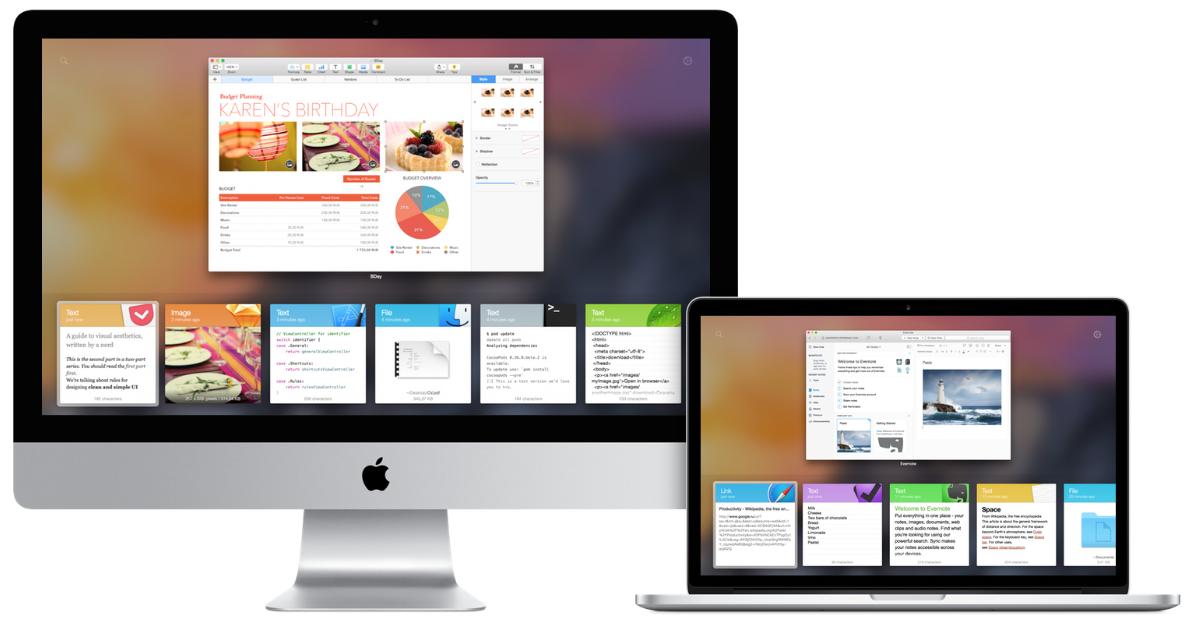
You know how it goes: you copy a link, or a piece of text, intending to paste it – then you get distracted and copy something else before you get the chance. You then have to find and copy the first item again. A clipboard manager solves this problem by saving a history of the items you copy, letting you paste in any one of them later.
There are plenty of clipboard managers around (a quick search of the Mac App Store found 34 of them), and you might think that when you’ve seen one, you’ve seen ’em all. But where Paste stands out is in using a colorful interface with large previews, intended to make it easy to identify the item you want to paste. I’ve been trying it out for the past few days …
Expand
Expanding
Close


Dedicated accessories for Apple’s 12-inch MacBook with Retina display are still rarities at this point with the new design being different in every dimension than other MacBooks in the notebook lineup. For new MacBook owners looking to keep the $1300 and up machine in pristine condition, Moshi has a whole collection of premium accessories designed for the 12-inch MacBook. Today we’re taking a look at Moshi’s iGlaze 12, iVisor, ClearGuard & Muse 12: a lightweight hardshell case, bubble-free screen protector, ultra-thin keyboard cover, and slim fitting sleeve case for MacBook owners.
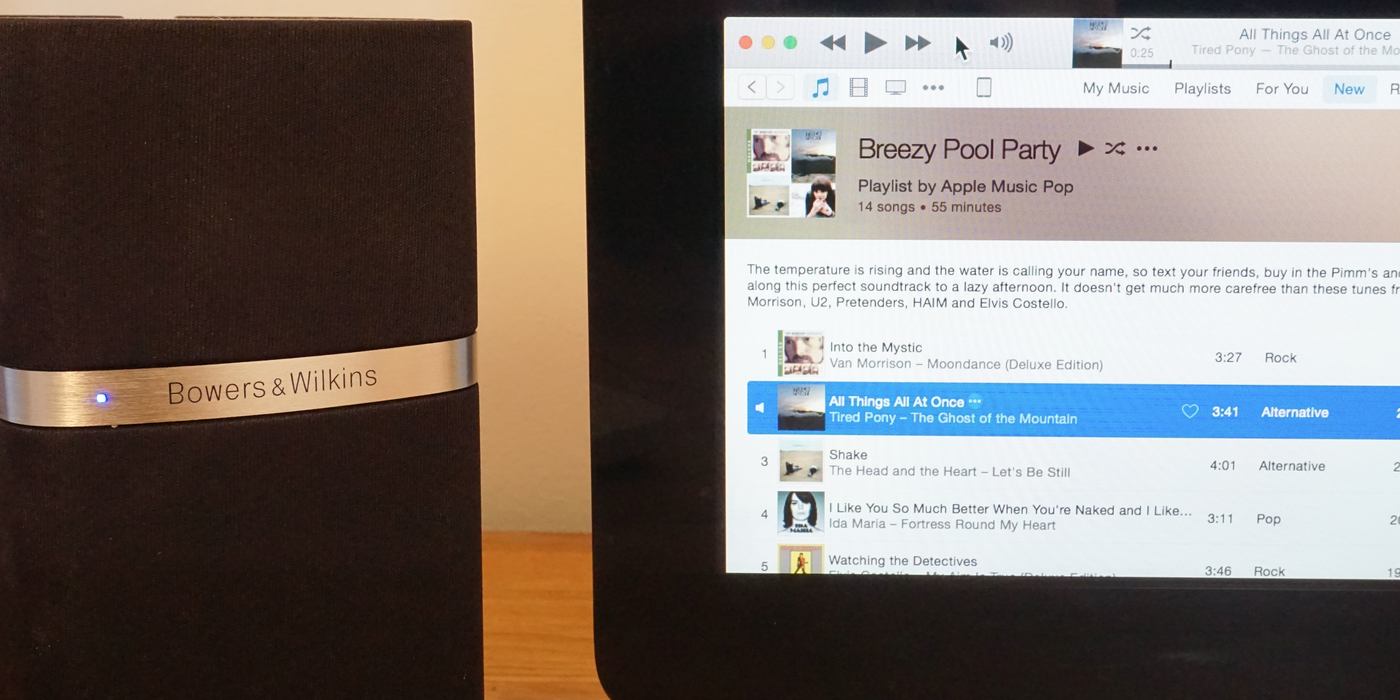
I’m not expecting here to replicate my rather extensive Apple Watch diary series – I doubt this one will run to four pieces. I’m also not starting out here as an Apple Music skeptic. I’ve been using Spotify for years, and – from a brief trial of Beats Music – started out pretty confident I would be jumping ship once Apple Music launched.
But I do think Apple Music has one thing in common with the Watch: I don’t think it’s possible to judge it without a reasonable amount of usage. So I thought I’d begin with my first impressions and then follow up once I’ve used it long enough to have more to say.

I’m not going to dwell on the launch-day glitches, like the welcome screen (above) left over from the beta, the rather belated iTunes update, Beats 1 outage, frequent spinning beachballs in iTunes and the tracks that either refused to play at all or took an age to do so. Half the planet was simultaneously using the service yesterday, so these things will only become issues if they persist. So leaving those aside, what were my first impressions … ?
Expand
Expanding
Close



Back when white earbuds dominated the market, Beats by Dre proved that mainstream customers were willing to pay $300 for large wired headphones and nearly $400 for wireless versions — even plasticky, overly bassy ones. The subsequent shift towards big headphones nearly killed makers of premium in-ear models, leading many audio companies to mimic Beats’ formula. But there were holdouts: iconic audio companies including Bowers & Wilkins refused to compromise their materials or change their sonic signatures to match Beats. Instead, B&W offered premium-priced headphones made from premium-quality materials, and let customers pick between plastic Beats or metal and leather alternatives.
Today, Bowers & Wilkins is debuting P5 Wireless ($400), a Bluetooth version of last year’s luxurious P5 Series 2 (and the since-discontinued original P5). Mixing chrome, brushed aluminum, and ultra-soft sheep’s leather, P5 Wireless is virtually indistinguishable from P5 Series 2 apart from its ability to operate with or without a 3.5mm audio cable. Classy in ways that even the top-of-line Beats Pro can’t match, P5 Wireless is the first Bluetooth headphone I would recommend to fans of classic premium audio gear…
If you want an Apple Watch stand, you can choose from three major materials: plastic, wood, or metal. The universally affordable plastic options tend to look a bit cheap when paired with the Apple Watch — particularly non-Sport models — while the pricey wood ones are somewhat polarizing, sparking a roughly equal mix of “love” and “hate” responses. From what I’ve gathered from readers, metal is the most popular Apple Watch stand option, with options starting at $20 and climbing sharply; most of the best metal stands are hovering around the $60 mark. For months, I’ve felt that the sweet spot for a nice metal Apple Watch stand was right in the middle of that range, but there hasn’t been a worthy option to test the viability of the $40 price point.
That’s part of the reason Just Mobile’s TimeStand ($40) feels inevitable. It was merely a matter of time until the metal masters at Just Mobile weighed in with their take on an Apple Watch stand, and given their design history, it’s no surprise that the result is an elegant little desktop sculpture. TimeStand is machined from a single piece of either silver or black anodized aluminum with a weighted, rubber-padded base, distinctly modern and substantial, yet $20 less expensive than options I’ve previously reviewed from Mophie and Nomad. Moreover, TimeStand’s unique shape offers compatibility with all Apple Watch bands, though there are some small caveats you might want to be aware of…


Keep up with the best gear and deals on the web by signing up for the 9to5Toys Newsletter. Also, be sure to check us out on: Twitter, RSS Feed, Facebook, Google+ and Safari push notifications.

The antitheft Kensington Security Slot has been gone from all MacBooks aside from the classic 13-inch model for years now as Apple’s notebook designs have gotten increasingly thinner. Without that slot making a return, third party solutions like Maclock’s The Blade are needed to secure an unattended MacBook and prevent theft. Today we’re taking a look at The Blade and how it can secure even Apple’s thinnest notebook, the 12-inch MacBook with Retina display.
Expand
Expanding
Close
Up until recently, Thunderbolt 2 docks could mostly be described as “seen one, seen them all.” I’ve continued to like the idea of docks that fuse Thunderbolt 2, USB 3.0, and other peripherals together in a single Thunderbolt-to-Mac connection, but the docks I’ve seen from Belkin, Elgato, and Kanex are so similar in looks and features that they’d be hard to tell apart in a lineup. CalDigit’s dock looked very different from the rest, but functioned almost exactly the same. No Thunderbolt 2 dock has been small enough to consider “portable,” and CalDigit’s design is downright bag-defiant in shape.
That’s why it’s great to see Akitio take a different path with the $279 Thunder2 Dock (available through Amazon for $230), a Thunderbolt 2 dock with a smaller form factor and focus. Roughly as thin as a MacBook Pro and made from a nearly-matching aluminum, Thunder2 Dock manages to include seven high-speed data ports even though it’s roughly the size of a portable hard drive. Since it requires wall power, it’s not completely portable, and just like its rivals, you give up certain features to gain others. But it’s definitely the first Thunderbolt dock I’d carry around if I needed multi-device support in the field…

Nope, I haven’t caved to temptation and bought a $10,000 gold Apple Watch (waiting for gen-2…kidding!) … that’s a $549 stainless steel Apple Watch that met WatchPlate’s plating service to create a rose gold version with stunning resemblance to the Apple Watch Edition.
Last month we unboxed the first 42mm Apple Watch “3rd-party gold-plated edition” with Link Bracelet, a yellow gold version that looks like the ones only celebrities like Beyonce have, and today we’re taking a look at WatchPlate’s rose gold plating on a 38mm Apple Watch with Classic Buckle and Sport band. Check out our hands-on photos below:
Expand
Expanding
Close


It would be silly to say that Apple’s latest iteration of the 15-inch 2015 MacBook Pro with Retina Display is the best MacBook yet, because that’s mostly the truth with every new model. Unfortunately, you won’t find a shiny new processor setup this time around, as Apple stuck with the trusty old Haswell configuration, but there are some nice improvements here.
The good news is, there’s a bump in clock speed across the board if that matters to you and we have a new GPU setup thanks to AMD in the high-end model. Even with these modest upgrades, the MacBook Pro I purchased is a beast for content creation…
When the iPod was surging, full-sized headphones were flailing. For decades, big “cans” were the only proper way to quietly listen to the massive audio players stored in home A/V cabinets. But by 2006, portable audio devices were king, and their pocketable little white earbuds were everywhere. Then Beats by Dre came along and convinced people that big headphones were worth buying again, even for portable media players. Beats’ signature Studio headphones aren’t as easy to carry around as little earbuds, but as their growing popularity demonstrates, people haven’t seemed to mind.
blueLounge’s new Posto ($20) is the latest in a series of “big headphone” stands made by Apple accessory companies. I’ve previously tested heavy, all-metal options such as Just Mobile’s HeadStand, which hover around the $50 price point and — to their credit — try to do one or two nice little things to justify that sort of price point. There are also cheap headphone stands that tend to look… cheap. Posto is clearly the result of a different theory of design. The black version is made from several different materials that somehow look nearly indistinguishable from one another, reducing the cost, weight, and assembly challenges found in other headphone stands. (A white and silver version uses different-looking parts.) Consequently, Posto works much the same as HeadStand, but costs less than half the price. If you’ve just dropped $250 or more on a pair of big headphones, Posto lets you manage them without breaking the bank…
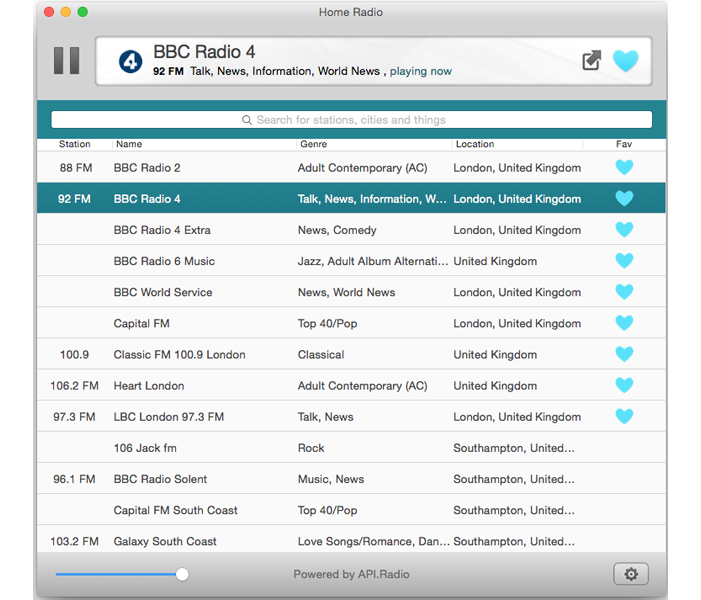
While we’re all expecting good things from the radio side of Apple Music, it’s going to be a curated experience, meaning we’ll get the radio stations Apple chooses to offer. If it doesn’t cover all of our favorite stations, we’re going to need another radio app to plug the gap.
For listening on the move, the free SwipeRadio iOS app is a delightfully minimalist way to do it. Developer Dataphase has now taken the same approach on the Mac, with Home Radio. The philosophy is the same: no bells, no whistles, just the radio stations you want to listen to in an extremely lightweight app.
I’ve been trying it out, and if you want to do the same, developer Noam Gordon is kindly making it free for today only (22 June) especially for 9to5Mac readers …
Expand
Expanding
Close

Pebble Time is an interesting smartwatch. This is a bit different from anything else out there in the sense that it’s super low-tech. There’s absolutely nothing flashy about it. As far as smartwatches go, this is as barebones as it gets, but is that bad thing?
Wood has historically been a tricky material for Apple accessories: it can be challenging to precision-fit to Apple devices, and isn’t always a good visual match for metal and glass. But wood accessories are beginning to enjoy a renaissance thanks to the Apple Watch. Since nightstands are almost invariably made from wood, and Apple Watches need to be left on nightstands for overnight charging, matching wooden Apple Watch stands can blend in to an extent that plastic or metal stands cannot.
Oregon-based SchuttenWorks’ new Wave Apple Watch Charging Stand ($75) arrives on the heels of well-regarded wood stands from Pad & Quill and DodoCase, and is actually a little less expensive — there are cheaper wood options, but they don’t look great and are getting bad reviews. Thankfully, SchuttenWorks hasn’t skimped on Wave’s design. Available in your choice of seven different woods, the C-shaped holder can hold open- or closed-band Apple Watches, and uses internally hidden magnets to make assembly a snap. Is there one that’s right for your nightstand?…
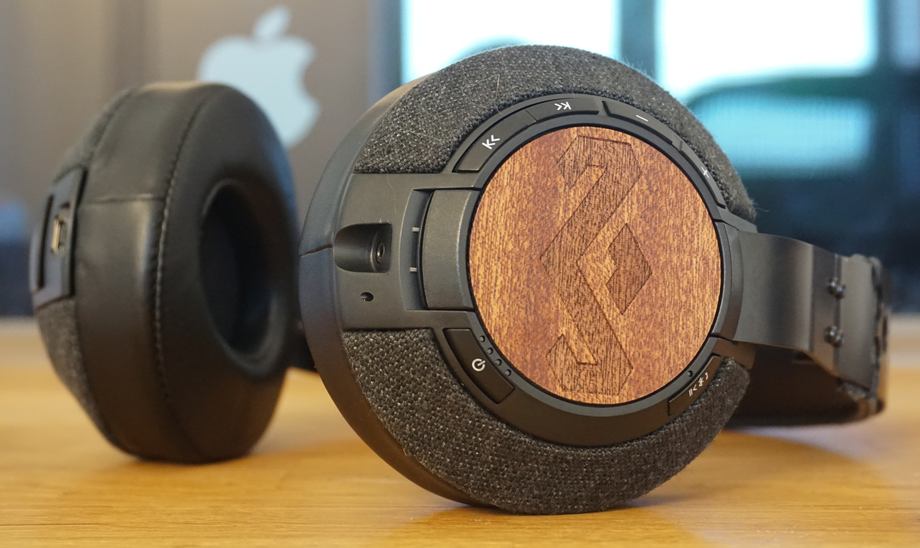
Friends have often expressed surprise at the fact that I continue to use wired headphones. My beautifully-portable and much-loved Bowers & Wilkins P5 headphones go with me almost everywhere, while my Master & Dynamic MH40s are my go-to headphones in the living room.
Friends know my aversion to visible cables, and I’m usually an ‘any excuse for a gadget’ type guy, so why, they ask, do I continue to wear wired headphones? There have been a couple of reasons for that. First, the ‘yet another device to charge’ factor – to add to my Macs, iPad, iPhone, bike cam, GPS and now Apple Watch.
Second, the sound quality of Bluetooth headphones hasn’t compared well to wired ones in my experience. I’ve tried a bunch of Bluetooth headphones in the store, but none persuaded me. However, designing with wood and leather is always a good way to catch my attention, so I thought I’d try House of Marley’s Liberate XLBT over-ear headphones …
Expand
Expanding
Close

Over the weekend I got my hands on the new $99 Ultimate Ears Roll Bluetooth speaker — a durable and waterproof frisbee of a device that pumps the beats like the UE Mini Boom cousin it is replacing. The form factor is totally new however.
First up: The UE Roll sounds really good with significant bass emerging from that thin profile. Not quite as good as $200+ portable speakers like the Bose Soundlink Mini or even the full-sized UE MegaBoom but plenty good to fill up a room or for a few people to rock out with some background music on the beach for a volleyball game. If you find yourself in a quiet, still spot the sound really comes through clean even though the device with its bungee cord off the back lends itself to the great outdoors and physical activity.
The Roll connects to Apple and other Bluetooth devices – even the Apple Watch – through a typical Bluetooth 4 connection, but Logitech offers some very premium features via the iOS or Android app that debuted with the Megaboom. With the app, you can set an alarm, “equalize” the sound, pair two or more speakers for stereo or do Sonos-like arrays in every room, check battery status and more with updates promised for the future…
Expand
Expanding
Close
blueLounge isn’t a typical Apple accessory maker. If you look through its 15-year backcatalog of releases, you’ll notice that its products are markedly different from somewhat overlapping alternatives produced by rivals — intensely practical and cleanly-designed, yet sometimes so conceptually minor that they’re hard to review. Take CableDrop and CableDrop Mini, for instance, circular adhesive pads that each do nothing more than hold one cord in a fixed position wherever you want it. I use CableDrop Mini every day with my MacBook Pro’s power cable, but can’t justify a full review of something so utterly basic.
The simultaneous release of two new blueLounge accessories — Portiko ($25) and Pixi ($10) — gives me the rare opportunity to cover one of the company’s minor but practical items alongside one that’s more gadget-like. Portiko (shown above) is a wall- or table-mountable power source attractive enough to put on display between the four devices it can charge at once. It has enough USB and AC power outlets to handle a MacBook, iPad, iPhone, and Apple Watch at the same time, or other combinations of devices. Pixi is blueLounge’s latest cable management solution, a set of elegantly-built elastic and plastic bands that wrap around bunches of cables, tidying up your desk. Read on for more details and pictures…

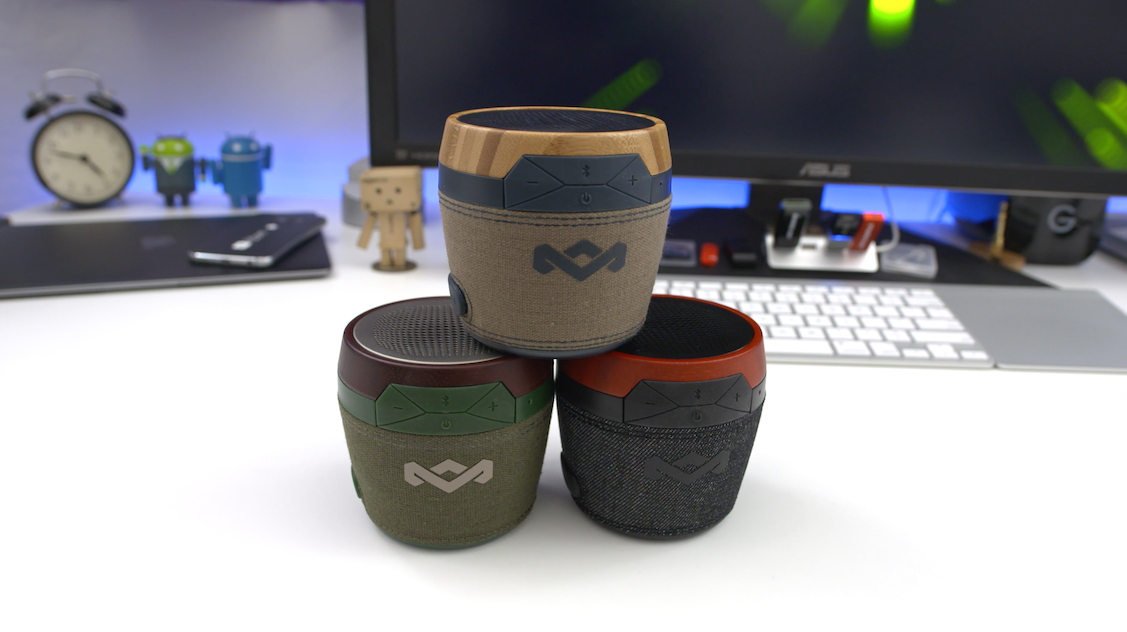
Back at CES 2015, I had a chance to swing by House of Marley’s booth and check out some of their latest and greatest. One of those items was the Chant Mini Bluetooth speaker. Well, it’s finally here and time to give it the review treatment. Can a $50 portable Bluetooth speaker really be all that great? Let’s find out…
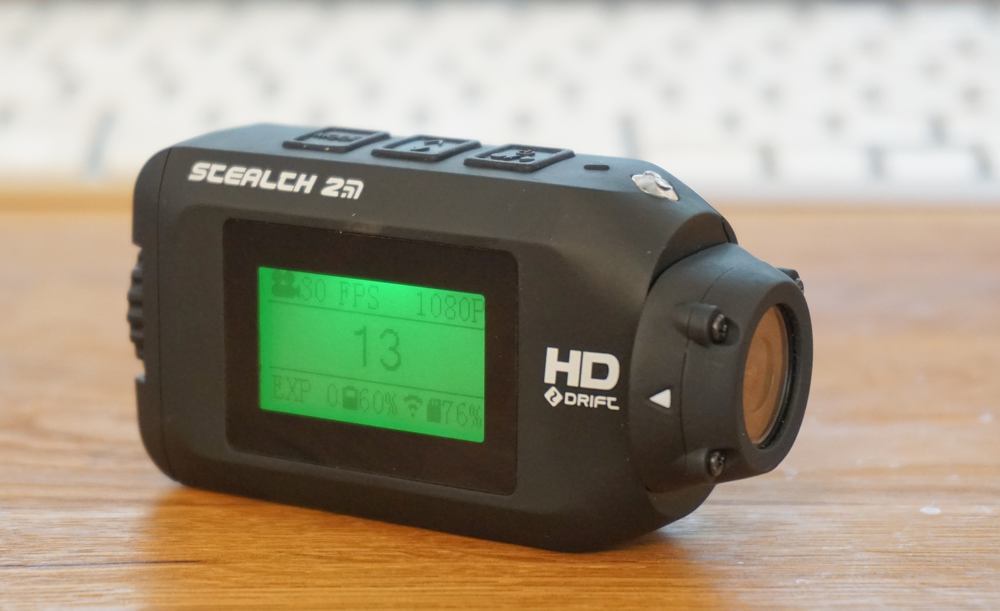
Action cams are a great way to relive fun experiences, and also provide the reassurance of video evidence should anything untoward happen while cycling. I’ve run a camera on my bikes for a few years now, my current one being the Garmin Virb Elite. The Drift Stealth 2 has a similar form-factor to the Garmin, but is about half the size, so I thought I’d see how well it stacks up.
If I lived in California, I might be able to entertain you with some surfing footage from the morning, skiing from the afternoon. As I live in London, however, the best I can offer is a cycle commute across central London. While lacking the big scenery, there are days when it can feel like an adrenaline sport …
Expand
Expanding
Close
Cloud syncing services like Dropbox and iCloud Drive connect most of our devices nowadays, and AirDrop offers fast data transfer between Macs for smaller files… when it works. Physically moving files from one machine to another using a drive in the middle, or sneakernet, remains the most reliable way to quickly move files between Macs for many. Without a proper adapter, Apple’s 12-inch MacBook doesn’t fit into this workflow though. That’s where SanDisk’s Dual USB Drive ($49.99), comes into play.
Dual USB Drive conveniently works with both USB-C MacBooks and traditional USB ports on other Macs or PCs, all in a tiny package with plenty of storage…

Pad & Quill is precisely the type of company qualified to make accessories for the Apple Watch. The Minneapolis company has been producing fine iPhone, iPad, and Mac accessories for years now, and the first handmade Pad & Quill Apple Watch accessories continue that level of quality. Today we’re checking out two wooden charging stands and two leather travel cases: the Timber Catchall, Luxury Pocket Stand, Roll Up Kit, and Luxury Travel Pouch for Apple Watch. Both charging stands have a distinct and rich look with features that differ from previous charging stands we’ve seen…
Given the widespread adoption of Bluetooth wireless for in-car telephone calling and music streaming, it would be easy to write off Lightning connector-equipped car accessories as… decreasingly important. Any recent car with Bluetooth audio probably also has a USB port built in for Apple device charging and audio output, letting many people integrate iPhones, iPods, or iPads with cars using nothing more than a budget Lightning-to-USB cable.
But that’s not true for everyone. At CES in January, Griffin showed two new car accessories designed to help Apple users whose cars lack USB ports and Bluetooth. iTrip Bluetooth (aka iTrip Bluetooth Aux) hit stores a couple of months ago, turning any aux-only car stereo into a Bluetooth music receiver. This week, it was joined by iTrip AUX ($50, aka iTrip AUX with AutoPilot), which provides a one-connection charging, audio, and remote control solution for any Lightning-connector iPad, iPhone, or iPod. It has 2.4-Amp power output, capable of refueling any of these devices at peak speed, plus a line-out audio port, and an integrated three-button remote control. If Bluetooth sound quality isn’t good enough for you, or you value a single-connection charging and audio solution, this could be a viable car accessory…

Eventually, pocket-sized cameras will compare in low-light performance to today’s large and expensive DSLRs. Although pro photographers will have moved on by then to even more powerful large cameras, the vast majority of people will see no need to carry big, heavy lenses and camera bodies around. The iPhone’s ascendance demonstrates that “eventually” is at least foreseeable, even though it’s not happening in the near term.
Serious photographers won’t be giving up their DSLRs any time soon, and in fact will be toting plenty of camera hardware — many times, along with a laptop — to any event or destination important enough to photograph properly. Over the years, I’ve learned that the “ideal bag” for my personal needs is one that can hold my camera, several lenses, and whichever MacBook I’m using. Having hunted for the ultimate carrying solution for both computer and photo gear, the best solutions I’ve found are made by Incase.
The bag I’ve used actively for the last three years is Incase’s DSLR Sling Pack ($90, above left), and incredibly, it looks virtually identical today to when I first started using it. The DSLR Sling Pack is perfect for 11″ MacBook Airs and 12″ MacBooks, plus a big camera body with three lenses. But since my 13″ MacBook Pro barely fits inside its zippered compartment, I’ve been struggling with whether to replace the bag. That’s why I’m checking out two larger models today: the DSLR Pro Sling Pack ($170, middle), and traditional DSLR Pro Pack ($150, right). They’re large enough for up to 15″ MacBook Pros and have more room for DSLR gear, as well. Which is right for you?…
In May 2005, iTunes evolved from a music player into a video library manager, paving the way for video iPods (October 2005), Apple TV (March 2007), and AirPlay video streaming (September 2010). Since then, iTunes libraries have become bigger and more central in homes, as users now stream content stored in iTunes — sometimes called a media “server” — to “clients” including Apple TVs, iPads, iPhones, and iPod touches. Unless you stream all of your content from the iTunes Store, you probably have some space-consuming videos sitting in your computer’s iTunes library, where they can be accessed by client devices so long as both the server computer and iTunes are turned on.
Apple has resisted calls to release a standalone, inexpensive iTunes home media server for years: 2008’s release of Time Capsule came tantalizingly close, but couldn’t act as a standalone streamer. So when my video library became too large to keep on my iMac, I bit the bullet and bought a used Mac mini to serve as an iTunes server. It works well, and consumes a lot less power than keeping my iMac on all the time, but it’s still a full-fledged $700 computer — overkill for streaming videos to the Apple devices in my home.
Today, I’m going to help you build a small, inexpensive, and ultra energy-efficient iTunes media server. Depending on the size of your iTunes library, it could cost as little as $150, or as much as $300, in either case much less expensive than a Mac mini. The key component is Intel’s new Compute Stick, a tiny basic Windows PC that can plug directly into an HDTV, run iTunes, and stream videos across your network. For around $130, you can now get an iView-branded Compute Stick with a CPU similar to the 12″ Retina MacBook, bundled with a wireless keyboard and trackpad. Although there are some important caveats you should understand up front, the Compute Stick can become a ~3-Watt video server using a $20+ microSD card, radically reducing the energy required to stream iTunes content in your home. If you need more storage and power, you can easily add a near-silent $90+ hard drive with 2TB-5TB of capacity…