9to5Mac Reviews
All the products that the 9to5Mac team has reviewed.
All the products that the 9to5Mac team has reviewed.
All the products that the 9to5Mac team has reviewed.
All the products that the 9to5Mac team has reviewed.



Even though I’ve had a fair bit of experience with video projectors, I took Celluon’s PicoPro somewhat for granted when I reviewed it this January. I praised the pocket-sized projector, which squeezed a 720p laser video display and speaker into the footprint of an iPhone 6 Plus, but I didn’t triple-underscore how much easier it was to use than most of its rivals. PicoPro worked so well and so quietly with such little effort that I hardly thought about it.
AAXA’s ST200 Short Throw LED Pico Projector ($299) is the newest of the traditional projectors PicoPro is challenging. It has roughly the same footprint and 1280×720 resolution as PicoPro, but it’s around 2.5 times thicker, since it uses a lightbulb-illuminated LED projection engine — just like almost every other projector on the market. There’s an audible fan inside, and because ST200 needs to power that fan and the lightbulb, it can’t match PicoPro in battery life. It also requires more manual user adjustment when you’re setting it up.
But ST200 is a markedly better video projector and audio device when judged on raw output quality, and less expensive, besides. If you’re looking for a compact way to display 720p video from an Apple TV, Mac, or iOS device at up to a 100″ diagonal size, ST200 delivers brighter, more color-accurate video output than PicoPro, more powerful speaker output, and — if you appreciate this — many more settings to play with. Read on for the details…
Across the How-To guides I’ve written for adding solid state drives (SSDs) to iMacs, Mac Pros, Mac minis and MacBooks, there was one option I left out: thumb drives. While external SSDs such as Elgato’s Thunderbolt Drives and Samsung’s T1 can do two things — dramatically speed up Macs and add storage space — thumb drives tend to be much slower, lower in capacity, and made from inexpensive materials to achieve smaller sizes and price points.
Other World Computing’s new Envoy Pro mini (120GB/$119, 240GB/$199) sits directly between thumb drives and SSDs in both features and performance. “It’s nearly twice as fast as the average thumb drive,” OWC says, and roughly the size of an actual adult thumb — larger than most USB flash drives, but a lot smaller than traditional external hard drives, while promising “desktop-class” SSD speeds, capacities, and build quality. Unlike common plastic thumb drives, it’s made from aluminum and uses a USB 3.0 connector, yet matches desktop SSD 120GB or 240GB storage capacities. It’s affordable, but clearly designed to be a professional option.
How does it actually stack up? Read on…


While self-driving cars may be the future of personal transportation, we’re still stuck driving the old-fashioned way for now, and a new iPhone game will show you why the future can’t come fast enough.


The new USB-C port on Apple’s new 12-inch MacBook (review) is both a gift and a curse. If you frequently connect legacy USB peripherals to your notebook, then you’ll have to deal with using an adapter between your old gear and your new laptop each time (and should possibly consider another machine for now). The move from Apple’s proprietary MagSafe 2 connection to the new industry standard USB Type C port for charging, however, opens up the door to third-party power adapters and portable battery packs.
During my initial MacBook evaluation, I verified this possibility with a 13,000mAh portable battery pack I had on hand. Vinsic’s 20,000mAh ultra slim power bank is a giant battery that offers even more juice for your iPhone, iPad, or 12-inch MacBook with a sleek design and an LED status indicator…

Apple has today added a new guideline to the App Store Review Guidelines, the first clause specifically targeted at Apple Watch development. This rule that Watch apps that only tell time will be rejected has actually been enforced since Apple started accepting WatchKit submissions as many developers complained to find their apps had been rejected for this reason. The documentation change now formalizes this rule into an official policy.

Two of the hottest product categories at this year’s CES were home automation and wearables, which Apple is now tackling with HomeKit and the Apple Watch. As has historically been the case, the price premiums Apple has set for its products have left plenty of room for more affordable alternatives. Misfit, a company co-founded by former Apple CEO John Sculley, is now competing in both categories: the just-released Bolt Wireless LED Smart Light Bulb ($50) joins a small collection of Bluetooth-controlled lights, while its late 2014 wearable fitness and sleep tracker Flash ($33-$50) is in the process of being upgraded to control Bolt.
Misfit’s pitch for Bolt is interesting. It’s billing the color-shifting bulb as producing “gallery-quality light,” and focusing its new Misfit Home app for iOS on creating “Lightscapes” — lighting scenarios including neutral bright white, warm sunrises and sunsets, candlelight, forest and volcanic tones, amongst other “scenes” where the color is set but the brightness is adjustable. When Bolt works, it’s a wonderful source of light, but as is common these days, some post-release tweaks will be needed to exploit its full potential…
The first time I found an AC wall outlet under my seat on an airplane, I realized that I could use my MacBook Pro with its wall charger for hours, even if I’d partially discharged the battery before boarding. Later, when I rode a bus with an AC outlet onboard, the freedom to enjoy my laptop for hours made the long trip feel brief. But I’ve had far more trips without AC outlets than with them, and there have been plenty of times when my MacBook could really have used a recharge mid-trip.
That’s why I’m genuinely excited about ChargeTech’s ChargeAll Portable Power Outlet ($150-$200), which primarily exists to give you access to an AC outlet literally anywhere you might be — something that I can’t believe has taken so long to become available. There are two versions, one with 12,000mAh of power, and the other with 18,000mAh of power, either with enough energy to keep your MacBook going for hours on the road. Both units have the overcharge and short circuit protection you’d expect from a surge board — the difference is that you can toss them into a bag or a car…
Omitting an integrated stand was a critical decision when Apple designed the first iPad: it eliminated the thickness, moving parts, and weight that the feature would certainly have required. But stand functionality was obviously needed, so Apple built one into the lid of the very first iPad case, then evolved it into Smart Covers and folio-style Smart Cases. ZeroChroma and several other companies subsequently built stands into the backs of lid-free iPad cases, but most of the other great iPad stands out there are standalone — meant to sit around waiting for your iPad to return.
Lynktec’s 360° Tablet Kickstand ($40, aka Grip Stand) is designed for people who want a “take it everywhere” stand that works with any iPad. Made from solid aluminum and black plastic, it uses a residue-free adhesive pad to attach to the back of a bare or encased iPad, folding down and rotating for easy storage. If you don’t already have a case with a built-in stand, this may be your next best option…

I love Netflix. I haven’t even owned a TV for many years, relying on either a MacBook Pro – with or without Apple Thunderbolt Display – and iPad for the limited amount of TV and movie viewing I tend to do.
Magzter Gold essentially aims to be a Netflix for magazines, a single monthly subscription giving you all-you-can-eat access to digital magazines on your iPad. The reality is a little messier, and whether it makes sense for you will depend on how many magazines you read and which ones …
Expand
Expanding
Close


LifeProof has become a household name in the iPhone accessory world since debuting its first ultra-protective case in 2011. The company has continued improving its waterproof cases with each new version of the iPhone. With the iPhone 5, LifeProof introduced its Nüüd series, which offers protection from water, snow, dirt, and shock while still exposing the display. We took a look at it last summer, noting that its an excellent choice for the adventurous iPhone user, albeit a bit bulky. It’s still available for $48.
With the iPhone 6, Apple presented LifeProof with a new challenge. The large, thin form factor of the iPhone 6 meant that LifeProof would have to work incredibly hard to develop a case that maintained a manageable form factor, while offering the same protection that users of the case have come to expect. We reviewed the LifeProof Fre for the iPhone 6 earlier this year and pointed out that it was a well thought out option, but that the Nüüd model would be very much welcomed. I’ve recently been testing the LifeProof Nüüd case for the iPhone 6. Here’s what you need to know:


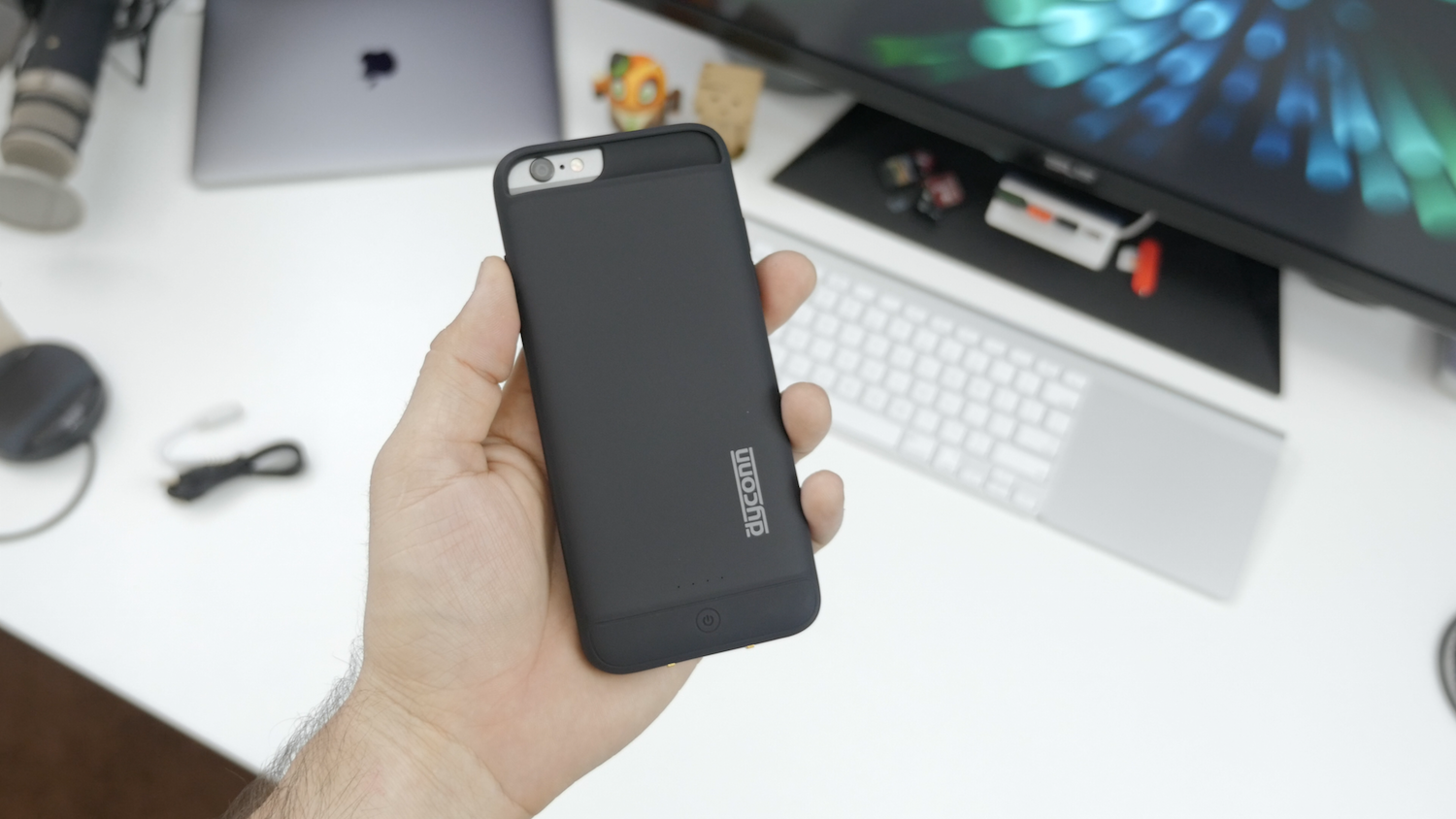
There are absolutely no shortage of battery case offerings for iPhone 6. Even though we’ve covered the best iPhone battery cases here, it’s sometimes overwhelming sorting through them all. The real winners are the ones with maximum battery capacity and some extra features to spice things up. Recently, I came across Dyconn’s i6 Power Case and was pleasantly surprised to find that it fits most of what I was looking for, but is it enough? Well, not only does this case pack a 3,200 mAh battery inside, it also features wireless charging. It’s not a must-have feature, but I sure do appreciate the convenience…
Early reviews of Apple’s MacBook (Retina, 12-inch, Early 2015) have framed it as an expensive prototype from the future — a notebook that will someday be the standard, but one most people aren’t ready for yet. Despite that classification, the new MacBook is extremely tempting if you’re in the market for a new computer: it’s more portable than even the MacBook Air, it’s the first Mac available in gold and space gray finishes, and it has a trackpad with a new feature called Force Touch.
But can you actually do work on the 12-inch MacBook? That’s the $1300 question everyone is asking. I’ll unpack my experience below …
As a founding member of the Wires Are Evil club, I’ve been waiting impatiently for wide-area wireless charging, where any device on a desk or within a certain area of a room is wirelessly charged. That still seems a way off yet.
A good halfway house would be inductive charging powerful enough to work through the thickness of a desk, so your charging pads sit out of sight on the underside of the desk and your devices charge as soon as you put them down on the right place on the desk. Sadly today’s wireless charging standards are too weedy to work through even the thinnest of desks.
If you want wireless charging today, then, you’re going to have to have a visible wire to a charging pad, and place your device on that. Apple has so far limited wireless charging to the Apple Watch, but if you want it for your iPhone, you can buy a wireless charging case that allows you to use any compatible wireless charging pad. We’ve reviewed a number of these over the years, and I thought it was about time to try one for the iPhone 6 …

Up until now, Bluetooth wireless audio was purely optional for Apple’s devices: every iPad, iPhone, and iPod has shipped with a 3.5mm audio port to connect with wired earbuds and headphones. The Apple Watch is different: it’s Apple’s first fully wireless device, with no user-accessible ports to connect accessories, even though it can work as a standalone music player during workouts. The lack of a headphone port is actually a positive, since tethering your wrist to your head with a cable would look silly, and isn’t ergonomically ideal. Thankfully, Bluetooth headphones have come a long way over the past few years, shrinking from gangly and boxy earmuffs into earphones comfortable enough to exercise with.
Since one of the Apple Watch’s major selling points is fitness functionality, this quick guide to the best Apple Watch headphones and earphones focuses mostly on accessories that can work anywhere, rather than options you can’t wear while exercising. But I’ll include some larger options, too, just in case you’re picking a pair for non-athletic use, or to share with your iPad, iPhone, iPod, or Mac…
Mophie’s Juice Packs are unqualified success stories. After debuting the first Juice Pack in late 2007, Mophie became synonymous with “iPhone battery cases,” and enjoyed years of popularity despite increasing competition. But the company’s USB battery packs aren’t as well-known. Ranging from minimalist to ruggedized, Mophie’s Powerstations range from 3,000mAh to 12,000mAh in capacity, and carry hefty $80 to $150 MSRPs. Regardless of whether they’re judged by features or battery performance for the dollar, they’re hard to pick over rivals, since you can now get a high-quality 25,600mAh battery for the same price as a 3,000mAh PowerStation.
Based upon last year’s iPhone 5/5s-specific Space Packs, the brand new Spacestation is Mophie’s shot at differentiating its USB batteries from the masses. Offered in 32GB ($150), 64GB ($200) and 128GB ($300) capacities, Spacestation combines an app-managed USB flash drive with a 6,000mAh battery, which promises “3X extra battery” life. Realistically, that’s enough power for a full recharge of the original iPad mini or three recharges of older iPhones. But since 6,000mAh batteries are getting cheaper every week, Spacestation’s appeal is mostly in its ability to at least double the number of videos, music, photos, and documents that can be accessed by your iOS device on the road…
Last month, budget charging accessory maker Aukey released PB-N30, the first external battery with a female Lightning recharging port. For only $15, PB-N30 seemed like a steal given its 3,600mAh capacity — just right for use with any iPhone — but wasn’t capacious enough for power-hungrier iPads. So Aukey has released PB-N28 ($25) as a solution for tablet users, remarkably equipping it with over three times the power for only $10 more.
PB-N30 is an upgraded sequel to the company’s older PB-18, which stuffed a 12,000mAh battery into an iPhone 5-shaped enclosure. While the new model’s capacity is the same, PB-N30’s USB ports jump from 2.1-Amp/1-Amp charging to 2.4-Amp/1-Amp support, and it has a more neutral design that neither sticks out nor knocks off an Apple product. Not surprisingly, it cuts a corner or two to achieve its super-low price…

With the release of the first developer beta of iOS 8.4 this evening, Apple gave us the first look at the oft-rumored redesign of the Music app. With the expected announcement of Apple’s streaming music service happening in June, the Music app redesign has been expected for several months now. The newly introduced Music app offers a handful of new features in the first beta of iOS 8.4, as well as a redesigned interface that’s similar to iTunes on the Mac. Let’s take a brief look…
Unless you pick the matte black versions, which look like most of the other iPhone 6 and 6 Plus battery cases I’ve tested, you’ll quickly be wowed by how premium Mophie’s newest Juice Packs feel in your hand. Glossy white plastic Apple accessories may have become passe years ago, but Mophie somehow got the look and feel just right — better, even, than the “unapologetically plastic” iPhone 5c.
The reason for that luxe feel? Mophie needs it, as the new Juice Pack Plus for iPhone 6 ($120) and Juice Pack for iPhone 6 Plus ($100) are currently the most expensive battery cases currently available for their respective iPhones. Though the company has never been shy about charging more for top quality cases, this year’s Juice Packs are hitting shelves well after numerous solid and aggressively priced competitors.
Below, I’ll discuss how Mophie’s price to performance equations actually play out for these Juice Packs, and whether they’re worth buying in light of other options…
Craft cocktails are in the midst of a renaissance, buoyed by rediscovered classic recipes, higher-quality ingredients, and increasingly talented bartenders. Pre-made mixes and artificially-flavored spirits are declining in popularity, as freshly-assembled natural flavors are ascending. But once you’ve had a truly great cocktail at a restaurant or bar, making one by yourself at home may seem challenging. The latest version of Perfect Drink ($40), Brookstone’s (and developer Pure Imagination’s) “app-controlled smart bartending” solution for iOS users, is here to help.
Perfect Drink has been through a few hardware and software revisions, but the latest-generation accessory and just-released version 3.0 app elevate it to greatness. The core of the product is a precise digital scale — recently upgraded from the original hardware — that works in tandem with your iPad or iPhone to eliminate the need for measuring cups. You call up a recipe in the Perfect Drink app and just add liquids until the scale and app tell you to stop, dynamically adjusting the recipe if you overpour. A just-released update enables the app to store a list of all the spirits, fruit, and mixers you have on hand, helping you quickly choose from recipes you’re capable of making…
Now that the Apple Watch is officially in the wild, it’s clear that stands and docks make sense for two reasons: they keep metal and metal-accented bands from getting scuffed up, and guarantee a stable charging connection all night long. Some stands also serve as beautiful displays for your Watch, as well. That’s why we’ve put together this guide to the best Apple Watch stands and docks to help you choose one that’s great for your needs. Every solution relies upon the Apple Watch Magnetic Charging Cable includes in each Apple Watch box, so what you’re getting is a stand with the ability to manage the Watch and charger.
Inside, I’ll show you a large collection of stands that range in price from $20 to $135, with considerably different levels of sophistication. Some are just basic plastic holders for Apple’s charger, while others have really nice designs made from metal, leather, and wood. Updated with new Apple Watch options on October 22, 2015!
We originally reported that Apple was preparing to release a redesigned 12-inch MacBook in January and the company made the device official during its Spring Forward event. The 12-inch MacBook doesn’t go on sale until tomorrow, April 10th, but reviews have already started pouring in today.
The all-new 12-inch MacBook has been completely redesigned and is the thinnest MacBook Apple offers. The laptop sports a 2304×1440 resolution display and is just 13.1mm thick at its thickest point. To get the laptop this thin, Apple made compromises and those compromises have made many potential buyers worry. The new MacBook only features a single USB-C port, with Apple encouraging users to use adapters to fulfill their other needs. Performance concerns also arose when benchmarks allegedly emerged from the laptop showing performance on-par with that of a 2011 MacBook Air. You can read our roundup of all the 12-inch MacBook reviews below:
Just so there’s no ambiguity on this point, I’m definitely an Apple TV fan. The first-generation model was a (literally) hot mess, but Apple did a much better job with the streamlined second- and third-generation versions, which I use every day and have strongly recommended for years. If you have an iPad, iPhone, or iPod touch, the Apple TV is one of the top three accessories you can buy for under $100, and nearly a no-brainer at Apple’s recently announced $69 price point.
Even as a fan, though, I give Apple TV’s chief competitor Roku great credit for developing compelling alternatives. According to reports, Roku is the number one seller of media streamers, and has been outselling the Apple TV for some time now. While it’s true that sales don’t necessarily reflect quality, Roku has earned its numbers by frequently iterating on its products — ironically unlike Apple, which has spent years letting an old Apple TV design chug along as a “hobby.” The difference in Roku’s and Apple’s approaches became starker yesterday when Roku released the new Roku 3 with Voice Search ($100) and new Roku 2 ($70), updates to two of its already-successful devices. These media streamers include several of the key features Apple should be adding to the Apple TV, including voice search, downloadable apps, games, and more…


LaCie announced its new 4TB Thunderbolt/USB 3 Rugged RAID portable hard drive ($420 list, $399 Amazon) today, and I’ve had some time to take it for a little ‘spin.’ There are two speedy 7200RPM 2TB portable hard drives RAID-ed together inside to give the device very impressive, almost SSD-like speeds but with the cost savings and huge storage of portable hard drives. At the same time, the package isn’t much bigger than a regular portable hard drive and better yet, it can take a serious beating…
Apple currently sells more “laptop” than “desktop” Macs, but in reality, most Macs will be used substantially on flat surfaces — desks, tables, and sometimes nightstands. iPads are more lap-friendly, but also tend to get used upright, particularly for watching videos and access in the kitchen. Since I’ve spent a lot of time testing Apple device stands and mounts, I wanted to share what I’ve learned with you, so you can choose the solution that best suits your Mac, iPad, or both at the same time.
Below, I’ve hand-picked options for different types of users, starting with passive MacBook stands such as Twelve South’s BookArc for MacBook Pro ($50). Made from Mac-matching aluminum with gray rubber inserts, BookArc is designed to safely hold a MacBook Pro upright so that its ports and SD card reader are easily accessible. Twelve South also sells a smaller version of BookArc for the MacBook Air, a bigger BookArc for the Mac Pro, and an earthy version called BookArc mod for fans of wood. That’s a rarity, as most Mac and iPad stands are designed to match Apple’s products, as you’ll see inside…