9to5Mac Reviews
All the products that the 9to5Mac team has reviewed.
All the products that the 9to5Mac team has reviewed.
All the products that the 9to5Mac team has reviewed.
All the products that the 9to5Mac team has reviewed.


Yes, another secure and ephemeral messaging app. There’s Wickr, Snapchat, Confide, so what makes Wiper Messenger different? I’ve had the chance to play around with the new free chatting app on iOS, and it seems to act as a fusion of WhatsApp, Snapchat, and Wickr. The app prompts you for your email address or phone number in order to create your account, and then you are brought to a fairly simple interface with three tabs across the bottom: Chats, Contacts, and More. Let’s go tab-by-tab:

You don’t need me to tell you that being a tech-head can pose a few challenges when travelling. Budget airlines often have ridiculously tight carry-on restrictions, which can make it hard to get all your gadgets into a bag that meets both size and weight limits. And once you arrive at your destination, you also have the worry of ensuring that all your valuable electronics remain safe from thieves.
Scott eVests are designed to solve both problems, allowing you to carry lots of technology on your person, rather than in a bag, with each item securely zipped into an inside pocket. The company’s latest addition to the range – the RFID Travel Vest – adds one further feature: protection of RFID-readable payment cards and passports from portable skimmers …
Expand
Expanding
Close
See that little $190 daughter card up there^? It houses 240GB of Transcend SSD and it could replace the 64GB or 128GB SSD that came in your MacBook Air in as little as 5 minutes. Even better, Transcend just released larger versions in 480GB and 960GB sizes to blow your SATA III MacBook Air or Pro into new worlds of space. Keep in mind these are SATA-based SSDs and Apple’s latest round of MacBook Pro/Airs came with speedier PCIe SSDs so you can’t use these on Apple’s late 2013/2014 models (see bottom of the article for compatibility list).
I got my hands on a demo unit and took it for a test drive…
I enjoy photography, and mostly prefer to take full control of the final output using powerful software like Lightroom. But there are times when I just want something fast, easy and automated to create something fun for a Facebook image or similar – and that’s what PhotoMatte is all about.
The idea is a simple one: choose a template to suit the occasion, ranging from beach holidays to a wedding; drag your chosen photos onto the template; choose your output format – from Mac desktop image down to iPhone wallpaper – click Export and the job’s done …
Expand
Expanding
Close
One of the reasons I like Macs is that their useful life tends to be significantly longer than that of a typical Windows machine. This is especially true of the pre-Retina MacBook Pro models, where it’s trivial to upgrade both the RAM and the drive.
I’d previously swapped out the 750GB hard drive and optical drive that came with my late-2011 MacBook Pro 17 for two 1TB hard drives. Along with a RAM upgrade, that gave me a 16GB RAM, 2TB hard drive machine. The plan was to use the machine in that form for a year or two, then do a further upgrade to SSDs once 1TB models arrived and fell to a halfway sensible price.
When that finally happened, and I did the upgrade, that gave me two 1TB hard drives surplus to requirements. I could have placed each into its own external drive caddy, but one 2TB drive is more useful than two 1TB ones, so I decided instead to try out OWC’s Mercury Elite Pro mini. This is an external enclosure for two 2.5-inch drives, which supports both USB 3 and Firewire 800, drawing power from either source – making it a portable drive without the need for external power …
Expand
Expanding
Close

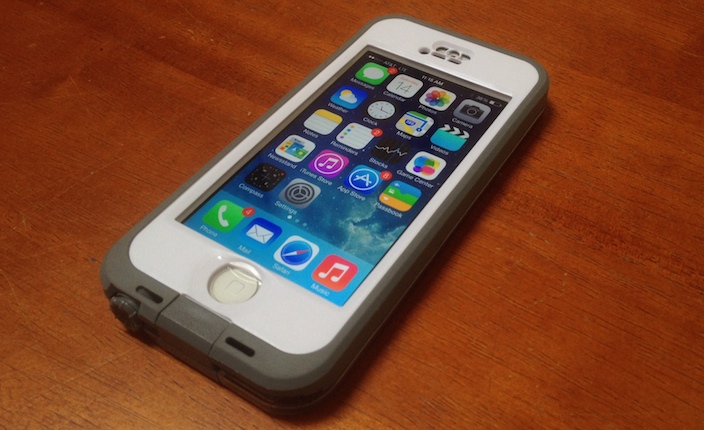
This case has been around for a while, and frankly, I’ve always been a no-case kind of guy. But when I found myself not being as careful with my now almost two-year old iPhone 5, I thought that maybe I should just go all the way. Maybe I should get ahold of one of the more protective cases out there, without going off the deep end and getting something would provide more protection than I need.

Ever since the Mac Pro was released in December, we’ve faced an onslaught of 4k displays. We reviewed Seiki’s budget offering last year, and while we liked it overall, it did have more than its fair share of set backs. For instance, you could only use the full 4k resolution at 30Hz, which meant that there would be noticeable lag when using the display as a monitor. Despite the low refresh rate, the display was still a great deal at its then $450 price point (now down to $390) and truly got us excited for the potential of 4k. At CES this year, we also saw a variety of 4k displays, some of which were priced for budget-minded customers, and some of which were high-end. Noticeably missing from CES, however, was Apple’s frenemy supplier/competitor Samsung.
Samsung, at the end of May, unveiled its take on an affordable 4k display. Samsung’s U28D590D is a 28-inch 4k monitor that supports full 4k resolution at 60Hz via a DisplayPort 1.2 connection. There are also two HDMI ports, but they’ll only do 4k at 30Hz, like the Seiki. The big selling point of the Samsung monitor, aside from doing 4k at 60Hz, is that it costs just $646 on Amazon. This puts it far below any currently available 4k monitor with 60Hz capabilities. I purchased the Samsung U28D590D on Amazon while it was priced at $666 and have been using it as my primary display for the past week. How does it compare to the Seiki? Is 4k all it’s hyped up to be? Let’s discuss.
There are times when an iPad can act as a handy sidekick to your Mac, but with a typical iPad stand you end up looking a little like a nodding dog as you look up at your monitor and down at your iPad. The TwelveSouth HoverBar 3 is designed to solve that, positioning your iPad display right next to your iMac or Apple Thunderbolt/Cinema Display.
The HoverBar can also be used on its own to position an iPad more comfortably, especially when using it to watch movies …
Expand
Expanding
Close

A few weeks before initial reports that Apple was planning to acquire Beats Electronics, I started AT&T’s three month trial of the Beats Music subscription streaming service.. Given that generous window of time, I felt more comfortable investing my time than I would with a one or two week trial. When news broke that Apple was in final talks to purchase Beats, I was caught off guard and immediately concerned that the subscription service that I was starting to really like would change under Apple’s watch. Since the deal has been made official, Apple has said that Beats Music will continue as it is (across multiple platforms even) as will the headphones line (Beats branded, not Apple branded) for now.
Because I was rather surprised by the appeal of Beats Music and Apple is now endorsing the headphones more than ever (even if only really for their massive profit margins), I got really curious Friday afternoon to try out a pair of Beats headphones first hand so I did just that. I’ve been using the Beats Studio Wireless headphones (Amazon) just about all waking hour of this weekend, and below you can read my thoughts on one of the products included in Apple’s biggest acquisition to date.
Expand
Expanding
Close
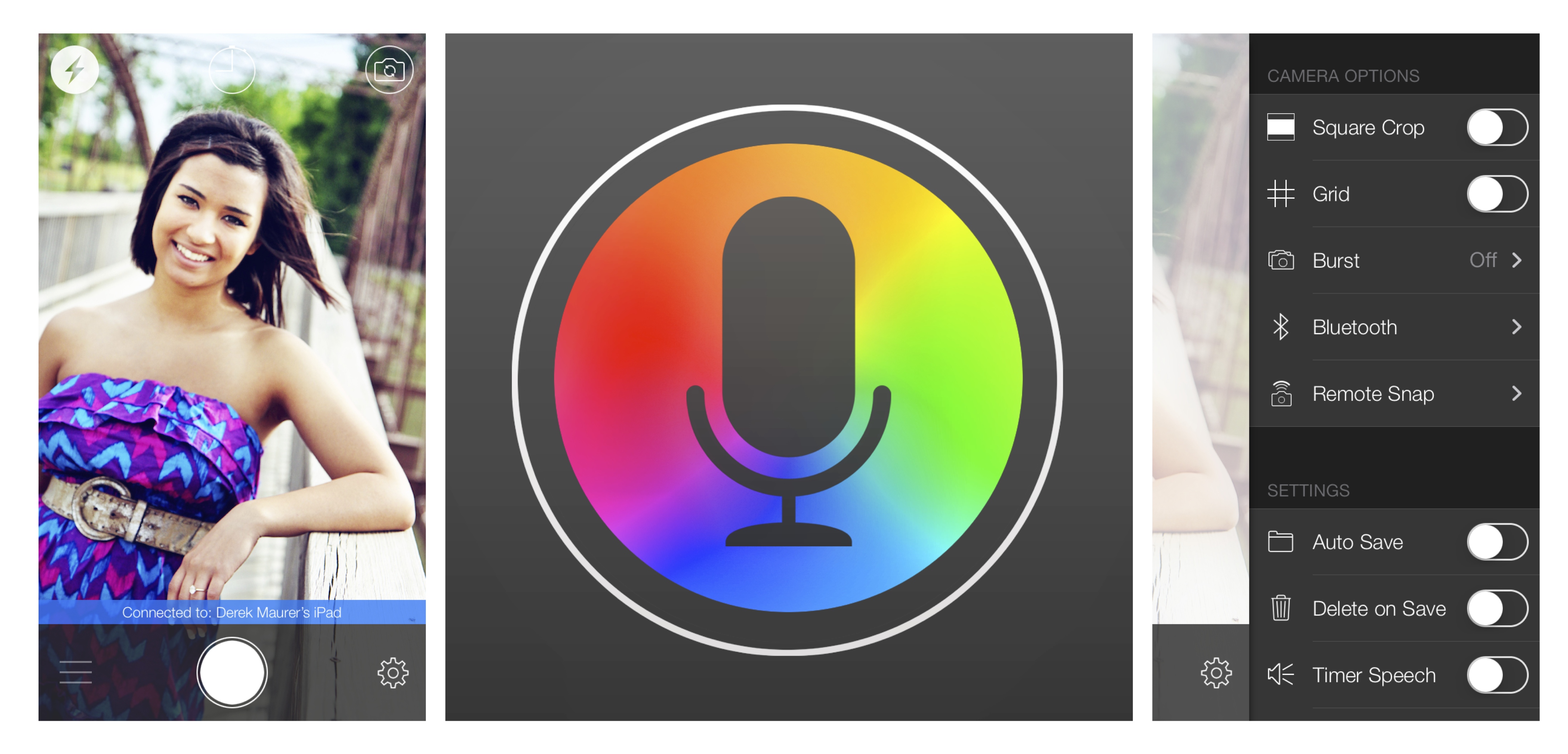
VoiceSnap, a new app from MocaApps LLC, allows you to take photos using voice commands on an iPhone or other iOS device. Rich in features, the app is very customizable and includes the settings needed to make it an effective solution for taking photos.
We were eager to get our hands on Logitech’s iPhone transforming Case+ system immediately following its announcement. The idea is that this system is so versatile that it’s up to nearly any task you could ask of an iPhone case. It allows you to switch between rugged protection, wallet functionality, a windshield/dashboard mount, and a battery pack without having to remove anything.
Without the Case+, you would need to buy at least five different iPhone accessories to perform all of the same core functions that the Case+ offers: rugged protection, multi-angle stand, ID/credit card carrier, car dashboard/windshield mount, extended battery. It’s certainly a novel idea and an ambitious product from Logitech so head below to find out if we think the Case+ is worth investing in…
Expand
Expanding
Close
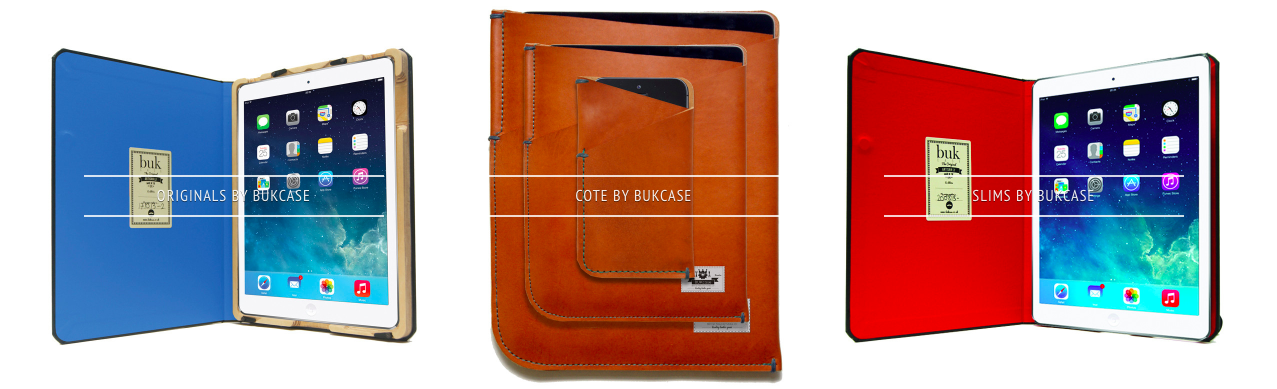
BUKcase creates handmade cases for Apple products. Each of their products is made-to-order by local master bookbinders in Manchester, England, who use local materials and traditional machinery. Each product comes with a unique personal ID number and a birthday.
To make its products more unique, BUKcase even offer custom engraving options. Since appearing on the television show Dragons’ Den, (the British version of Shark Tank), the company has had tremendous sales growth despite the lack of funding. We had the opportunity to review several of their products below…

ActiveBoard is a new tweak for iOS 7 that adds a couple of useful features to the home screen. Using a pulsating glow behind app icons, ActiveBoard will let you know if an app has a notification or is running in the background. A red glow and bouncing animation will indicate a missed or unread notification, while a white glow informs you of the app’s background status.
We’ve covered Algoriddim’s djay for iOS, the popular all-in-one DJ system software, in the past including the debut of djay 2, and today djay is out with a major new feature that unlocks over 20 million songs: Spotify integration. Previously, the DJ app relied solely on songs downloaded and stored in the iPhone or iPad Music app. The latest version of djay focuses on music access and discovery and also includes set list sharing using Spotify playlists as well as more than 30 new audio effects to unlock within the app. I’ve had the opportunity to test drive the new version of djay with Spotify integration over the past week, and it’s definitely a major benefit to users of the DJ system software.
Expand
Expanding
Close
You’d think choosing a photo to use on your iPhone lockscreen would be a pretty simple task. Scroll through your Camera Roll, choose a photo you like, hit Set and you’re done.
The reality is a little different. Half the time the photo you really want to use is landscape format (horizontal) and you need a vertical image. The iPhone will automatically crop it, and allow you to slide the image around to get a crop you like, but the result rarely does justice to the original shot.
The other half of the time, you find a portrait (vertical) photo which looks great on its own but then clashes with the clock and slide to unlock text when you set it as your lockscreen. Lockscreen Wallpaper Designer is a very simple app that aims to solve these problems …
Expand
Expanding
Close

Fresco News is a news reader app that delivers news in a whole new way by displaying informative, captivating, emotional photographs. It features content from political, sports, business, technology and entertainment news providers such as Aljazeera, BBC, Bloomberg, Boston Globe, CNN, The Guardian, Huffington Post, maskable.com, NY Post, NY Times, Reuters, Time Magazine and VICE News. Users get to scroll and flick through the images that convey the news.
Fresco presents the news in the form of a photo feed that illustrates each headline visually. Tapping a photo offers a brief description of the photo and the associated story. Tapping on it again allows you to view it in a fullscreen parallax-enabled view. You can also read the full accompanying article from a variety of news sources.

Compared to “traditional” news apps, Fresco is a helpful app that provides a practical, enjoyable news experience. For anyone who wants to stay informed of current events, the app provides a significantly less cumbersome method for getting the latest news.
Currently the photos in the feed come from professional journalism photographers, such as AP, Getty, or Reuters. In the app’s next update, the images will be a mix of professional and crowdsourced. The photo does have to be approved by the developers in order to show up in the app, but users will have the opportunity to be paid for their photos.
According to John Meyer, founder and CEO of Fresco News, when a newsworthy event takes place close to a Fresco user, they will receive a push notification informing them that they can be paid for photos of that event. The process of submitting a photo takes less than thirty seconds. Meyer is also working with news organizations to license their photos.
The next update will also contain more options for navigating within the app, allowing users to choose which feed to follow based on topic, interests, location or user.
As an avid news consumer, I will definitely be taking advantage of this free app, and highly recommend it to other like-minded news junkies looking to get the latest headlines. You can get Fresco News from the App Store for free.
We’ve all done it. You put your keys down, and five minutes later you have no idea where they are. You could swear you put your phone on the kitchen table last night, but it’s not there now. You put your bag under the restaurant table and then walk out without it. Doing all three in the same week might suggest the help you need is more medical than technological, but for those occasions when you do one or other of them, Proximo is designed to help.
Bluetooth tags also provides some degree of protection against theft, where you’ll be alerted to any of your tagged items walking off.
There are a number of different tagging systems on the market, with varying levels of functionality. Proximo is one of the more sophisticated, offering five different features …
Expand
Expanding
Close

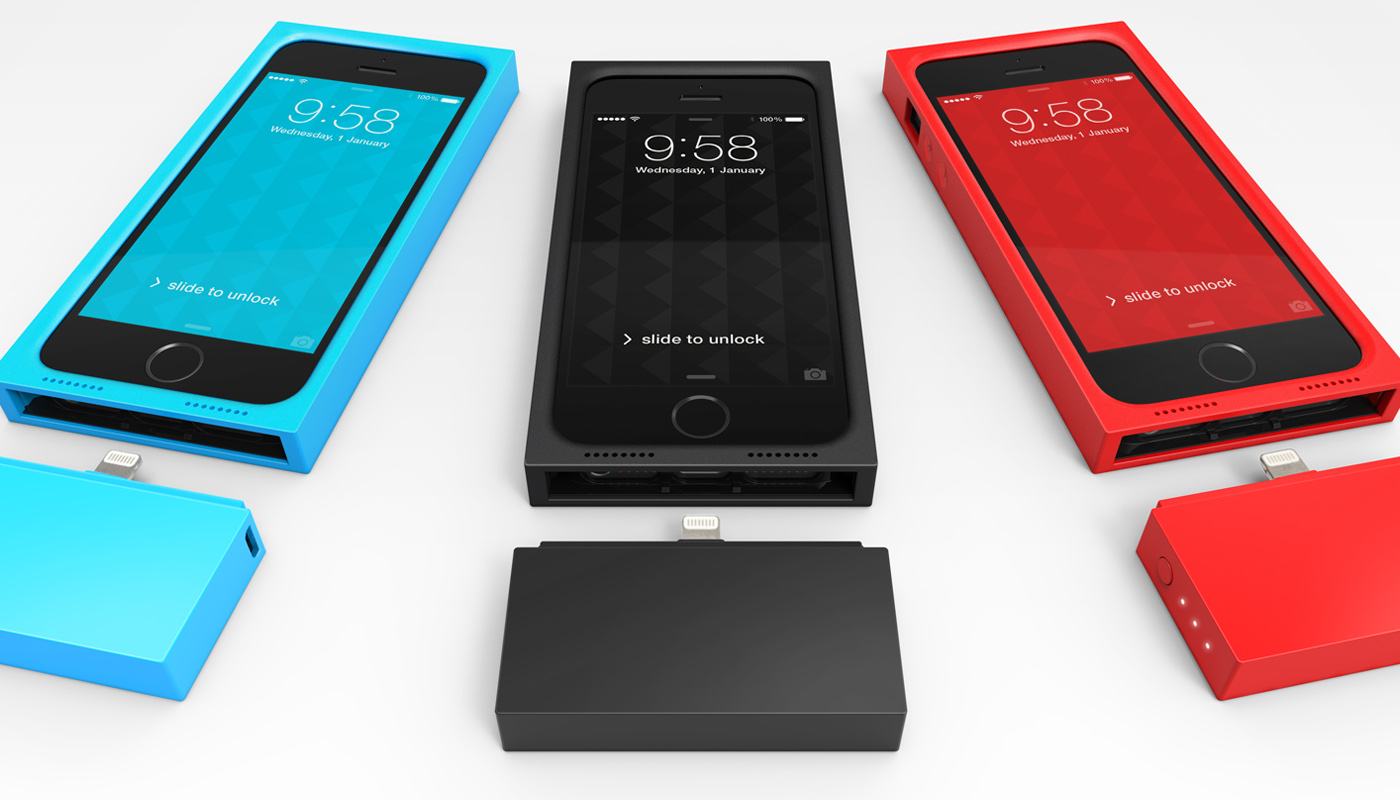
Augment is a new case series from Rubix that puts a spin on the traditional battery case. Rubix is currently seeking funding on Kickstarter to produce this product line, but don’t let that get you down. This is definitely worthy of your hard-earned cash if you’d like to have the benefits of a battery case, without all of the bulk.

Taphive GmbH has recently released a major update to their movie management and discovery app, TodoMovies 3. TodoMovies 3 is a to-do app focused on movies. It has a gorgeous layout, and does a superb job managing a movie related to-do list with a robust set of features.
In this article, I will provide some examples of how the app could be used to aggregate a list of movies you want to watch, explore a vast amount of information about those movies, and discover movies you may not know about.

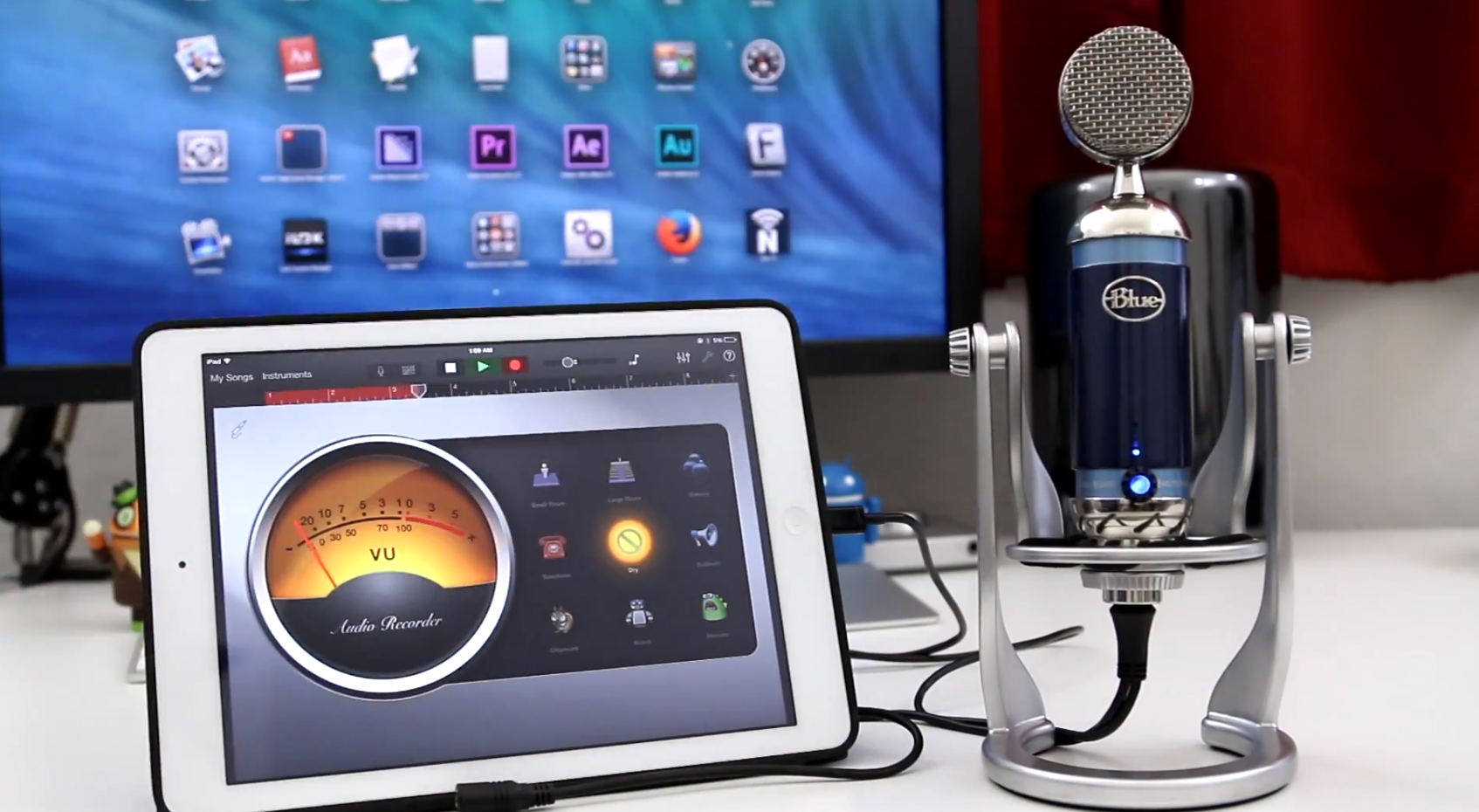
When you think of a USB microphone, what’s the first thing that comes to mind? For myself, I tend to picture a subpar microphone that would normally be used for Skype calls or other basic tasks. Of course, these microphones have come a long way in recent years, but nothing makes this more evident than Blue Microphones’ Spark Digital condenser microphone.
[youtube=https://www.youtube.com/watch?v=iGvBySddOD8]
Having remarked that I don’t generally favor hiding iDevices in cases, I find myself reviewing the second iPad case in a week …
There’s no shortage of Bluetooth keyboards available for the iPad Air, and we previously did a roundup of some of the early contenders from Logitech, Belkin and ZAGG. However, only the ZAGG offered a backlit keyboard for use in the dark, so when Kensington joined the fray, I decided to give it a try …
Expand
Expanding
Close
After previously announcing the feature and showing it off last month in a promotional teaser, Realmac Software is finally bringing the highly requested reminders functionality to the popular Clear to-do list app on both the Mac and iOS platform. The latest version also brings some extra goodies that add even more personality to the app like new sound packs. Check out the details below to see how the latest version of Clear measures up as an alternative to Apple’s own Reminders application and other apps as well.
Expand
Expanding
Close
We’ve taken a look at a vast array of portable Bluetooth speakers and have found that most include similar features but sound quality and reliability can vary greatly. That’s why we eagerly awaited the arrival of our JBL Pulse, because it dares to be unique in a sea of familiarity. A dazzling display of LEDs encompasses the entire unit, bringing your music to life by dancing along with the beat. We put this new speaker to the test to see if this LED-studded speaker is just a novelty or if it has a lasting impact on the way we enjoy our music…
I don’t generally like to hide away my iDevices inside cases, but there are some environments where this is at least strongly advisable – and the basket of a hot-air balloon is definitely one of those. In anything but still air, a landing tends to involve the basket being dragged across the ground – and much as you try to secure things, there’s always the risk of loose items taking a fall. Which can get expensive when one of those loose items is an iPad Air.
iPads are the perfect navigation device in a hot-air balloon as you need to simultaneously reference three different types of maps. An airspace map, showing the areas you can’t fly into without risking an A380 bearing down on you (followed shortly afterwards by the aviation licensing authority). A land map to show the ground detail you need for navigation and landing purposes. And finally, a map showing Sensitive Areas (SAs) where landowners request that you either don’t land or overfly above a specified altitude (generally 500 or 1000 feet) to avoid disturbing cattle, dogs and so on.
An iPad provides a moving map combining all three types of data in a single view. But with bumpy landings a fact of life, it would be a braver man than I to risk using a naked iPad. I thus decided to look around at the protective cases available, and having been impressed by the Otterbox Defender iPhone case, tried out the version for the iPad Air …


