9to5Mac Reviews
All the products that the 9to5Mac team has reviewed.

All the products that the 9to5Mac team has reviewed.
All the products that the 9to5Mac team has reviewed.
All the products that the 9to5Mac team has reviewed.


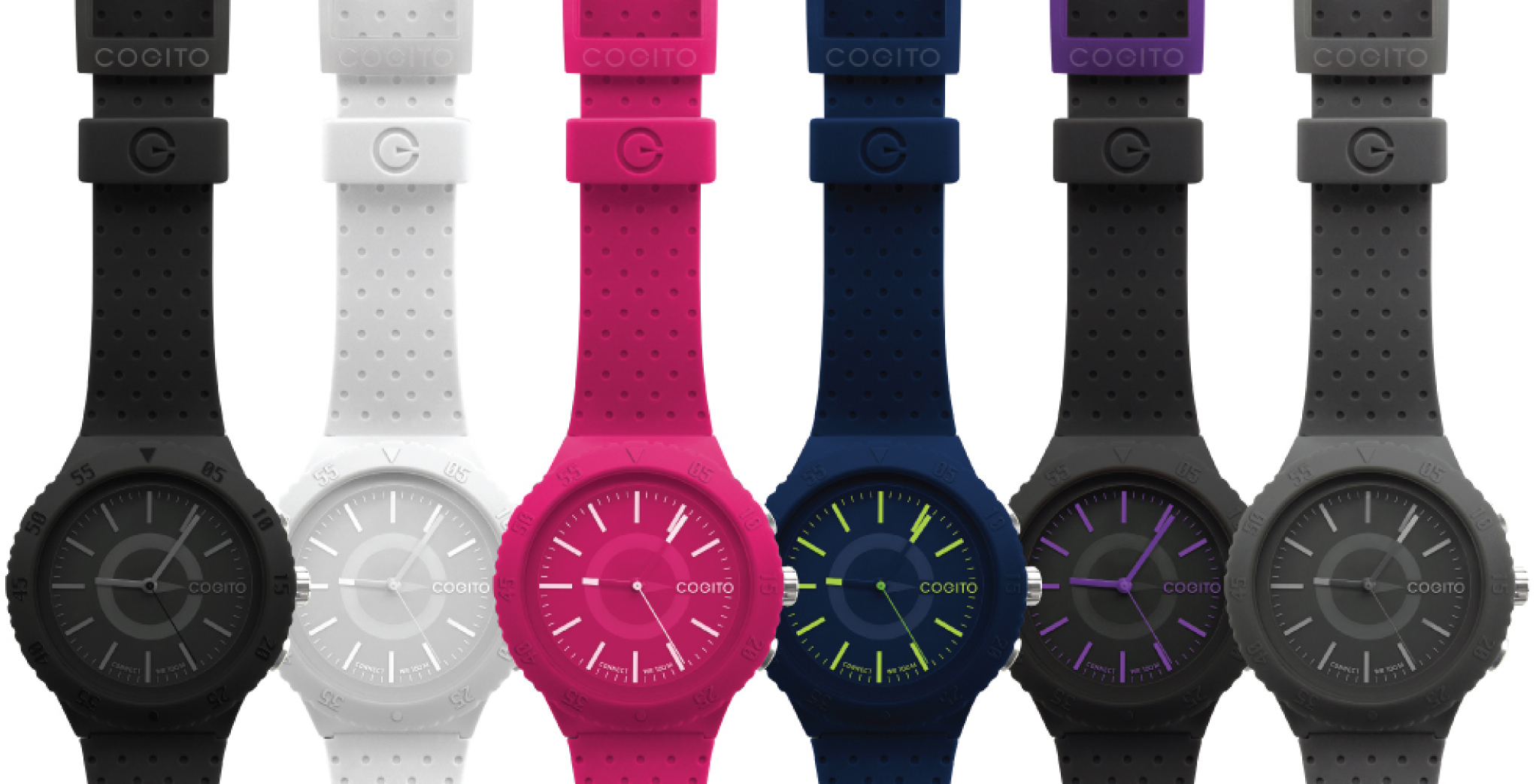
When you put the word “smart” in front of anything, most people tend to think that it’s going to be some kind of advanced product. Most smartwatches on the market have a display and offer a simplified (or detailed) look at information from your smartphone along with access to third-party apps and services.
CONNECTEDEVICE is the company that’s trying to put the “watch” back in smartwatch. What if your smartwatch was created with the primary purpose of showing the time? Well, that’s exactly what the Cogito Pop does. It offers style and functionality, but don’t expect anything fancy here. The Cogito Pop puts notifications on the back burner, but that’s not necessarily a bad thing.



There are Mac accessories that are exciting or fun, and others that are boring but useful. The Elgato Thunderbolt Dock most definitely falls into the latter category.
As regular readers will know, I’m of the view that wires are evil. Anything that can be wireless should be wireless, and any wires that are unavoidable should be hidden from sight. This is particularly easy if you have an Apple Thunderbolt Display, of course, since all you need in the way of wires from a MacBook is power and Thunderbolt: everything else can be plugged into the back of the monitor.
But if you share my aversion to visible wires and don’t have a Thunderbolt display, or you are frequently connecting and disconnecting your MacBook from a bunch of devices on your desk, the Elgato Thunderbolt Dock may be the answer …

Recently, I’ve had the opportunity to try out a number of Satechi’s USB hubs in my effort to combat my growing need to wire in more stuff to my Mac’s 4 USB ports. While wireless is often more convenient and downright necessary on laptops to have a good experience, I still enjoy the speed and reliability of a wired connection on my desktop setup. To have a completely ergonomic experience and avoid plugging and unplugging things, a USB hub of some sort is definitely needed. The challenge to buying the right hub for your needs is deciphering how each hub differs; it’s not just limited to the number of ports available…
After first debuting on the Mac then joining iOS with the iPhone, Fantastical is finally ready to replace the calendar on your iPad, too. With Fantastical for iPad, Flexibits has brought the same, streamlined design and natural language parsing for quick event and reminder entry to the iPad. I’ve been using Fantastical for iPad for a few weeks now, so let’s take a look at how it compares to Apple’s calendar app…
Expand
Expanding
Close

Using our voice to control computers has never really taken off. For many of us, using voice recognition technology wasn’t even a consideration until features like dictation and Siri arrived on our iPhones and iPads. There’s good reason too: the voice recognition features built into our devices have always had the reputation of being half-baked. They simply aren’t accurate and consistent enough to replace our tried and trusted mouse and keyboard or touchscreen. While half decent dictation features come with every Mac (and are powered by Nuance’s technology), the voice recognition features you get with latest version of Nuance’s Dragon Dictate for Mac go well beyond simply dictating speech to text.
Expand
Expanding
Close

[youtube https://www.youtube.com/watch?v=HXELeBT8L2o]
When UpTo originally launched, it focused on being what it described as “half-social, half-calendar.” Unfortunately, that didn’t work out so well as the social side and the calendar side fought for dominance, resulting in an app that felt like it didn’t know what it wanted to be when it grew up.
Today the company behind UpTo is re-launching the app with a new design and a new focus: rather than trying to turn calendars into a social network, the app is now focused entirely on being the best calendar app it can be. That being said, the new version of the app is not entirely devoid of social features.
Keep reading to find out how the developers finally figured out how to balance these two sides to the software.


As we have previously noted, Just Mobile sells a variety of premium accessories primarily for Apple products that are made out of aluminum. These designs and materials are similar to what Apple makes for its own products, so Just Mobile’s accessories are popular items for fans of Apple’s product design. For the past few weeks, we have been testing out some of Just Mobile’s latest iPhone accessories: the AluFrame and the AluCup Grande. You can find our full reviews below:

We’ve reviewed a fair bit of Thunderbolt docks for Mac here and one thing remains constant: The starting prices range well over $200 (Belkin’s a deal at $150) and that’s before you buy an expensive $30 Thunderbolt cable. The question is: Do you really need Thunderbolt to have a quality/usable dock for your MacBook? Can you get almost all of what you need just from USB 3?
Kanex sent me their $90 USB 3 SimpleDock a few months ago and I’ve put it through its paces ever since. The first thing you’ll notice out of the box is that it is made extremely well, looks very ‘Apple’ and is substantial in weight. It doesn’t move when you plug in devices because of that weight and a rubberized bottom. On top, all you’ll see is a space that coincidentally fits an iPhone perfectly with a charger cable hole through the bottom. Around back, you’ll find 3 USB 3 ports, a Gigabit Ethernet port as well as a 10W high powered ‘Charge-only’ port.
So you are getting 3 products in one here: An iOS device quick charger, a USB3->Gigabit Ethernet adapter and 3 port USB 3 hub. The question is: Is the SimpleDock worth the $90?

ProWidgets is a brand new tweak for jailbroken iPhones and iPads that builds on the foundation of a previous tweak called Tap to Widgets (both by developer Alan Yip) to provide the most solid and complete widget platform on iOS. With nine built-in, fully-featured widgets and an architecture that allows third-party developers to add their own, ProWidgets is one of the best tweaks you can get right now.
Keep reading for a full breakdown of everything this tweak can do for you.
I’ll admit, I’ve never felt the need to purchase network-attached-storage (NAS) hardware for storing and accessing my media or backing up my files. These days most of my content, from photos and movies to back ups of important files for work, are already stored in the cloud. My photos are (supposed to) auto backup to Photostream in iCloud, iTunes has all of my music downloadable from all my devices from the cloud, and any important files and everything else go directly to Dropbox or Google Drive. Around 90% of my content is already stored and accessible from anywhere in the cloud.
That being said, for the last year or so I’ve been hearing more and more about Synology DiskStation products. Coworkers can’t stop talking about them, and the products have received a lot of praise from many other reviewers as well.
I’ve been putting the Synology DiskStation hardware and brand new DiskStation Manager 5.0 software to the test in recent months to see if I could really benefit from a NAS solution despite all my content already being on the cloud and backed up. With today marking the release of 5.0, the company’s biggest software update yet, I thought now would be as good a time as any to share my experience.
Expand
Expanding
Close
For the past few weeks, I’ve been testing out Mophie’s new ‘Space Pack’ battery case with included storage that it showed off earlier this year at CES. While I’ve never used a case on my iPhone for longer than a few days, I do run out of battery more often than I’d like, and Mophie’s promise of extra storage built into the hardware sparked my interest. (Oh, and I do think the name is cool and clever…) I really wanted to try out the Space Pack just to prove what I expected: You can’t possibly add more storage to an iPhone in a way that isn’t gimmicky and a poor experience. Admittedly, my expectations were far from what Mophie has been able to accomplish; considering the limitations designed into iOS software and iPhone hardware, the Mophie Space Pack is a very interesting and useful accessory…
Expand
Expanding
Close


Font Studio from Paolo Quadrani is a Mac app that allows you to modify and customize fonts. It provides you with the ability to create a range of font styles. It also includes in impressive collection of fonts that can be customized, saved and organized. In this article we will discuss scenarios in which this app can be useful, how the app works, and what you should expect if you purchase it.
The promise of the Thunderbolt standard is that it can deliver a lot of data over long distances very quickly for many types of devices. Unfortunately, that promise has been pretty slow to materialize, and the long distance piece of the equation has been particularly painful.
Corning is hoping to turn that around this year with the consumer launch of its Thunderbolt Optical Cables in 10 meter (33 foot), 30 meter (99 foot), and 60 meter (198 foot) sizes. With these lengths, you can put your Thunderbolt hard disk and arrays far away from your desk. If you have a Thunderbolt Display or a Thunderbolt dock, you can even move your Mac to the utility closet or basement and really clean up your desk space.
I’ve been using the 33-foot version for a few weeks and here’s my take:
Expand
Expanding
Close
I’ve been on the search for the perfect headphones for my whole life.
Apple’s fall out of my ears if I think too hard and I even have problems keeping typical in-ear headphones in my ears when working out. Getting those weird things that go around my ears to hold them isn’t a great general purpose solution. In-ear headphones also typically lack the depth of sound of over the ear headphones.
Unfortunately, over the ear headphones often lack the mic and iOS controls that you can easily get with in-ear headphones. Add that they are usually bulky and heavy and are too hot on the ears and you usually have a non-starter as a general purpose headset.
The Onkyo ES-CTI300(SS) On-Ear Headphones with Control Talk for iOS Devices aim to be the best of both worlds…
For every bit that Apple gave pixel-drawn leather a bad reputation with apps like Find My Friends and the Lion-era OS X calendar, Pad & Quill restores your faith in the actual material. I’ve recently been using Pad & Quill’s Field Bag, a classy, vertically designed version of its leather Messenger Bag. Let’s cut to the chase: it’s a very, very nice bag. The kind of bag that makes you want to be a better person… or at least a better dresser. As the headline reads, Pad & Quill’s Field Bag is designed for those who like nice things. As a MacBook and iPhone user, like you I’m sure, I have an appreciation for quality products. Read on to see why this fits into that category…
Readdle’s app Documents has long been one of the most complete solutions for managing your files on the go. With an intuitive interface and powerful download management features, it has been a solid contender in the file management app arena for some time.
Today, the company has launched version 5.0 of the software, introducing a host of new features and a colorful design refresh for iOS 7. Keep reading for a full review of the new look and features available in the latest update.
I was a huge gushing fan of the Bose Soundlink Mini when I reviewed it this summer, calling it the “Best Sounding portable Bluetooth speaker ever”. For $199 you’d get bookshelf type of power and clarity with 6 hour battery in a portable package that you could throw in a coat pocket, bag, or purse.
This week, Bose started shipping a bigger version, the $299 Soundlink 3 which is officially the successor to the Soundlink 2 but it grabs a lot more technology, features and appearance from the very successful Mini. The big bro ‘III’ boasts an impressive 14-hour battery, 6 Bluetooth device memory, and doubles the Mini with four drivers and two passive radiators. In the process it doubles in size to a 3-pound package that isn’t nearly as portable as the Mini at 5 inches high, 10 inches wide, and 2 inches deep.
But does that $100 and double size give you appreciably better sound?

Ayecon (that’s pronounced Icon) has long been hailed as one of the most amazing, most complete themes available for jailbroken iOS devices. Today, Surenix, the designer behind that theme, has released the iOS 7-inspired Ayeris (pronounced Iris). The theme features colorful app icons, redesigned interface elements, and more.
Keep reading for a full breakdown of what the theme includes and even more screenshots of it in action.


As our families grow, so do our device charging needs. Where we just used to need 2 USB ports to charge our iPhones, we now have iPads, cameras, Bluetooth speakers, portable flashlight/batteries and even a few Android devices laying around that constantly need to be chargers. Our excellent 2-port ZaggSparq just couldn’t handle all of the stuff anymore. Time to step up to something more substantial.
We’d heard great things about the new Anker IQ 40W 5V / 8A 5-Port Family-Size USB power supply. In fact, at Amazon where it can be nabbed on sale for $26, it gets almost exclusive 4 and 5 star ratings.
Anker hooked me up with a unit to test out at CES and I’ve relied on it since to keep our house full of devices charged. What’s particularly impressive about this one is that it has 40W of power to distribute through the 5 USB ports (a 25W one is a few bucks less). Anker’s new IQ does one better by recognizing high power requirements in devices like iPads, other tablets and even HPs new Chromebook and giving those devices the full 2-3 Amps of power they need to get charged quickly. Anker explains it thusly:
Not all USB ports are equal. Where past USB ports were hard-wired to exclusively charge iOS OR Android, we’re introducing Smart Port technology to create a truly universal charger. Dynamically adjusting to any device’s unique maximum charging speed, the Smart Port takes the brainwork out of compatibility.Just plug in and it’ll do the rest.
Were the reviews right? Was this the end to my USB charging woes?
Despite smartphones and tablets being commonplace these days for just about everybody and their grandmother, most non-techies that you run into probably don’t own a pair of touchscreen gloves. That is, winter gloves that don’t require you to take them off to use your iPhone, iPod or iPad. I’ve tried out a couple cheap pairs in recent years from Amazon and elsewhere, but they’ve never really been warm and/or well-made enough to use on a daily basis.
This year I’ve been trying out a few of the more expensive pairs available from one of the original companies making touchscreen gloves, Mujjo. I’ve put a couple different pairs from Mujjo to the test over the past month during a cold Canadian winter to see if they’re really worth the extra cash.
Expand
Expanding
Close
Rdio, the popular subscription music service, is rolling out an update today to its iPhone and iPad app that brings a couple of welcomed new features including playlist editing for iPhone and iPod touch and reviews. As for the new playlist editing features, Rdio explained in its blog post:
Now, you can update your playlists from your iPhone or iPod touch — in addition to creating playlists and adding new tracks, you can now remove and rearrange tracks until you’ve made the best playlist ever (or it’s dethroned by your next playlist, of course). You can also customize the playlist artwork, change its visibility and collaboration settings, and more.
The new Rdio app also includes reviews for albums and playlists from both users and critics. Not only will you now be able to write your own album and playlist reviews from within the app, you’ll also be able to browse reviews from critics in addition to reviews written by other users.
Rdio notes in its blog post that it has “also made tweaks to the app’s design, user interface, and overall performance.”
The updated Rdio app for iPhone and iPad is available on the App Store for free.
If you travel frequently for work, you’ve probably seen one of a number of 30-pin alarm clocks that have almost become standard at business hotels. That was great while we had 30-pin iOS devices, but now that we’ve mostly moved to Lightning, it is mostly just lip service – about as convenient and up to date as that wired room line phone installed next to the toilet.
Philips hopes to remedy the transition to Lightning with their new-ish AJ7260D/37 Dual Dock Triple Charging Clock Radio which retails for around $130. I’ve been using the alarm/clock radio for about a month now and here are my observations:
If you’re looking for the best iPhone case ever made, look no further.
When it comes to iPhone cases I’ve tried just about all of them: Protective cases from companies like Otterbox, Lifeproof, and HardCandy, super-slim cases that add barely any bulk to the device, wallet cases for holding cash and cards, and just about everything in between. It’s true I’ve long preferred the look and feel of the naked iPhone in my hand opposed to a case, but I’ve now found a case that truly does the Jony Ive-designed hardware inside justice. It’s a case that’s converted me from one of those annoying blowhards constantly boasting about not using a case to someone that won’t leave home without it.
I’ve finally found the perfect case…
Expand
Expanding
Close
MyPhotostream is a simple, standalone Mac app for viewing your pictures from Photo Stream without having to open the mammoth of an app that iPhoto has become.
This app removes a major point of friction for me, and I’m guessing I’m not alone. Open iPhoto and it’s loading your image library, checking location data, updating Photo Stream and Shared Photo Streams, and who knows what else. If you’re viewing iPhoto in full-screen (as it best appears in my opinion) and you have a camera or iOS device connected, it will pull you back to a desktop view and take over the screen with a modal import prompt (even if auto-import is disabled); it’s a mess.
MyPhotostream digs your Photo Stream photos out of the mess and presents them in a simple, customizable grid view.
Expand
Expanding
Close