Safari

See All Stories

Apple seeds Safari 7.1 & 6.2 with WebKit improvements to developers and AppleSeed users

Site default logo image


Apple has released a new beta version of Safari to beta testers in the AppleSeed program and Mac developers. The new version for Mavericks is 7.1, while Moutain Lion users will see version 6.2. The update includes several upgrades to the WebKit engine that powers the browser.

According to the release notes, the changes include support for WebGL, IndexedDB, and JavaScript tweaks, among other things. There is also apparently a change to the way the app handles extensions, as the beta disables all installed add-ons by default and the notes request that developers check for any compatiblity issues.

Version 7.1 will likely be the last major update to Safari for Mavericks before the launch of OS X Yosemite, which will include the all-new Safari 8. The full seed notes for this beta are below:


Expand
Expanding
Close

Apple seeds iOS 8 beta 2 to developers alongside new Apple TV OS beta

Site default logo image

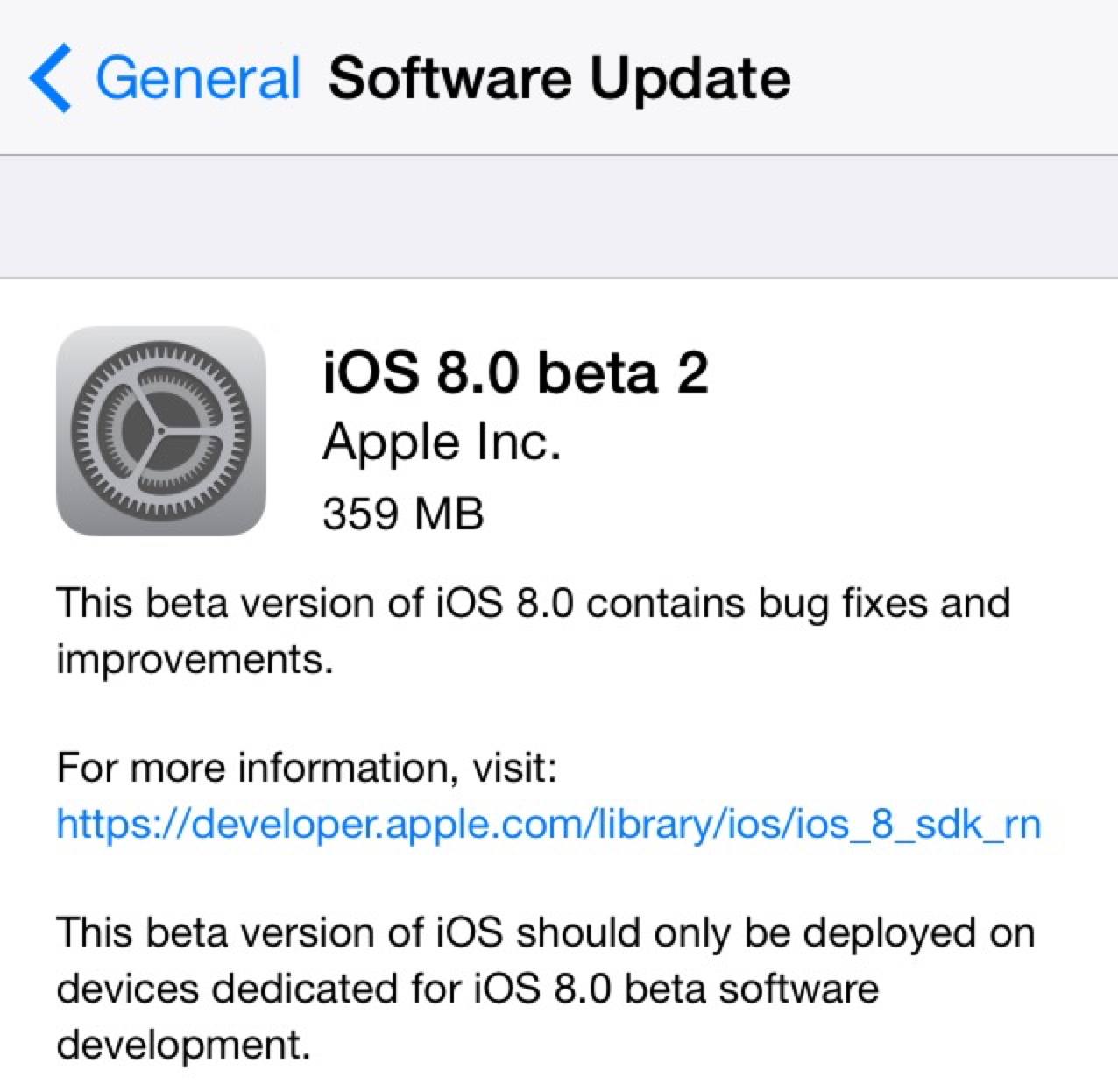
Two weeks following the 2014 Worldwide Developers Conference and the release of the first beta build of iOS 8 to developers, Apple has provided iOS 8 beta 2 to developers. The new release is available over-the-air in iOS 8’s Settings menu, and it’s available for supported iPhones, iPads, and iPod touches.

iOS 8 officially launches this fall and includes several new features for both consumers and developers alike. iOS Device users will experience a new Health app for integrating health and fitness data, improvements to Safari, enhanced Messages features, design tweaks in Mail, and significant changes to notifications, photo management, and the keyboard. Developers will now be able to create third-party keyboards, integrate the Touch ID fingerprint scanner into apps, and integrate third-party home automation products with iOS.

We’ll be updating this post (below) with new features in iOS 8 beta 2 as they are discovered, and you can share your findings with us via email at tips@9to5mac.com. 


Expand
Expanding
Close

iOS 8 lets apps access Safari AutoFill credentials for quick & easy login

Site default logo image

In iOS 8, Apple is making the process of logging into apps a much smoother experience by allowing native iOS apps to access usernames and passwords stored in Safari. The new feature, which works by letting iOS apps tap into Safari’s AutoFill & Passwords feature, will allow users to login to apps with a simple tap rather than having to type login info. Imagine your username and password are stored in Safari’s AutoFill for Facebook, for example. When launching the native Facebook iOS app, the feature will let users select from passwords stored in Safari to quickly login (as pictured above with Apple’s demo “Shiny” app).
Expand
Expanding
Close

Here’s the iPad split-screen app mode Apple is working on in iOS 8 (video)

Site default logo image

As we reported in May, Apple is working on a split-screen multitasking feature for iPad apps for a version of iOS 8. The feature, akin to the key productivity function on the Microsoft Surface, was not announced at WWDC last week, but code references to the feature have been found across the iOS 8 Software Development Kit.

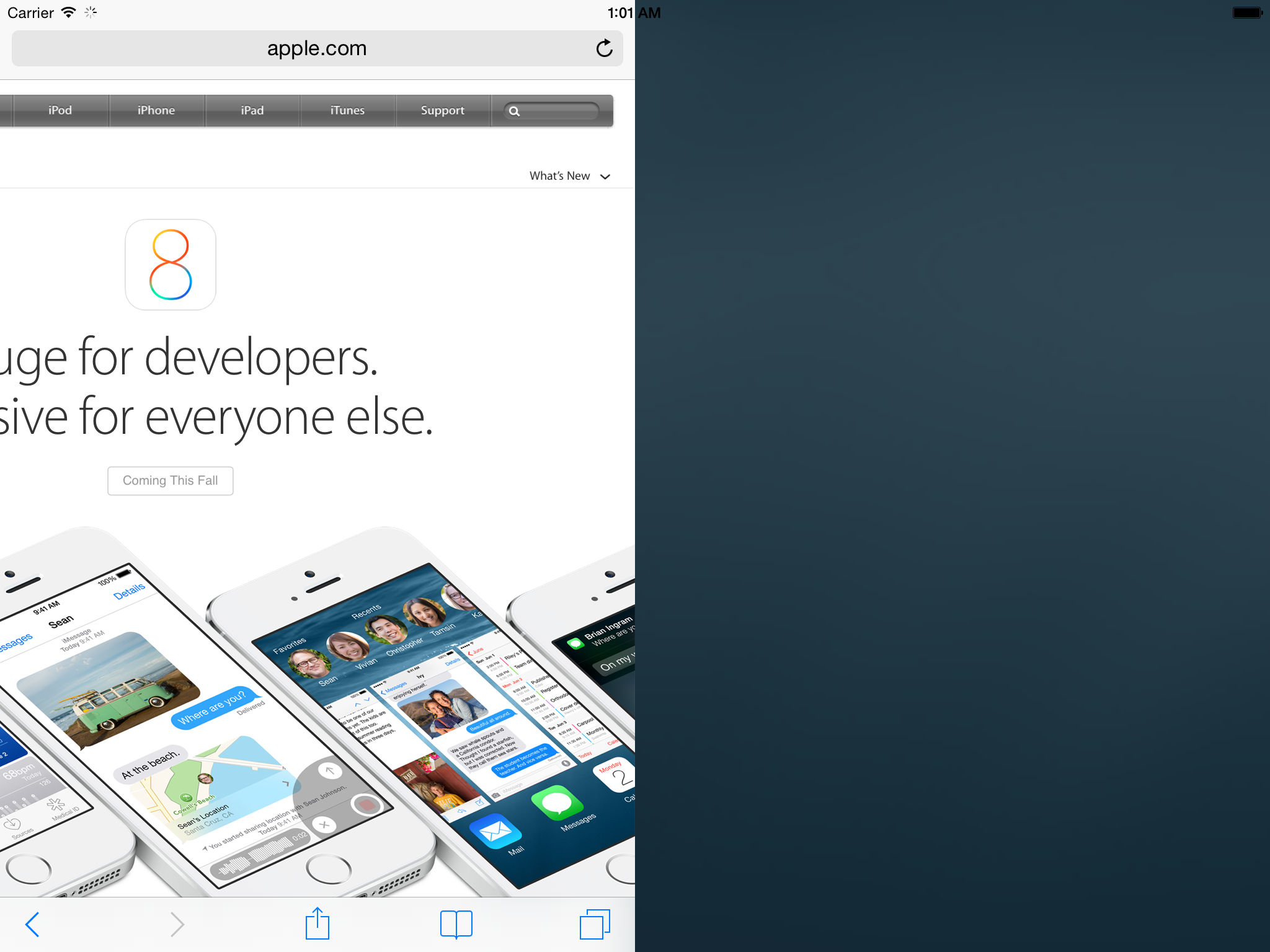
Now, developer Steven Troughton-Smith has dug further into the upcoming split-screen multitasking feature and has hacked the iOS 8 iPad Simulator to make the function partially work. As can be seen  above, Safari is taking up half the display. The tweaking to the simulator is yet to completely unlock all functionality with two different apps running side by side, but this demonstrates that Apple has been definitely testing the feature internally.

Troughton-Smith has also put together a video showing the split-screen mode in action on the simulator. That video can be seen below:


Expand
Expanding
Close

Site default logo image

Safari in iOS 8 uses camera to scan and enter credit card info

In iOS 8, Apple has a new feature in Safari that allows users to scan a credit card with the device’s camera rather than manually entering the number when making a purchase online.

When entering a credit card number into a form online to, for example, make a purchase, Safari already allowed users to quickly select credit cards stored in its Passwords & AutoFill settings. You can still do that, but in iOS 8 you’ll now also have the option to select “Scan Credit Card” and snap a picture of the card. Apple then uses optical character recognition of sorts to input the number into the text field in Safari. There’s also a way to scan and save cards using the camera directly from within the Passwords & AutoFill settings.

Website developers don’t have to do anything to enable the feature, as Safari appears to automatically detect when a credit card number is being requested and presents the option to scan above the keypad.

Safari received some other updates announced this week at WWDC too, including a redesign in OS X Yosemite on the Mac, and highly requested features on iOS like the ability to request a desktop site and a tab view for iPad.

Site default logo image

iOS 8 WebKit changes finally allow all apps to have the same performance as Safari

When iOS 7 launched, developers discovered that their apps with built-in web browsers were unable to achieve the same level of JavaScript performance as the stock Safari app. This was because Apple restricted use of its improved Nitro JavaScript engine to its own app, leaving third-parties with a slower version.

[tweet https://twitter.com/vickimurley/status/473955064629829632 align=’center’]

As of iOS 8, however, it seems that decision has been reversed. All apps will now be able to use the same improved JavaScript engine that powers Safari. That means Google’s Chrome browser on iOS will now be just as quick as Safari, as will the pop-up browsers embedded in apps like Twitter and Facebook.

Polls: What are your first impressions of iOS 8 and Yosemite?

Site default logo image

Now you’ve had a chance to catch up on our coverage of the main new features of iOS 8 and OS X Yosemite, and seen our hands-on videos (iOS 8 overview, OS X Yosemite overviewiOS 8 Spotlight and iOS 8 interactive notifications), we’d like to hear your first impressions of each.

Whether you’re blown away by all the new features, disappointed by things you wanted but didn’t get, or just a bit underwhelmed, here’s your chance to let us know.

We’ve summarized the features Apple has chosen to highlight, and there are separate polls for each platform … 
Expand
Expanding
Close

Site default logo image

Apple releases Safari 7.0.4 & 6.1.4 for OS X with security improvements

Alongside the release of OS X 10.9.3 and iTunes 11.2 last week, Apple released Safari version 7.0.3 and 6.1.4. Apple has since released a minor bug fix to that version of iTunes, and today Apple has released a security update to Safari bringing the latest version to 7.0.4. Users can find the latest version in the Mac App Store.

Safari 6.1.4 and Safari 7.0.4

  • WebKitAvailable for: OS X Lion v10.7.5, OS X Lion Server v10.7.5, OS X Mountain Lion v10.8.5, OS X Mavericks v10.9.3Impact: Visiting a maliciously crafted website may lead to an unexpected application termination or arbitrary code execution

    Description: Multiple memory corruption issues existed in WebKit. These issues were addressed through improved memory handling.

Read Apple’s documentation on the latest version of Safari here.

Site default logo image

Apple seeds OS X 10.9.3 build 13D61, Safari 7.0.4 to developers

Apple has seeded a new build (13D61) of the upcoming OS X 10.9.3 update to developers. The developer update comes just hours after Apple seeded a slightly newer build to its AppleCare team. 10.9.3 is expected to ship in the near future and features improved support for 4k monitors on newer MacBook pro models. The update also re-introduces the ability to sync contacts and calendar data to an iOS device from iTunes over a USB connection.

The update is accompanied by the very first seed of Safari 7.0.4. At the moment there are no details as to what’s new in the Safari update, aside from the typical performance updates and such. These updates don’t yet appear to be available for AppleSeed users.

Site default logo image

Apple pushes OS X security update, Safari 7.0.3

Alongside the release of iOS 7.1.1 for iPhone, iPad, and iPod touch, Apple has released a security update for OS X.

Security Update 2014-002 is recommended for all users and improves the security of OS X. This update also includes Safari 7.0.3.

While the update does not seem as severe as the previous security update containing a major SSL fix, it is recommended that all users update to the most recent version of OS X. The security update also includes a minor update to Safari.

This update:
Fixes an issue that could cause the search and address field to load a webpage or send a search term before the return key is pressed
Improves credit card autofill compatibility with websites
Fixes an issue that could block receipt of push notifications from websites
Adds a preference to turn off push notification prompts from websites
Adds support for webpages with generic top-level domains
Strengthens Safari sandboxing
Fixes security issues, including several identified in recent security competitions

The update is available now on the Mac App Store. You can read more about the security update here and Safari 7.0.3 here.

Apple says Heartbleed security flaw did not affect its software or services

Site default logo image

With an estimated half a million sites vulnerable to the “Heartbleed” vulnerability revealed earlier this week, which allows an attacker to access user details of websites previously believed to be secured by industry-standard SSL/TLS, your favorite social networks, stores, and other services around the web could potentially be handing out your password or other personal information to anyone who exploits the issue.

The bug exists in a library called OpenSSL, which is an open-source SSL implementation that many—but not all—web services use to secure sensitive traffic. If a website you use is affected by the bug, your personal data could be given to just about anyone. Unfortunately, changing your password on an unsecure site won’t even help unless the site’s owners have installed a fix (because the attackers can simply exploit the bug again to get your new password).

This serious issue affects a number of high-profile sites, but it seems your Apple ID is safe. Today, Apple gave the following statement to Re/code:


Expand
Expanding
Close

Apple releases Safari 7.0.3 with push notification changes, security improvements, and more

Site default logo image


After updating iWork for iCloud and its Mac and iOS counterparts, Apple has pushed out a new Safari update as well. The new version is 7.0.3 and contains mostly bug and security fixes. Apple has been beta testing this update with developers for the past few weeks. The two biggest parts of this update are changes to push notifications and the way URLs are handled.

For users who don’t want to be asked about push notifications from any site, there’s now a checkbox in the notification preferences that disables them entirely. Unchecking the box for “Allow websites to ask for permission to send push notifications” (seen above) will block all notification prompts in the future.

The second big change enables Safari to recognize new generic top-level domains (the .com bit at the end of the URL). The organization responsible for managing these has recently created several new ones for generic terms (like “.pizza”). Safari will now recognize these and go to the correct URL rather than trying to search for the term.
Expand
Expanding
Close

Site default logo image

Apple seeds Safari 7.0.3 and 6.1.3 Seed 2 to developers

After seeding the first beta of the next versions of Safari for OS X a week ago, Apple has just seeded another pre-release version of Safari 7.0.3 and Safari 6.1.3 (Seed 2) to developers.

Apple provides the following focus areas for devs in the release notes:

Please focus testing on the following areas:

• General website compatibility

• Safari Push Notifications

• Login AutoFill

• Credit Card AutoFill (OS X Mavericks only) • Extension Compatibility

Safari 7.0.3 will arrive for Mavericks users while the 6.1.3 release is the latest for Mountain Lion users. The updates require the following:

Safari 6.1.3 for OS X Lion requires OS X 10.7.5 with Security Update 2013-002. Safari 6.1.3 for OS X Mountain Lion requires OS X 10.8.5. Safari 7.0.3 for OS X Mavericks requires OS X 10.9.2 and is also included in OS X 10.9.3.

Earlier this month Apple pushed updates for iTunes 11.1.6 and OS X 10.9.3 betas to developers. When released to the public, the new iTunes version will restore the ability to sync contacts and calendars to an iOS device, while OS X is expected to introduce the ability to output at 4k resolution with a 60Hz refresh rate on the latest MacBook Pro models.

Contestants at Pwn2Own take down Safari, but said OS X security is better than other systems

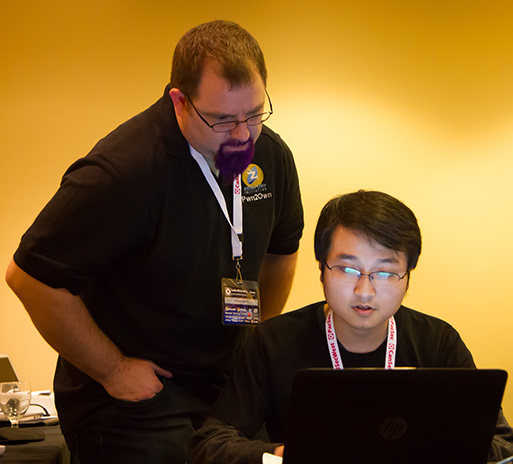
<a href="http://www.pwn2own.com/photo-gallery/#prettyPhoto[]/13/">Pwn2Own</a>

As usual, the annual Pwn2Own contest featured many hackers targeting the latest operating systems and browsers from the major vendors, including Apple. Threatpost reports that the “Keen Team” focused Safari on Thursday and exploited it with relative ease.

The team took home a $40,000 bounty for their efforts on Safari, as well as a share in a $75,000 prize for co-engineering a zero-day Flash exploit. They say they will donate some of their winnings towards charities representing missing Malaysian Airplane passengers.

The group say that for Safari, they used two different exploit vectors. One vulnerability was a heap overflow in WebKit that enabled arbitrary code execution. The team then used this opening to use another exploit to bypass the application sandbox and run code as if it was user privileged.


Expand
Expanding
Close

Nuance announces Dragon Dictate 4, with pre-recorded transcription features and Gmail integration

Nuance has just announced the next major version of its Mac dictation software, Dragon Dictate 4. The new version improves recognition accuracy as well as several new features, including the ability to machine transcribe from a pre-recorded audio file. You no longer have to be recording a voice live to get transcription.

[youtube=http://www.youtube.com/watch?v=RRfbZ0h4yBo]

We’ve had a quick play with the software and the accuracy is almost scary good compared to older versions of the software. Speaking in a normal voice gives you almost 100% accuracy and even mumbling seems to work. While Mavericks uses the same Nuance speech engine, Dictate 4 has a better interface for transcription and tons of extra features as outlined in the videos above and below.

Dragon Dictate software has also been updated for modern system architectures — it is a 64-bit app now.  This results in better performance and better memory management over its predecessors. The company says it has drastically reduced latency when interpreting speech.

[youtube=http://www.youtube.com/watch?v=YnGKb854CNI]


Expand
Expanding
Close

Apple patched a major SSL bug in iOS yesterday, but OS X is still at risk

Site default logo image

Update: Apple says an OS X fix is coming soon.

Yesterday Apple released iOS update 7.0.6 alongside new builds for iOS 6 and Apple TV  that it said provided “a fix for SSL connection verification.” While Apple didn’t provide much specific information on the bug, it wasn’t long before the answer was at the top of Hacker News. It turns out that minor security fix was actually a major flaw that could in theory allow attackers to intercept communications between affected browsers and just about any SSL-protected site. Not only that, but the bug is also present in current builds of OS X that Apple has yet to release a security patch for.

Researchers from CrowdStrike described the bug in a report:

“To pull off the attack an adversary has to be able to Man-in-The-Middle (MitM) network connections, which can be done if they are present on the same wired or wireless network as the victim. Due to a flaw in authentication logic on iOS and OS X platforms, an attacker can bypass SSL/TLS verification routines upon the initial connection handshake. This enables an adversary to masquerade as coming from a trusted remote endpoint, such as your favorite webmail provider and perform full interception of encrypted traffic between you and the destination server, as well as give them a capability to modify the data in flight (such as deliver exploits to take control of your system),”

Adam Langley, a senior software engineer at Google, also wrote about the flaw on his blog ImperialViolet and created a test site to check if you have the bug (pictured above):
Expand
Expanding
Close

Site default logo image

Hate the new Twitter web redesign? This Safari extension might help

If you’re not a fan of the new iOS 7-like design on Twitter.com, this Safari extension transforms the massive, white tool bar into a less distracting, dark tool bar. It still keeps the simple, flat look and color matching, but it’s much less distracting. Now if only iOS could toggle back and forth as easily…

[tweet http://twitter.com/chrkirk/status/431105681102344192]

[tweet https://twitter.com/chrisfholm/status/431105399635206144]

[tweet https://twitter.com/bowiesongs/status/430418029814366208]

You can download TwitterDarkBanner here.

Apple releases Mavericks OS X 10.9.1 with improved Gmail support, Shared Link improvements, more

Site default logo image

Apple has released OS X 10.9.1 for Mac via the Mac App Store today. The update includes a number of Mail related fixes including improved support for Gmail as well as numerous bug fixes. The update also fixes a VoiceOver issue that prevented sentences with emoji characters from being read…


Expand
Expanding
Close

Site default logo image

Google fights to have iPhone privacy case dismissed from UK courts

google-hq

Google, which was fined $22.5M by the FTC for illegal use of tracking cookies on iPhones even when the user had set Safari to reject them, is asking the UK’s High Court to reject a claim for compensation from a group of British iPhone owners, reports The Guardian.

Google is arguing that any case should be held in the U.S., and that UK courts have no jurisdiction in the matter. It also observes that a similar claim in the USA was dismissed two months ago.

Google has been called “arrogant and immoral” for arguing that a privacy claim brought by internet users in the UK should not be heard by the British legal system […]

In the first group claim brought against Google in the UK, the internet firm has insisted that the lawsuit must be brought in California, where it is based, instead of a British courtroom … 

Lawyers for the claimants argue that the company has violated UK law, and that the case should therefore be heard by UK courts.

“British users have a right to privacy protected by English and European laws,” said Dan Tench, a solicitor from the law firm Olswang, which represents the claimants.

“Google may weave complex legal arguments about why the case should not be heard here, but they have a legal and moral duty to users on this side of the Atlantic not to abuse their wishes. Google must be held to account here, even though it would prefer to ignore England.”

While the case itself seems unlikely to succeed in any case – it being difficult to prove that harm was done to individuals – it is likely to lead to renewed debate about the legality and morality of companies doing business in one country while claiming to be legally resident elsewhere.

The British government queried back in May the accuracy of Google’s responses to questions about its tax status after the company paid just £6M ($9.7M) UK tax on a turnover of £395M ($644M).

Site default logo image

Apple seeds Safari 6.1.1, 7.0.1 updates to developers following internal testing


Earlier this month, we reported that Apple has seeded a new version of Safari to Apple employees for internal testing. Now, Apple has provided that update to developers via the Developer Center.

Versions for OS X Mavericks, OS X Mountain Lion, and OS X Lion are all available, and Apple asks developers to focus on the following during their testing:

General website compatibility, Accessibility, Viewing and annotating PDFs, Login autofill, Password autofill, Setting and using break points in Web Inspector

Apple has not said when the new release will become available for customers, but based on the increase in testing, the release will likely occur within the next couple of weeks. Apple is also internally testing updates to OS X Mavericks: 10.9.1 and 10.9.2.
Site default logo image

Mac Developers also have access to upcoming OS X Mavericks Mail update

Last week, we reported that Apple had provided its employees with an update to the Mavericks Mail app that solves several issues relating to Gmail account compatibility. While this has seemed to stay under the radar, Apple has also provided the update to registered Mac Developers. Apple says that the update became available on October 31st, but we have not heard any sightings of this update until now. The update should be available for all users in the coming weeks. Thanks, Hunter!


Expand
Expanding
Close

Site default logo image

Pinterest adds Safari Push Notifications for OS X Mavericks

Pinterest today announced on its blog that it’s introducing Safari Push Notifications for users running Apple’s new OS X Mavericks update.

This makes it easy to get real-time updates, like when someone comments on your Pin, or sends you a Pin they think you’ll like. Similar to the push notifications you might see on youriPhone or iPad, you can see alerts in the upper right of your desktop screen.

Pinterest is using Apple’s new Apple Push Notifications Service introduced with Mavericks that allows websites to offer users the ability to receive push notifications on their desktop and in the OS X Notification Center. Pinterest push notifications can be activated by visiting Pinterest in Safari on Mavericks.

Apple readies iBooks, Safari, Remote Desktop, and Mail bug fix updates for Mavericks

Site default logo image

In addition to the incoming OS X Mavericks Mail Update that we reported on previously, sources say that Apple is readying a slew of performance and bug fix updates for several other OS X Mavericks applications. According to the updates seeded today to Apple employees, Apple is preparing updates for iBooks, Safari, and the Remote Desktop Client apps:


Expand
Expanding
Close

Site default logo image

Latest Mavericks Safari browser safer as Flash finally gets sandboxed

Safari 7, introduced with OS X Mavericks, is now better protected against malware and poorly-written Flash code as Flash is finally sandboxed.

Sandboxing means that OS X restricts what the code can do, stopping a badly-written app from crashing the entire browser and preventing malware from getting access to any other part of your Mac. Flash has been sandboxed for some time in Chrome, Firefox and even Internet Explorer.

In an Adobe blog post, Platform Security Strategist Peleus Uhley wrote:

For the technically minded, this means that there is a specific com.macromedia.Flash Player.plugin.sb file defining the security permissions for Flash Player when it runs within the sandboxed plugin process. As you might expect, Flash Player’s capabilities to read and write files will be limited to only those locations it needs to function properly. The sandbox also limits Flash Player’s local connections to device resources and inter-process communication (IPC) channels. Finally, the sandbox limits Flash Player’s networking privileges to prevent unnecessary connection capabilities.

Safari users on OS X Mavericks can view Flash Player content while benefiting from these added security protections. We’d like to thank the Apple security team for working with us to deliver this solution.

Via CNET