Twitter

See All Stories

Twitter is a social networking site that was created in 2006. Users send "tweets" to let people know what they are doing. It was created by Jack Dorsey, Noah Glass, Biz Stone, and Evan Williams.

Twitter accused of hypocrisy over Trump tweets

Twitter is a social networking site that was created in 2006. Users send “tweets” to let people know what they are doing. It was created by Jack Dorsey, Noah Glass, Biz Stone, and Evan Williams. Prior to building the service, they were working on a podcast directory called Odeo.

Odeo was a directory and search destination website for RSS-syndicated audio and video. It employed tools that enabled users to create, record, and share podcasts with a simple Adobe Flash-based interface.

When iTunes 4.9 was released, it ultimately made Odeo irrelevant. The people behind the company went on to create a service called Twttr. Twttr would eventually be called Twitter. iTunes 4.9, believe it or not, ultimately led to the creation of one of the most popular social networks in the world.

The major turning point for service’s popularity was the 2007 South by Southwest Interactive conference. Over the next few years, Twitter began to see rapid growth. For mobile devices, it originally relied upon third-party apps. In 2010, Twitter acquired application developer Atebits. Atebits had built the Twitter app known as Tweetie for the Mac and iPhone. It was renamed as Twitter and released for free.

Over the years, the apps have seen various revisions. There are currently versions available for iOS while desktop users must either use the web interface or a third party app like Tweetbot or Twitterrific.

Facebook launches updated Instagram w/ 15 sec video clips, custom filters & cinematic stabilization

Site default logo image

http://vimeo.com/68765934

Today, live from Facebook’s press event, the company just announced that its bringing video to Instagram with a brand new set of features. In what appears to be direct competition for Twitter’s rapidly growing Vine video sharing app, Instagram will soon allow users to share similar short video clips. On stage, Instagram demoed an updated iOS app that now includes a button for video capture that will allow users to create 3-15 second long videos using multiple clips.

It also announced that it has partnered with an artist to create 13 brand new custom filters specifically for video and a handful of leading experts to integrate “mind blowing” cinematic video stabilization features (something that isn’t too great in a lot of other apps).

So what does this mean for your content? Nothing’s different from photos. We’re still committed to making sure you have control over all of your content. Only the people who you let see your photos will be able to see your videos. And as with photos, you own your videos.

As for where videos will appear, like photos, Instagram says “your video will appear on your profile and in feed. If your visibility is set to private, only your approved followers can see videos or photos you share.”

The video feature will also be available on the web, allowing users to view Instagram videos in any browser without having to use the apps.
Expand
Expanding
Close

As Apple’s built in camera gets filters, Instagram planning to move into Vine territory with Video?

Site default logo image

Just as Apple introduced iOS 7 equipped with Instagram-like filters built-in to the redesigned camera app (although not for video), word has it Instagram is looking to move into Vine’s territory by adding video features in an upcoming update.  According to a report from TechCrunch, Facebook’s event later this week won’t focus so much on that rumored news reader, but more so on integration of a Vine-like short video feature for Instagram:
Expand
Expanding
Close

Site default logo image

American Airlines iOS app adds departures, gate & seat changes on lock screen for Passbook boarding passes, more

American Airlines updated its app for iPhone and iPad today bringing an enhanced Passbook experience for digital boarding passes, improvements for AAdvantage account holders, and the ability to chat with the airline’s Twitter team.

Perhaps the most notable update, and something British Airways announced it will be adding soon to its recently announced Passbook support, is the ability to view updates about departure times, gate and seat changes directly from your iOS device’s lock screen. The updates will appear after you’ve added your boarding pass to Passbook.

Also included in today’s update is the ability to “Send a direct message to the AA Twitter Team for assistance with flights, highlight exceptional service or general inquiries.”

More enhancements in version 2.4.0 of the American Airlines app below:

What’s New in Version 2.4.0

• You can now login with the e-mail address associated with your AAdvantage account.
• The TSA precheck logo will now appear on your boarding pass in passbook, if applicable
• Now Executive Platinum AAdvantage members can Give Feedback via Twitter
• Send a direct message to the AA Twitter Team for assistance with flights, highlight exceptional service or general inquiries
• You will now receive updates about departure times, gate and seat changes on your lock screen after you’ve added your mobile boarding pass to passbook

Site default logo image

9to5Toys Last Call: $71 Kingston 64GB Wi-Drive for iPhone/iPad/iPod, $119 Western Digital 2TB USB 3.0 Portable HD

From 9to5Toys.com:

A large majority of the deals we cover each day come from a variety of ‘Daily Deal’ websites or are so popular that they don’t even last 24 hours.  We know you can’t be at your computer every second, so we’re going to roundup the best deals each day to make sure you have a fair shot at the deals you want. Be sure to follow 9to5Toys.com so you never miss a deal... TwitterRSS FeedFacebook

Today’s Featured deals:

Other great deals we love:

Kubi is a cloud controlled robotic desktop stand for your tablet. It enables you (or whoever is on the other end of a video call) to look around and interact through the tablet. Kubi is capable of a 300° pan and a 90° tilt, and is compatible with any Bluetooth enabled tablet, from iPads to the Microsoft Surface. This product is a game-changing video conference device for anyone who works remotely. This deal expires at midnight, so get it now for $259 + Free Shipping (Marked down from $315).

Site default logo image

New Eye-Fi Mobi SD card transfers digital camera content to iPhone/iPad instantaneously via built-in WiFi

Many casual photographers have been reaching for their smartphones over their digital cameras recently for the convenience of social media integration and other sharing options. Eye-Fi has long offered photographers the option to transfer high-quality media from standalone cameras to personal computers and mobile devices but required intermediary WiFi hotspot access – a major obstacle for photographers shooting on location outdoors and in remote locales.

Today, Eye-Fi announced the “Eye-Fi Mobi,” which instantaneously beams new photos and content from digital cameras (without WiFi capabilities) to your favorite mobile device. “Simply replace any camera’s standard SD card with Mobi, and just two quick steps later, the camera’s photos instantly appear on the selected iOS or Android smartphone or tablet.”

The Eye-Fi Mobi puts beautiful, high-quality images on your mobile device ready to be uploaded to Facebook, Twitter, Instagram or any other social network.  The built-in WiFi means you’ll never have to seek out network access to transfer your pictures.  Setup does not require a computer, account or cloud.  Just download the Eye-Fi mobile app to get started.

Eye-Fi Mobi is available now in two flavors; 8GB ($50), 16GB ($80).

Site default logo image

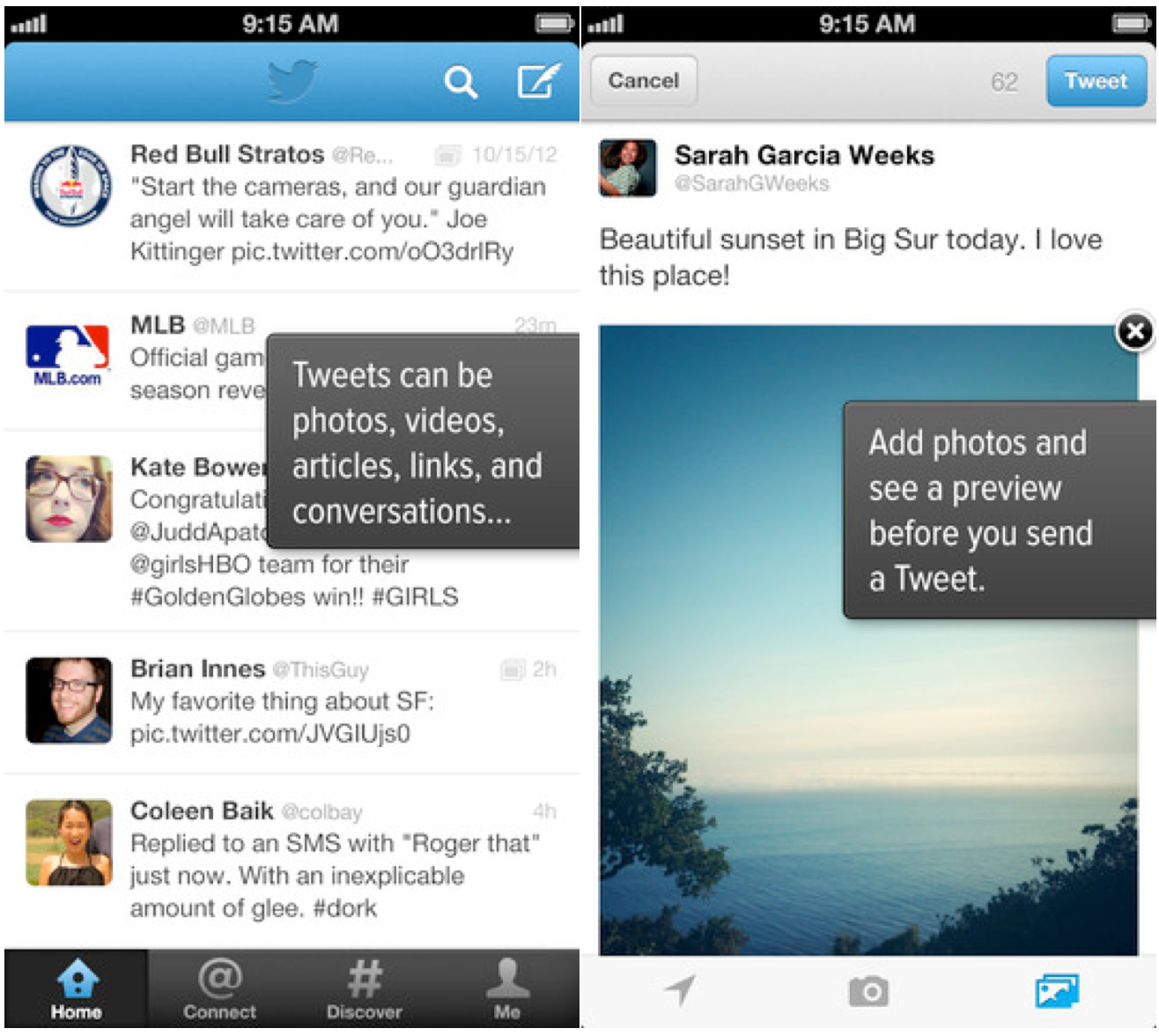
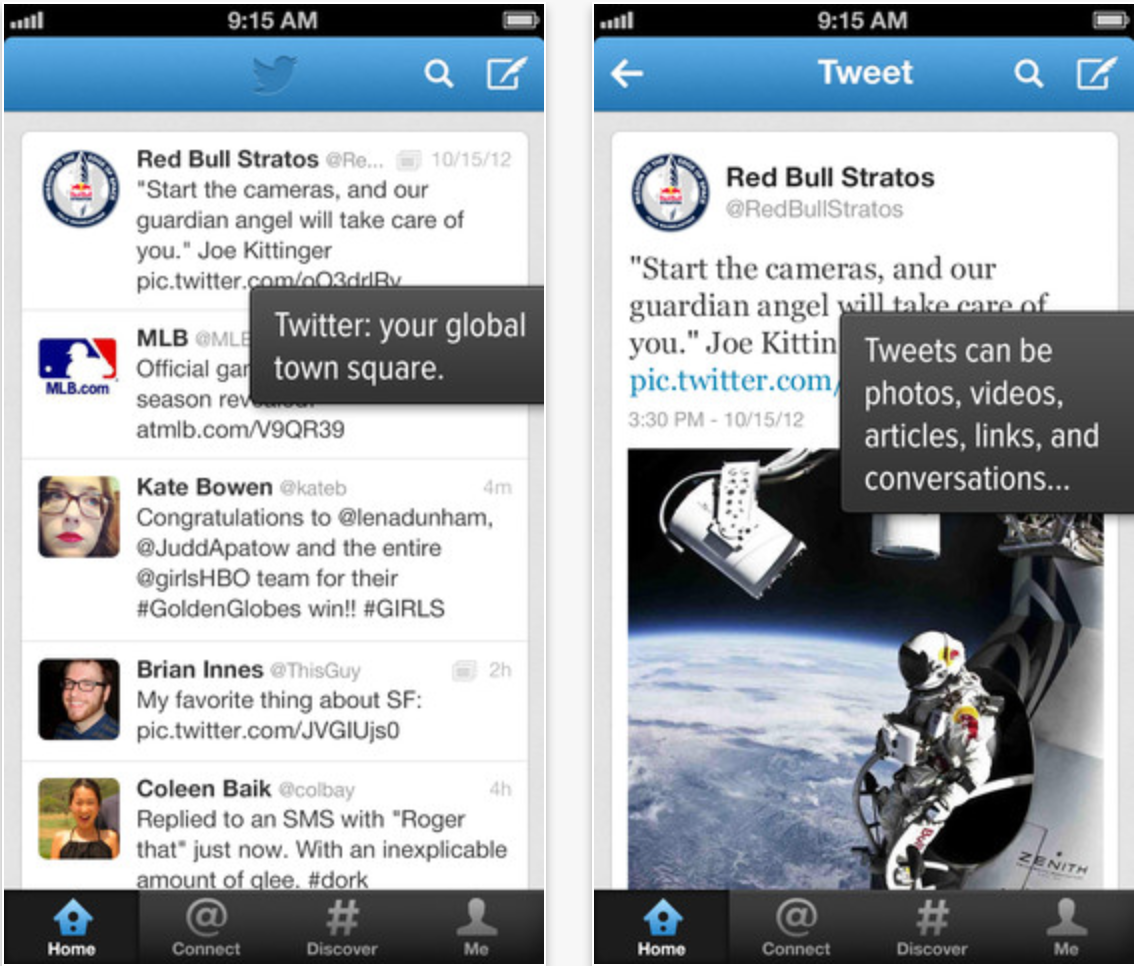
Twitter refreshes iPhone app interface, adds new Tweet composer, notifications when friends sign up

Twitter has updated its application for the iPhone and iPod touch with a refreshed user-interface for the Tweets timeline.

Additionally, the updated application features a new Tweet composer interface that actually allows users to preview what a posted Tweet will look like in the timeline. Also notable is the new ability to receive notifications when friends join Twitter.

Improvements and fixes for the Lists functionality are also present in this 5.7 update. 


Expand
Expanding
Close

Site default logo image

Twitter for Mac updated with Notification Center integration, performance improvements, more

Twitter for Mac is continuously receiving updates and today it received a highly requested feature: Notification Center integration. Users can configure the setting in the preference window within the app.

OS X already offered Twitter integration, but notifications deferred to the web rather than its native client. It was less than a month ago when the app received its first update in countless months, and today’s update demonstrates Twitter’s dedication to its continued development.

Twitter 2.2.1 is now available in the Mac App Store:


Expand
Expanding
Close

Developer hacks iOS to route notifications through Google Glass (video)

Site default logo image

An iMessage notification sent to Glass

Adam Bell (@b3ll), a well-known developer for many software platforms, has figured out a way to route all notifications from an iOS device through Google Glass. The implementation, even in its early stage, seems to work quite well. Bell notes that all notifications, such as iMessages and Tweets automatically are shown via the Google Glass interface. Video and more details below:


Expand
Expanding
Close

Flickr, Vimeo integration likely to bolster social ties in iOS 7

Site default logo image

Flickr/Vimeo iOS Apps

In the upcoming overhaul of its iPhone, iPad, and iPod touch operating system, iOS 7, Apple plans to include an increased presence of third-party social networks, including Flickr and Vimeo, according to a person familiar with the software. Since the new software is yet to be even officially announced, there is a very real possibility that any feature in testing could be removed prior to the announcement, this person said (much like Facebook integration was removed from iOS 4). More details below:


Expand
Expanding
Close

Preview of Analog Camera for iPhone by Realmac Software

Site default logo image

Analog Camera for iPhone by <a href="http://click.linksynergy.com/fs-bin/click?id=jZ6GP8Fu9UU&subid=&offerid=146261.1&type=10&tmpid=3909&RD_PARM1=https%3A%2F%2Fitunes.apple.com%2Fnl%2Fartist%2Frealmac-software%2Fid310591643%3Fl%3Den" target="_blank">Realmac Software</a>

From the wonderful folks who brought you Clear for iPhone and Mac, Realmac Software announced today it will bring a few of its stunning filters from Analog for Mac to the iPhone with Analog Camera.

Analog Camera for iPhone resembles the simplistic, gesture based UI of Clear for iPhone, featuring soft square or rectangle buttons that pop up upon contact and prompt fun, clever sounds.

Check out my observations of the app and a teaser video below:
Expand
Expanding
Close

Site default logo image

Twitterrific 5 iOS app gets Readability, Droplr support, improved notifications, more

The Twitterrific 5 for Twitter iOS app has been updated today to version 5.2.2 with a number of new features and enhancements. Among them, the popular iOS Twitter client gets support for the Readability bookmarking service, Droplr as a new image service, and a few welcomed performance enhancements such as Indicators in timeline tabs that “are updated as tweets are read” and updating read/unread notifications for tweet timestamps as you scroll.

A full list of what’s new in version 5.2.2 of Twitterrifc for Twitter is below:

What’s New in Version 5.2.2

NEW FEATURES

• Added new bookmarking service: Readability
• Added new image service: Droplr

IMPROVEMENTS

• The read/unread state of tweet timestamps are updated as you scroll
• Indicators in timeline tabs are updated as tweets are read
• Added VoiceOver feedback after performing profile actions (follow, unfollow, etc)
• Third party logins are now cleared out when a service is disabled
• Additional larger font size setting on iPad

BUG FIXES

• Compose attachment buttons are now disabled during @name autocomplete
• Fixed a bug that could cause replies to be counted more than once
• Improved reliability when clearing push notification badges
• VoiceOver no longer repeatedly announces new tweet count
• When composing replies, VoiceOver reads text first instead of original tweet

NOTES

• Yfrog links now open in the in-app browser instead of the photo viewer

Site default logo image

App.net launches ‘Passport’ app for iPhone to manage accounts, find browsing clients, sign up for free

New Twitter-like social network App.net has launched an iPhone and iPod touch app called “Passport.” The application serves as a simple way to manage App.net accounts, edit your profile, and find and follow other App.net users. Importantly, the “Passport” app does not serve as a browsing client for an App.net feed, but rather as an app primarily focused on finding third-party App.net clients.

Notably, the app allows you to create a free account. Previously, to get a free account, users needed to have been invited by an existing user.

The app is available for free on the App Store. We previously posted a guide to our favorite App.net clients. You can follow us and our staff on App.net.


Expand
Expanding
Close

Site default logo image

Twitter for iOS updated with location-based trends, improved Vine playback, more

Twitter for iOS received an update today that brings location-based trends to your iPhone or iPad, first reported by AllThingsD.

See what’s happening near you or around the world by viewing Trends in hundreds of locations.

Also:
• Invite friends to join Twitter from within the app
• Improved playback of Vine videos
• Replies to retweeted Tweets now include both the author and person who retweeted the Tweet
• Enjoy a smoother experience due to bug fixes and other improvements.

The update is available now in the App Store.


Expand
Expanding
Close

Site default logo image

Vine updated with front-facing camera support, mentions

via guardian.co.uk

Your Vine stream will probably start to include a lot more faces, for better or worse, as the Twitter-owned video-sharing app received an update today to include support for the iPhone’s FaceTime camera as well at mentions:

Today we’re introducing an update to Vine that we think you’ll love. Over the last few months, we’ve asked for your feedback on a lot of things, from reporting bugs to suggesting new features. We’ve been listening. Here are a few new additions to Vine:

You can now shoot with the front-facing camera. When creating a post, tap the button in the bottom left corner to try the front-facing camera. You can switch back and forth between the regular and front-facing camera as many times as you want.

Vine now supports mentions, so you can tag people in your post. Users who are mentioned will receive a notification in Activity. To mention a user, type @username and select the name among the suggestions you’ll see. See the screenshot below for an example — when I type @chris, I see suggestions for Chris Fry, Chris Hardwick and Christofer Drew. When I select Chris Hardwick, his Vine profile will automatically link in my post’s caption.

The update is available now on the App Store.

(Source: Vine Blog)

Twitter for Mac goes Retina, gets design tweaks, 14 new languages

Site default logo image

After years without an update, Twitter has updated its official Mac app with Retina display support and much more:

Today we’re announcing a few improvements to Twitter for Mac:

  • Photos: It’s easier than ever to share photos. Simply click the camera icon in the lower-left corner of the Tweet compose box, and choose a photo to share. If you prefer, you can still drag and drop photos from the desktop.
  • Retina display support: Now Twitter is even more vibrant and detailed on the highest resolution Mac notebooks. With this update, Tweets will be clearer and sharper, creating a more vivid experience.
  • 14 more languages: In addition to English, Twitter for Mac now supports Dutch, French, German, Indonesian, Italian, Japanese, Korean, Malay, Portuguese, Russian, Simplified Chinese, Spanish, Traditional Chinese, and Turkish.

Along with these updates, Twitter for Mac offers keyboard shortcuts, support for multiple accounts and timelines, and other features that you’ve come to love.

You can get this update now in the Mac App Store. Keep an eye out for more improvements to come, too.


Expand
Expanding
Close

Tweetbot 2.8 gets media timeline, redesigned image viewer, more

Site default logo image

Tweetbot fans, a new update awaits you at the App Store. Today’s 2.8 update has some interesting new features and important bug fixes.

Topping the list is the “media timeline” – find it located next to the search box – which will show you all of the images and video in your timeline. Speaking of images, Tapbots totally redesigned the image viewer in this round. Rounding out this update is “Tweet/status detail view now displays the number of Favs and Retweets” which will be enjoyed by narcissists everywhere. Oh and what update wouldn’t be complete without  “Various other bug fixes including Fixed Instagram Previews”?

Get it on iTunes ($2.99)
Expand
Expanding
Close

Site default logo image

Twitterrific 5.2.1 adds notification badges and more

Twitterrific 5 has recieved another big update today, which introduces several new features, improvements, and fixes. The most prominent new feature is the fact that you can now enable app badges for push notifications, but other new additions include support for Twitter’s trending topics and the Favstar service. There are also a bunch of little improvements and bug fixes throughout the app, further polishing the recently-redesigned app.

The update is available now in the App Store. The change log is below, and you can find our full review of Twitterrific 5 here.

NEW FEATURES

• App badges for push notifications (enable in iOS Settings > Notification Center)
– Notification count for replies, mentions & DM’s
– Using app badges also clears messages from Notification Center
• Favstar support (enable in Settings > Other Services)
– View a user’s Favstar page from their profile or via long tap on their avatar
– View Favstar info on a tweet via more actions menu (…)
• Twitter trends (open Sidebar > Search > Tweets tab to view)

IMPROVEMENTS

• Faster tweet loading time
• Search interface remembers last selected tab
• Support for Twitter stock symbols ($AAPL, etc)
• New tweet count stays on screen until the timeline is scrolled
• Home timeline auto-refreshes when posting a new tweet or DM
• Automatic theme changing now based on dawn/dusk at your location
• Compose gesture: one-finger swipe left/right to adjust cursor
• VoiceOver now speaks hint text at the bottom of settings panel
• VoiceOver now speaks muffled tweet descriptions
• Holding timeline position improved when using VoiceOver
• Photo viewer can be dismissed using VoiceOver’s two-finger Z gesture

BUG FIXES

• Muffled hash tags are now case insensitive
• Buttons in settings are now easier to tap
• Corrected display bugs during pull-to-refresh
• Fixed a bug that prevented Readability from turning off
• Tweets at the top of the timeline are easier to swipe
• User links in emailed tweets now properly point to the user’s profile
• Fixed various bugs that caused the timeline to jump to top unexpectedly
• Compose displays correctly when using foreign language keyboards on iPad
• Additional fixes & improvements

Twitter #music for iPhone, iPod touch is now playing

Twitter launched its new music discovery app Twitter #music for iPhone today.

Twitter #music takes a step toward filling the void created when everyone migrated from MySpace, which was one of the most effective music discovery tools for me until it was largely vacated.

Twitter promises to “change the way people find music, based on Twitter,” per the social network’s blog, which I believe will be widely appreciated.


Expand
Expanding
Close

The search for the top App.net client

Site default logo image

Welcome to 9to5Mac’s Smackdown series, where we compare the top hardware and software accessories for your Apple products.

App.net (or “ADN,” as many users have come to call it) was launched last year as an alternative to other microblogging platforms that had become more hostile to developers in recent months. The idea wasn’t so much about ripping off Twitter as it was about giving developers a friendly place to build cool apps and services. Rather than being funded by venture capitalists or advertisments, ADN was funded solely by the people using the platform. Users and app developers paid a yearly fee to get into the network or build on its API.

In the time since it was opened to the public, ADN has lowered their annual fee, introduced feature-limited, invitation-only free accounts, a cloud storage service, and more. Thanks to the developer-friendly atmosphere, many amazing iPhone clients have been released. In today’s smackdown, we’re going to put three of the most popular, fully-featured apps head-to-head to determine which one is the best.

If you want to give these apps a try, you’ll need either a free or paid ADN account. The free accounts are only available by invitation, but lucky for you we happen to have 400 invitations to hand out. Want to claim one? Just click this link and sign up. Once you get there, be sure to follow us.


Expand
Expanding
Close

Review: Panic’s Status Board – the ultimate information dashboard for your iPad

The team over at Panic Inc. have been teasing their new iPad app on their blog and Twitter all week, and today the app known as Status Board hits the App Store.

The Oregon-based software company is largely known for their OS X FTP client Transmit, but entered the iOS space in April 2011 with the launch of Prompt, their SSH client for iPhone and iPad, followed by their affectionately named web editor Diet Coda this past May. This marks the third year in a row that Panic has released an entirely new app on the iOS platform.

Let’s jump right on board:

Expand Expanding Close

Unofficial Apple ‘union’ leader leaves the company tomorrow

Site default logo image

Photo: Josh Lowensohn/CNET

Cory Moll, an Apple retail employee who founded an unofficial union for Apple Store staff, is leaving the company tomorrow, having apparently resigned.

Moll founded the ‘Apple Workers Union’ as a Facebook page and now-defunct website, describing it as “a movement of empowerment to bring change and improvement of working conditions to Apple’s retail stores” in response to what some employees felt to be low pay and limited opportunity for advancement.

Moll tweeted earlier today  that tomorrow would be his final day. In an email to 9to5Mac and others, he said:
Expand
Expanding
Close

Site default logo image

TweetDeck for Mac updated with column & content filters, advanced search, wide columns, much more

Twitter today released a big update to its popular TweetDeck Mac App Store app, bringing a long list of highly requested features like enhancements to filters, columns, fonts, and key commands.

Version 2.7.1 of TweetDeck for Mac introduces new column filters, the ability to filter columns by content type, Users filters on columns, and a new ‘wide column setting’. Also included in today’s update is a new “powerful advanced search”.

When it comes to Content filters, you can now filter by “media, RTs, including and excluding terms.” Meanwhile, the new Users filters will let you view “verified users, members of a list and more.”

Other new features in today’s release include new font size settings, the ability close windows using CMD+W, verified badges when searching lists, and an option to enable infinite scroll in temporary columns. The release notes pointed out that Spacebar would also now trigger a page down event.

A full list of what’s new is below:

What’s New in Version 2.7.1

➤ Introduced column filters and powerful advanced search
➤ Added Content filters to columns and search including ability to filter by media, RTs, including and excluding terms
➤ Added Users filters to columns and search including ability to filter by verified users, members of a list and more
➤ Added wide column setting
➤ Added new font sizes to settings
➤ Spacebar now triggers page down event
➤ Cmd+W closes windows
➤ Social proof for favorites & RTs in detail view
➤ Added verified badge to list searches
➤ Enabled infinite scroll in temporary columns

WSJ profiles app developer responsible for inventing/popularizing pull-to-refresh and other GUI innovations

Site default logo image


The Wall Street Journal published a piece last night that profiled influential app developer Loren Brichter of Atebits and Tweetie fame. The 28-year-old developer is the man behind several apps that were first to implement or help popularize well-known gestures and UI features that have since become design standards for many popular apps and developers. Perhaps the best example is “pull-to-refresh”—a feature that Brichter built into his Tweetie app before selling to Twitter:

Mr. Brichter got his start in the mobile industry while at Apple from 2006 to 2007 as part of a five-person group working out early kinks in technology that made the iPhone’s graphics hardware and software communicate… In 2008, Mr. Brichter built Tweetie to have a better way to use Twitter and eventually included the “pull-to-refresh” feature. After selling the app to Twitter for what he says was “single digit millions” in 2010, he stayed on at Twitter working remotely on the company’s apps for about a year and a half. He left to keep experimenting.

Other features Brichter helped to popularize include the slide-out panels that we see in apps such as Facebook and a feature described as “cell swipe” that’s popular in Twitter apps for revealing lists of hidden functions by swiping. WSJ was quick to point out that Brichter has filed for a patent on at least the “pull-to-refresh” gesture (now owned by Twitter), but Brichter explained that he allows most developers to implement the features freely:
Expand
Expanding
Close