update

See All Stories
Site default logo image

Infuse 2.2 for iOS incoming with new features & performance improvements


We were quite impressed with the redesigned Infuse media player from developers FireCore when it first launched version 2 last month. The app, which supports 14 video formats and 1080p playback, is today getting an update to version 2.2 with a few notable new features and performance enhancements.

The update includes some features highly requested by users including the ability to download files form network shares for offline playback,  as well as new “rich cover art and video info” when browsing network shares. Other new features include a new list view option, a volume boost setting, and an option to disable metadata fetching.

A full list of improvements in today’s update below:

  • Download files from network shares (for offline playback)
  • Browse network shares with rich cover art and video info
  • List view option
  • Volume boost setting
  • Option to disable metadata fetching (good for home videos)
  • Improved streaming speed and reliability
  • Improved detection of network devices
  • Improved clarity of In-App purchase prompts
  • Improved playback of some video formats
  • Other performance and stability improvements

The Infuse 2.2 update should be hitting the App Store any minute.

Site default logo image

Evernote adds Descriptive Search feature to Mac app

Evernote announced today that it’s adding a Descriptive Search feature for english users of its Mac app. Evernote says the new feature allows users to search using “everyday language to find notes the way he/she remembers them.” That means you’ll be able to use a number of descriptive words that act as filters to search for notes. Among the descriptive words, or filters, that will be recognized by the new feature are dates, apps, places, documents, images, audio, devices, web sources, type of content, notebooks, and tags. Evernote gives the example of searching for vegetarian recipes using phrases such as “recipes tagged as vegetarian” or “vegetarian recipes.”

Descriptive Search makes suggestions based on actual contents of your Evernote account, such as notebooks, contents of your notes, tags, and devices. Other examples of searches and results include:

Search –> Result
‘Notebook project with pdfs’ –> all the notes in the project notebook with PDFs attached
‘Web clips created last month’ or ‘web clips last month’ –> every web page clipped this month
‘Notes from japan’ or ‘in japan’ –> all the notes created while in Japan
‘Notes from phone with audio’ or ‘phone with audio’ –> all the notes created on a phone that have an attached audio file or recording

No word on when the update will be available to mobile users but the new Descriptive Search feature will be available initially in English to all Evernote accounts through the Mac App. The update should be rolling out to the Evernote for Mac app shortly.

A full list of filters for the new descriptive search feature is below:

Site default logo image

Google Wallet iOS app gets loyalty card scanning, notifications for nearby merchants

After rolling out the update to Android devices last week, Google today updated its Google Wallet app for iOS with the ability to scan physical loyalty cards. Rather than having to type out your account information to join a new program within the app, scanning a physical loyalty card from a supported retailer will auto-populate your info and automate the process.

The updated app also now includes new notifications for nearby retailers related to loyalty programs you’ve joined. If you’ve joined the Walgreens program, for example, you’ll get notifications reminding you “to shop and earn rewards” when close to a brick and mortar retail location.

The updated Google Wallet iOS app is available on the App Store now.

Site default logo image

Evernote iOS apps get new customizable home screen w/ three color themes & much more

[youtube=http://www.youtube.com/watch?v=8HOROMnILMo]

Evernote pushed out a nice update to its iOS app today that brings a new customizable homescreen that will offer a few ways for users to personalize their experience. First off, the new home screen includes three color themes– Light, Dark, and Classic– but it will also now let users “add, remove, and rearrange sections” and quickly hide & reveal details for each:

The first thing you’ll notice are the redesigned New Note buttons that now sit at the top of the screen. They’re big, clear and easy to tap. Right above them, is the Settings gear. Tap it to get to the home screen customization options.

Also new in today’s update is the ability to automatically save scanned business cards to your contacts and adjust the quality of audio notes to “optimize for sound or file size.” Another new option will put the sync status bar below the Settings gear. In addition, Evernote said in a blog post that the new app is faster and more responsive:

We’ve made the app snappier and more responsive. For example, titling and retitling notes is now approximately a lot faster. Tap into the note title and the cursor pops in right away, note title suggestions appear to make things even quicker. We’ve also tweaked the note editor to make frequently used features easy to find. No more delays. In and out.

Version 7.3.0 of Evernote for iPhone and iPad is available on the App Store now.

Site default logo image

Facebook update allows you to hide certain stories and people from your news feed

A Facebook for iOS update that was released earlier today includes the ability to hide certain people from your main news feed. To do so, just tap the downward arrow on any post and select the “I don’t like this post” option. From there you can select from a few different options for hiding the post or the user that posted it.

The iPhone version of the app also allows you to see all of your videos in a single album. This feature didn’t make it to the iPad version for some reason, but it might make the jump in a future update.

You can grab the updated app for free on the iOS App Store.

What’s New in Version 6.9

• Choose whose posts you see in News Feed
• See all the videos you’ve uploaded in one album (iPhone only)

Site default logo image

Apple silently removes Keynote Remote from the App Store, recommends users update to Keynote 2.1 for iOS

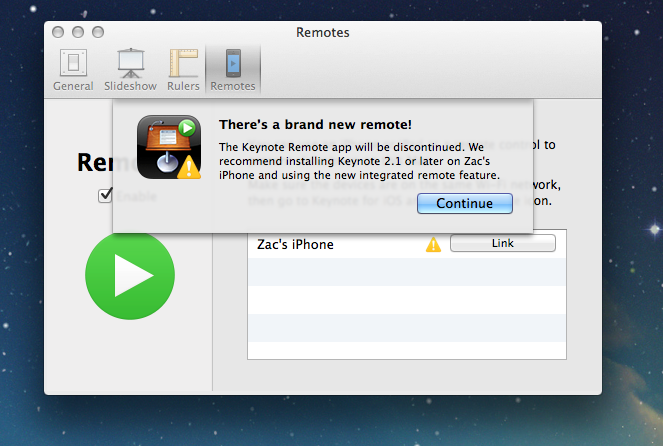
Coinciding with today’s update to Keynote for Mac and iOS, Apple has silently removed the old Keynote Remote application from the App Store. Although a direct link to the application still works, some readers are reporting that they are no longer able to download the app, and it no longer appears in search results.


Expand
Expanding
Close

Site default logo image

Apple updates WWDC 2013 app with fix for video playback problems

Apple has just released an update for last year’s WWDC app to address an issue that has prevented developers from being able to watch session videos through the app for quite some time time. All of the videos are also available on the iOS developer portal, so the bug fix probably wasn’t very high on Apple’s priority list.

If you still want to use the WWDC app for some reason, it’s available for free on the App Store, but requires a paid developer login to view the videos.

[tweet https://twitter.com/PiersonBro/status/423640348804407297 align=’center’]

What’s New in Version 1.0.3

This release addresses an issue where developers were unable to log into the app to watch videos. Thank you for your bug reports and feedback.

Site default logo image

Google updates YouTube for iOS 7 with improved search results and captions

The YouTube app for iOS has been updated with a new design for iOS 7, including the new keyboard and status bar, and a blurred sidebar design like that found in other apps.

The update also includes improved search results that include videos, playlists, and channels all on one screen. Finally, the new version introduces new settings for closed captioning and subtitles.

You can grab the free YouTube app on the iOS App Store.

CES 2014: Belkin shows off app controlled WeMo lightbulbs, Crock-Pot Slow Cooker, & ‘Maker’ DIY kit

Site default logo image

Belkin is the official sponsor of 9to5Mac’s International CES 2014 coverage 

At CES this year Belkin is focusing on expanding WeMo, its lineup of home automation products that allow you to control power outlets and connected products using an iOS app. We reviewed the company’s original WeMo kit, but it’s come a long way from just the socket and motion detector it first launched. Today we got a look at three new WeMo products coming soon, including: smart LED lightbulbs, a Crock-Pot slow cooker, and a new DIY kit dubbed “Maker”. 
Expand
Expanding
Close

Site default logo image

Tweetbot for iPhone adds support for viewing photos in direct messages

Tweetbot for iPhone was updated today to add support for viewing photos send via the service’s direct messaging feature. Tweetbot is one of the first third-party apps for iOS to support the photo feature, which was introduced in the official Twitter client earlier this month.

Unfortunately Twitter does not allow third-party clients to send photos in direct messages, so you’ll still have to use the official Twitter app to send them. The update also includes miscellaneous bug fixes.

You can grab Tweetbot for iPhone for $4.99 on the iPhone App Store.

What’s New in Version 3.2.1

– Added support for viewing images in Direct Messages. Sending images in Direct Messages is not yet supported by the Twitter public API.
– Various bug fixes

Site default logo image

Fitbit app taps into iPhone 5s M7 motion processor for new MobileTrack feature

The Fitbit iPhone app received a notable update today that brings basic tracking features directly to the iPhone 5s without the need of one of FitBit’s tracking watches. The new “MobileTracker” feature, which takes advantage of Apple’s new M7 motion co-processor, provides some of FitBit’s basic activity tracking features right on the device. The new feature, due to the new M7 motion co-processor, is currently only available on the iPhone 5s. The company is yet to make an official announcement, but with CES right around the corner we’d expect to hear more about the update soon.

As noted by the Fitbit employee in the tweet below, the update will allow iPhone 5s users to try basic features of the app before investing in the hardware.

The app also receives a number of other new features today including redesigned silent alarms, the ability to a set a custom water goal, and a revamped profile editor, tracker settings, and sign-up screen. A full list of what’s new in version 2.1 of the Fitbit app is below:

What’s New in Version 2.1

The Fitbit app now features MobileTrack which offers basic Fitbit activity tracking directly using your iPhone 5s.
Redesigned Silent Alarms settings. Set, switch, edit, and remove alarms faster than ever.
Set your own custom water goal.
Redesigned profile editor.
Redesigned tracker settings.
Redesigned sign-up and sign-in.
Tap on people in Friend Finder to see their profile.
Swipe on friends on your leaderboard to Cheer, Taunt, or Message.
Tap on tabs to auto-scroll to the top.

[tweet https://twitter.com/barrycburton/status/417710071804489728]

Site default logo image

Tweetbot for Mac updated with several much-needed bug fixes

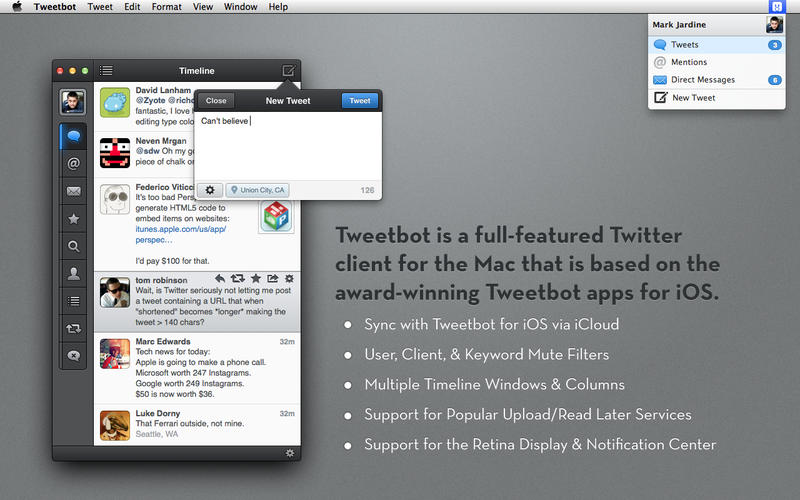
Tweetbot for Mac was updated today to version 1.4.1. The new update brings a collection of sorely-needed fixes to some of the biggest bugs affecting users of the previous version, including the inability to see new tweets when they load, problems with multi-monitor setups, and direct messaging issues. It also includes all of the updates to version 1.4, including smooth scrolling on OS X Mavericks, quick-reply from notifications, and more.

The update is available for free to all current users. New users can grab the app for $19.99.

What’s New in Version 1.4.1

– Fixed the issue where you can see “x unread items” but can’t scroll up to see them
– Fixed the issue where direct message images would not load when clicked
– Fixed the issue with some users seeing hangs related to iCloud syncing or playing audio
– Fixed the issue where the main Tweetbot window could move from the secondary to primary monitor after restarting the app

Site default logo image

Google Play Music for iPhone updated with iOS 7 UI, “I’m feeling lucky” radio, genre search, and more

Google has updated its Google Play Music app for iPhone with several new features and a refreshed UI for iOS 7. The app was first released last month but had not yet been designed for the latest version of iOS.

Besides the updated interface, the app includes support for “I’m feeling lucky” radio stations, the ability to search for music and create stations by genre, and auto-playlists.

You can grab Google Play Music for free on the App Store.

What’s New in Version 1.1.0.988

– UI updated for iOS7

– Added support for I’m feeling lucky radio

– Auto-playlists (including Thumbs Up playlist) added to playlist view

– Genre radio stations added for All Access users

– Added ability to search for genres

Thanks for the tip, Isa!

Site default logo image

Snapchat updated to version 6.1, now has camera filters, up to seven “best friends,” and more

Snapchat was updated to version 6.1 today, introducing several new features to the popular photo messaging app for iOS. Like many photo apps, including iOS 7’s native Camera, Snapchat now supports visual filters for photos taken with the app.

Other additional features include a new “best friends” option that allows users to set seven favorite contacts apart from the rest, as opposed to the previous option for only five. The full change log is below.

Snapchat is available for free on the iOS App Store.

Introducing Additional Services

Smart Filters – Add data overlays to your Snaps!
Visual Filters
Replay
Special Text
Front-Facing Flash
Up to 7 Best Friends

To enable additional services go to Settings > Additional Services > Manage

Site default logo image

IMDb iOS app gets iOS 7 redesign, improved navigation & filters, Oscars section, more

The IMDb iOS app for iPhone and iPad gets a nice update today that finally introduces an iOS 7 style redesign for the app. On top of the new look and feel, the app also adds a bunch of new features that improve navigation and make it easier to track people and release dates using filters and wish lists:

What’s New in Version 4.0

– New iOS7 look and feel!
– New navigation and homepages for iphone, including a sleek dropdown menu, accessible from every page.
– Name lists! Finally, you can keep track of your favorite people!
– New list sorts and filters (including the much requested Release Date sort for Watchlists).
– Vote on interesting name trivia, title trivia, quotes, and goofs.

The updated app also includes a new section dubbed “Road to the Oscars” that includes “all your nominations and award season photos leading up to The Academy Awards®, including live results during both the Golden Globes and The Academy Awards® broadcasts.”

Version 4.0 of the IMDb app for iPhone and iPad is available on the App Store now.

Site default logo image

Facebook Pages Manager for iOS updated with iOS 7 design and new tagging features

Facebook has updated its Pages management client for iOS. The new app has been redesigned for iOS 7 and now more closely resembles the mail Facebook app. The updated app also allows page administrators to tag other pages and people in posts and comments.

You can get Facebook Pages Manager on the iOS App Store for free.

What’s New in Version 2.2

• Optimized for iOS 7
• Tag other Pages in sharing tool
• Tag people in comments

Site default logo image

Apple updates Remote app with the ability to control iTunes Radio

Apple has updated its Remote application for iOS with the ability to control iTunes Radio playing on a user’s computer. Previously the app could only control playback of music that was stored locally in an iTunes library, but now Mac and PC users will be able to control their streaming stations remotely as well. The feature does not appear to work with Apple TVs running iTunes Radio yet.

The app was recently overhauled for iOS 7 along with Apple’s other iOS software. Remote is free on the iOS App Store.

Behind the scenes look at Apple TV app development w/ the new Bloomberg channel

Site default logo image

Unlike its developer program and vast ecosystem of apps on iOS and Mac, there’s not much we know about Apple’s strategy for content on the Apple TV. There’s been a lot of talk that a much rumored refreshed Apple TV set top box— or perhaps even the rumored full-fledged TV set— might also come alongside a more open developer platform with app distribution.

For now, however, Apple is slowly and quietly behind closed doors making deals with select content partners that are building apps for the platform. How is Apple working with developers to build and approve these apps? Does it have an Apple TV SDK that could in theory be released to all developers? With Bloomberg TV today becoming the latest app to launch on the platform, we’ve talked with the people that built the app to get some insight into the Apple TV development process.
Expand
Expanding
Close

Bloomberg launches on Apple TV globally with 24/7 live news stream, on-demand content, iOS integration & more

Site default logo image

Following Apple’s steady release of new content and features for its existing Apple TV platform in recent months, this week it adds yet another as Bloomberg becomes the first channel to live stream business news 24/7 to Apple TV customers. We spoke with Bloomberg’s head of mobile Oke Okaro who told us all about the new Apple TV app.

The majority of the content you’ll find in the new app is the same Bloomberg TV content you’ll find on its website and in its mobile apps but specifically optimized for the larger screen. That includes a live stream of business news, on-demand content with a mix of full TV show episodes and clips, and a special live stream that will appear only for events and breaking news. While there is similar news programming already on the Apple TV through apps like The Wall Street Journal and SkyNews, Bloomberg will be the first to have a 24/7 live stream of business news. That’s compared to the WSJ app which often only live streams content on certain hours throughout the day. It’s also going beyond the other news apps by offering all of its content for free in full-length form in addition to integration with its iOS apps coming in a future update.
Expand
Expanding
Close

Site default logo image

Microsoft updates Bing for iPad to version 2.0 with iOS 7 design, SkyDrive bookmarks, and more

Microsoft has released a major update for its Bing app for iPad. The new app features a revamped interface to match the aesthetic of Apple’s latest OS along with a host of other features and improvements. Users are now able to save the daily image found on the search engine’s home page to their camera rolls for use as a wallpaper or whatever other purpose they decide.

Images and bookmarks can now be saved in the app and synced via Mirosoft’s SkyDrive service to other devices. Search results can now be shared to Facebook, Twitter, and other social platforms. Improvements and updates have been made to maps results, the Bing logo, and other graphics throughout the app.


Expand
Expanding
Close

Site default logo image

Plex media player for iOS updated with new design for iOS 7

Plex, the popular media player for desktop and mobile devices, has been updated to version 3.3 today. The update introduces an updated look based on Apple’s iOS 7 design along with a new media player screen for music and videos. The iOS 7 design isn’t entirely new, but a tweaked version of the existing design. The update also includes miscellaneous bug fixes.

You can get Plex for iOS now on the App Store. For new users, the app is $4.99. Existing users can update to version 3.3 for free.

Site default logo image

Apple updates Remote Desktop Client and Dashboard Widget with fixes

Apple has issued a pair of updates today to its Remote Desktop software. The first update is Apple Remote Desktop 3.7.1 Client:

The 3.7.1 update is recommended for all Apple Remote Desktop clients and addresses several issues related to overall reliability, usability and compatibility.

The Client works hand-in-hand with the main Apple Remote Desktop administrative software, which is available on the Mac App Store. The second update issued today is version 3.7 of Apple’s Remote Desktop Dashboard widget:

The Apple Remote Desktop Dashboard widget* gives you an instant, at-a-glance view of the remote computers in your network.

It’s fully integrated with the Apple Remote Desktop administrative application, so a click on a particular computer will allow you to select and start working with any computer in the system.

The widget requires a user to have the administrative app installed.


Expand
Expanding
Close

Site default logo image

Paper by FiftyThree app updated w/ palm rejection, erase, & blend for new ‘Pencil’ stylus shipping this week

Last month creators of the popular Paper by FiftyThree iPad app announced that it would soon be shipping a $60 Bluetooth stylus for the drawing app called “Pencil”. With the first preorders for the device expected to start shipping this week according to the company’s Twitter account, today it has also updated the official Paper by FiftyThree app with features specifically for Pencil.

The app now supports new palm rejection, erase, and blend features for Pencil:

Palm Rejection— Pencil and Paper work together to produce the most sophisticated and effective palm rejection in any app available today. No setup, no calibration, just natural feeling writing and drawing.

Erase— Pencil’s unique built-in eraser lets you get down to what’s essential.

Blend— Pencil takes care of the lines so you can use your fingers to blend colors on the page and smooth rough edges without ever picking up a tool.

FiftyThree has been taking preorders of Pencil as an in-app purchase directly in the Paper iPad app as well as through its website. It’s selling a graphite model for $50 and a walnut model for $60. While the first preorders will begin shipping this week, an update on its Twitter account today notes new orders will take around in 3-4 weeks.

Report: App Store search updated to compensate for typos, improve discoverability

Site default logo image

According to a report from TechCrunch, Apple has recently implemented updates to the App Store’s search engine allowing it to compensate for “misspelled queries with small typos” and provide more useful results. The update also reportedly extends to app titles that have spaces in the title:

For example, those looking for the highly ranked “QuizUp” game wouldn’t have found it before if they had typed in “Quiz Up” with a space. Now it appears.

The result will ultimately be better discoverability for apps in the App Store, especially for developers targeting keywords that are commonly misspelled. As noted by TechCrunch, it’s also something that has helped Google provide better results on its Play store (as highlighted in the graphic from SEO firm SearchMan above):
Expand
Expanding
Close