update

See All Stories

iOS 7.0.1, iOS 7.0.2, and iOS 7.1 already seeing widespread testing inside Apple


Site default logo image

While the first version of iOS 7 will arrive for end-users next week, Apple is already well into testing for iterative updates to the revamped operating system. According to web analytics for 9to5Mac, Apple employees seem to already be testing iOS 7.0.1, iOS 7.0.2, and iOS 7.1. While we cannot absolutely confirm that these tests are occurring inside Apple, it seems likely based on the cities in which these operating systems are being tested. Apple’s headquarters is in Cupertino, California, and we are seeing these views from these unreleased operating systems from both Cupertino and surrounding areas.
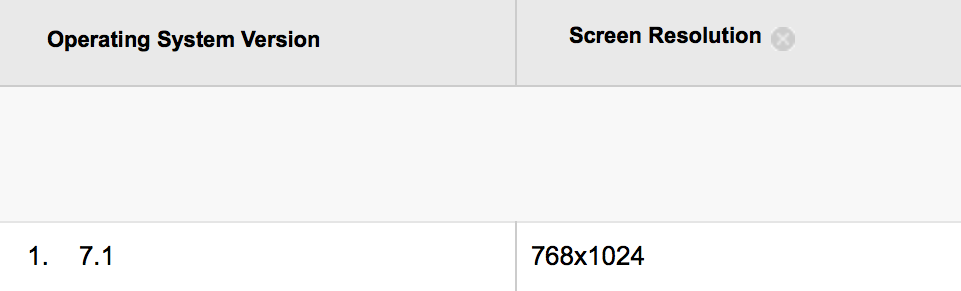
Based on Apple’s past release history, iOS 7.0.1 and iOS 7.0.2 are designed as successive bug fix updates, while iOS 7.1 could bring either new functionality or support for new hardware. Apple typically releases bug fixes updates within a few weeks following a major iOS launch, so it is somewhat unsurprising to see Apple employees already testing the new versions. Based on Apple preparing new models of iPad hardware for the later this fall, perhaps the iOS 7.1 update is designed to launch on that new hardware. We previously reported that the new iPads will run a successive update to iOS 7.0. Perhaps backing this up is that all signs of iOS 7.1 testing in our analytics have been conducted on iPads.


Expand
Expanding
Close

Site default logo image

Adobe Revel cloud service gets updated iOS app with support for video

Adobe has updated its Adobe Revel app today, which allows users to store and access photos and videos in the cloud and sync across Mac, PC, and iOS devices. Previously only available for photos, Adobe has updated its iPhone and iPad apps today to include support for uploading, watching, and sharing videos with the service.

The Adobe Revel service provides unlimited uploads for the first 30 days for free, and 50 photos every month after that. Adobe didn’t specify if the same limits will apply to videos,  but upgrading to Revel Premium for $5.99/month will provide unlimited photo and video imports.

In other app news, Apple appears to have started accepting apps compiled with the iOS 7 SDK. We noticed one of the first– Local Cloud Pro— has been updated today with full iOS 7 support including iOS 7’s Dynamic Type and other new features.

Site default logo image

Google Maps for iOS adds ability to share locations to Google+

Google updated its Google Maps app today for iPhone and iPad with one new feature on top of the usual bug fixes. With version 2.2.0, users can now share their locations directly to Google+ from within the Google Maps iOS app. Tapping the the share button will now provide a “Google +” option and users can also select specific circles to share with before posting. Previously users could only mail, message, or copy a location to the clipboard.

What’s New in Version 2.2.0

● Share your favorite places with friends via Google+
● Bug fixes

Site default logo image

Ebay updates ‘Fashion’ & ‘Motors’ apps w/ iPad support, adds interactive maps to StubHub

Ebay has updated some of its mobile apps today with new features and support for additional devices. Its Motors and Fashion apps, which provide dedicated experiences for browsing vehicles and fashion products on eBay, today get support for iPad. The Motors app also gets a redesign for iPad, improved search, and updated layouts on both iPhone and iPad.

Ebay also updated its StubHub iOS apps today with new interactive maps for the upcoming pro and college football and basketball seasons. You can now “filter listings by section on 1,800+ maps and see the view from your section on more than 400 maps.”

The updated StubHub, eBay Motors, and eBay Fashion apps are available for free on the App Store now.

Apple TV updated with Vevo, Disney Channel, Disney XD, Weather Channel, Smithsonian apps

Site default logo image

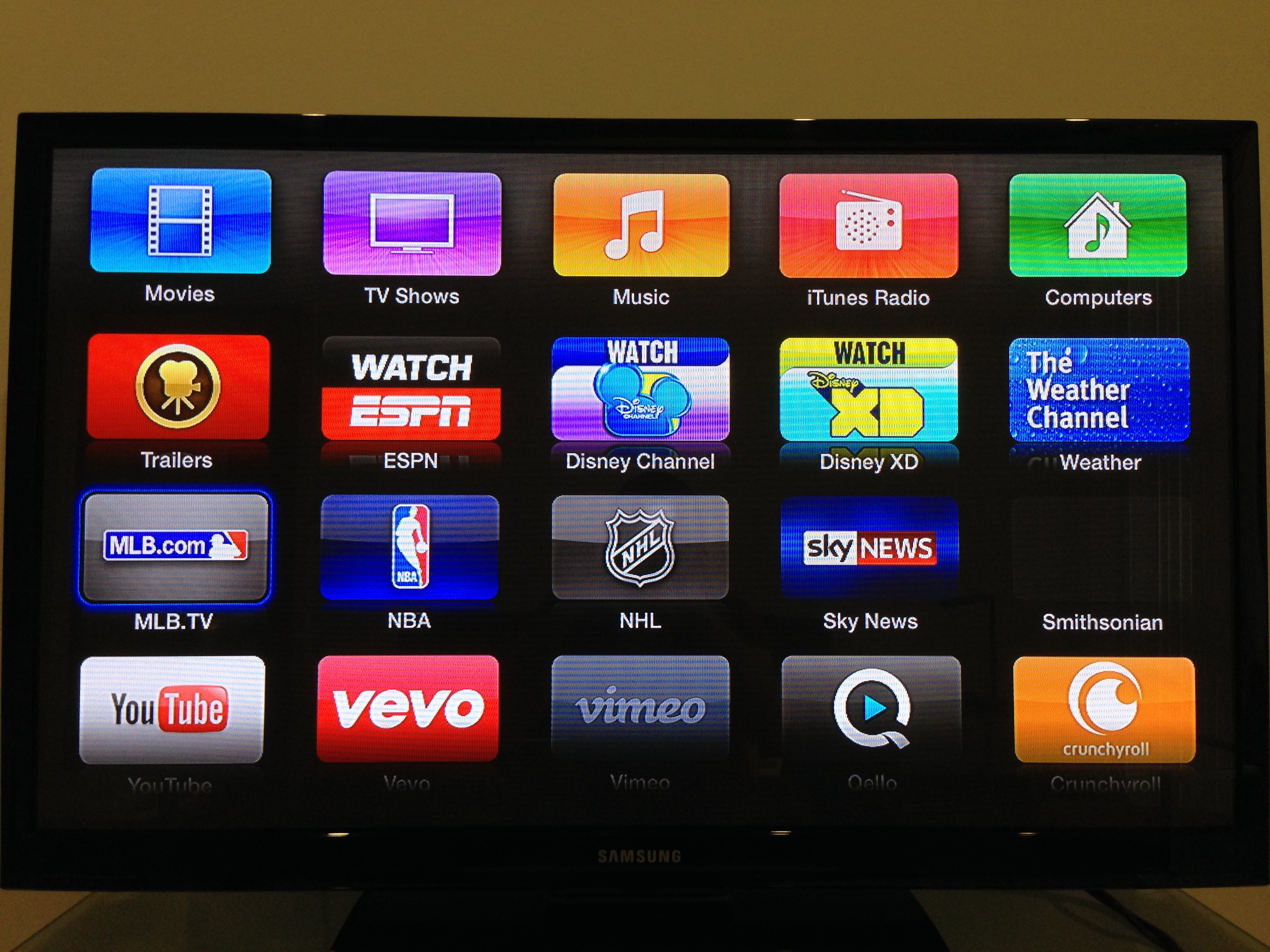
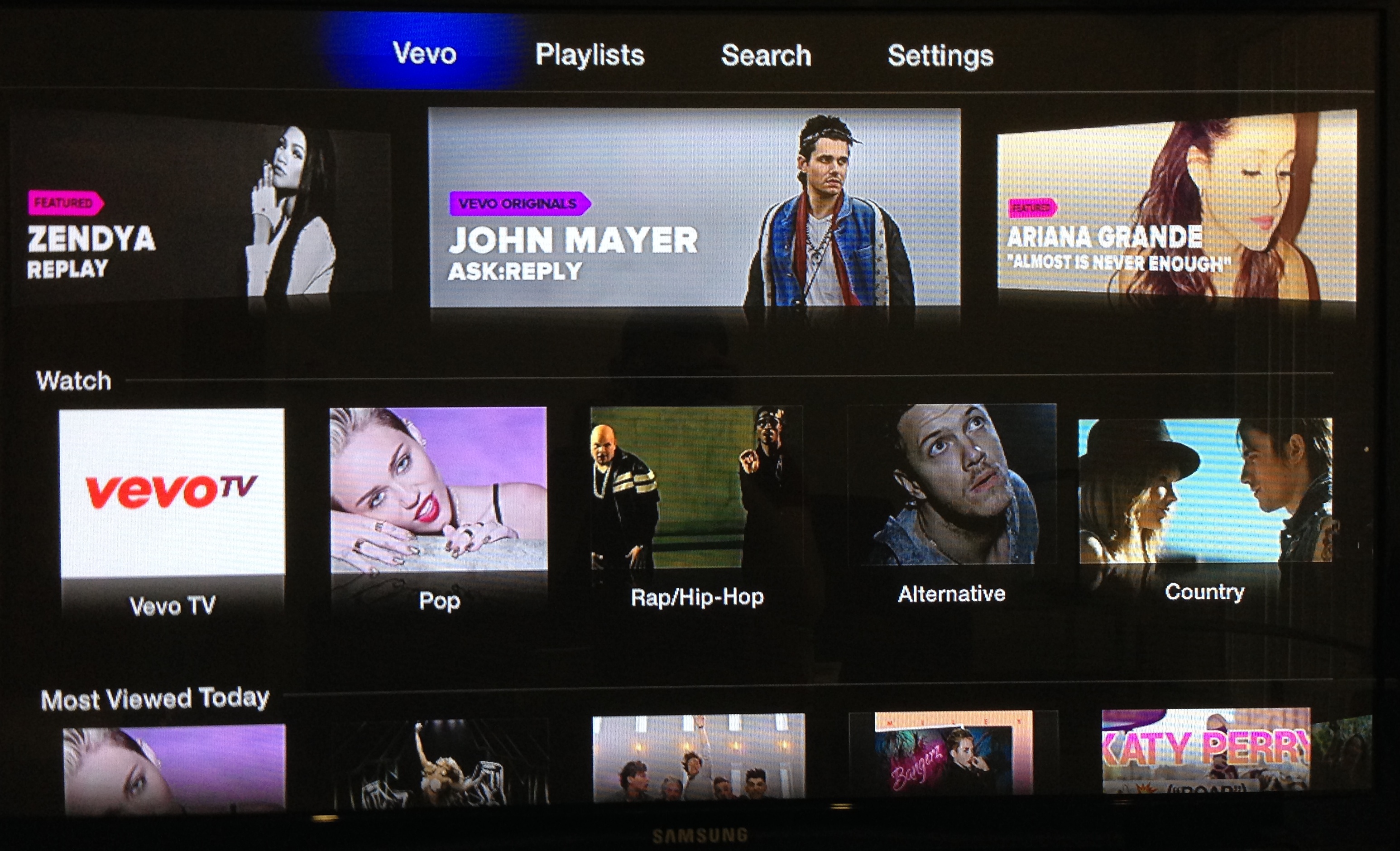
Today, Apple has issued an over-the-air update to the Apple TV that brings several new content apps. Notably, in line with expectations, an app for the Vevo Music Video service has arrived. Also new are Disney Channel and Disney XD apps.

With Apple’s deep partnership with Disney, it is about time that Disney has been fully integrated into the Apple TV. Apple TV users will now also be able to access Weather information via a new app from The Weather Channel. An app for the Smithsonian is also now present.

The Disney apps require cable provider authentication, while The Weather Channel, Smithsonian, and Vevo are available immediately for all users.

Earlier this year, the Apple TV was updated with ESPN, HBO Go, and SkyNews. Time Warner Cable integration is reportedly in the works for later this year.

Images of the new content offerings below:


Expand
Expanding
Close

Finish for iPhone 2.0 introduces Kiip integration, more notifications, task times, and more

Site default logo image

Finish, the Apple Design Award-winning task management app created by a duo of high school students, received a substantial upgrade to version 2.0 today. The new version brings many visual tweaks and bug fixes throughout the app, but the biggest changes are the addition of several new, highly-requested features.


Expand
Expanding
Close

Site default logo image

WatchESPN app updated for iOS 7, adds ‘Live Toolbar’ that lets you stream two videos at once

ESPN has updated its WatchESPN app for iOS today with a new feature called “Live Toolbar” that allows users to multitask while continuing to watch live programming. Rather than having to leave the live stream of whatever event you’re watching at the time, the new live toolbar will allow you to keep up with scores, browse upcoming events, and even watch video highlights or a second video stream. Perhaps the most notable new feature is the ability to watch a second video next to live programming when rotating the device into landscape mode:

Top Videos: Watch multiple things at once! Keep up with the latest news and highlights right alongside the live ESPN programming you’re watching. Rotate your device while watching two videos.

The new live toolbar feature is only rolling out to users on iPad and iPad mini, and will also let users “switch to additional ESPN programming without exiting the video” and follow scores of additional games while watching live programming.

Version 1.7 of the WatchESPN app also includes iOS 7 support, more events from “ESPN on ABC”, and ESPN3 access for users connecting from a college or military network.

Apple just recently added the watch ESPN service, alongside HBOGo and a handful of others, to the AppleTV.

What’s New in Version 1.7

Introducing the WatchESPN Live Toolbar on iPad! Now you can keep up with news, scores and on-demand video from your favorite sporting events while watching live programming on ESPN.

The live toolbar includes:
– Live TV Lineup: See what’s on ESPN’s networks and switch to additional ESPN programming without exiting the video.
– Scores: Follow additional games while watching your game on ESPN. Launch video highlights at the conclusion of an event (where available).
– Top Videos: Watch multiple things at once! Keep up with the latest news and highlights right alongside the live ESPN programming you’re watching. Rotate your device while watching two videos.

*The Live Toolbar is available on iPad and iPad Mini only.

Also new in 1.7:
– Users connecting from a college or military network now get access to ESPN3 events automatically!
– WatchESPN is now compatible with iOS7.
– “ESPN on ABC” events will now appear in the WatchESPN app. Selecting these events will bring you into the WatchABC app.

*WatchESPN 1.7 requires iOS 6 or above.

Site default logo image

Skype for iPad & iPhone updated with HD video calls, improved call quality

Update: The iPhone version of Skype just received the same update with HD video calling support on iPhone 5.

Today Skype updated its iPad app with the ability to make HD quality video calls in addition to several other performance improvements. It’s a feature that’s been available on other platforms for quite sometime, including the Mac client, but today the higher quality video calls finally make their way to the latest iPad. Earlier this year Skype rolled out HD video calling to Windows Phone device’s and noted it would include “720P HD on higher-end devices.” We’d imagine that’s also the case with today’s iPad update but, as always, the quality of video will also depend on the quality and bandwidth of your internet connection.

The HD video calling feature is only available on iPad 4, and version 4.10 also brings enhancements to call quality and stability. It also includes “a redesigned country code picker on the dial pad.”

What’s New in Version 4.10

Call quality improvements
– Make HD quality video calls from your iPad 4.
– General improvements to call quality and stability.

General fixes and improvements
– A redesigned country code picker on the dial pad.

Site default logo image

CBS Sports iOS app gets full iPad support including live video

CBS has updated it’s ‘CBS Sports’ iOS app today with full support for tablet users, allowing iPad users on iOS 6.0 and up to access all of the on-demand and live content that the app previously only offered to iPhone users. The updated app doesn’t just bring a native iPad design with support for the larger screen as pictured above, but it will also now allow users to access live video. On top of on-demand content from CBS, the app offers live streams for a number of sporting events, including: NCAA basketball (January-April), PGA TOUR (May-August), and SEC football games (Sept-Dec). It also brings access to special events including “NCAA March Madness, The Masters, NFL Draft Day, PGA TOUR and more.”

The updated CBS Sports iOS app is available for free on the App Store now.

What’s New in Version 6.0

v6.0
* Tablet Ready! Follow all the action on your iPad, including watching Live Video.

Site default logo image

Twitter #music app gets new ways to discover artists, scans iPhone library for personalized recommendations

Twitter updated its Twitter #music iPhone app today with several new ways to discover new artists in addition to personalized recommendations based on the content in your iPhone’s music library.

Version 1.2 of the app now allows users to “listen to artist’s top tracks, similar artists, and the artists that your favorite artist follows on Twitter.” However, another interesting new feature will scan the device’s music library in order to serve up relevant recommendations based on your past listening habits.

Twitter is also making it easier to find artists that you like by making it easy to quickly access the artists that you’ve tweeted about in the past.

Personal recommendations based on previous listening habits is becoming a prerequisite for just about any music app ahead of Apple’s iTunes Radio launch. Apple’s upcoming service will rely heavily on its personalization features similar to iTunes Genius, and Rdio and others have been adding similar features that focus more on stations custom tailored to the user’s listening preferences.

Lastly, the app gets support for a number of new languages:

What’s New in Version 1.2

We’ve added a bunch of new ways of discovering music. Listen to artist’s top tracks, similar artists, and the artists that your favorite artist follows on Twitter.

We also scan your iPhone’s music library now to suggest more relevant artists to you. And we show you the artists that you’ve Tweeted about so you can always get back to them.

Finally, we’ve localized #music into all of your favorite languages. If you’re one of those good looking people living in Belgium, Denmark, Finland, France, Germany, Italy, the Netherlands, Norway, Portugal, Spain, Sweden, or Switzerland then we’ve got you covered!

Site default logo image

Rdio apps get revamped Stations with personalized “You FM” feature

Subscription music service Rdio announced today that it’s completely overhauling how stations work through the service.  While stations and the player get a refresh with new endless station types to pick from, the big new feature is something Rdio calls “You FM”:

You FM — A brand new, personalized, adjustable station that leverages Taste Profiling technology from The Echo Nest and incorporates all your listening history, track voting, Facebook likes, Twitter follows, and more to create a truly unique and individualized listening experience. As your tastes grow and evolve, so does You FM.

The new player will let users “vote on individual songs, tune stations towards familiar or adventurous sounds, and pivot stations based on favorite tracks” in order to fine tune stations. You’ll even be able to listen to others’ You FM stations. An endless station that’s automatically customized to the user’s listening habits seems like a must have feature for apps competing with Pandora and Spotify, and it’s something that Apple’s upcoming iTunes Radio app will take advantage of heavily.

The Rdio iOS app has already received the update and the new features are available on Android and the web app as well.

FireCore releases Infuse 1.3 with Wi-Fi file transfers, fullscreen TV-out, and more

Site default logo image

Our launch video review of Infuse

FireCore has released an update for Infuse, the popular video app for iPhone and iPad. The new update boasts new features such as the ability to transfer videos to your iOS device through a web browser, fullscreen TV-out support, new sharing options, and more.

Infuse 1.3 is a free update for existing owners. New owners can get the app for $4.99 on the App Store. The full change log can be found below.


Expand
Expanding
Close

Site default logo image

Facebook Messenger iPhone app adds support for attaching Instagram photos

Facebook updated its Messenger iOS app today making it easier to send photos and emoji with a few new features. Facebook is deeper integrating Instagram into Messenger, allowing users to attach photos from Instagram albums (in addition to any other album on their iPhone) right in the app. Version 2.6 of the app also makes it easier to send photos and emoji with a new paper clip icon that users can tap from any message.

What’s New in Version 2.6

Now it’s easier to send photos and emoji:
– Just tap the paper clip from any message
– Choose photos from Instagram and any other album on your phone

Don’t forget about stickers: Tap the smiley to see what’s new in the sticker store.

Bug fixes

Site default logo image

Pebble smartwatch app for iOS updated with email notification support

Pebble smartwatch users running iOS 6 won’t have to wait until iOS 7 to get email notifications: the company behind the watch has issued an update for its iOS app to support email alerts.

The update supports Gmail via a login through Google, while other IMAP email accounts are supported via a login-system within the app. Non-IMAP accounts (like POP) are not supported.

For those who receive a lot of email, Pebble has included an option to temporarily pause email notifications:

Once it has been successfully set up, you will see the account listed on the Email Notifications page. A blue bar means that the account is active. If you would like to temporarily disable the notifications, simply tap the bar once to turn them off; it will appear grey when the notifications are disabled. Tap the bar again when you wish to re-enable the notifications.

Pebble also has troubleshooting instructions on its support page. Of course, Apple is working on its own smart watch. The Pebble recently went on sale at Best Buy. 

Temple Run 2 adds Usain Bolt as a playable character

Celebrity endorsements can be cheesy, but this is a well-themed tie-in to the popular franchise. For a limited time, you can buy Usain Bolt as a playable character. Each character in Temple Run have different special abilities and Bolt is no exception. Bolt has a shield, providing invincibility for a short time as well as attracting coins, like a magnet. Imangi, the game’s developers, has warned that this is a limited-time promotion so eager fans should not wait if they want to play as an Olympian in the game.

Temple Run 2 is free; Usain Bolt is available, for a limited time, as an in-app purchase for 99cents.

Site default logo image

Viber iPhone app updated w/ doodles, ‘Seen’ status, new emoticons, and more

Popular messaging and VoIP service Viber just updated its iPhone app with a number of new features that first hit Android devices yesterday. The update brings “doodles”, a feature that lets users draw on top of photos before sharing.

Also new in version 3.1 of Viber is the ability to see when a recipient has viewed a message with “Seen” status notifications.

In addition, the updated app includes more emoticons, additional language support, and “Support for the Viber Desktop application on Windows and Mac.”

A full list of new features is below:

What’s New in Version 3.1

• Send doodles or paint over a photo and share it with your friends!
• “Seen” status lets you know when your messages have been seen
• Support for the Viber Desktop application on Windows and Mac
• Fun new emoticons
• Message performance improvements
• Bug fixes
• Localized to: Croatian, Norwegian, Romanian, Slovak and Ukrainian

Site default logo image

‘Showtime Anytime’ iOS app updated with Live TV streams

Showtime updated its “Showtime Anytime” app today with live TV feeds that allow users to watch what’s currently airing on both SHOWTIME East and SHOWTIME West. That’s in addition to the on-demand content it previously offered.

The app is available for free on the App Store for iPhone and iPad, and available to subscribers of AT&T U-verse, Comcast XFINITY, DIRECTV, Optimum and Verizon FiOS.

What’s New in Version 2.0

– Live TV: Tune in to watch what’s currently airing LIVE on SHOWTIME
– Improved stability and performance
– Minor bug fixes

Site default logo image

Mac mini shipping times slip to 5-7 days on Apple’s Online Store as new Haswell Macs are rumored

Apple’s Mac mini shipping times have slipped from 24 hours to 5-7 days, MacRumors notes. The change occurred today as a Bing Search cache points to 24 hour shipping times as of yesterday.

The slip in shipping times currently appears exclusive to the Mac mini, in multiple Apple Online Stores, as Apple’s other Macs are still showing the typical 24 hour times to ship.

While a slip in shipping times does not confirm an imminent update, Apple’s Mac mini was last updated in October of last year and lacks the current Intel Haswell chipset. The last major redesigned of the computer occurred in mid-2010.

The slip also comes at a time in which Apple is rumored to be preparing Haswell-based MacBook Pro and iMac models for release in the coming months. MacBook Airs with Haswell chips debuted in June.


Expand
Expanding
Close

Site default logo image

Apple updates Logic Pro X with performance improvements & bug fixes

Following the release of a redesigned Logic Pro X suite earlier this month, Apple has just updated the app to version 10.0.1 with a number of bug fixes and performance improvements. Notably, its new Track Stacks feature will “no longer be inadvertently flattened by loading a Patch” and will also have access to Tuner for stacks containing audio tracks. In addition, Apple says “24-bit audio files are no longer converted to 16-bit when exporting projects to AAF”.

Full release notes below:

Site default logo image

Google Drive for iOS adds option to open links in Chrome & Safari

Google has just updated its Google Drive app for iOS with a couple new features and performance enhancements. After adding support for opening links in native Google apps from the Chrome iOS app last week, it has now updated the Drive app with an option to open links within files in Chrome and Safari.

Also new in version 1.5.0 of Google Drive for iOS is support for inserting rows and columns via the “+” button within Google Sheets, as well as stabilization and other bug fixes:

What’s New in Version 1.5.0

  • Clicking on links from within files gives you the option to open in Chrome and Safari
  • Insert rows and columns using the “+” button in Google Sheets
  • Stabilization & bug fixes
Site default logo image

Apple releases software update for new MacBook Air to fix Wi-Fi, audio & Photoshop bugs

Apple just released a software update for the mid 2013 MacBook Air that addresses rare issues related to wifi connectivity, audio playback, and Photoshop:

This update fixes an issue that in rare instances may cause an intermittent loss in wireless connectivity, an issue with Adobe Photoshop which may cause occasional screen flickering, and an issue which may cause audio volume to fluctuate during video playback.

Last month, we reported that Apple started investigating reports of Wi-Fi issues on its new MacBook Air and some customers even received replacements.

The 3.35MB MacBook Air (Mid 2013) Software Update 1.0 is available to download now.

Chrome for iOS adds support for opening links in Google apps, voice & text-to-speech enhancements, fullscreen iPad, & data cost savings

Site default logo image

Google has just issued a big update to its Chrome app for iPhone and iPad that brings new “interoperability with other Google Apps” and a number of other notable features. That means that you’ll now be able to open all links for YouTube, Maps, Google+ and Drive in their native apps instead of in the browser. You’ll also now be able to access the apps with a single tap from within Chrome.

The update also brings enhancements to the newly introduced voice search capabilities, including: always visible controls from the toolbar and text-to-speech support for “all variations of English, Spanish, German, Italian, French, Japanese, and Korean.”

Other improvements in today’s update include fullscreen support on iPad, easier access to browser history, and, according to Google, data cost savings:

Reduce data usage and speed up page load times. View data savings in Bandwidth Management settings. This feature is being rolled out and will be available to all users over time.

Google explained the experimental data cost savings feature in a whitepaper when it was first introduced on Android. In the document, Google says its tests showed the feature can reduce data usage by up to 50%:
Expand
Expanding
Close

Site default logo image

Apple issues OS X Mavericks Preview 3 graphics bug fix for random rebooting

A day following a minor OS X Mavericks Preview 3 update to correct an issue involving OS X’s Recovery Mode, Apple has pushed out an update to Mavericks users to resolve an issue for Macs that randomly reboot. Apple calls this update “Mavericks Preview 3 Graphics Update 1.0,” and it is available via the Mac App Store. Thanks, D!


Expand
Expanding
Close

Site default logo image

Apple pushes bug fix updates to AirPort Utility on iOS, OS X & Mavericks Recovery mode

Apple has issued a minor bug fix update to both AirPort Utility on OS X and on iOS. The OS X Update is available via Software Update on the Mac App Store, while the iOS version is in the App Store on iOS and iTunes. 

The update, on both platforms, is to squash a bug for AirPort Base Stations not begin recognized by the app. Apple, last month, pushed out AirPort Utility updates to add compatibility for the new 802.11ac AirPort Extreme and AirPort Time Capsules.

In OS X Mavericks-specific news, Apple has pushed out an update to testers for the OS X Recovery function. Thanks, D!


Expand
Expanding
Close