update

See All Stories
Site default logo image

DirectTV to add voice search, capabilities to its iPhone app later this year (video)

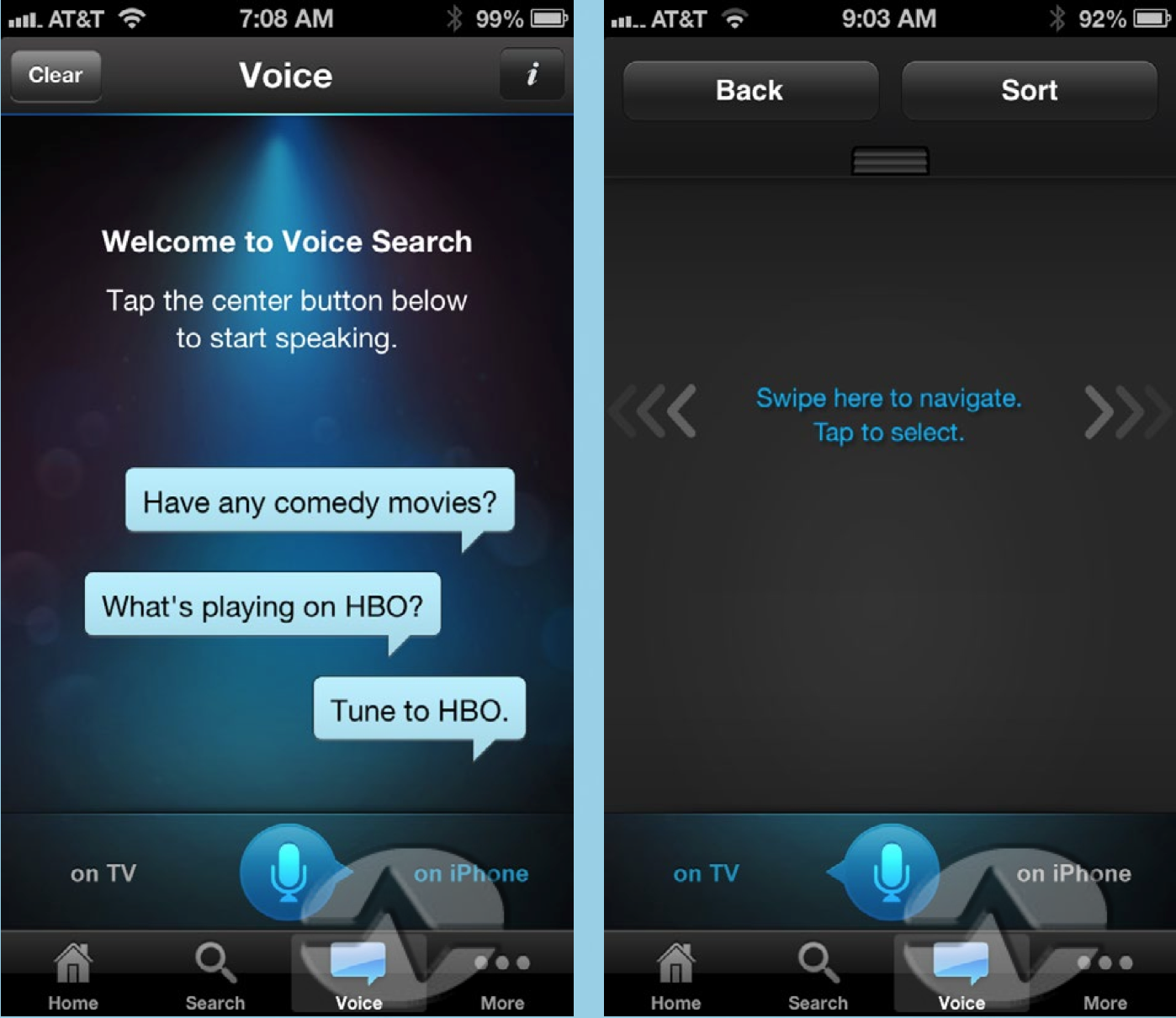
DirectTV has announced that it will be adding voice search and capabilities to its iOS application later this year, and a beta will be available this summer. Like Apple’s Siri application for iOS, the application will understand many different types of commands. For example, you can say “find movies with Tom Cruise” or “what’s playing on HBO?” Solid Signal posted a review for the DirectTV voice app, detailing some of the more advanced voice features.

While you wouldn’t want to use voice control in place of a remote, it’s a nice parlor trick to tune a receiver using your voice. Say “Tune to channel 7” or “tune to ABC” and the receiver will change channels for you. The natural language recognition is quite good, too. Saying “find me some comedies” resulted in over 200 being found.

The site also published a video overview:


Expand
Expanding
Close

Tweetbot 2.8 gets media timeline, redesigned image viewer, more

Site default logo image

Tweetbot fans, a new update awaits you at the App Store. Today’s 2.8 update has some interesting new features and important bug fixes.

Topping the list is the “media timeline” – find it located next to the search box – which will show you all of the images and video in your timeline. Speaking of images, Tapbots totally redesigned the image viewer in this round. Rounding out this update is “Tweet/status detail view now displays the number of Favs and Retweets” which will be enjoyed by narcissists everywhere. Oh and what update wouldn’t be complete without  “Various other bug fixes including Fixed Instagram Previews”?

Get it on iTunes ($2.99)
Expand
Expanding
Close

Site default logo image

Discovery Channel and TLC iOS apps updated with “Plus” interactive second-screen experience

Discovery Communications updated two of its iOS apps today with a brand new second screen experience dubbed “Plus”. Available for the Discovery Channel HD app and the TLC app for iPhone and iPad, “TLC Plus” and “Discovery Plus” brings interactive “second-screen” content that syncs to some of the network’s most popular shows. According to iTunes, the synced experience includes “exclusive factoids, photos, and more” and will also allow you to sync up with previously aired Plus-enabled shows that you may have recorded on your DVR.

The Plus experience isn’t available for all shows yet and is currently only available on iPad, although iPhone support and more content is on the way. The updated apps also include a new schedule guide allowing users to “quickly see when a series is currently airing new episodes, and what new shows are about to premiere.”

Update, April 24: Discovery has now updated its Animal Planet iOS app with a new experience that offers views from 12 live HD cameras:

What’s New in Version 2.5

Now on your iPad: Introducing Animal Planet L!VE, featuring unfiltered, round-the-clock access to the compelling worlds of the beautiful, cute and misunderstood. With this update, users can immerse themselves in 12 live HD cameras.

Site default logo image

Vu news app for iPhone has unique interface, recommends content

We’ve been testing a new, free iPhone news app called Vu that presents content based on what you have previously read/viewed within the app via an easy to use, fast interface. The app recently gained article saving and improved article sharing features, and we think it is worth taking a look at. Like other news apps, you can sync content between your iPhone, iPad, and your computer. You can access content you have saved for later via a web browser on non-iPhone devices.

Site default logo image

LinkedIn iPhone app updated with simpler, more personalized interface

LinkedIn has updated its iPhone and iPod touch application with a redesigned, simpler user-interface that is more personalized. Additionally, the update allows for more actions from the Updates Stream. The iPad app does not appear to have picked up the new interface yet, but the tablet-optimized version did receive bug fixes and performance improvements. Release notes:


Expand
Expanding
Close

Site default logo image

Time Warner Cable iOS app updated with ability to stream live TV away from home

As announced yesterday, Time Warner Cable has updated its iPhone, iPad, and iPod touch application with the ability to access and stream select OnDemand content and TV channels while away from home. Previously, the application could only stream TV while you were in your home with Time Warner Cable TV service. Additionally, the app update has improved filtering and sorting for categories and shows. Bug fixes and various performance enhancements are also included in the 3.2.0 update.


Expand
Expanding
Close

Site default logo image

Mailbox email app for iPhone removes reservation system following scaling improvements

The Mailbox for iPhone email application no longer has a reservation system, its developers announced today. The developers say that improved scaling contributed to this.

Good news! Mailbox is now available without having to wait in line. After 10 weeks of around-the-clock hard work, our engineering team has scaled the Mailbox service to deliver over 100 million messages per day (and growing). We believe we can now confidently handle new users as they sign up, so we’ve pulled down the reservation system.

It is unclear if Dropbox, the new owner of Mailbox, contributed to the new scaling efforts. The developers say that the app processes 100 million emails per day. Yesterday, Mailbox was updated with interface enhancements and new snooze options.


Expand
Expanding
Close

Facebook for iOS gains ‘ChatHeads’, iPad app redesigned, Brichter working on Home

Site default logo image

Facebook has released an updated version of its Facebook application for iOS today, bringing the iPad application more in line with the website’s recently announced redesign and adding some features from the Android-based Facebook Home software. The Verge took a hands-on look at the updated app.

The iPad application now has a more streamlined, simplified user-interface that focuses more on content such as photos…


Expand
Expanding
Close

Site default logo image

Apple releases minor Xcode update with fixes/improvements

Today, Apple has released a minor update to its Mac Xcode software development suite. The update includes various performance improvements and bug fixes. It is available on the Mac App Store as a free update. Thanks, D!

What’s New in Version 4.6.2

• Improves LLDB performance for debugging Objective-C code.
• Fixes an issue where the crash log database could grow very large.
• Additional bug fixes and stability improvements.


Expand
Expanding
Close

Site default logo image

Mailbox email app for iPhone updated with improved swipes, smarter snoozes

Mailbox for iPhone and iPod touch, the popular Gmail application recently acquired by Dropbox, has been updated with a couple neat enhancements. Adjustments for snooze times are now more specific, swipes are faster, and the UI has been updated with various tweaks. Additionally, bug and performance fixes are also present.

What’s New in Version 1.2.0

– smarter snoozes (adjust based on time of day and week)
– faster swipes (swipe as many items at one time as you want)
– UI improvements (e.g. double-tap a name bubble to see email address)
– bug fixes (including swipe-to-open bug) and performance improvements


Expand
Expanding
Close

Review: Readdle brings Documents to the small screen

Site default logo image

Readdle has finally brought their popular Documents iPad app to the iPhone and iPod touch with the latest update. The iPhone version has all of the features you would expect in a file management app and a few extras.

The main file manager window displays all of your files in a grid or list sorted by name, date, or size. You can create folders, zip and unzip archives, and view a variety of file types from this view. PDFs, plaintext files, audio, pictures, and more can be added to your collection. The audio player works when the app is in the background so you can continue listening to your music.

Your most recently used files will accumulate in a special folder automatically so you can find them again easily. A search feature on the main page allows you to search any file by name, but you can also enable an indexing feature lets the app search the contents of your documents as well.


Expand
Expanding
Close

Site default logo image

Real Racing 3 iOS app updated with vehicles from Chevy, 100+ new events, cloud save, much more

While the highly anticipated Real Racing 3 from EA received a lot of press when it first launched back in February, much of it was negative attention due to developer Firemonkey’s decision opt for an in-app purchase, freemium model. Despite that, Real Racing 3 is considered one of the top racing games for iOS devices, and today it receives a massive update bringing new vehicles, events, and game modes to the title.

Version 1.1.0 of Real Racing 3 includes the return of vehicles from Chevrolet such as the Chevrolet Cobalt SS and the Camaro ZL1, 100+ new events bringing the total up to over 1,000, and the ability to save to the cloud and transfer saves between devices. The update also brings a new event type called “Hunter!”:

What’s New in Version 1.1.0

Ladies and gentlemen, start your engines. American fan favorite Chevrolet makes its return to Real Racing! This update features the Chevrolet Cobalt SS and the Camaro ZL1, an all-new Hunter mode, Cloud Save functionality, and 100+ new events! Plus, compare and compete using the new friends leaderboard.

• New manufacturer – Chevrolet! The Cobalt SS and the Camaro ZL1 join the lineup
• New event type – Hunter! Chase down the hunted car and overtake within one lap
• 100+ new events! Total number of events now exceeds 1,000!
• Cloud Save functionality! Transfer your save data between devices
• New social features! See who is online and compare how your friends are doing with the statistics leaderboard
• Check your TSM mailbox for the latest friend notifications
• Improved tutorial and main menu
• Numerous additional improvements, fixes, and performance optimizations

Foursquare’s updated iPhone app brings Explore recommendations to the front page

Site default logo image

Foursquare for iPhone was updated version 6.0 today. The update brings the Explore functionality to the forefront of the app. Explore is Foursquare’s recommendation engine, which suggests attactions that users may find interesting based on their previous check-ins.

The new update brings the Explore search box to the top of the navigation bar, enabling quick access to the feature, which now serves up results faster than ever.

With the new Foursquare 6.0, we’ve crunched our billions of check-ins to instantly show you the most interesting things nearby. They’re insights that only Foursquare can deliver, the moment you open up the app. We also put search front-and-center, so you can find whatever you’re craving fast.

✓ Instantly see the best of what’s nearby. In Paris for the first time? We’ll show you the top sights and attractions, approved by local check-ins. In a familiar neighborhood? We can tell you about an up and coming restaurant that just opened up a few blocks away. Whether you’re near familiar stomping grounds or a tourist fresh off the plane, we show you the most interesting things nearby when you open Foursquare.

✓ Search is front-and-center! You can search Explore from the top of the app as soon as you open it up, so you can find what you’re craving even faster. Type what you’re looking for (like “dessert” or “park”), browse a type of place (like “Nightlife”), or tap “Best Nearby” to see our top picks in the area.

The update is avaiable for free on the App Store.

OS X 10.8.4 code confirms new Macs incoming with super-fast 802.11ac Gigabit wireless support

Site default logo image

Apple is preparing to soon release new Mac computers that support super-fast 802.11ac Gigabit wireless, according to code-findings inside of Apple’s latest OS X Mountain Lion 10.8.4 beta seed to developers. The code was located by a tipster inside of the operating system’s WiFi-frameworks folder. As you can see in the image directly below, the 802.11ac code is not found in OS X 10.8.3, which is the latest public release of Apple’s Mac operating system.

Previous reports have claimed that Apple is working with wireless chipmaker Broadcom to produce 802.11ac chips for future Macs. Now, it appears, Apple’s software is ready to support the new wireless technology as well. More details below…


Expand
Expanding
Close

Intel announces 2014 Thunderbolt update with 4K support; opens door for Retina iMacs?

Site default logo image

Retina iMac mockup via <a href="http://macspoilers.com/665/a-slimmed-down-retina-imac-rumored-to-launch-with-the-ipad-min/"><em>MacSpoilers</em></a>

Today, Intel announced a new version of its Thunderbolt technology that will ship with devices in 2014. The new Thunderbolt technology supports up to 20Gbps throughput, which is up from the 10 Gbps supported by the current version of Thunderbolt.

Notably, the new technology supports 4K resolutions, which could open the door for even higher-resolution Mac displays. Perhaps, this is the technology that Apple needs to work with in order to begin a Retina display rollout for its all-in-one desktop computer, the iMac, or even Mac Pro compatible Thunderbolt displays.


Expand
Expanding
Close

Site default logo image

Rumor claims Mac Pro update coming this month

According to an unverified rumor from MacDailyNews, Apple will announce the next generation of its Mac Pro line sometime this month.

Apple will announce its replacement for the company’s Mac Pro lineup this month, a source who has been correct about Apple product matters in the past has just informed us. We cannot independently corroborate this information, so this item has been categorized as a rumor.

MacDailyNews says its source for this information has provided accurate information in the past, but the site still classifies the information as a “rumor” because it could not corroborate the details. The site previously reported accurate information regarding iCloud pricing and the iOS name.

The site is not sure if this will be a revamp to the existing Mac Pro or a new computer that will be deemed as a Mac Pro replacement.

Earlier this year, we reported that new regulatory standards forced Apple to discontinue its current model of Mac Pros. The computer has since been removed from multiple European online stores.

Apple CEO Tim Cook previously told an Apple customer that Apple is working on something “really great” in the Pro space for “later” in 2013.


Expand
Expanding
Close

Site default logo image

Algoriddim’s ‘djay’ apps get Audiobus support alongside new features & enhancements

Following Apple’s decision to update GarageBand with support for the inter-app audio routing system known as “Audiobus”, the popular djay apps by developer Algoriddim have been updated with Audiobus support alongside a long list of new features.

On top of support for the Pioneer DDJ-WeGO and DDJ-ERGO controllers through the Pioneer DJC-WeCAi iPad Connection Cable for the iPad version of the app, both the iPhone and iPad djay apps get the following new features and enhancements:

What’s New in Version 1.6.4

✔ Introducing Audiobus support: Now you can stream live audio directly to other Audiobus-compatible apps! See http://audiob.us for more information
✔ Added support for Pioneer DDJ-WeGO and DDJ-ERGO controllers (requires Pioneer DJC-WeCAi iPad Connection Cable, sold separately)
✔ “Shuffle” setting is now also applied to Automix Queue
✔ Pause audio when disconnecting headphones or dock audio
✔ Gain is no longer reset when “Reset EQ” setting is off
✔ Allow sliding crossfader up after tapping to leave it centered
✔ Improved handling of iOS audio system errors
✔ Improved caching
✔ Improved Vestax Spin 2 mapping: allow tempo fine-adjust using Shift & +/– buttons
✔ Changed ION iDJ 2 Go jog wheels to scratch during playback (the previous pitch-bend behavior can be enabled using “Jog Pitch Bend Mode” in the MIDI settings)
✔ Fixed playback issue after loading error with specific files
✔ Fixed audio distortion when using Key Lock with Bluetooth audio
✔ Fixed lock screen audio controls starting both turntables
✔ Fixed possible crash when editing Automix Queue while Automix is active
✔ Bug fixes, performance and stability improvements

djay for iPhone is available on the App Store now for $0.99, and the iPad version is available for $4.99. The free, LE versions of the app also gained Audiobus support today.

Algoriddim even updated its vjay apps that allow users to mix music and videos with many of the new features—minus Audiobus support—included in the djay updates.

Google releases free Quickoffice iPhone app for Google Apps for Business customers

Site default logo image

After releasing a free version of the Quickoffice iPad app for its Google Apps for Business customers in December, Google today announced free iPhone and Android versions of the app exclusively for its Apps for Business customers.

Google Apps for Business can already edit Microsoft Office files using Quickoffice on an iPad, and starting today they can do the same on iPhone and Androiddevices. From Word to Excel to Powerpoint, you can make quick edits at the airport or from the back of a taxi and save and share everything in Google Drive… iPad and iPhone users can open and edit Office files directly from the Drive app. Just open Drive and select the file, make edits using Quickoffice and save it back to Drive.

Google noted the updated apps also bring new features including support for multiple Google Drive accounts, improved chart rendering, ZIP folders from multiple files, and the ability to sort Drive files by “Shared with me, Starred, and Recent”:
Expand
Expanding
Close

Apple updates Final Cut Pro X with new features as part of campaign to win back pros

Site default logo image

Following reports this morning that Apple was preparing to a launch a new campaign on its website to lure skeptical professionals back to Final Cut Pro X, Apple has now pushed out updates to the app in addition to smaller updates to its Motion and Compressor apps.

Version 10.0.8 of the ‘Final Cut Pro’ Mac App Store app brings a number of new features and enhancements, many of which focus on improvements for professional users. Among the updates is support for Sony XAVC codec up to 4K, the ability to view “ProRes Log C files from ARRI ALEXA cameras with standard Rec. 709 color and contrast levels,” and a long list of editing fixes, tweaks and enhancements that have been highly requested by pro users.

Apple has now updated its website with the new Final Cut Pro campaign we mentioned earlier. It includes a feature with acclaimed director Tsui Hark and Canada’s largest newspaper The Globe and Mail. The ‘What’s New’ Final Cut Pro product page was also updated to show off some of the new features in today’s update such as support for the Sony XAVC codec.

Apple also updated Compressor and Motion today with minor updates that include fixes.

A full list of what’s new in Final Cut Pro X, Compressor, and Motion is below:

Expand
Expanding
Close

Site default logo image

TweetDeck for Mac updated with column & content filters, advanced search, wide columns, much more

Twitter today released a big update to its popular TweetDeck Mac App Store app, bringing a long list of highly requested features like enhancements to filters, columns, fonts, and key commands.

Version 2.7.1 of TweetDeck for Mac introduces new column filters, the ability to filter columns by content type, Users filters on columns, and a new ‘wide column setting’. Also included in today’s update is a new “powerful advanced search”.

When it comes to Content filters, you can now filter by “media, RTs, including and excluding terms.” Meanwhile, the new Users filters will let you view “verified users, members of a list and more.”

Other new features in today’s release include new font size settings, the ability close windows using CMD+W, verified badges when searching lists, and an option to enable infinite scroll in temporary columns. The release notes pointed out that Spacebar would also now trigger a page down event.

A full list of what’s new is below:

What’s New in Version 2.7.1

➤ Introduced column filters and powerful advanced search
➤ Added Content filters to columns and search including ability to filter by media, RTs, including and excluding terms
➤ Added Users filters to columns and search including ability to filter by verified users, members of a list and more
➤ Added wide column setting
➤ Added new font sizes to settings
➤ Spacebar now triggers page down event
➤ Cmd+W closes windows
➤ Social proof for favorites & RTs in detail view
➤ Added verified badge to list searches
➤ Enabled infinite scroll in temporary columns

Site default logo image

Flipboard 2.0 update allows you to make your own magazines, personalized recommendations and more

Popular iOS news app Flipboard was updated today to version 2.0, and it brings a refreshed look, speed improvements, and the ability to create your own magazines. The UI enhancements include a more prominent search bar with improved personalize recommendations and updated sharing buttons to Twitter, Facebook and Google +.

The most notable new feature in the update is the ability to create your own custom magazines article by article. The way the feature works is: if you want to save an article that you’ve found online or within Flipboard, you bookmark it and it’s automatically added to your personalized magazine. Once you’ve finished creating your magazine, you can publish it publicly or save it privately.

https://twitter.com/markgurman/status/316729661843443712

According to TheVergeFlipboard also announced today that it reached 50 million users.

The update to Flipboard is available today and should be available on Android next month.

What’s New in Version 2.0

★ You can now collect and save content into your own magazines, tap the new “+” button to get started.
★ Your magazines are public, but can be made private (viewable only to you).
★ Use the new bookmarklet to add items to your magazines from your browser.
★ Get Flipboard notifications when people like, comment or subscribe to your magazines.
★ Easily email or share magazines to Facebook, Twitter, G+, etc
✓ Search is now front and center on your Flipboard, with new improved results.
✓ Faster page-loading and faster flipping performance.
★ Personalized recommendations for more to add to your Flipboard.

Apple’s Podcasts app updated with custom stations with automatic updates, iCloud support for stations, playlists, more

Site default logo image

Apple has updated its Podcasts app today with a number of new features. Among the most notable is the ability to create custom stations that update automatically as new episodes of podcasts are available. There are also a number of new enhancements for stations and playlists, including iCloud support to keep stations up to date on all your iOS devices.

The app also now includes a redesigned “Now Playing” view that shows playback controls, as pictured in the screenshots above.

Other improvements include On-The-Go playlists and support for syncing playlists from iTunes, an option to have stations begin playing with the latest or oldest episode, and other fixes and performance enhancements:
Expand
Expanding
Close

Apple updates GarageBand for iOS with support for Audiobus, better control over region and note editing & more

Site default logo image

Apple today updated its GarageBand for iOS, bringing the app up to version 1.4 and providing support for Audiobus. Originally launched in December 2012, Audiobus is an iOS app available from developer A Tasty Pixel and described as an “inter-app audio routing system.” The app allows users to route audio from a growing list of third-party and Audiobus-compatible synths, drum machines, effects, and audio-editing apps and record them simultaneously in other supported multi-track editing apps. That means GarageBand users will now be able to use Audiobus to route audio instruments and effects from other Audiobus-compatible iOS apps into a GarageBand session.

Audiobus provides an SDK to developers that want to integrate the ability to support the Audiobus app and a long list of popular music creation apps have already taken part, including: Cubasis, Animoog, many of Korg’s apps, JamUp, Loopy, and now GarageBand. You can see a full list of apps that support Audiobus here. The Audiobus app will cost you an extra $9.99 on top of the cost of GarageBand ($4.99).

Other improvements in today’s update include the ability to turn off grid snapping to easier control the placement of regions when editing and a fix for issues with third-party audio accessories:
Expand
Expanding
Close