Akitio’s SK-2520 U3.1 is a portable diskless enclosure that can be populated with two SATA SSDs. It results in a relatively quick RAID-enabled drive that can be powered directly via USB-C. Should Mac users give it a look? Watch our brief hands-on video walkthrough for more details. Expand Expanding Close
Portable SSDs are finally starting to come down in price as competition is continuing to ramp up between manufacturers. In the spring we saw Western Digital unveil a new line of USB-C drives designed for Apple’s latest MacBooks. Fast forward to today, and Samsung is refreshing its popular external storage solutions with its new T5 offerings.
USB-C is at the forefront of these new Samsung drives but those still rocking USB-A will be able to take advantage, too. Hidden amongst today’s announcement is that the T5 lineup will be able to hit speeds up to 540MB/s, which is right on level with Samsung’s internal desktop SSDs. More details below.
With Apple’s MacBooks moving from special MagSafe connectors to universal USB-C ports for charging, it’s now possible for accessory makers to easily make battery packs for expanding laptop power. Mophie’s new $149.95 Powerstation USB-C XXL is a high-capacity external battery that promises to charge new MacBooks…
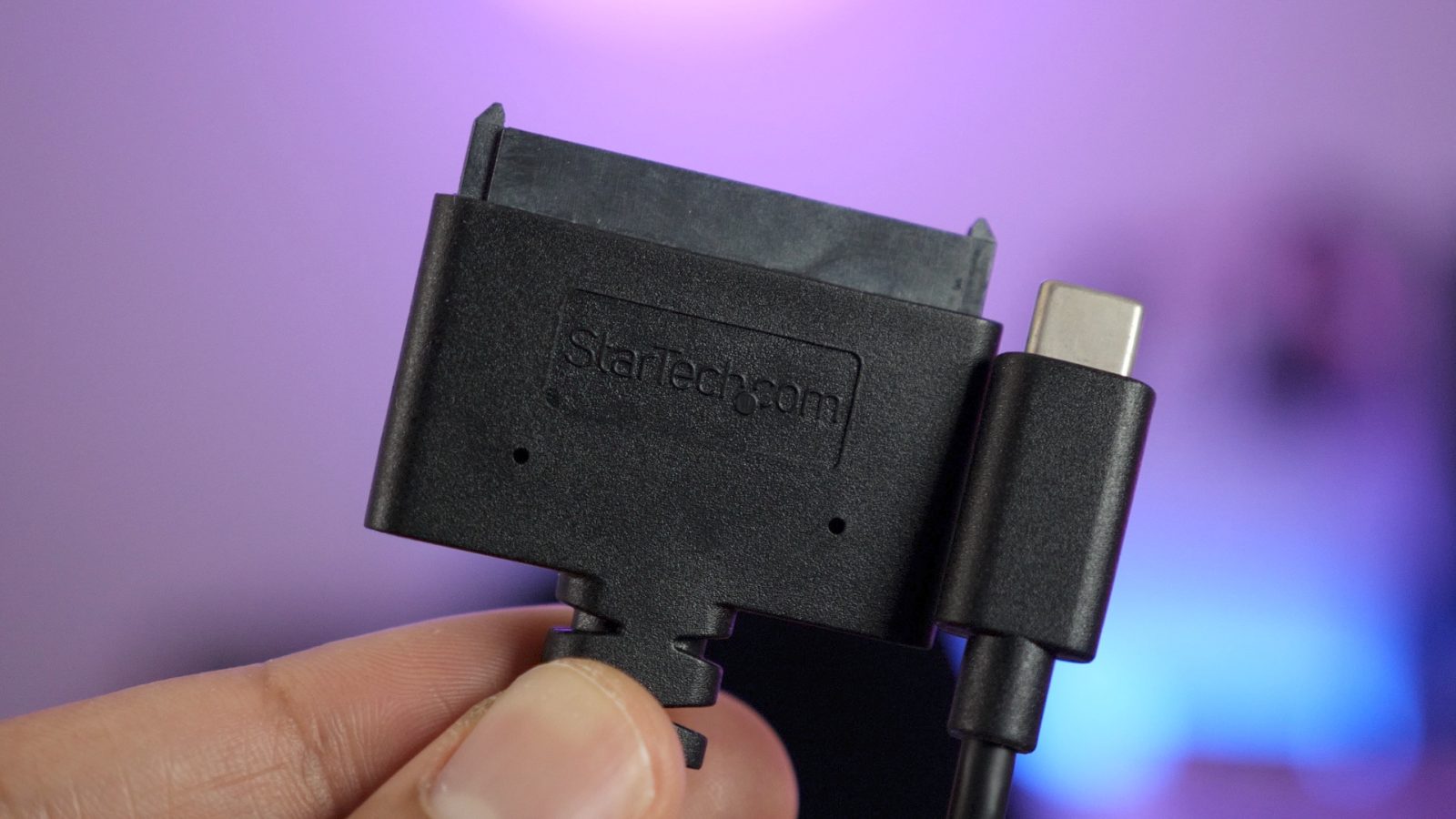
I recently got my hands on the Atomos Ninja Inferno external recorder and monitor for my Panasonic GH5. This 7-inch monitor allows you to record 4K video directly to 2.5-inch SATA SSDs. It’s a wonderful tool for my video workflow, because it allows for extra long recording times, and fast data transfers to my Mac.
The only problem is that the external monitor doesn’t ship with the needed USB-enabled caddy for transferring data from the SSD to my MacBook Pro. Atomos sells a docking station, but it’s limited to USB-A connections.
That’s where StarTech’s wonderful USB-C to SATA adapter comes in. This inexpensive adapter makes it super-easy to transfer data from a SATA-enabled SSD to the MacBook Pro via USB-C. Watch our hands-on video inside for the details. Expand Expanding Close
Satechi has just announced the availability of its take on the USB-C hub for the 2016 MacBook Pro. While USB-C ports may be standard in a few years, today they’re just not, and many creatives still rely on external hubs to get their work done. Satechi’s new aluminum Type-C Pro Hub will bring back the ports and expansion power users need.
Apple’s decision to go all-in on USB-C on the 2016 MacBook Pro machines hit significant resistance from those who would need to purchase multiple dongles to connect to their existing accessories. The company responded by offering discounts on a range of USB adapters and cables, first to the end of last year and later extended to the end of March.
Those deals are now gone, however, so here’s a roundup of some decent alternatives …
Shortly after announcing a USB-C external SSD, Western Digital has announced a USB-C version of its externally-powered spinning metal G-Drives in capacities of up to 10TB. They will also be available in 4TB and 8TB models.
The company says that the drives can also power MacBooks and MacBook Pro models, enabling a single-cable connection, though it doesn’t mention an important caveat …
If you’re looking for an external SSD for use with your 12-inch MacBook or 2016 MacBook Pro, Western Digital’s My Passport SSD looks like it could be ideal for the job. With a USB-C connection as standard (and a USB-A adapter in the box), it will be available in a choice of three capacities …
I wrote an opinion piece last year speculating on whether Apple would switch from Lightning to USB-C, and when it might do so. A new report today suggests that the company is planning to do so this year, in the iPhone 8.
I argued then that there were compelling reasons for Apple to make the switch. While the Lightning port is a clever standard, USB-C is even smarter and more capable. Adopting a single port across both Mac and iOS devices would massively simplify the cable and connector ecosystem. And the high-speed data transfer capabilities provided by USB-C would allow Apple devices to work together better than ever.
I addressed the three possible objections before, but let’s quickly summarize them here …
[Update: We’ve heard from two readers who recently ran into an issue where using the USB-C to USB-C cable does not work with this display and the 2016 MacBook Pro. Unfortunately, in one case, different cables and support from HP and Apple also didn’t provide a solution. Please share below in the comments if you have experienced the same or something similar.]
If you’ve decided to pass on LG’s UltraFine Display there are only a few other options when it comes to 4K USB-C displays. Jordan covered the best choices back in November and now all of these displays are available (with varying degrees of stock).
There are a few compromises that come along with the $500 ENVY 4K display compared with options like Lenovo’s ThinkVision X1 or LG’s 27UD88-W, but I decided to try HP’s ENVY 27 with price, design, and specs hitting a good portion of my wish list. Keep reading after the break to hear about my first week with this new display.
Satechi is launching a new USB-C Power Meter that can detect faulty cables, batteries, and chargers before they damage your MacBook or other hardware. USB-C Power Meter measures voltage, current, and power input over time so you can tell if an accessory is working as advertised or misbehaving.
Up to three-quarters of 9to5Mac readers think Apple should switch from Lightning to USB-C in the next iPad. Some 39% think the company should do it regardless, while a further 35% say Apple should make the switch if it does it for iPhones also.
However, a quarter of readers think Apple should stick with Lightning, at least for now, citing the slightly larger size and a less robust port as drawbacks of USB-C.
We previously discussed whether Apple would switch from Lightning to USB-C in future iPhones, with the majority of readers expecting this to happen this year or next …
With Apple having gone all-in on USB-C, it’s no surprise that third-party manufacturers are scrambling to meet demand for compatible accessories – but LaCie is no stranger to the new port. The company began offering USB-C drives back in 2015, recently announced drives using the same super-speed SSDs used in the new MacBook Pro and has today announced USB-C versions of two of its most popular drives …
A 9to5Mac poll of 2016 MacBook Pro owners revealed that the majority found it no big deal to adapt to the brave new USB-C-only world. More than 5,000 readers took part, with 56% describing it as ‘a small deal/painless.’
Apple’s decision to go all-in on USB-C ports on the new MacBook Pro has of course generated a great deal of debate. In a poll we ran almost two months ago, a slim majority of you felt that the decision was a positive one, but the votes were very close.
Now that many of us have been using our shiny new machines for some time, and had the chance to adjust to working with the new ports, I thought it would be interesting to see how easy or difficult an adjustment it has been …
When Apple launched the iPhone 5 with a new-fangled Lightning port – instead of the 30-pin dock connector that had been a standard feature on every previous generation of iPhone, as well as on iPods since 2003 – there was a great deal of outrage.
‘What about all the docks and speaker systems we own that have 30-pin connectors?’ was the question many asked. The decision was described as arrogant and unreasonable. Apple was accused of profiteering, by forcing everyone to buy new cables, docks and speakers.
Apple responded in three ways. It pointed to the undeniable technical superiority of the new port. It explained the difficulty of making ever slimmer devices with a port designed for much thicker ones. And it assured everyone that this would be the last change for a long time – that the Lightning port would be around for many years to come …
Now that users are finally getting their hands on Apple’s AirPods, a few tidbits of information about the product are starting to roll in. Earlier today, we shared how AirPods hold up after drop and water tests. Now, eagle-eyed users have noticed that the charging port on the AirPods case is nearly identical to the shape of a USB-C port, leading to some questions…
We already gave you the rundown on requirements for connecting your old DisplayPort and HDMI displays to the new MacBook Pro, and if you need a new monitor now, the best option going forward is probably to go all-in on USB-C. That goes not only for MacBook Pro or 12-inch MacBook users, but also anyone who wants to be future-proofed as Apple moves to Thunderbolt 3 on other devices going forward (most displays have HDMI and/or DisplayPort for your other Macs).
These are the best 4K and 5K USB-C and Thunderbolt 3 displays available so far:
The Late 2016 MacBook Pro lacks many of the convenient ports that we’ve seen on previous MacBook releases. But if there’s a silver lining to be found, it’s that the USB-C ports featured on the new machines are super-versatile.
With a single USB-C cable, for instance, you can tap into CalDigit’s USB-C Dock, which gains you instant access to multiple legacy USB-A ports, Gigabit Ethernet, HDMI 2.0, DisplayPort 1.2, an extra USB-C port, and an additional 3.5mm headphone jack along with a microphone jack.
In addition, the unit is able to charge a MacBook up to 60W. That means that the dock should do fine charging the smaller 13″ MacBook Pro at full speed, but will take a bit longer charging the 15″ MacBook Pro that ships with a larger power adapter.
CalDigit’s USB-C Dock isn’t a perfect device, but it does a pretty good job of turning the new MacBook Pro into a desktop-worthy machine, if you can put up with the compromises you’ll have to make in order to use it. Have a look at our hands-on video walkthrough for the details. Expand Expanding Close
Satechi is well-known for producing Mac-centric hardware, so it’s no surprise that the company has made several USB-C accessories, including a handy multiport adapter. This particular adapter, which is similar in stature to a pack of chewing gum, features two USB-A ports, HDMI, and a USB-C pass-through for charging. Should new MacBook Pro owners consider this little accessory? Expand Expanding Close
The Apple community has had a hard time being content with the Mac lately. First it was the feeling that the Mac line including MacBook Pros weren’t being updated as often as, say, iPhones. A redesigned MacBook Pro helps resolve that with at least one member of the Mac family.
But the new MacBook Pro goes all in on USB-C and drops legacy ports like standard USB-A, and many Mac users believe this move is too aggressive considering the cost attached to this transition. The good news is that Apple is listening and lowering the price of its USB-C adapters in an effort to ease the USB-A to USB-C transition, but you have to act fast…
Apple’s new MacBook Pro is totally ready for a USB-C future, but some of your current accessories like printers and mics might not be so prepared. Printers, mics, audio equipment, and a lot of other common accessories use a boxy connector and standard USB to interface with your Mac.
Last night we received a report from Macotakara that the new MacBook Pros were still coming this month, despite a lack of any announcements from Apple. The reporting didn’t specify anything about the internal hardware specs, but did resurface the idea that MagSafe, Thunderbolt 2, and USB-A ports would be replaced.
The thing for me is this: Apple just dropped the headphone jack from the iPhone 7 and the reaction to that has been controversial to say the least. Apple explained that the move took courage and was needed to move from analog to digital, free up space in iPhones, and push wireless. There are no signs that this affected iPhone sales, but transitions are still hard.
Headphone jack aside, if new MacBook Pros fully replace USB-A with USB-C, are we in for the next episode in the same series? We’ve already seen this with the 12-inch Retina MacBook’s single USB-C port, but it’s worth considering what it could mean for MacBook Pro users if true.