Apple has consistently worked at making the iPhone ever slimmer, and has been willing to make compromises to achieve that, most notably in battery-life. But with the iPhone 6 and 6s, it is close to the limit on how slim an iPhone can be – and the reason for that is the oldest piece of tech in the phone. The iPhone 6/6s is not very much thicker than the diameter of the 3.5mm headphone jack.
The latest iPod touch shows that Apple has a little more room for manoeuvre (above photo Anandtech, below iFixit).
But really not much. If Apple wants to continue the iPhone’s diet, at some point very soon it’s going to have to ditch the 3.5mm headphone socket in favor of an alternative. There are four possible options open to it … Expand Expanding Close
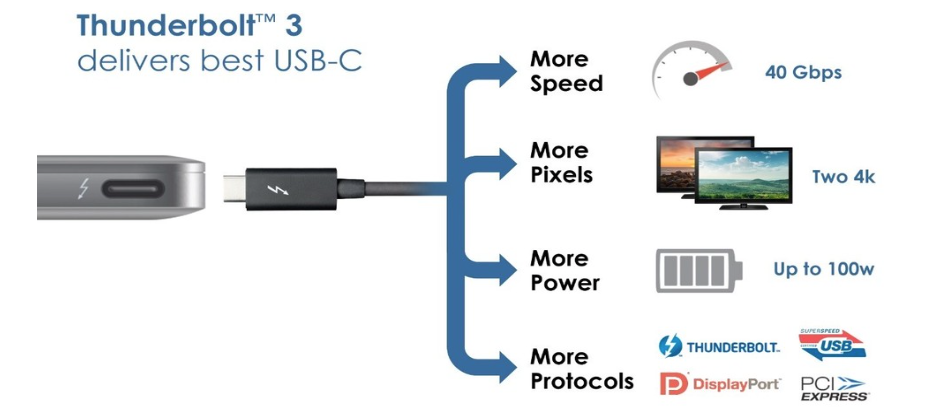
Apple’s decision to equip the 12-inch MacBook with just a single port was a controversial one, but the USB-C port Apple chose just got a whole lot more powerful. Intel announced back in June that it was integrating USB-C and Thunderbolt 3 to create “one compact port that does it all” – and that port just hit the market in the form of the revamped Dell XPS range.
That means that a single port combines superspeed USB, Thunderbolt, DisplayPort, PCI Express and power. The DisplayPort channel can simultaneously handle two 4K monitors.
Dell has opted to include two of the new ports, and this is an approach I think we can expect Apple to take with the new MacBook Air models (whatever they are actually called) and, in time, the MacBook Pro … Expand Expanding Close
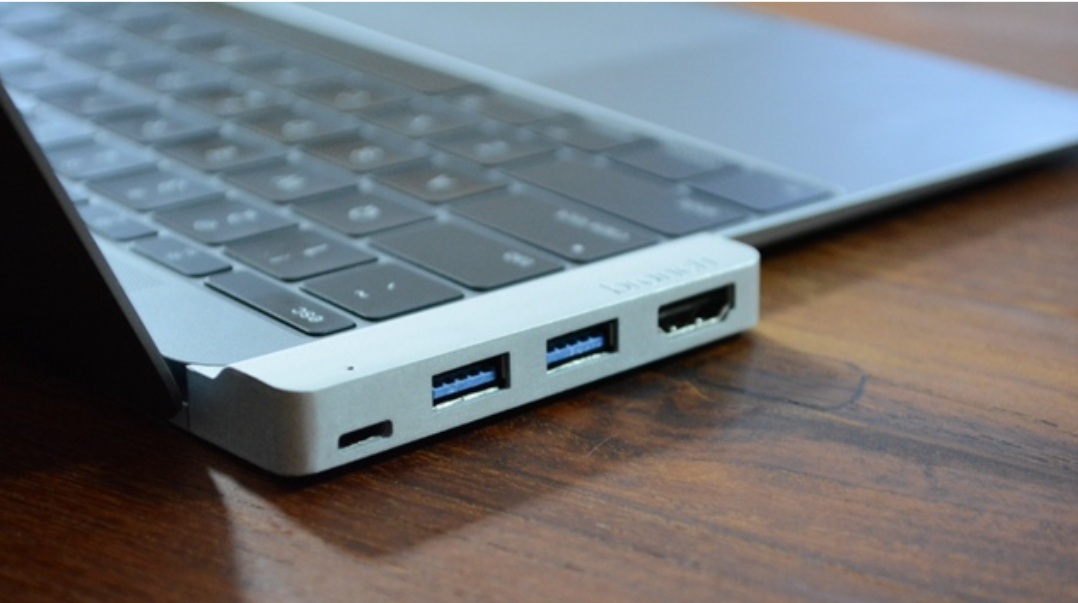
Satechi’s new Type-C USB Hubannounced in October at first glance looks like the perfect solution for using single-port Retina MacBooks with wired accessories and SD cards. It adds three traditional USB 3.0 ports like MacBook Airs and MacBook Pros so you can plug in flash drives, Lightning cables, and most other USB accessories. It also reads SD cards and Micro SD Cards, just not at the same time. And the sleek hub is offered in Mac-matching colors that look almost official…
We’ve already seen severalcrowdfundingcampaigns for USB-C hubs to expand the capability of Apple’s 12-inch Retina MacBook, which features a single USB-C port for connecting accessories, and Satechi is joining the scene with its own USB-C hub available now.
Available in three color-matching aluminum finishes that fit Apple’s gold, silver, and space gray MacBooks, Satechi’s Type-C hub adds three USB 3.0 ports plus two SD card slots, both standard and Micro, to the USB-C-only Retina MacBook. This allows you to use standard USB cables and accessories like flash drives simultaneously with a single adapter. Satechi highlights its hub’s portable size, which appears to minimally extend the edge of the laptop with similar dimensions to an extra column of keys. Expand Expanding Close
Ever since Apple launched the single-port 12-inch MacBook, we’ve seen a flurry of companies offering to add the missing ports back in through various adapters, hubs, docks and more. Latest to the party is Branch, a Kickstarter project whose USP is its ‘form-fitted’ shape, which is naturally available in each of the three MacBook colors.
The emphasis here is on packing the essentials into an extremely portable unit, providing USB-C pass-through, two USB 3.0 ports and one Mini Display port capable of driving a 4K monitor. The company had originally pitched with HDMI (shown above), but said that it has switched to Mini DisplayPort following feedback from Kickstarter users … Expand Expanding Close
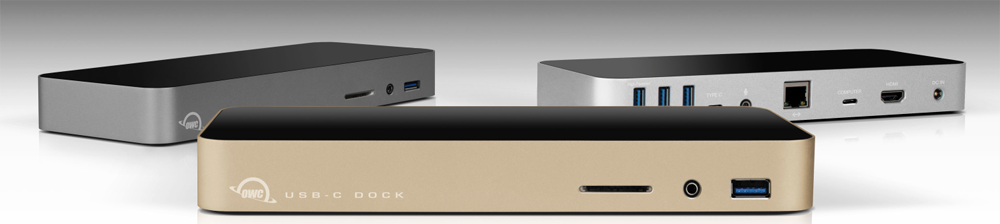
The 12-inch MacBook is the ultimate portable Mac, but that single USB-C port feels a lot less convenient when you want to connect to a bunch of devices at home or in the office. We covered a $79 portable hub yesterday, and now OWC has announced its $129 desktop model, available for pre-order today for delivery in October.
Available in silver, space gray and gold, to match your MacBook, the OWC USB-C Dock provides a total of 10 ports in a unit designed to remain on your desk, allowing you to instantly connect and disconnect via a single USB-C cable … Expand Expanding Close
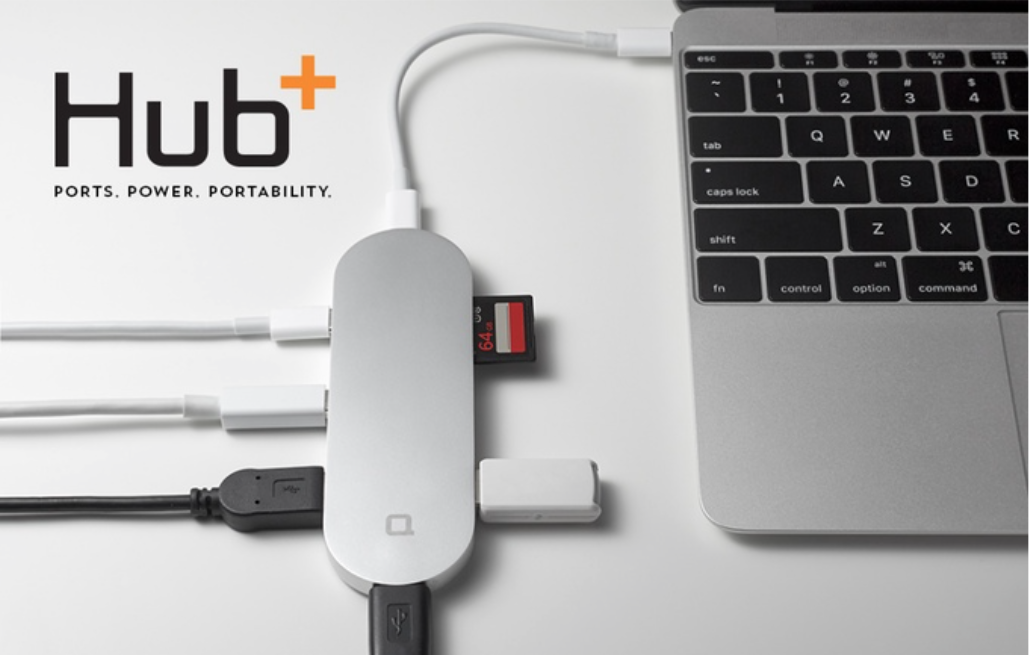
A neat hub designed to provide 12-inch MacBook owners with a useful way to connect existing devices has just hit $670k on Kickstarter – somewhat in excess of its modest $35,000 goal.
The Hub+ plugs into the single USB-C port of the MacBook and turns that into two USB-C ports, 3 conventional USB-A sockets, a mini DisplayPort and an SDXC card slot. The sleek device offers a choice of silver, space gray and gold to match your MacBook … Expand Expanding Close

Cloud syncing services like Dropbox and iCloud Drive connect most of our devices nowadays, and AirDrop offers fast data transfer between Macs for smaller files… when it works. Physically moving files from one machine to another using a drive in the middle, or sneakernet, remains the most reliable way to quickly move files between Macs for many. Without a proper adapter, Apple’s 12-inch MacBook doesn’t fit into this workflow though. That’s where SanDisk’s Dual USB Drive ($49.99), comes into play.
Dual USB Drive conveniently works with both USB-C MacBooks and traditional USB ports on other Macs or PCs, all in a tiny package with plenty of storage…
The USB-C port first introduced by Apple in the new 12-inch MacBook looks likely to be used across the MacBook range as Intel has adopted the standard for Thunderbolt 3.
Thunderbolt was developed to simultaneously support the fastest data and most video bandwidth available on a single cable, while also supplying power. Then recently the USB group introduced the USB-C connector, which is small, reversible, fast, supplies power, and allows other I/O in addition to USB to run on it, maximizing its potential. So in the biggest advancement since its inception, Thunderbolt 3 brings Thunderbolt to USB-C at 40Gbps, fulfilling its promise, creating one compact port that does it all.
Apple was an early adopter of the Thunderbolt standard, which allowed a single port to be used for both high-speed data transfer and DisplayPort monitor connections. Intel’s integration of the two standards would allow Apple to replace the Thunderbolt port in the MacBook Pro range while still maintaining full compatibility with existing peripherals … Expand Expanding Close
Adapters for adding thicker ports are nothing new for Apple’s modern line of notebooks. Even the high-end Retina MacBook Pro decidedly excludes a direct Ethernet connection, and Apple’s MacBook Air and new ultrathin 12-inch MacBook are especially too thin for a wired connection to the Internet without relying on an adapter in the middle.
While modern WiFi is fine for most everyday situations, even Apple acknowledges that a wired connection is necessary in some instances. To remedy this, it sells a $29 USB Ethernet Adapter and a faster $29 Thunderbolt to Ethernet Adapter. The 12-inch MacBook has neither port, however, additionally requiring Apple’s $19 USB-C to USB Adapter to work with the slower adapter.
Popular accessory maker Anker has shown off its upcoming lineup of USB-C cables and adapters including USB-C to USB 2.0, 3.0, and USB-C solutions. Especially interesting for 12-inch MacBook users is Anker’s USB-C to Lightning cable — the first that I’ve seen from a reputable vendor — which will allow users to connect iPhones, iPads, and iPod touches with Lightning ports directly to Apple’s USB Type C-only notebook for charging and syncing. Expand Expanding Close
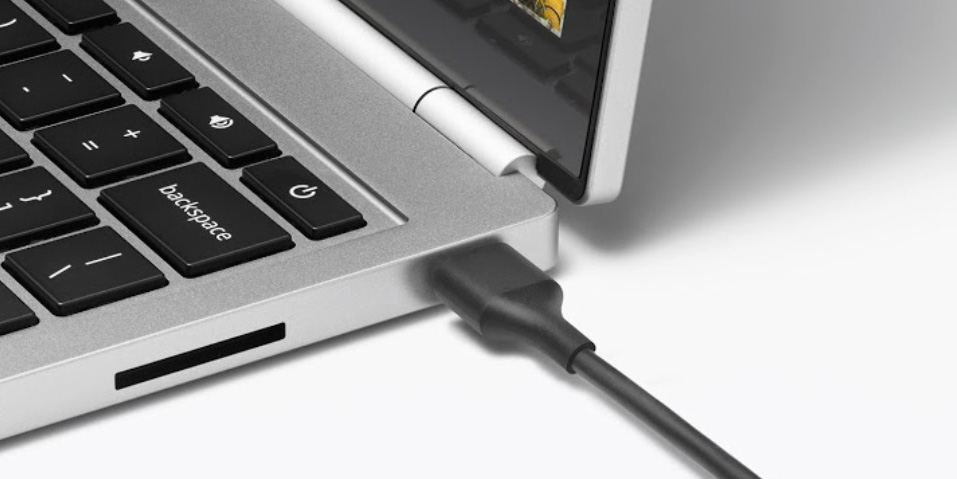
The new USB-C port on Apple’s new 12-inch MacBook (review) is both a gift and a curse. If you frequently connect legacy USB peripherals to your notebook, then you’ll have to deal with using an adapter between your old gear and your new laptop each time (and should possibly consider another machine for now). The move from Apple’s proprietary MagSafe 2 connection to the new industry standard USB Type C port for charging, however, opens up the door to third-party power adapters and portable battery packs.
During my initial MacBook evaluation, I verified this possibility with a 13,000mAh portable battery pack I had on hand. Vinsic’s 20,000mAh ultra slim power bank is a giant battery that offers even more juice for your iPhone, iPad, or 12-inch MacBook with a sleek design and an LED status indicator…
Traveling with any MacBook is a lot easier today than it was five or ten years ago. Apple’s latest laptops consume much less space than their predecessors, and last much longer when they’re in active use. Whether it’s on a seat-back tray or resting in your lap, your MacBook can deliver quite a few hours of productive work time, video viewing, or even gameplay without assistance. But it can do even more if you bring the right accessories along.
My goal is to help you choose the best items to carry with you on the road — the type of items I’ve spent years testing. The picks below are highly practical and focused to make good use of space and address real-world concerns that many travelers have. Read on!
Early reviews of Apple’s MacBook (Retina, 12-inch, Early 2015) have framed it as an expensive prototype from the future — a notebook that will someday be the standard, but one most people aren’t ready for yet. Despite that classification, the new MacBook is extremely tempting if you’re in the market for a new computer: it’s more portable than even the MacBook Air, it’s the first Mac available in gold and space gray finishes, and it has a trackpad with a new feature called Force Touch.
But can you actually do work on the 12-inch MacBook? That’s the $1300 question everyone is asking. I’ll unpack my experience below …
The radical approach taken by Apple in equipping the new 12-inch MacBook with just a single port for both power and connectivity makes the machine extremely sleek, but somewhat problematic to use when you want to connect multiple devices. Two Kickstarter projects aim to solve that.
First, InfiniteUSB, which already provides stackable cables for standard USB ports, has launched a USB-C version called, unsurprisingly, InfiniteUSB-C. Each cable has a combined USB-C plug and socket at one end, enabling you to piggy-back as many as you need, and either a Lightning, Micro USB or USB socket on the other end … Expand Expanding Close
USB-C is the sole port on Apple’s new 12-inch MacBook, and CalDigit today announced a version of its durable external drive that takes advantage of the new reversible USB 3.1 port. CalDigit Tuff features a USB-C port and cable for connecting the portable drive to the Apple’s ultra-thin notebook, and an included adapter cable ensures compatibility with the USB port that you’re used to seeing on your hardware as well. Since the new MacBook’s thin and light profile intends for it to venture out of your office and into the wild, CalDigit Tuff is ruggedized to endure drops, splashes, dust and other extreme environments.
CalDigit Tuff starts at $139.99 for 1TB HDD with availability starting in July (new MacBook orders currently deliver in 4-6 weeks). A solid state drive version with up to 1TB of storage will also be available while a higher capacity 2TB HDD option will be offered. Expand Expanding Close
As I noted in Part 1 of How-To: Decode Apple’s Tech Specs pages before buying a new Mac, Apple has designed the Mac purchasing process to be easy: pick a model, pick the good, better, or best configuration, hand over your cash, and enjoy your computer. Since most people get confused by tech specs — bullet points filled with numbers and acronyms — Apple downplays them in its marketing materials, leaving customers to sort through the details and figure out what most of them mean.
But these specs are really important when you’re shopping for the right Mac for your current and future needs. So I’ve created this How-To guide to walk you through each of Apple’s Tech Specs pages using clear explanations, hopefully enabling you to properly understand what you’re about to buy. Part 1 focused on the “big 5″ Mac specs you really need to know about, and this Part 2 looks at the rest — generally things that remain the same in a given model, regardless of the configuration you choose…
Welcome to Happy Hour 006. In this episode Zac, Seth, and Benjamin discuss new Apple Watch details and wrap up the need-to-know information, a new controversial Steve Jobs documentary, and the future of USB-C. How will it affect future iOS devices and Macs? The Happy Hour podcast is available for download on iTunes and through our dedicated RSS feed…
The quote, taken from TheTechBlock about 54 minutes in:
I have heard, can’t say who, but let’s call them “informed little birdies”, that USB-C is an Apple invention and that they gave it to the standard bodies. And that the politics of such is that they can’t really say that. They’re not going to come out in public and say it, but they did. It is an Apple invention and they do want it to become a standard.
That’s a bit weird, because if Apple did invent USB Type-C, it would seem like a no-brainer for replacing Lightning. But Gruber noted in a post earlier this week that he didn’t think Apple would replace Lightning with USB Type-C.
I think the answer is probably “No, Apple is not going to switch the iPhone and iPad to USB-C”. I think Lightning is a more elegant design, including being slightly thinner. And I think Apple likes having a proprietary port on iOS devices.
But, if they did move iOS devices to USB-C, then you could charge your iOS devices and MacBook with the same cable. And within a few years, all phones and tablets from all companies would charge using the same standard.
A few minutes of research into the matter yields a wealth of data about the genesis of USB Type-C and while Apple does play an active role, it appears they had a lot of help – to put it charitably… Expand Expanding Close
When Apple unveiled the new 12-inch MacBook with just a single port (plus a headphone socket), it was doing not just one radical thing, but two. Reducing a machine to just one port was the first; dropping MagSafe was the second.
MacBook Air offers innovations you won’t find anywhere else — like the MagSafe 2 power connector, which breaks cleanly away from the notebook if you accidentally trip over the power cord.
The magnetic power cord attaches securely and detaches cleanly.
It’s one of the features that even the most die-hard opponents of Macs tend to grudgingly admit is a good idea. And yet that (very) shiny new MacBook aimed at the largest slice of the MacBook Air market doesn’t have it. Is this a one-off move for a single model, or will we see USB C power replacing MagSafe across the entire MacBook range … ? Expand Expanding Close
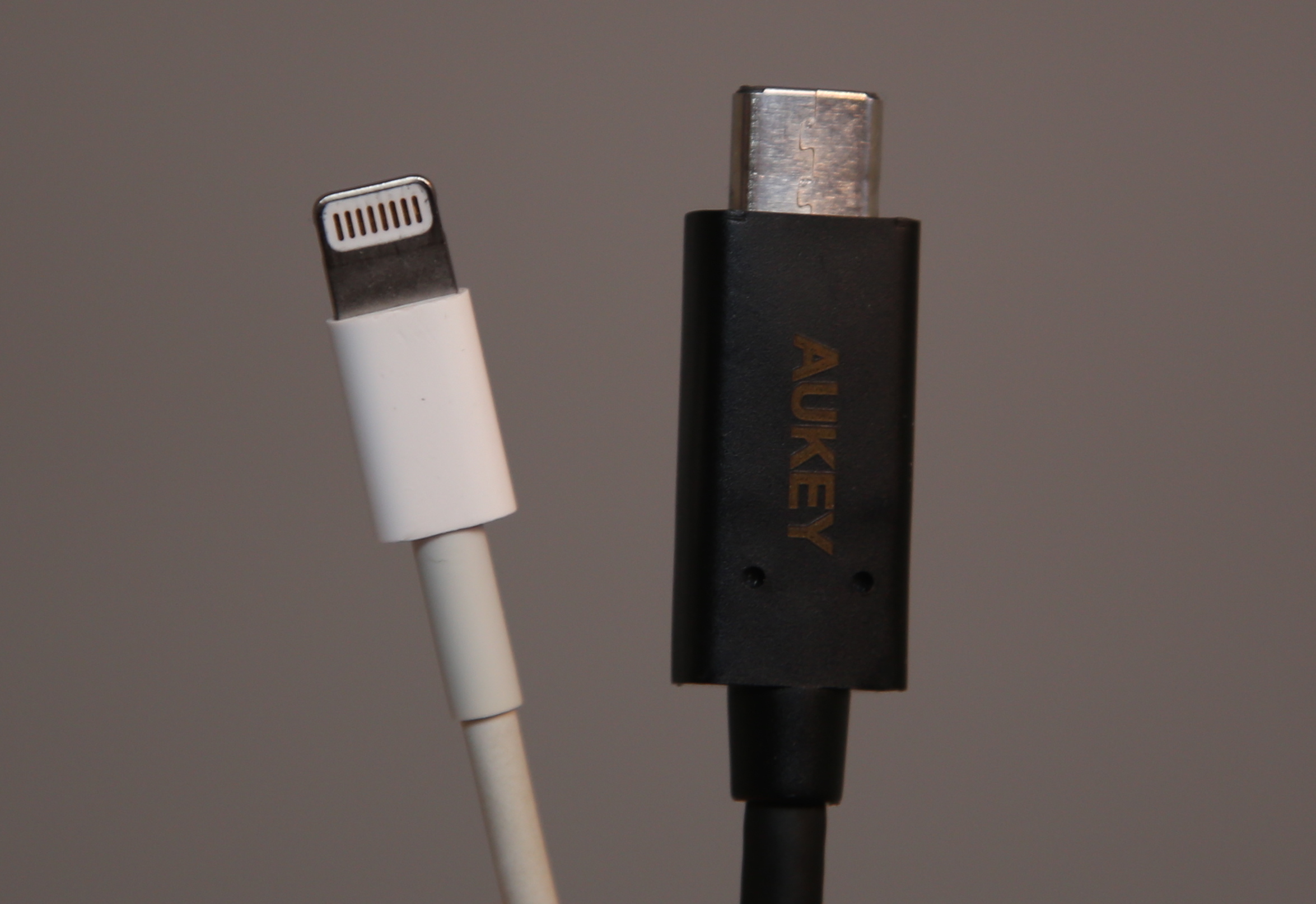
Lightning vs. <a href="http://www.amazon.com/Aukey-Hi-speed-Reversible-Connector-Supported/dp/B00RGNJXD4/ref=sr_1_1?amp;amp;qid=1421386415&amp;sr=8-1&tag=thepartim-20&ie=UTF8&amp;peasin=B00RGNJXD4&amp;keywords=B00RGNJXD4&amp;pebp=1421386732649">USB-C cable from Aukey</a>
We’ve been poring over Apple’s change to the 8.4mm by 2.6mm USB Type C standard since we got tipped the design of the new MacBook late last year. It is a big change for Apple and puts the future of longstanding technologies like Thunderbolt and MagSafe into questionable status. Even Lightning seems a whole lot more vulnerable when an adapter that is marginally bigger, but has the whole industry behind it, shows up in Apple’s future flagship laptop.
Some quick, fun facts on USB Type C that make it pretty amazing: Expand Expanding Close