video

See All Stories

Watch the iPhone’s accelerometer pick up keystrokes from an invisible keyboard (Video)


Site default logo image

A student at Goldsmiths, University of London has apparently been able to create an invisible, virtual keyboard for iPhones by using the device’s built-in accelerometer to pick up vibrations caused by tapping or typing on a surrounding surface area. As you can see from the video demonstration above, the “Virbrative” software developed by Florian Kraeutli (on a jailbroken iPhone 4) allows him to measure the strength and frequency of vibrations and then map them to iOS’ onscreen keyboard. The Telegraph spoke with Kraeutli about the software developed for a project on user interfaces:

“The signals I’m collecting are very weak,” said Florian Kraeutli, a computing student at Goldsmiths, who created the system as part of his work on user interfaces.“At the moment it’s more of a proof of concept but if you made the accelerometer more sensitive you could improve the accuracy quite easily.”

In the video above, we see the developer use a keyboard drawn on a piece of paper to train the system before tapping directly on the table underneath. Kraeutli noted users would ideally “train each key, but you can do just a couple.” According The Telegraph, the system “determines the intended key correctly about 80 per cent of the time, so the data is also fed into an auto correct dictionary to ensure the words are spelled correctly.” Kraeutli suggested that access to more powerful accelerometers could allow him to increase the accuracy of the system:
Expand
Expanding
Close

Site default logo image

First Nexus 10 reviews show off a laggy Android 4.2 (Video)

[youtube=http://www.youtube.com/watch?v=Dt1ZKiZaem8&feature=youtu.be&start=72]

Reviews are starting to hit the web for Google’s new Nexus 10 tablet, its first true 10-inch iPad competitor. Most reviewers are praising the device’s display—some even calling it equal to or better than the full-sized iPad’s Retina display. Hardware aside, it appears even the latest version of Android might be the biggest source of frustration as perfectly highlighted at 1:17 in The Verge’s hands-on review above.

Stay tuned for the 9to5Google review of the Nexus 10 this weekend.

Site default logo image

Spoof ‘banned’ iPad mini promo [Video]

[youtube=http://www.youtube.com/watch?v=Os87PLlyU4k]

You might have seen past “banned” Apple promo videos from John Elerick and crew on YouTube. The guys are out with their latest spoof Apple commercial today, but this time it is for the iPad mini. On a serious note, Amazon is taking note of some of the iPad mini’s shortcomings, as pointed out in the video, by posting a comparison of the Kindle Fire HD and the iPad mini on its website. Amazon already included the comparison in its recent earnings release, but today it posted a large graphic on its homepage that reads “Much more for much less” while comparing specs of the two devices:

Elerick’s recent banned iPhone 5 promo, also worth a watch, is below:

[youtube=http://www.youtube.com/watch?v=qFUz6vHEQCM&feature=share&list=SPEFE01BA954950D82]

Sharp’s IGZO on display at IFA Berlin: better touch sensitivity, smaller bezels [Gallery/Video]

Site default logo image

[youtube=http://www.youtube.com/watch?v=fctZx8_Naa8]

We had the opportunity to spend a lot of time with Sharp today at its IGZO display booth. While they would not say which Apple products would incorporate their new displays, they did seem to insinuate these were the best displays on the market, and Apple is the type of company that uses the best displays.

So why are these the best?


Expand
Expanding
Close

Site default logo image

Padcaster iPad case turns your iPad into the ultimate camera

The Padcaster case was just announced this week at the National Association of Broadcasters conference as an awesome way to turn an iPad into the ultimate on-the-go filming and editing machine. Available soon for $199, the case allows you to attach an iPad to a tri-pod, and then attach multiple lenses and an external mic to get even higher quality video. To attach a lens, you will also need to purchase the $79.99 mount. From there, you can use iMovie, YouTube, Camera.app and more from the App Store to edit videos right as they are shot.

As you can see in The Verge’s hands-on with the case shown above, it looks very useful. Of course, it is not something that you would want to keep on all the time, but rather for situations when you need to record, edit, and upload video quickly. Nonetheless, the iPad looks to make an awesome 10.1-inch view-finder. Check out this sample video from the rig below:

Expand
Expanding
Close

Radically improve iPad 2 video capture with the Makayama Movie Mount

Site default logo image

The Makayama Movie Mount is essentially a case for your iPad 2 that allows you to “radically improve video capture” by attaching a number of professional photography related peripherals. Some of the possibilities include third-party wide angle and tele-lenses, microphones and lights, and a standard tripod (not included) for “stable shots, pan & tilt camera movements”.

Simply clip the iPad 2 into the case and attach your third-party accessories to one of the two standard hot shoes or screw fittings. Wide angle lens conversion up to 0.5x and zoom-angle up to 2x comes courtesy of a 37mm screw fitting that allows you to attach conversion lenses and even switch between the attached lens and the iPad’s lens on the fly.

[youtube=http://www.youtube.com/watch?v=J2mKeAmEwOM&feature=player_embedded]

Expand
Expanding
Close

Boxee releases iPad app that features Mac to iPad video streaming

Site default logo image

Boxee has just released a free iPad app that allows users to stream almost any video type from their computer. Streaming features aside, the app is focused at helping users find content to watch online from their friends and what’s popular. Sharing is done through the Friends tab, which is a queue of everything your friends are sharing through Boxee’s social service. There is a also a Popular tab showing what the world can’t get enough of.

The social features are cool, but we really love the Watch Later bookmark you can use to bookmark videos from around the web. The bookmark takes an Instapaper approach and will queue up the videos on your iPad for viewing later. To go along with their Boxee Box, you can also send a video that you were watching on your iPad to your big screen — almost Air Play like.

Check it out in the App Store.


Expand
Expanding
Close

Skype launches HD video calls for Mac OS X Lion with 5.3 update

Site default logo image

Today Skype announced the 5.3 update for Mac OS X which brings HD video calls to Lion among a handful of other UI enhancements and bug fixes. The official Skype blog explains:

With Skype 5.3 for Mac OS X, you’ll also be able to send and receive HD quality video when talking to your friends and family. You’ll need to use the Mac’s built-in webcam or choose from a variety of webcams from our Skype Shop, such as the Logitech C910, to make video calls in crystal clear HD quality. To receive clear HD video calls on your Mac, we recommend an upload/download speed of 1.5Mbps.

While previous versions of Skype, even 2.8, seem to run rather well on Lion, official support should iron out any bugs you’ve been noticing since upgrading. The new update is not only available for Lion users, however, Skype’s blog post notes it is also compatible back to Leopard.

You can grab Skype 5.3 for Mac OS X here. We’ll let you know if we find anything else interesting in this latest update.

Expand
Expanding
Close

HDMI.org: Your Mini DisplayPort to HDMI cable is “unlicensed and should not be sold”

Site default logo image

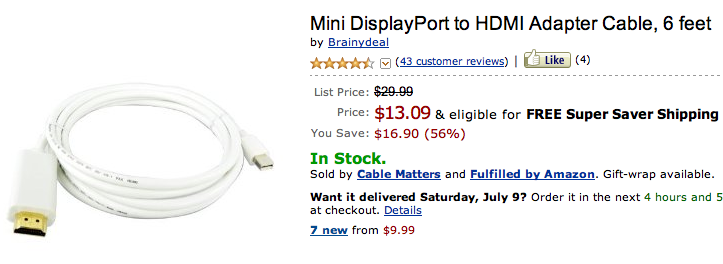
TechRadar is reporting that HDMI.org, the group that oversees the HDMI spec has informed them that MiniDisplayPort->HDMI cables are illegal and shouldn’t be sold. All of them.

Last week that it was rumoured that hundreds of thousands of Mini DisplayPort to HDMI cables are to be recalled because HDMI Org has deemed the cable system to be out of HDMI spec.The DisplayPort system is used primarily by Apple in its Mac range, but there’s a number of other manufacturers who use the port – including Toshiba.HDMI Org has exclusively contacted TechRadar about the situation and confirmed that any cable that has a DP male connector on one end and an HDMI male connector is unlicensed and should not be on sale.

Apparently at issue is that the “HDMI specification defines an HDMI cable as having only HDMI connectors on the ends. Anything else is not a licensed use of the specification and therefore, not allowed.”

Insane.

So for the record this is not OK (get them while supplies last):

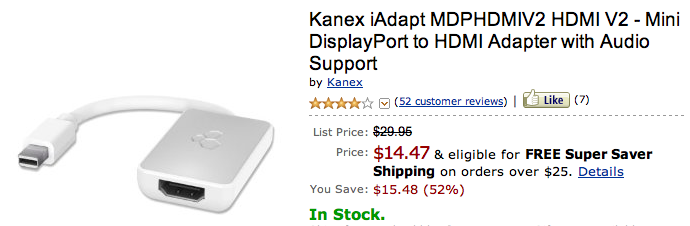
What is OK, is these little dongles, which are actually pretty popular (we like the Kanex!)

.

What is making HDMI.org so batsh!t insane?  As you can see, you still need to buy a licensed ($$$) HDMI cable to use the adapter below whereas the top adapter bypasses the licensing issue altogether…or at least it did until today.


Expand
Expanding
Close

Import of previous Final Cut Pro XML coming soon to Final Cut Pro X

Site default logo image

.

There has been a big stink (several actually) about Final Cut Pro X’s lack of ‘Pro’ features.  One such glaring omission has been the lack of Final Cut Pro 7 XML imports.  MacMagazine.br did some digging and found that the code for doing Final Cut Pro 7 imports is actually inside Final Cut Pro X and for some reason hadn’t been enabled for shipping.


As per usual, Apple will likely enable that functionality (and many others that are missing) in updates to Final Cut Pro X.  If you are daring, MacMagazine offers a workaround that might be able to import now (they haven’t yet tested).


Expand
Expanding
Close

Skype for iPad with video calling promotional video (update: it’s legit)

Site default logo image

[youtube http://www.youtube.com/watch?v=B5G_CkPfDOU]

We’re not exactly sure what’s going on here, but Skype apparently posted a promotional video for an official iPad application this morning. The video has been deleted (if it ever existed) but it looks like the real thing, based on a purported  re-upload by RazorianFly. If legit, Skype for iPad looks amazing, has video calling, 3G and WiFi support, and an easy to navigate interface with animations and clean graphics. Real or fake?

Update: A Skype executive confirmed it’s legit to TUAW.

Try your luck below…


Expand
Expanding
Close