Adobe



Adobe is out with its annual Photoshop Elements and Premier Elements updates, which let you quickly edit and share your photos and videos from the desktop. The consumer friendly Photoshop Elements 14 and Premier Elements 14 includes handy new features that everyday photographers will appreciate including dramatic camera shake and haze removal tools for enhancing images plus motion titles for creating profession looking movies.
Expand
Expanding
Close

Ahead of its annual Max conference in October, Adobe is talking up its new photo retouching app dubbed Project Rigel that is expected to debut at the event this fall. As we learned in late May, Project Rigel is a new Adobe mobile app in development set to replace and improve the image retouching tools previously available in the discontinued Photoshop Touch iOS app.
Expand
Expanding
Close

Adobe announced almost one year ago that it had acquired the team behind the popular image editing app Aviary, and since then the iPhone app has picked up Adobe ID support for syncing editing supplies with Creative Cloud and joined the Creative SDK. Now Adobe is tying Aviary’s tools like text adding and filter adjustments to Adobe Social — which lets social media managers publish content with simple workflows — thanks to tighter Adobe Creative Cloud integration. Adobe highlights what Aviary integration with Social will mean for users:
Expand
Expanding
Close

Amazon may have been Apple’s target when it unveiled its iBooks Store alongside the iPad in 2010, but the digital retail giant’s latest move is helping fulfill Steve Jobs’ vision of a web without Flash. Amazon Advertising issued an update to its technical guidelines today declaring that it will stop accepting Flash-based ads starting next month. Adobe cited “recent browser setting updates from Google Chrome, and existing browser settings from Mozilla Firefox and Apple Safari” that interfere with displaying Flash ads.
Expand
Expanding
Close

It’s been a rough week for the fate of Adobe’s Flash Player plugin. Yesterday we told you about Facebook’s security chief pushing Steve Jobs’ anti-Flash message and calling on Adobe to announce an end-of-life date for the plugin, and today a major web browser has opted to actually block Flash to protect users from security issues. Mozilla said today that it is temporarily disabling Flash by default until Adobe is able to address recent exploits discovered in the plugin…
Expand
Expanding
Close
Facebook’s chief security officer, Alex Stamos, echoed a message first delivered quite memorably by Steve Jobs in 2010: it’s time for Adobe to kill Flash. Addressing Apple’s position of not supporting the plug-in on iOS and instead pushing HTML5, security was just one key point in Jobs’ epic Thoughts on Flash essay when the iPad launched.
We also know first hand that Flash is the number one reason Macs crash. We have been working with Adobe to fix these problems, but they have persisted for several years now.
Five years later, our dependence on Flash has greatly diminished on the desktop, but security issues continue to be an issue with the plug-in. In 2010, Jobs used more than 1600 words to explain Apple’s reason for not adding Flash support to iOS. In 2015, Facebook’s security chief pushed the message in less than 140 characters:
Expand
Expanding
Close

Adobe has issued a security update for its Flash Player on OS X, Windows, and Linux. The company says in a security bulletin on its website that this update addresses a critical security vulnerability that could allow an attacker to gain control and take over an affected system.

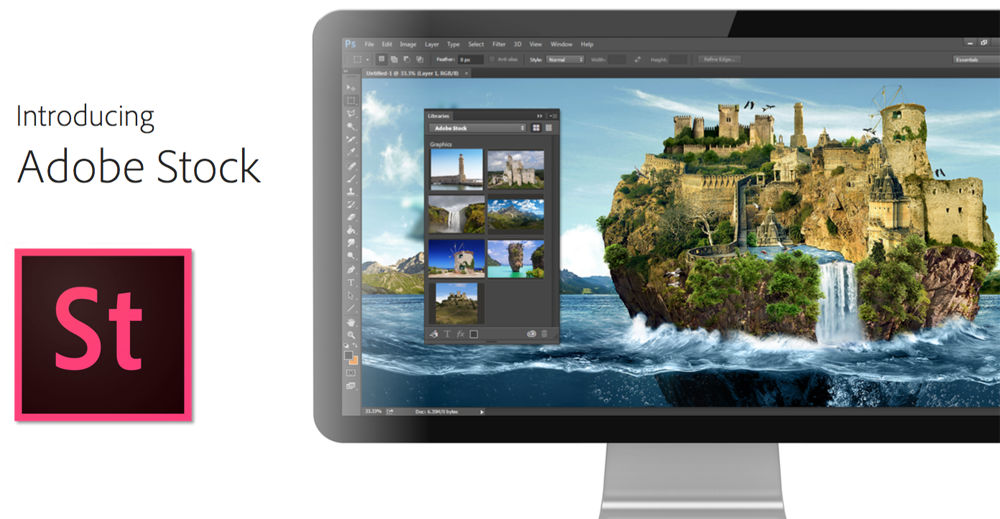
Alongside the updates to its mobile apps yesterday, Adobe has also updated its entire suite of Creative Cloud desktop apps and launched a new Adobe Stock images service integrated within those apps – something the company says “radically simplifies” the process of buying and using stock images.
“Adobe Stock extends Creative Cloud’s value as a vibrant global marketplace,” said David Wadhwani, senior vice president, Digital Media, Adobe. “Eighty-five percent of customers who purchase stock images use Adobe creative tools. The deep integration with our latest Creative Cloud desktop apps, including Photoshop and InDesign, makes buying and using stock photos incredibly easy. At the same time, our customers – the best photographers and designers on the planet – will have the opportunity to contribute millions of new photos and images to Adobe Stock. This is really going to raise the bar in the world of stock content.”
Single images cost $9.99 for existing Creative Cloud subscribers, but Adobe offers two volume subscriptions offering significantly better deals …
Expand
Expanding
Close

Adobe is updating two of its mobile apps today with a few notable features including a welcomed Adobe Photoshop Mix update that brings support for importing from Creative Cloud Libraries and a new “Send to Lightroom” feature.
Expand
Expanding
Close

Google has been working with Adobe to improve battery life drain caused by Flash and today flipped the switch on a new Chrome feature that does exactly that. The new feature aims to detect Flash on a webpage that is actually important to the main content and “intelligently pause content” that isn’t as important. The result is to hopefully make the web experience with Flash more power efficient to improve battery life on your laptop. Here’s how it works:
Expand
Expanding
Close


Adobe announced today that it plans to discontinue its Photoshop Touch software for iPhone and iPad as it changes its approach to bringing features from its professional desktop application to mobile platforms. Rather than continuing to develop an all-in-one app that tries to recreate the Photoshop desktop experience on smartphones and tablets, Adobe is fully embracing its recent strategy of releasing multiple apps that each perform specific functions well. Adobe also revealed a preview of one of those new apps coming to replace Photoshop Touch under the name Project Rigel…
Expand
Expanding
Close

Until this year, Mac owners had three major options for organizing large digital photo collections: Apple’s mainstream iPhoto, Apple’s “pro” app Aperture, and Adobe’s similarly professional-grade Lightroom. When Apple discontinued iPhoto and Aperture in favor of an even more basic app called Photos, many people —amateur photographers and professionals alike — had to decide whether to downgrade to Photos or switch to Lightroom. Apple understood that it was ceding at least the professional market to Lightroom, and even helped Adobe to develop Aperture and iPhoto to Lightroom importers. With the writing on the wall, some people switched to Lightroom 5 well before Photos officially debuted last month.
I didn’t; since Lightroom 5 was almost three years old, I wanted to see what Adobe would deliver in its much-anticipated sequel. On April 21, Adobe released Lightroom 6 and Lightroom CC (2015) as standalone and cloud-linked versions of the same app. Both promise major speed improvements over Lightroom 5, new tools and brushes, a new facial recognition feature, automatic HDR and panoramic photo creation, and new slideshow options. As part of Adobe’s “Creative Cloud,” Lightroom CC comes bundled with Adobe’s latest version of Photoshop, plus cloud photo synchronization services, for $9.99 per month. Alternately, Lightroom 6 can be purchased by itself for $149 as a standalone download, minus Photoshop and cloud functionality.
Below, I’m going to focus on the key questions Aperture users have been asking: what it’s like to transition from Aperture to Lightroom — including new details added after initial publication of this article — plus which version of Lightroom to buy, and whether transitioning is a good (and safe) idea. The answers may surprise you…
Apple today has confirmed that is updating its web plug-in blocking mechanism in OS X to disable all versions of Adobe Flash Player prior to the most recent, which is version 17.0.0.169. On older systems, all versions of Flash prior to 13.0.0.281 are blocked.

[youtube https://www.youtube.com/watch?v=45_zCZnqmqU?rel=0&showinfo=0&w=704&h=396]
Following months of rumors, Adobe is today announcing Photoshop Lightroom 6 and Lightroom CC, the latest versions of its popular photo editing and organization software. Sharing the same code, design, and much of the same functionality, the two Lightroom releases are separated into purchasable (Lightroom 6) or subscription (Lightroom CC) versions, only the latter of which can sync with Adobe’s mobile applications. Apple notably recommended Lightroom as a replacement for its recently-discontinued Aperture professional photo application, and worked with Adobe to build an Aperture library importing tool to aid users during the transition.
Lightroom manages large photo libraries, while offering photographers powerful tools for RAW and JPEG image adjustment. Now solely a 64-bit application, Lightroom 6/CC promises huge speed improvements when applying prior effects to images, as well as newly added tools and brushes. As shown in the embedded video, facial recognition has been added, enabling functionality similar to Apple’s Faces feature from Aperture and iPhoto. A new HDR (high dynamic range) tool uses two images to create a composite photo with more vivid colors and detail, while brushes such as radial and graduated filters have been added. The app has also gained new slideshow options, automatic panorama stitching, video slide shows, and many other features.
Photoshop Lightroom CC can be downloaded now as part of Adobe’s Creative Cloud Photography subscription service for $9.99 per month; a prepaid year of CC Photography access is normally $119.88, and currently on sale at B&H Photo Video for $99.88. Photoshop Lightroom 6 can be ordered for $149 as a standalone download. Adobe has also released version 1.4 updates to its mobile apps Lightroom for iPad and Lightroom for iPhone with support for Lightroom CC, improved cropping, and TIFF file support. Both iOS apps are now available for free from the App Store, but require Creative Cloud subscriptions.
Adobe announced its new Document Cloud service a few weeks ago including new iOS apps for handling documents on-the-go. Described as the digital document hub, Adobe’s Document Cloud includes integration with new apps for iPhone and iPad.
Adobe Fill & Sign for iPad is out now with integration with new Adobe Acrobat DC app allowing you to complete PDF forms right down to your signature from your iPad. Adobe EchoSign for both iPhone and iPad is now Adobe eSign Manager DC as it now integrates with the Document Cloud service. At the center of the mobile experience is the previously mentioned Adobe Acrobat DC for both iPhone and iPad. Formerly Adobe Reader, the new Adobe Acrobat DC app is the company’s PDF management app showcasing the new Document Cloud service.
The new and updated apps are available now on the App Store and come included with an Adobe Document Cloud subscription which starts at $14.99/month after a 30-day free trial. Full Adobe Creative Cloud members can also access Document Cloud through Adobe Acrobat DC at no additional charge.
Adobe is out today with its latest app for content creators on the iPad. The new Adobe Slate app is available for free and joins the similar Voice app Adobe launched last May. Where Adobe Voice focused on using the iPad and later the iPhone for story telling with the spokenword backed by visual elements, the new Adobe Slate app pairs text with fluid and customizable attractive layouts that look great whether you’re a designer or not.
Expand
Expanding
Close
Adobe today released a new iPad app dubbed Comp CC that offers “rapid creation of layout concepts for mobile, Web and print projects” that can later be used in Photoshop CC, Illustrator CC and InDesign CC. Adobe first previewed the new app last year when it was still an early prototype, but today the app is arriving on the App Store for all.
Expand
Expanding
Close
Adobe is taking its document strategy to the cloud with its latest service. Taking the same approach as its Creative Cloud Suite of apps for creators, Adobe is revealing its new Document Cloud service alongside two new apps for iOS: Acrobat Mobile and Fill & Sign. The new service aims to make handling PDFs and other documents much more flexible, and the new iOS apps can bring paper documents into the Adobe Document Cloud for work on the go…
Expand
Expanding
Close


Keep up with the best gear and deals on the web by signing up for the 9to5Toys Newsletter. Also, be sure to check us out on: Twitter, RSS Feed, Facebook, Google+ and Safari push notifications.
Last Call updates:

[tweet https://twitter.com/llsethj/status/568071035926523904 align=’center’]
Microsoft Office 365 Personal ($70 value) FREE w/computer/iPad/tablet purchase including this $50 Android at Best Buy
Adobe is out with an update to its Photoshop Express photo editing app for iPhone and iPad today. The latest release of Photoshop Express for iOS, version 3.5, adds integration with the WhatsApp Messenger app for sharing edited photos directly to the chat service. The update also includes the usual bug fixes including some for issues for iOS 8 users specifically.
Adobe is also giving Photoshop Express users access to some premium features within the app for free. Photoshop Express users with a free Adobe ID (you can sign up here) can use paid features like Premium and Custom Looks as well as noise reduction without paying. Adobe says this promotion will only be available for a short time.
Adobe updated two of its creative iPad apps today with new features and additional Bluetooth stylus support. Both Illustrator Line and Photoshop Sketch were updated to version 2.1 and picked up support for FiftyThree’s Pencil Bluetooth stylus and Wacom’s Intuos Creative Bluetooth stylus when drawing in each app. Both new app versions also added the ability to auto save sketches to Projects and your usual performance improvements.
Expand
Expanding
Close
Adobe released version 1.4 of Photoshop Mix for iPhone and iPad today adding a new “auto crop” feature that Adobe says “analyzes images and suggests non-destructive boundaries based on the primary objects in an image.”
The latest version of the photo editing app also includes the addition of Instagram as a sharing option while sharing to Facebook has been improved. The Creative Cloud-connected app can now open files directly from Lightroom, Photoshop Sketch, Illustrator Line, and Illustrator Draw as well while support for six more languages was added in the update.
Auto crop feature from Photoshop Mix
Check out the full change log for Photoshop Mix, which first launched in June, below with all the new details.

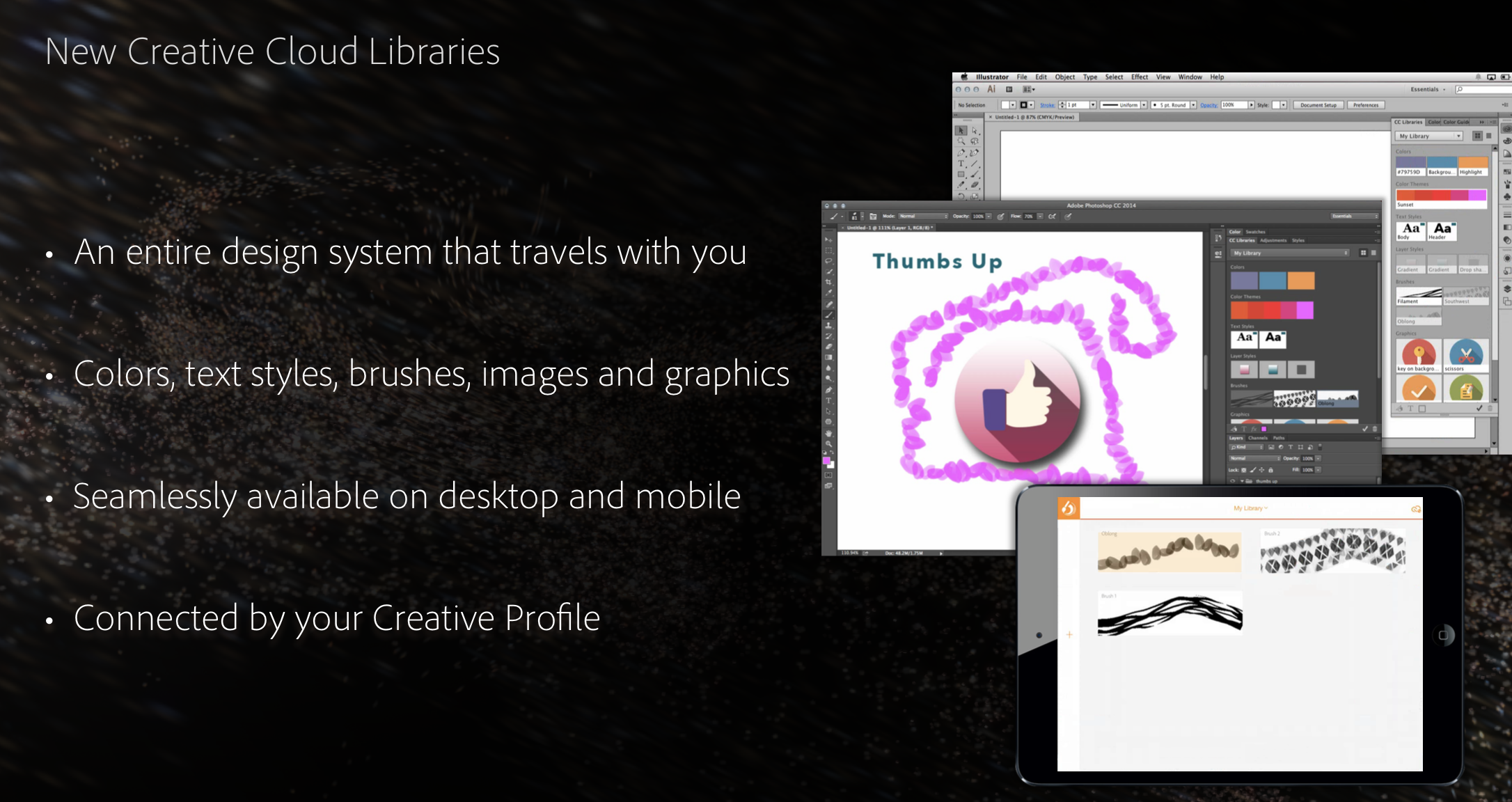
Alongside a string of updates to both the mobile and desktop Creative Cloud software suites, Adobe today launched a trio of new services at its annual MAX conference. First up, and most critical to the updates on the software side of the story, is the new Creative Profile content synchronization service. Blending nicely with the existing Creative Cloud sync service, Creative Profile takes ubiquity of files to new heights by allowing synchronization of more aspects of documents:
This Creative Cloud release includes a new Creative Profile that connects creatives to their work, to the assets they use to create, and the communities that matter to them – no matter where they are. Files, photos, colors, brushes, shapes, fonts, textstyles, graphics, and any other assets are always at their fingertips. This new Creative Profile moves with creatives from app-to-app, and device-to-device, so assets automatically appear when they need them, in the right context.
Most critically, it is optimized for the new desktop and mobile apps so new content created with Adobe’s latest products can be easily synchronized. The Creative Profile service launches today, and it is a free addition for customers with existing Adobe Creative Cloud subscriptions…
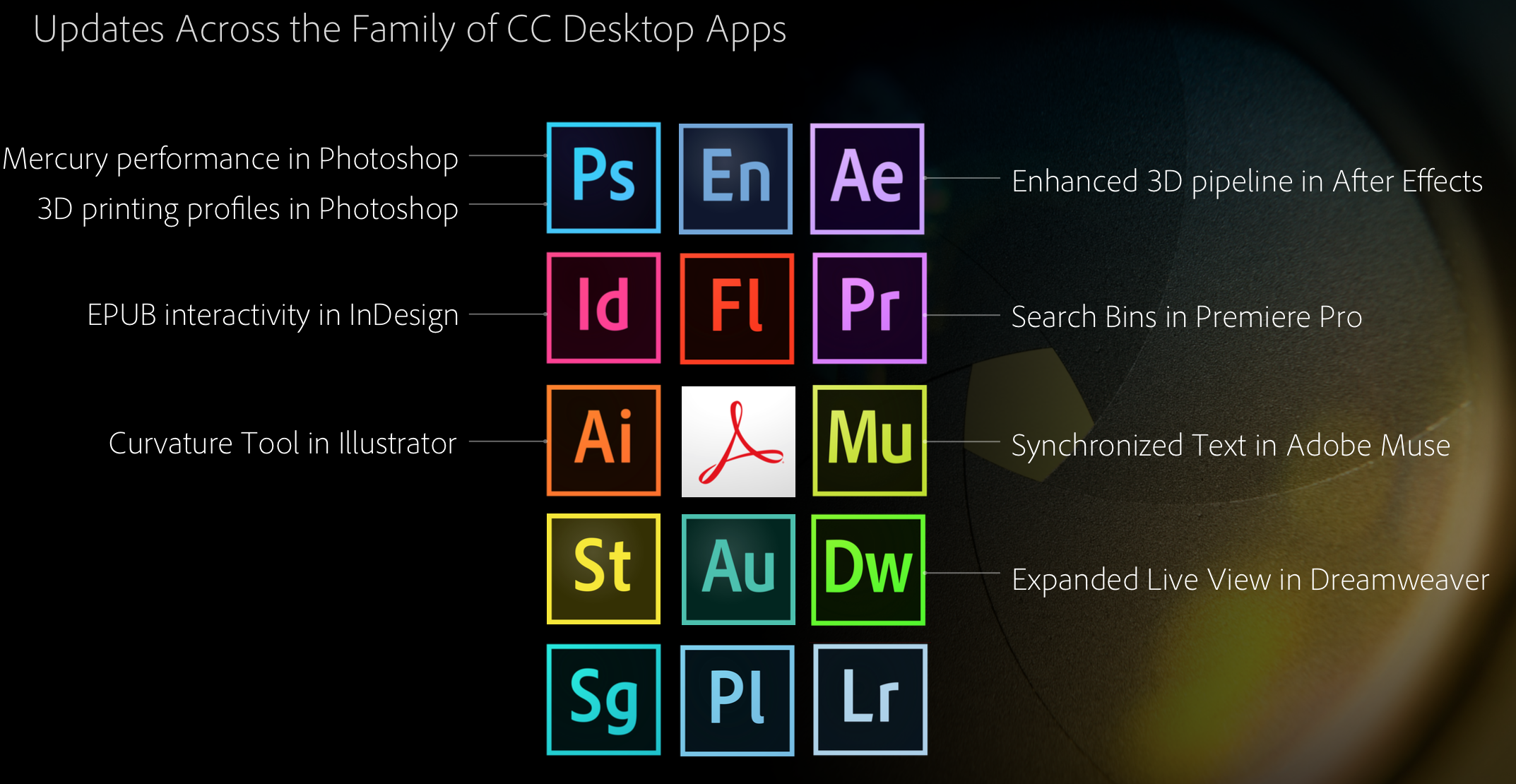
To complement the new Creative Cloud Talent Search, Creative Profile services, and significant mobile app updates, Adobe is today enhancing most of its suite of desktop Creative Cloud applications. Here are the highlights, courtesy of Adobe:
Touch support on Windows 8 devices for key design applications; new 3D print features and enhanced Mercury Graphics Engine performance for Photoshop CC; a new Curvature tool in Illustrator CC; interactive EPUB support in InDesign CC; SVG and Synchronized Text support in Muse CC; GPU-optimized playback for viewing high resolution 4K and UltraHD footage in Premiere Pro CC; and HiDPI and new 3D support in After Effects CC.
Perhaps more interesting on the desktop side of today’s news are some fresh services. Here’s Adobe’s explainer on the new Cloud Market, Cloud Libraries, and Cloud Extract products:
The Cloud Market feature could give services like Getty Images a run for its money, while Cloud Libraries is the iCloud-like solution that ties all of Adobe’s supported platforms together. Cloud Extract is an advanced cloud-based solution that allows designers and developers working on Photoshop projects together to share data on an asset-by-asset or feature-by-feature basis.
Like with the new services and mobile applications covered in our other Adobe news articles this morning, the updated desktop apps and new Creative Cloud services are free additions for those with existing Creative Cloud subscriptions.